
1. Introduction
Thank you for choosing the ZIFON YT-2000 Electric Pan Tilt Head. This device is designed to enhance your mobile camera and live streaming experience with intelligent AI facial tracking, remote control capabilities, and precise motorized movement. Please read this manual thoroughly before operation to ensure proper use and to maximize the product's lifespan.
2. Safety Information
- Do not expose the device to water or excessive humidity.
- Avoid dropping or subjecting the device to strong impacts.
- Do not attempt to disassemble or repair the device yourself. Contact qualified service personnel.
- Use only the provided charging cable and a compatible 5V power adapter.
- Keep out of reach of children.
- Ensure the device is placed on a stable surface or tripod before mounting a camera or phone.
3. Package Contents
Verify that all items listed below are included in your package:
- 1 x ZIFON YT-2000 Electric Pan Tilt Head
- 1 x Phone Clip
- 1 x Type-C Charging Cable
- 1 x Remote Control (2.4G)
- 1 x User Manual

Image: Contents of the ZIFON YT-2000 package, including the pan tilt head, phone clip, Type-C charging cable, remote control, and user manual.
4. Product Overview
Familiarize yourself with the components and controls of your ZIFON YT-2000 Pan Tilt Head.

Image: Diagram illustrating the key components of the ZIFON YT-2000. Labels include the 1/4 screw connector, face tracking lens, power switch, tracking indicator, and control buttons (M, A, B, +, -).
- 1/4 Screw Connector: For mounting cameras or the included phone clip.
- Face Tracking Lens: AI-powered lens for facial recognition and tracking.
- Power Switch: Turns the device on/off and activates tracking mode.
- Tracking Indicator: LED light indicating tracking status.
- Control Buttons (M, A, B, +, -): For manual control, setting AB points, and adjusting speed.
- Remote Receiver: For receiving signals from the 2.4G remote control.
5. Setup
5.1 Charging the Device
Before first use, fully charge the ZIFON YT-2000. The device has a built-in 2000mAh lithium battery.
- Connect the provided Type-C charging cable to the charging port on the device.
- Connect the other end of the cable to a 5V USB power adapter (not included).
- The charging indicator light will show charging status (refer to product for specific light behavior).
- A full charge provides approximately 4-5 hours of operation.

Image: Illustration of the ZIFON YT-2000's internal battery, emphasizing its long endurance with USB charging design for over 10 hours of use (note: product description states 4-5 hours, this image might be generic or for a different model, but illustrates the charging concept).
5.2 Mounting a Camera or Phone
- For Cameras: Securely screw your camera onto the 1/4 screw connector on the top plate of the pan tilt head. Ensure it is tightened to prevent wobbling. The device supports a maximum load of 2000g (2kg).
- For Phones: Attach the phone clip to the 1/4 screw connector. Then, carefully place your smartphone into the phone clip, ensuring it is securely held.
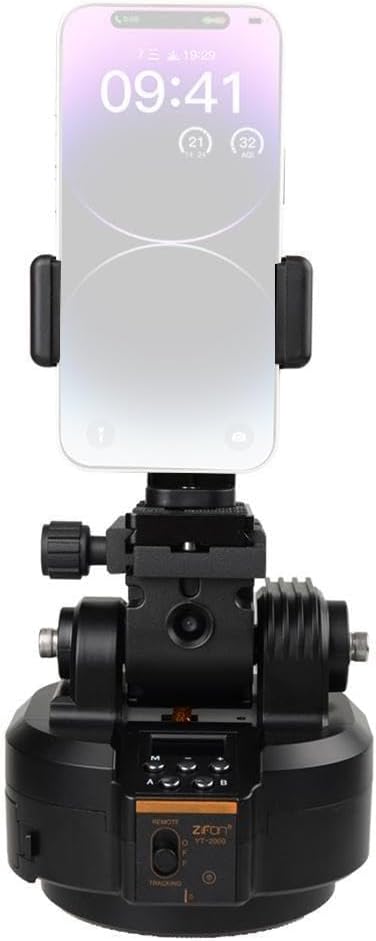
Image: The ZIFON YT-2000 with a smartphone securely mounted in the included phone clip, demonstrating its compatibility with mobile devices.

Image: The ZIFON YT-2000 with a camera mounted, alongside its remote control, highlighting features like face tracking, AB point functionality, and 2KG large load capacity.
5.3 Mounting on a Tripod (Optional)
The ZIFON YT-2000 has a 1/4 screw hole at its base, allowing it to be mounted on most standard tripods for stable operation.

Image: The ZIFON YT-2000 pan tilt head mounted on a tripod with a camera attached, demonstrating a typical setup for stable recording or live streaming.
6. Operating Instructions
6.1 Power On/Off and Tracking Mode
- To power on, slide the power switch to the "ON" position. The tracking indicator light will illuminate.
- To activate AI Face Tracking, ensure the power switch is in the "ON" position. The green indicator light should be steadily on.
- To power off, slide the power switch to the "OFF" position.
6.2 AI Face Tracking Operation
The YT-2000 features an intelligent AI chip for facial recognition and tracking.
- Once powered on and the green indicator is steady, the device is ready for tracking.
- Start Tracking: Make an "OK" hand gesture in front of the face tracking lens. The device will begin tracking the recognized face.
- Pause Tracking: Make a "palm" hand gesture in front of the face tracking lens. The device will pause tracking. Repeat the "OK" gesture to resume.

Image: The ZIFON YT-2000 pan tilt head integrated into a live streaming setup, demonstrating its use for tracking a subject during a broadcast or recording session.
6.3 Remote Control Operation
The included 2.4G remote control allows for convenient adjustment of rotation direction and speed.
- Direction Control: Use the directional buttons on the remote to manually control the pan (horizontal) and tilt (vertical) movement of the head.
- Speed Adjustment: Use the speed control buttons (e.g., + and -) on the remote to adjust the rotation speed. There are 8 adjustable speeds for both horizontal and vertical movement.
- AB Point Setting: The remote can be used to set and recall two specific positions (A and B points) for automated movement between them. Refer to the remote control's specific instructions for detailed steps on setting AB points.
- Remote Channel: The remote control supports channels 0-99. Ensure the remote and device are on the same channel if experiencing interference or if using multiple units.
6.4 Manual Speed Adjustment (On-Device)
You can also adjust the speed directly on the device using the '+' and '-' buttons.
- Press the '+' button to increase the rotation speed.
- Press the '-' button to decrease the rotation speed.
- Horizontal speed: 8 adjustable levels, from 0.05 rpm to 4 rpm.
- Vertical speed: 8 adjustable levels, from 0.05 rpm to 0.6 rpm.
7. Maintenance
- Clean the device with a soft, dry cloth. Do not use liquid cleaners or solvents.
- Keep the face tracking lens clean and free from dust or smudges for optimal performance.
- Store the device in a cool, dry place away from direct sunlight and extreme temperatures.
- When not in use for extended periods, charge the battery at least once every three months to maintain battery health.
8. Troubleshooting
| Problem | Possible Cause | Solution |
|---|---|---|
| Device does not power on. | Battery is depleted. | Charge the device using the provided Type-C cable. |
| AI tracking is not working. | Lens is dirty; insufficient lighting; incorrect hand gesture; subject too far/close. | Clean the face tracking lens. Ensure adequate lighting. Use clear "OK" or "palm" gestures. Ensure subject is within optimal tracking range. |
| Remote control not responding. | Remote battery depleted; remote not paired; interference. | Replace remote control batteries. Ensure remote and device are on the same channel (if applicable). Reduce interference from other 2.4G devices. |
| Motor movement is jerky or noisy. | Overload; obstruction; low battery. | Ensure mounted equipment does not exceed 2kg. Check for any physical obstructions. Charge the device. |
9. Specifications
| Feature | Detail |
|---|---|
| Product Name | Electric Pan Tilt Head |
| Product Model | YT-2000 |
| Net Weight | 855 g (1.88 lbs) |
| Product Dimensions | 122 x 120 x 130 mm (4.8 x 4.72 x 5.12 inches) |
| Max Load Capacity | 2000 g (2 kg / 4.4 lbs) |
| Tracking Mode | Horizontal Tracking, Gesture Support (AI Face Tracking) |
| Horizontal Speed | 8 adjustable levels, 0.05 rpm to 4 rpm |
| Vertical Speed | 8 adjustable levels, 0.05 rpm to 0.6 rpm |
| Remote Channel | 0-99 |
| Battery Capacity | 2000 mAh |
| Rated Charging Voltage | 5 V |
| Charging Port | Type-C |
| Manufacturer | LZYWOD |
| Compatible Devices | Camera, Mobile Phone |

Image: Technical drawing showing the dimensions of the ZIFON YT-2000 pan tilt head: 122mm (4.8in) width, 120mm (4.72in) depth, and 130mm (5.12in) height.
10. Warranty and Support
This product is covered by a standard manufacturer's warranty. For specific warranty terms and conditions, please refer to the documentation provided at the time of purchase or contact your retailer.
For technical support, troubleshooting assistance, or inquiries regarding spare parts, please contact the manufacturer LZYWOD or your point of purchase. Contact information may be available on the product packaging or the seller's website.
Note: Information regarding spare parts availability and software updates is not available at the time of this manual's publication.


