
1. Introduction
This manual provides essential information for the safe and efficient operation, maintenance, and troubleshooting of your LIECTROUX C7 Robotic Vacuum Cleaner and Mop. Please read this manual thoroughly before using the product and retain it for future reference.

Image: The LIECTROUX C7 Robotic Vacuum Cleaner and Mop, showcasing its sleek design and the model name.
2. Important Safety Instructions
To reduce the risk of injury or damage, read these safety instructions carefully before setting up, using, and maintaining your robot.
- This appliance can be used by children aged from 8 years and above and persons with reduced physical, sensory or mental capabilities or lack of experience and knowledge if they have been given supervision or instruction concerning use of the appliance in a safe way and understand the hazards involved.
- Children should be supervised to ensure they do not play with the appliance.
- Cleaning and user maintenance shall not be made by children without supervision.
- Do not use the robot in environments with open flames or fragile objects.
- Ensure the charging dock is placed on a level surface against a wall, with no obstacles within 1 meter in front and 0.5 meters on either side.
- Do not immerse the robot or its charging dock in water.
- Unplug the charging dock during lightning storms or when not in use for extended periods.
- Only use the original power adapter provided with the robot.
- Before cleaning, remove loose cables, small objects, and fragile items from the floor.
3. Package Contents
Verify that all items listed below are included in your package:
- 1 x Robotic Vacuum
- 1 x Charging Dock
- 1 x Charging Adaptor
- 1 x 2-in-1 Dustbin and Water Tank
- 2 x Pairs of Side Brushes
- 2 x Re-usable Wet Mopping Cloth
- 1 x Mop Pad
- 1 x Cleaning Brush
- 2 x HEPA Filter
- 1 x User Manual
- 1 x Remote Control
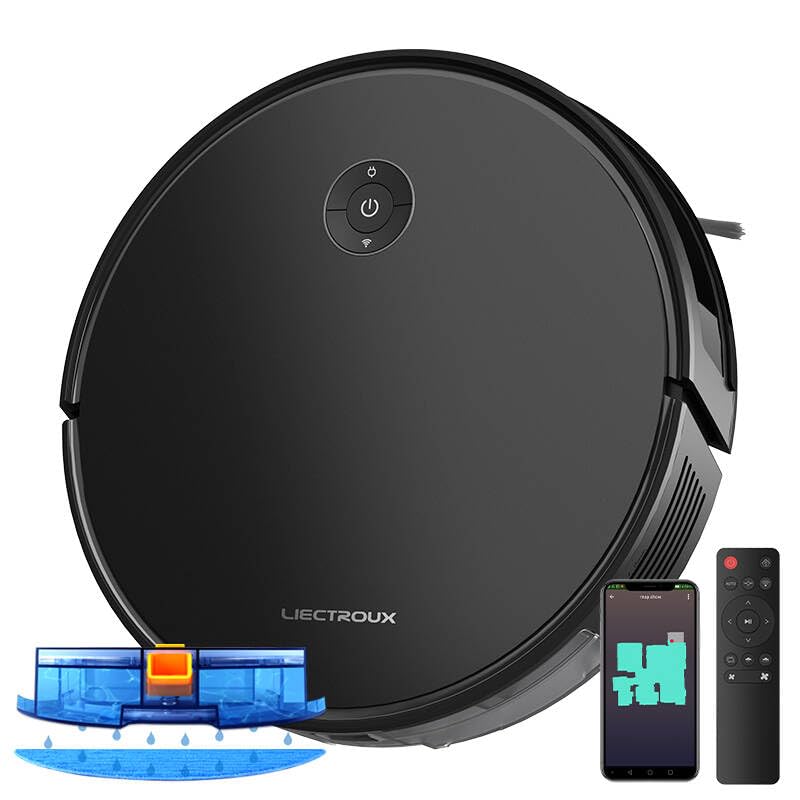
Image: The LIECTROUX C7 Robotic Vacuum Cleaner shown with its charging dock, remote control, and the 2-in-1 dustbin and water tank.
4. Product Overview
4.1 Robot Diagram
Familiarize yourself with the main components of your LIECTROUX C7 robot.

Image: An illustration of the LIECTROUX C7 highlighting the integrated 2-in-1 dustbin and water tank, demonstrating its simultaneous sweep and mop capability.
4.2 Key Features
- 6000Pa Suction Power: Provides strong suction for effective cleaning of various floor types, including carpets and hard floors.
- Smart Navigation System: Utilizes accurate gyroscope positioning and advanced zig-zag mapping for systematic and efficient cleaning paths.
- 2-in-1 Dustbin and Water Tank: Allows for simultaneous vacuuming and mopping, streamlining the cleaning process.
- Smart Electric Water Tank: Offers 3-level water flow control suitable for different floor types (low for tiles, medium for wood, high for greasy floors).
- Floating Roller Brush: Designed to pick up common debris, pet hair, and dust effectively, adjusting to floor contours.
- Anti-Drop Sensors: Prevents the robot from falling down stairs or off elevated surfaces.
- Slim Body Design: At 7.4cm, it can easily glide under furniture for thorough cleaning.
- Slope-Climbing Ability: Capable of climbing over obstacles up to 1.6cm high.
- Quiet Operation: Operates at a noise level below 45dB, minimizing disturbance.
- Wi-Fi Connectivity & Voice Control: Compatible with mobile app and voice assistants (e.g., Google Home) for remote control and scheduling.

Image: The LIECTROUX C7 in action, illustrating its powerful 6000Pa suction and the effectiveness of its floating roller brush in picking up debris.

Image: Three LIECTROUX C7 robots on different floor types, illustrating the 3-level water flow control of the smart electric water tank for optimal mopping.

Image: The LIECTROUX C7 with an illustration of cleaning solution being dispersed, indicating its compatibility with specific cleaning solutions for enhanced hygiene.

Image: The LIECTROUX C7 approaching a staircase, with an overlay illustrating the function of its anti-drop sensors to prevent falls.
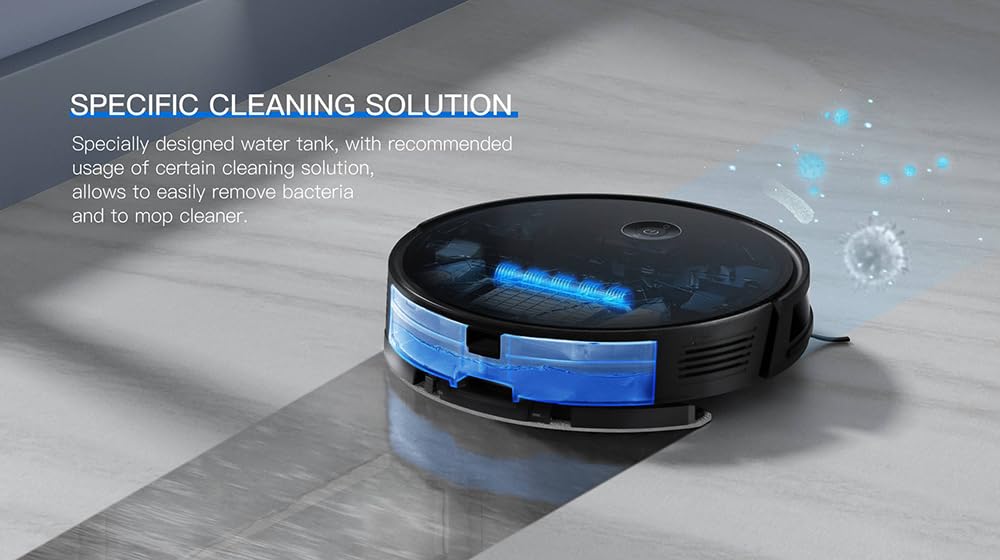
Image: The LIECTROUX C7 cleaning a floor next to a sleeping child, emphasizing its quiet operation with a noise level below 45dB.

Image: The LIECTROUX C7 cleaning underneath a sofa, illustrating its 7.4cm slim body design that allows it to access hard-to-reach areas.

Image: A close-up of the LIECTROUX C7's wheels, demonstrating its ability to climb over obstacles up to 1.6cm high, such as door thresholds.
5. Setup Guide
5.1 Charging Dock Placement
Place the charging dock on a hard, level surface against a wall. Ensure there are no obstacles within 1 meter (3.3 feet) in front of the dock and 0.5 meters (1.6 feet) on either side to allow the robot to return and dock properly.
5.2 Initial Charging
Connect the charging adapter to the charging dock and plug it into a power outlet. Place the robot onto the charging dock. The indicator light on the robot will show charging status. For first-time use, charge the robot fully for approximately 4-6 hours.
5.3 Installing Side Brushes
Turn the robot over. Align the side brushes with the corresponding slots (L and R) on the bottom of the robot and press them down until they click into place.
5.4 Installing 2-in-1 Dustbin and Water Tank
Open the top cover of the robot. Insert the 2-in-1 dustbin and water tank into the designated compartment until it clicks securely. Ensure the HEPA filter is properly installed inside the dustbin.
5.5 App Connection (Wi-Fi)
- Download the "LIECTROUX" app from your smartphone's app store (iOS or Android).
- Register an account and log in.
- Ensure your robot is charged and powered on.
- Follow the in-app instructions to connect your robot to your home Wi-Fi network. This typically involves selecting your Wi-Fi network, entering the password, and putting the robot into pairing mode (refer to the app for specific button presses).
- Once connected, you can control the robot, schedule cleanings, and monitor its status from your smartphone.
6. Operating Instructions
6.1 Starting and Stopping Cleaning
- Start Cleaning: Press the power button on the robot, the "Clean" button on the remote control, or tap "Start Cleaning" in the app. The robot will begin cleaning in Auto mode.
- Pause Cleaning: Press the power button on the robot, the "Pause" button on the remote, or tap "Pause" in the app.
- Return to Charging Dock: Press the "Home" button on the remote or in the app. The robot will return to its charging dock.
6.2 Cleaning Modes
- Auto Cleaning: The robot intelligently navigates and cleans the entire accessible area. This is the default mode.
- Spot Cleaning: Place the robot in a specific dirty area and select Spot Cleaning. The robot will clean in a spiral pattern around that area.
- Edge Cleaning: The robot cleans along walls and furniture edges. Select this mode via the remote or app.
6.3 Mopping Function
To use the mopping function, ensure the 2-in-1 dustbin and water tank is filled with clean water (and suitable cleaning solution if desired). Attach the mop pad to the bottom of the water tank. The robot will automatically dispense water during cleaning in mopping-enabled modes.
6.4 Remote Control and App Control
The robot can be controlled using the included remote control or the LIECTROUX mobile app. Both allow you to start/stop cleaning, select cleaning modes, adjust suction power, and send the robot back to its charging dock.

Image: A person interacting with the LIECTROUX mobile application on a smartphone, demonstrating the remote control capabilities for custom cleaning schedules, suction adjustment, and map management.
6.5 Voice Control
The LIECTROUX C7 is compatible with voice assistants like Google Home. Link your robot to your voice assistant account through the LIECTROUX app settings. Once linked, you can use voice commands such as "Hey Google, start cleaning with LIECTROUX C7" or "Hey Google, stop cleaning with LIECTROUX C7."
Image: The LIECTROUX C7 robot vacuum positioned near a smart speaker, illustrating its intelligent voice control capabilities with commands like "Start Cleaning" and "Stop Cleaning."
6.6 Scheduling
Use the LIECTROUX app to set up cleaning schedules. You can choose specific days and times for the robot to automatically start cleaning, ensuring your home stays tidy without manual intervention.
7. Maintenance
Regular maintenance is crucial for optimal performance and longevity of your robot. Always power off the robot before performing any maintenance.
7.1 Emptying Dustbin
After each cleaning cycle, or when the dustbin full indicator appears, remove the 2-in-1 dustbin and water tank, open the dustbin compartment, and empty its contents into a trash bin.
7.2 Cleaning Filters (HEPA)
Tap the HEPA filter to remove loose dirt. Do not wash the HEPA filter with water. Replace the HEPA filter every 3-6 months, or more frequently depending on usage.
7.3 Cleaning Side Brushes
Regularly check the side brushes for tangled hair or debris. Gently pull them off, remove any obstructions, and reattach them. Replace worn brushes as needed.
7.4 Cleaning Main Brush
Remove the main brush cover and lift out the main brush. Use the provided cleaning tool to cut and remove any tangled hair or fibers. Reinstall the main brush and cover.
7.5 Cleaning Sensors
Wipe the anti-drop sensors (located on the bottom of the robot) and the bumper sensor (on the front bumper) with a clean, dry cloth to ensure they function correctly.
7.6 Cleaning Water Tank and Mop Pad
After mopping, empty any remaining water from the tank. Rinse the water tank thoroughly with clean water. Remove the mop pad and wash it by hand or machine. Allow all components to air dry completely before reassembling.
8. Troubleshooting
If your robot encounters an issue, refer to the following table for common problems and solutions.
| Problem | Possible Cause | Solution |
|---|---|---|
| Robot does not power on. | Low battery; Power switch off. | Charge the robot fully; Ensure the main power switch is ON. |
| Robot cannot return to charging dock. | Charging dock obstructed; Robot too far from dock. | Clear obstacles around the dock; Place robot closer to the dock. |
| Suction power is weak. | Dustbin full; Filter clogged; Main brush tangled. | Empty dustbin; Clean/replace filter; Clean main brush. |
| Robot gets stuck frequently. | Loose cables; Small objects on floor; High thresholds. | Clear floor of obstructions; Use virtual barriers if available. |
| Mopping function not working. | Water tank empty; Mop pad not attached; Water outlet clogged. | Fill water tank; Attach mop pad correctly; Clean water outlet. |
| App connection failed. | Incorrect Wi-Fi password; Robot not in pairing mode; Router issues. | Verify Wi-Fi password; Re-enter pairing mode; Restart router. |
9. Specifications
| Feature | Detail |
|---|---|
| Brand | LIECTROUX |
| Model Name | C7 |
| Suction Power | 6000Pa |
| Navigation System | Smart Navigation System (Gyroscope, Zig-zag mapping) |
| Dustbin Capacity | Integrated with Water Tank |
| Water Tank Capacity | 340 Milliliters |
| Battery Life | Up to 140 minutes |
| Control Methods | App, Remote, Touch, Voice (Google Home compatible) |
| Filter Type | Multiple Layer Filter, HEPA Filter System |
| Product Dimensions | 33L x 33W x 7H Centimeters |
| Item Weight | 2 kg 700 g |
| Noise Level | <45dB |
10. Warranty and Support
10.1 Warranty Information
Please refer to the warranty card included in your product packaging for detailed warranty terms and conditions. The warranty typically covers manufacturing defects for a specified period from the date of purchase.
10.2 Customer Support
For technical assistance, troubleshooting beyond this manual, or warranty claims, please contact LIECTROUX customer support. Contact details can usually be found on the official LIECTROUX website or on your product packaging.
You can also visit the LIECTROUX Store on Amazon for more information and product updates.


