
Targa TDD-701MP5
Targa TDD-701MP5 7-inch Double-DIN Media Player User Manual
Model: TDD-701MP5
1. Introduction
Thank you for purchasing the Targa TDD-701MP5 7-inch Double-DIN Media Player. This manual provides essential information for the proper installation, operation, and maintenance of your new car media player. Please read this manual thoroughly before using the product to ensure optimal performance and safety.
2. Safety Information
- Always consult a professional for installation to prevent damage to the vehicle's electrical system or the media player.
- Do not operate the media player's advanced functions while driving. Distraction can lead to accidents.
- Ensure all wiring connections are secure and properly insulated to avoid short circuits.
- Keep the unit away from water and excessive moisture.
- Do not attempt to disassemble or modify the unit. This will void the warranty and may cause damage.
3. Package Contents
Verify that all items are present in the package:
- 1 x Targa TDD-701MP5 Media Player
- 1 x Trim Frame
- 1 x Remote Control
- 1 x EvoTuning 300W Super Tweeters (Pair)
- 1 x Gel Key Holder
- Wiring Harness
- User Manual (this document)
4. Product Overview
The Targa TDD-701MP5 features a 7-inch touchscreen display and various control options for an enhanced in-car entertainment experience.
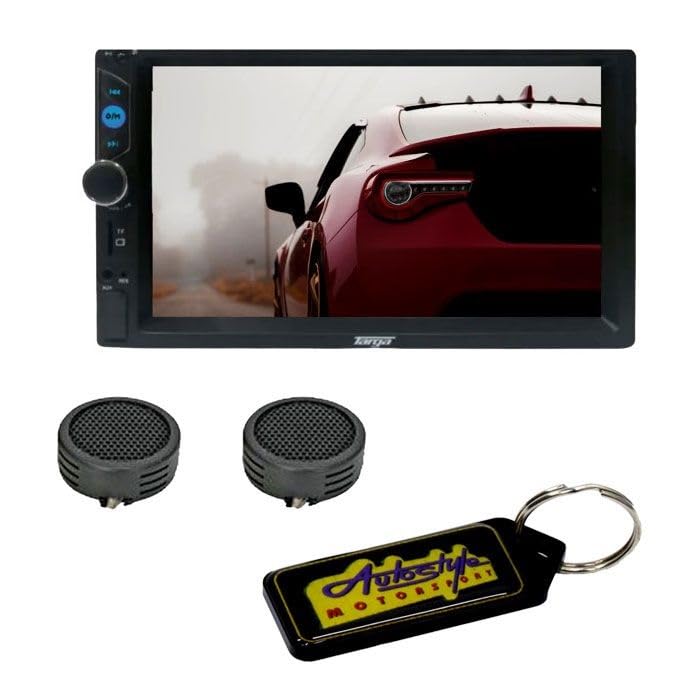
Figure 1: Front view of the Targa TDD-701MP5 Media Player. Shows the 7-inch touchscreen display, control buttons on the left side, and a rotary knob for volume/selection.
Front Panel Controls:
- 7-inch Touchscreen: Main interface for all functions (Resolution: 800x480).
- Power/Mode Button: Turns the unit on/off and switches between input modes.
- Volume Knob: Adjusts audio volume. Press to mute/unmute.
- USB Port: For connecting USB storage devices.
- TF Card Slot: For connecting TF (MicroSD) cards.
- AUX Input: 3.5mm jack for external audio sources.
- Reset Button: Small pinhole button to reset the unit (use a thin object).
5. Setup and Installation
Installation of this media player requires knowledge of car audio wiring. It is highly recommended to have the unit installed by a qualified professional.
5.1 Wiring Diagram (General Guide)
Refer to the wiring diagram provided with your unit for specific connections. A typical setup includes:
- Yellow Wire: Constant 12V (Battery +)
- Red Wire: Accessory 12V (Ignition Switch)
- Black Wire: Ground (-)
- Blue Wire: Power Antenna / Amplifier Remote Turn-On
- Orange Wire: Illumination (Connect to vehicle's dimmer circuit)
- Brown Wire: Reverse Gear Signal (For rear-view camera auto-switch)
- Speaker Wires: Connect to vehicle's speakers (e.g., White/White-Black for Front Left, Grey/Grey-Black for Front Right, Green/Green-Black for Rear Left, Purple/Purple-Black for Rear Right). Ensure correct polarity.
- Video Input/Output: RCA jacks for external video sources or monitors.
- Rear Camera Input: RCA jack specifically for a rear-view camera.
5.2 Mounting the Unit
- Carefully remove the existing car stereo from the dashboard.
- Connect the wiring harness from the TDD-701MP5 to the vehicle's wiring.
- Slide the TDD-701MP5 into the double-DIN opening in your dashboard.
- Secure the unit using the mounting brackets (if applicable) and reattach the trim frame.
- Test all functions before fully reassembling the dashboard.
6. Operating Instructions
6.1 Basic Operation
- Power On/Off: Press the power button on the front panel or remote.
- Volume Control: Rotate the knob or use the remote. Press the knob to mute.
- Mode Selection: Press the mode button to cycle through available sources (Radio, USB, TF, Bluetooth, AUX, Mirror Link).
- Touchscreen: Navigate menus and control functions by touching the screen icons.
6.2 Radio (FM)
- Select "Radio" mode.
- Use the on-screen controls to scan for stations, save presets, or manually tune.
- FM Range: 87MHz - 108.00MHz.
6.3 USB/TF Playback
- Insert a USB drive or TF card into the respective slot.
- The unit will automatically switch to USB/TF mode or prompt you to select it.
- Supports MP5/MP4/WMA formats. Navigate files and folders using the touchscreen.
6.4 Bluetooth Connectivity
- Select "Bluetooth" mode.
- On your mobile device, search for Bluetooth devices and select "Targa TDD-701MP5" (or similar name).
- Enter the pairing code (usually "0000" or "1234") if prompted.
- Once paired, you can stream audio and make/receive calls hands-free.
6.5 Mirror Link Function
- Connect your smartphone to the media player via a USB cable.
- Select "Mirror Link" mode on the media player.
- Follow the on-screen instructions on both the media player and your smartphone to establish the connection. This may require installing a specific app on your phone.
- Once connected, your phone's screen will be mirrored on the media player's display.
6.6 Rear-view Camera
- If a compatible rear-view camera is connected and the reverse gear signal wire is properly installed, the display will automatically switch to the camera view when the vehicle is put into reverse.
6.7 Audio Settings
- Access the audio settings menu via the touchscreen.
- Adjust Bass & Treble levels to your preference.
- Utilize the L&R Channel Stabilizer for balanced audio output.
7. Maintenance
- Cleaning the Screen: Use a soft, lint-free cloth to wipe the touchscreen. For stubborn marks, slightly dampen the cloth with water or a screen cleaner designed for electronics. Do not use abrasive cleaners.
- General Cleaning: Keep the unit free from dust and debris. Use a soft brush or compressed air to clean around buttons and ports.
- Avoid Extreme Temperatures: Do not expose the unit to direct sunlight for extended periods or to extreme cold, as this can affect performance and lifespan.
8. Troubleshooting
| Problem | Possible Cause | Solution |
|---|---|---|
| No power | Incorrect wiring; Blown fuse; Vehicle battery low. | Check power and ground connections. Inspect vehicle fuses. Ensure battery is charged. |
| No sound | Volume too low; Mute function active; Incorrect speaker wiring; Amplifier issue. | Increase volume. Deactivate mute. Check speaker connections. Verify external amplifier (if used) is powered. |
| Bluetooth not connecting | Device not in pairing mode; Incorrect pairing code; Interference. | Ensure Bluetooth is enabled on both devices and in pairing mode. Re-enter pairing code. Move closer to the unit. |
| USB/TF not playing | Unsupported file format; Corrupted files; USB/TF device not recognized. | Ensure files are MP5/MP4/WMA. Try a different USB/TF device. Reformat the device if necessary. |
| Mirror Link not working | Incorrect cable; App not installed/updated; Phone settings. | Use a high-quality USB cable. Ensure required app is installed on phone. Check phone's USB debugging/connection settings. |
| Unit freezes or is unresponsive | Software glitch; Temporary error. | Press the reset button (small pinhole on the front panel) with a thin object. |
9. Specifications
- Display: 7-inch Touchscreen
- Display Resolution: 800x480
- Power Output: 4x60W
- FM Tuner Range: 87MHz - 108.00MHz
- Supported Formats: MP5/MP4/WMA
- Connectivity: Bluetooth, USB, TF Card, AUX Input, Mirror Link
- Video: Video Output, Video Input, Supports Rear-view Cameras
- Audio Features: Bass & Treble Control, L&R Channel Stabilizer, Mute Function
- Additional Features: Clock, Remote Control, Trim Frame
- Item Weight: 400 Grams
- Country of Origin: China
10. Warranty and Support
This Targa TDD-701MP5 Media Player comes with a 6-month warranty from the date of purchase. This warranty covers manufacturing defects under normal use. It does not cover damage caused by improper installation, misuse, accidents, unauthorized repairs, or normal wear and tear.
For warranty claims or technical support, please contact your retailer or the authorized service center with your proof of purchase.
Ask a question about this manual
Ask about setup, troubleshooting, compatibility, parts, safety, or missing instructions. Manuals+ will review the question and use this page’s manual context to help answer it.