
VNCI VNCI6154A
VNCI 6154A Diagnostic Scanner User Manual
Model: VNCI6154A | Brand: VNCI
1. Introduction
The VNCI 6154A is a diagnostic adapter designed for Volkswagen Group (VAG) vehicles, including Volkswagen, Audi, Skoda, Seat, Bentley, and Lamborghini models from 1995 to 2024 and beyond. This device is compatible with original ODIS software drivers (v5.2 or later) and supports advanced protocols such as CANFD and DOIP. It functions as a plug-and-play device, eliminating the need for third-party driver managers or software.
The VNCI 6154A offers comprehensive diagnostic capabilities, including fault code clearing, flashing of hidden features, coding, and programming. It supports various communication protocols like KWP2000, UDS, CAN, and K-Line, ensuring broad vehicle compatibility.

Image 1.1: Front and back view of the VNCI 6154A diagnostic scanner.

Image 1.2: Various angles of the VNCI 6154A device, highlighting its connectors.
2. What's in the Box
Please verify that all the following items are included in your package:
- VNCI 6154A device (x1)
- USB cable (x1)
- USB flash drive (x1)
- Paper box (x1)
3. Setup and Installation
3.1. Connection Methods
The VNCI 6154A supports multiple connection methods to adapt to various diagnostic scenarios:
- USB Cable Connection Mode: Direct connection to your computer via the provided USB cable.
- AP (Access Point) Direct Connection Mode: Connect wirelessly to the device's built-in Wi-Fi access point.
- WLAN (Base Station) Connection Mode: Connect the device to an existing Wi-Fi network.
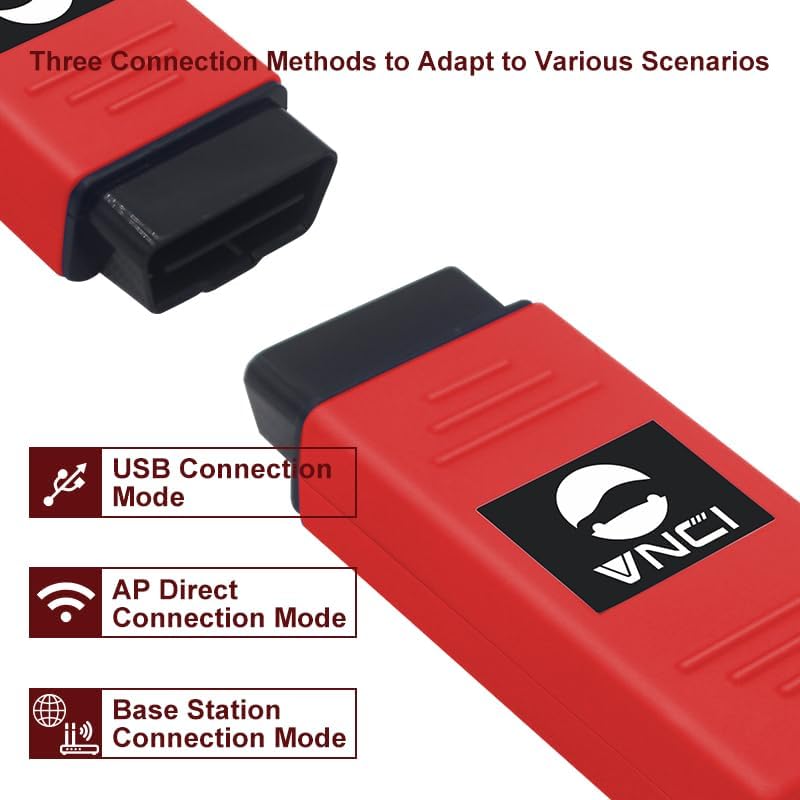
Image 3.1: Available connection methods for the VNCI 6154A.
3.2. Software Installation
The VNCI 6154A is designed to work with original ODIS software drivers. It does not require a separate driver manager or third-party software for its core functionality. Simply connect the device, and it should be recognized by your ODIS installation.
Important Note: This product does not include diagnostic software. You must install the original ODIS software (Service or Engineer versions) separately. Cracked or unofficial ODIS software versions may not function correctly or may cause compatibility issues. Ensure your ODIS software is version 5.2 or later for optimal compatibility.
Compatible ODIS Software Versions:
- OEM ODIS Service Software: v24, v23, v11, v10, v9.1, v8.2, v7.2, v6.2, v5.2
- OEM ODIS Engineer Software: V14.1, V15.0, V16.0, V17.01
4. Operating Instructions
Once the VNCI 6154A is connected to your vehicle's OBD-II port and your computer, and the ODIS software is running, you can perform various diagnostic and programming functions.
4.1. Key Functions
- Vehicle Diagnosis: Read and clear fault codes, view live data streams, and perform component tests.
- Coding and Programming: Adapt control modules, perform online/offline programming, and activate/deactivate hidden features.
- Flashing of Hidden Features: Unlock additional functionalities present in the vehicle's control units.
- Online Functionality: Supports online diagnostic and programming features when connected to the internet and authorized ODIS services.
4.2. Supported Protocols and Models
The VNCI 6154A provides 100% support for DoIP and CAN FD protocols, in addition to KWP2000, UDS, CAN, and K-Line protocols.
It covers a wide range of VAG models from 1995 to 2023 and beyond, including:
- Volkswagen (1995MY-2023MY+)
- Audi (1995MY-2023MY+)
- Seat (1995MY-2023MY+)
- Skoda (1995MY-2023MY+)
- Bentley (1995MY-2023MY+)
- Lamborghini (1995MY-2023MY+)
- MAN (1995MY-2023MY+)

Image 4.1: Performance features of the VNCI 6154A.
5. Maintenance
5.1. Device Care
To ensure the longevity and optimal performance of your VNCI 6154A device:
- Keep the device clean and free from dust and moisture.
- Avoid dropping or subjecting the device to physical shock.
- Store the device in a cool, dry place when not in use.
- Ensure proper ventilation during extended operation, although the device is designed for continuous operation without significant heating.
5.2. Software Updates
While the VNCI 6154A works with original ODIS drivers, occasional firmware updates for the VNCI device itself may be necessary to maintain compatibility with newer ODIS versions or to improve performance. These updates are typically managed through a dedicated program called "VNCI Manager." It is recommended to check for updates periodically to ensure seamless operation with official ODIS software, especially as ODIS itself receives updates.
6. Troubleshooting
If you encounter issues while using your VNCI 6154A diagnostic scanner, please refer to the following common problems and solutions:
6.1. Device Not Recognized by ODIS Software
- Check Connections: Ensure the USB cable is securely connected to both the VNCI 6154A and your computer. If using wireless, verify the device is connected to the correct network (AP or WLAN).
- Verify ODIS Version: Confirm that your ODIS software is an original version (not cracked) and is compatible (v5.2 or later).
- Restart Software/Computer: Close and reopen the ODIS software, or restart your computer.
- Check Device Manager (Windows): In Windows Device Manager, ensure the VNCI 6154A device is listed without any error symbols.
6.2. Cannot Communicate with Vehicle
- OBD-II Port Connection: Ensure the VNCI 6154A is firmly plugged into the vehicle's OBD-II diagnostic port.
- Vehicle Ignition: Turn the vehicle's ignition to the ON position (engine off).
- Vehicle Compatibility: Double-check that your vehicle model and year are within the supported range (1995MY-2023MY+ for VAG brands).
- Software Updates: Ensure both your ODIS software and the VNCI 6154A firmware are up to date. Refer to Section 5.2 for firmware updates.
6.3. Specific Blocks/Functions Not Showing Up in ODIS
- ODIS Software Integrity: This issue is often related to using non-original or improperly installed ODIS software. Ensure you are using a legitimate and fully installed ODIS version.
- Firmware Update: Update the VNCI 6154A firmware using the VNCI Manager to ensure full compatibility with your ODIS version.
- Protocol Support: Verify that the specific function or block requires a protocol (e.g., DoIP, CAN FD) that is fully supported by both the VNCI 6154A and your ODIS software version.
7. Specifications
| Brand | VNCI |
| Model Number | VNCI6154A |
| Manufacturer Part Number | VNCI6154A |
| Power Source | Corded Electric (via OBD-II port or USB) |
| Operating System Compatibility | Windows 10 (for ODIS software) |
| Supported Protocols | DoIP, CAN FD, KWP2000, UDS, CAN, K-Line |
| ODIS Software Compatibility | OEM ODIS Service v5.2+, OEM ODIS Engineer v14.1+ |
| Vehicle Coverage | VAG Group (VW, Audi, Skoda, Seat, Bentley, Lamborghini, MAN) 1995MY-2023MY+ |
8. Warranty and Support
8.1. Warranty Information
The VNCI 6154A diagnostic scanner comes with a 2-year manufacturer's warranty. This warranty covers defects in materials and workmanship under normal use. Please retain your proof of purchase for warranty claims.
For specific warranty terms and conditions, please refer to the documentation provided with your purchase or contact the manufacturer directly.
8.2. Technical Support
For technical assistance, troubleshooting beyond this manual, or warranty inquiries, please contact your retailer or the manufacturer, Shenzhen Rockway Technology Co.,Ltd. Contact information can typically be found on the product packaging or the manufacturer's official website.
When contacting support, please be prepared to provide your product model (VNCI6154A), serial number, and a detailed description of the issue you are experiencing.
Related documentsVNCI6154A


Ask a question about this manual
Ask about setup, troubleshooting, compatibility, parts, safety, or missing instructions. Manuals+ will review the question and use this page’s manual context to help answer it.