
1. Introduction
This manual provides comprehensive instructions for the Tek Styz USB-C 50W/5A Data and Charging Cable, Model TS-2047. This cable is engineered for high-speed data transfer and efficient power delivery, ensuring reliable performance for your USB-C enabled devices.
The cable features USB-C connectors on both ends, supporting modern devices that utilize the USB-C standard for both charging and data communication. It is compatible with a wide range of devices, including the AT&T Trek 2 HD, Android phones, tablets, and computers with USB-C ports.

Figure 1: Tek Styz USB-C 50W/5A Data and Charging Cable. This image shows the black USB-C cable coiled, highlighting its robust design.
2. Product Features
- USB-C to USB-C Connection: Features USB-C connectors on both ends for universal compatibility with modern USB-C devices.
- High-Speed Charging: Supports power delivery up to 50W (18V at 5A), enabling rapid charging for compatible devices.
- Fast Data Transfer: Achieves data transfer speeds of up to 5 Gigabits Per Second (5Gbps), allowing quick synchronization of files.
- Enhanced Durability: Constructed with upgraded stainless steel and aluminum connectors, and a premium nylon braided cable for increased longevity and tangle-free use.
- Smart Chip Technology: Incorporates an E-marker smart chip to auto-fit your devices, ensuring safe and efficient charging.

Figure 2: Close-up view of the USB-C connector, revealing the integrated E-marker smart chip designed for safe and efficient power delivery.

Figure 3: An image illustrating the broad compatibility of the USB-C cable with various devices, including MacBooks, iPads, iPhones, Samsung Galaxy phones, and Google Pixel devices.
3. Setup
Setting up your Tek Styz USB-C cable is a straightforward process. Follow these steps to connect your devices:
- Identify Ports: Locate the USB-C port on your device (e.g., smartphone, tablet, laptop) and on your power adapter or host device (e.g., wall charger, computer).
- Connect to Device: Insert one end of the Tek Styz USB-C cable firmly into your device's USB-C port.
- Connect to Power/Host: Insert the other end of the USB-C cable firmly into the USB-C port of your power adapter or host device.
Important Note: This cable is designed for USB-C to USB-C connections only. Ensure both your charging source and the device you are connecting have compatible USB-C ports. This product does not support video output.
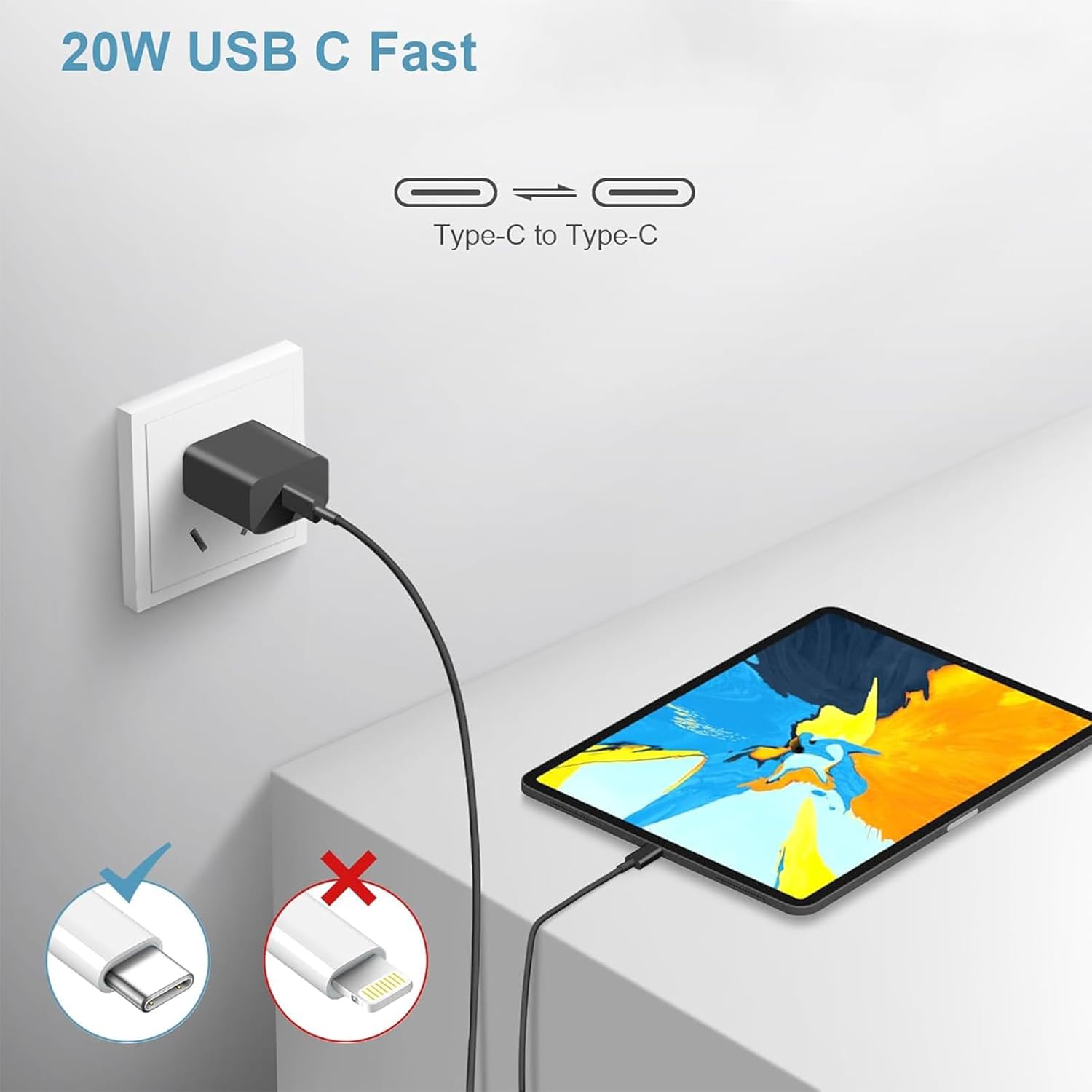
Figure 4: An illustration demonstrating the correct USB-C to USB-C connection for charging a tablet from a wall adapter. It visually distinguishes between compatible USB-C and incompatible Lightning connectors.
4. Operating Instructions
4.1 Charging Your Device
Once the cable is correctly connected to a compatible USB-C power adapter and your device, charging will commence automatically. For optimal fast charging performance (up to 50W), it is recommended to use an original USB-C wall charger or a high-quality charger that supports Quick Charge 2.0/3.0 or USB Power Delivery (PD).
4.2 Data Transfer
When connected to a computer or other host device equipped with a USB-C port, the cable facilitates data transfer at speeds up to 5Gbps. Ensure your device is unlocked and configured to allow data transfer if prompted by the operating system.

Figure 5: This image illustrates the simultaneous charging and data transfer capabilities of the USB-C cable, connecting a laptop to a tablet.
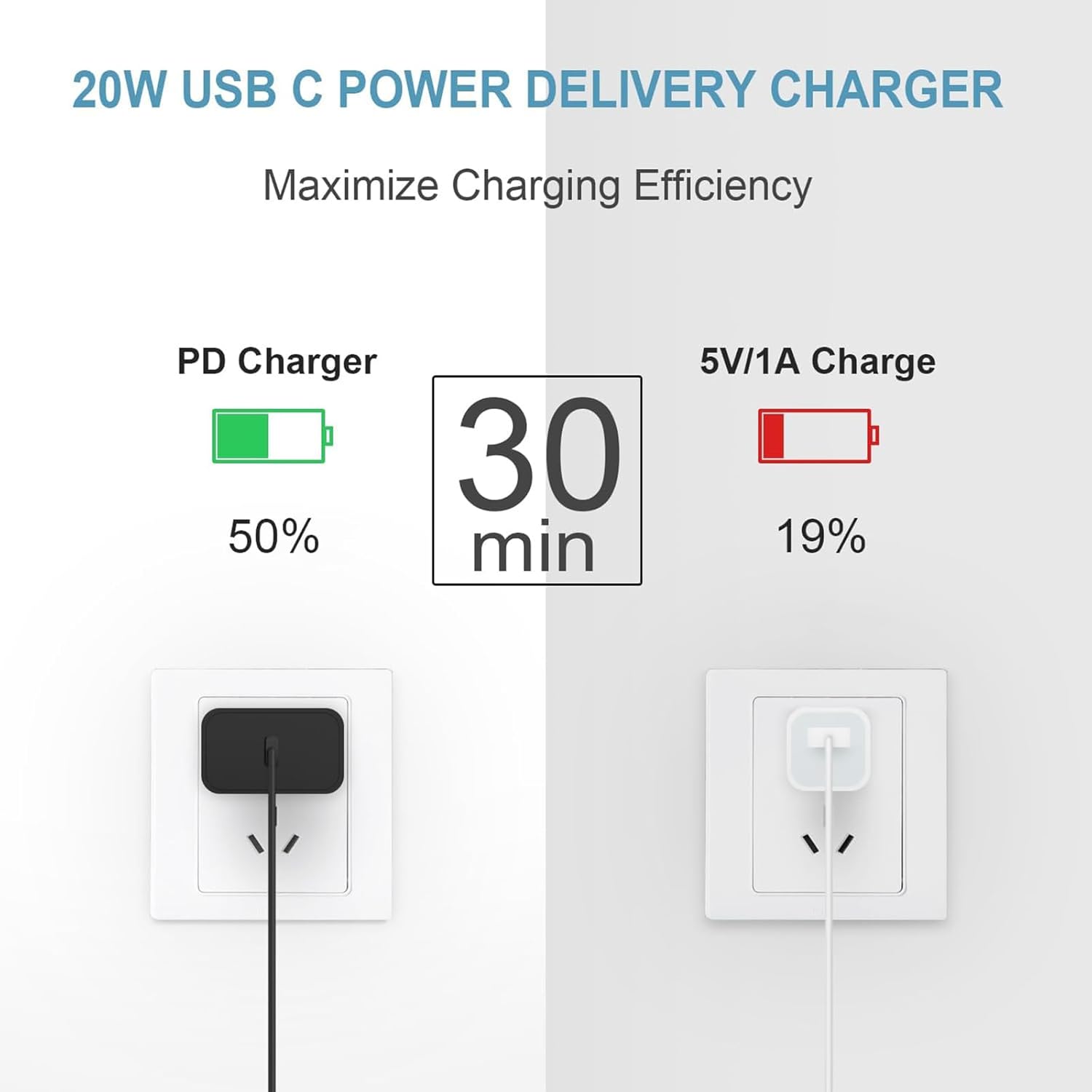
Figure 6: A comparison graphic demonstrating the superior charging efficiency of a 20W USB-C Power Delivery charger (50% in 30 minutes) versus a standard 5V/1A charger (19% in 30 minutes).

Figure 7: A user on a couch using a tablet connected to a wall outlet with the USB-C cable, illustrating its practical use in various home settings.
5. Maintenance
Proper care and maintenance will extend the lifespan of your Tek Styz USB-C cable.
- Cleaning: Gently wipe the cable with a soft, dry, lint-free cloth. Avoid using liquid cleaners, solvents, or abrasive materials, as these can damage the cable's insulation or connectors.
- Storage: Store the cable in a cool, dry environment, away from direct sunlight and extreme temperatures. When coiling the cable, do so loosely to prevent kinks and stress on the internal wires. Avoid sharp bends or excessive force on the connectors.
- Handling: Always grasp the connector head when plugging or unplugging the cable, rather than pulling on the cable itself. This prevents damage to the internal wiring and connector integrity.
6. Troubleshooting
If you encounter issues with your Tek Styz USB-C cable, refer to the following troubleshooting steps:
6.1 Device Not Charging
- Check Connections: Ensure both ends of the USB-C cable are securely and fully inserted into your device and the power adapter.
- Verify Power Source: Confirm that your power adapter is functioning correctly and is plugged into a live electrical outlet.
- Charger Compatibility: Ensure your power adapter supports USB-C Power Delivery (PD) or Quick Charge (QC) for fast charging. Lower wattage chargers may charge slowly or not at all for high-power devices.
- Test with Another Device/Charger: If possible, test the cable with a different compatible device or a different USB-C charger to determine if the issue lies with the cable, device, or charger.
6.2 Slow Charging Speed
- Charger Output: Verify that your charger provides sufficient wattage (up to 50W) and supports fast charging protocols (QC 2.0/3.0, USB PD).
- Device Usage: Intensive use of your device while charging (e.g., gaming, video streaming) can slow down the charging process.
- Battery Condition: Charging speeds can vary depending on the device's battery level and overall health.
6.3 Data Transfer Issues
- Device Permissions: Ensure your device is unlocked and has granted necessary permissions for data transfer to the connected computer.
- Host Port Functionality: Verify that the computer's USB-C port is functional and supports data transfer.
- Restart Devices: Try restarting both your device and the computer to resolve temporary software glitches.
7. Specifications
| Feature | Description |
|---|---|
| Brand | Tek Styz |
| Model Name | TS-2047 |
| Connector Type | USB Type-C to USB Type-C |
| Cable Type | USB Type-C |
| Data Transfer Rate | 5 Gigabits Per Second (5Gbps) |
| Wattage | 50 Watts |
| Amperage | 5 Amps |
| Voltage | 5-9 Volts (up to 18V) |
| Cable Length | 1.5 Meters / 5 Feet |
| Special Feature | Rapid Quick Fast Charger Cable |
| Compatible Devices | AT&T Trek 2 HD, Android, iOS, Mac, Windows devices with USB-C ports |
| Material | Upgraded Stainless Steel and Aluminum connectors, Nylon solid ABS high impact plastic |
| Certification | UL Listed and Compliant |
| Product Dimensions | 2 x 0.5 x 1 inches |
| Item Weight | 1 Ounces |
| UPC | 746697906132 |
8. Warranty and Support
Tek Styz is committed to providing high-quality products and customer satisfaction.
- Warranty Period: This USB-C to USB-C cable is backed by an 18-month worry-free period from the date of purchase.
- Customer Service: Should you have any questions, concerns, or require technical assistance, please do not hesitate to contact our customer service team. We strive to resolve most issues within 24 hours.