
1. Introduction
This manual provides detailed instructions for the installation, operation, and maintenance of the Aoleaby JK BMS Smart Balancer, model B1A16S. This device is designed to actively balance the voltage differences between battery cells in Li-ion, LiFePO4, and LTO battery systems, enhancing battery life and efficiency. It supports 2S to 16S configurations and features Bluetooth (BT) communication for real-time monitoring and control via a dedicated mobile application.
2. Safety Precautions
Always adhere to the following safety guidelines when handling the BMS and battery systems:
- Ensure all connections are correct before applying power. Incorrect wiring can damage the BMS or battery.
- Wear appropriate personal protective equipment (PPE), such as safety glasses and insulated gloves.
- Do not short-circuit battery terminals.
- Avoid exposing the BMS to water, moisture, or extreme temperatures.
- Keep out of reach of children.
- If any abnormal behavior is observed, disconnect power immediately.
3. Key Features
- JK Own Development APP: Access more BMS settings and monitor real-time battery status precisely via Bluetooth communication on your smartphone.
- JK Active Balance: Actively balances voltage differences between battery cells, raising battery usage efficiency to 99% and extending battery life.
- Full Functionality: Provides protection against over-charge, over-discharge, over-current, short circuit, and includes low-temperature charging cutoff.
- Wide Compatibility: Supports 2S to 24S Li-ion, LiFePO4, and LTO battery systems with 0.1A to 2A active balance current.
4. Package Contents
Upon opening the package, verify that all components are present and undamaged:
- JK BMS Smart Balancer Unit (B1A16S)
- Balance Wires
- Temperature Sensor
- User Manual (this document)
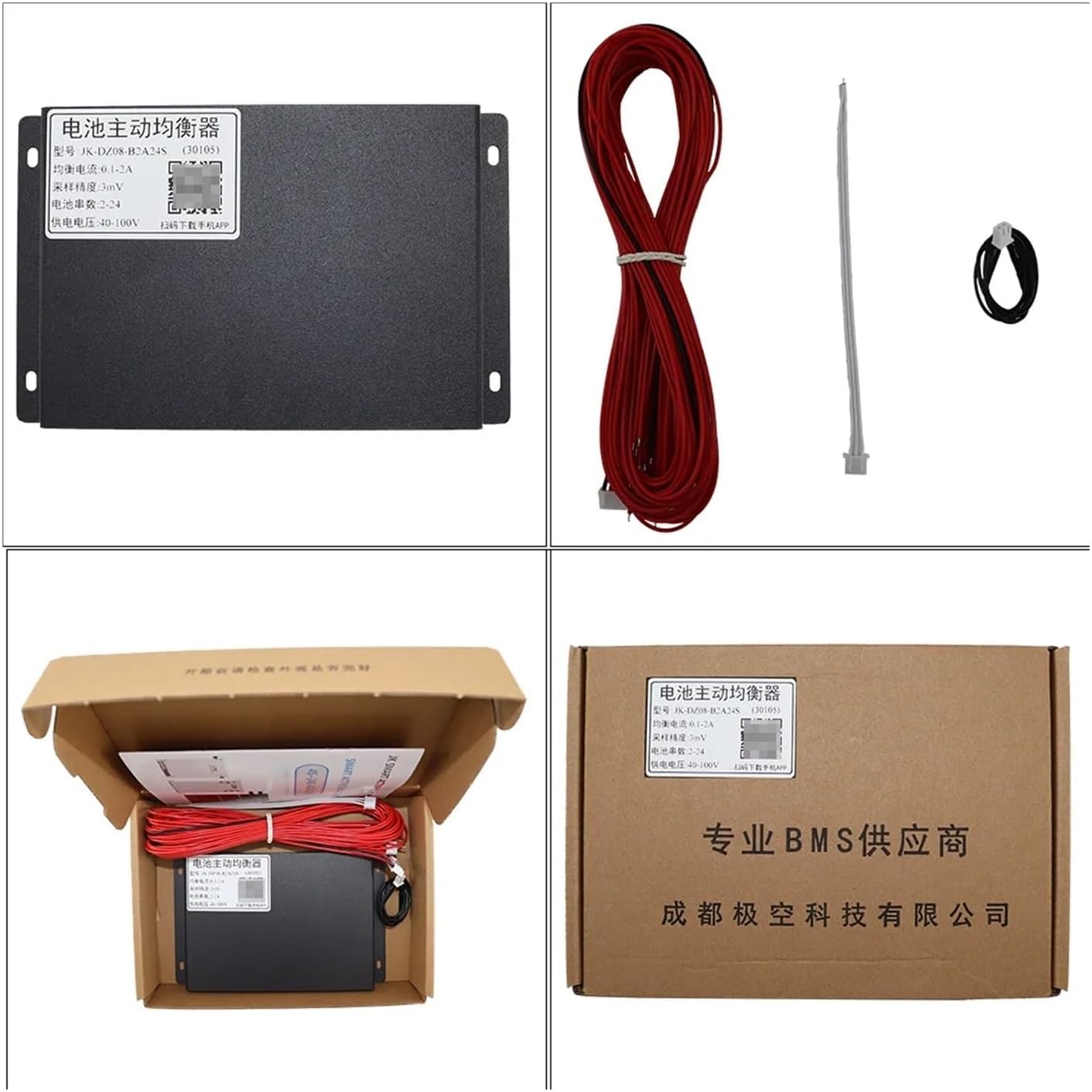
Image 4.1: Package contents of the JK BMS Smart Balancer. The image displays the main BMS unit, a bundle of red balance wires, and a white temperature sensor cable.
5. Setup and Installation
5.1 App Installation
To utilize the full features of your JK BMS, download and install the official mobile application. Scan the QR code below or visit the provided link:

Image 5.1: QR code for the JK BMS mobile application download. The image shows the main product unit with a QR code label.
App Download Link: http://qr17.cn/BApbC0
5.2 Wiring Diagram (General Guidance)
Proper wiring is critical for the safe and effective operation of the BMS. Always refer to the specific wiring diagram provided with your BMS model for precise connections. Generally, the balance wires connect to each cell in your battery pack, ensuring correct voltage sensing. The main power cables connect to the battery pack's positive and negative terminals, and then to your load/charger.
Important: Connect balance wires in the correct sequence, typically starting from the negative terminal of the first cell (B-) and progressing to the positive terminal of the last cell (B+). Incorrect wiring can lead to damage.

Image 5.2: Multiple JK Smart Active Balancer units. This image shows the physical appearance of various models, highlighting their uniform design.
6. Operation
6.1 Bluetooth Connection
- Ensure your smartphone's Bluetooth is enabled.
- Open the JK BMS mobile application.
- The app will scan for nearby JK BMS devices. Select your device from the list to establish a connection.
- Once connected, the app will display real-time battery data.
6.2 Using the Mobile Application
The JK BMS app provides comprehensive monitoring and control functionalities:

Image 6.1: Screenshots of the JK BMS mobile application. The left screen displays individual cell voltages and wire resistance, while the right screen shows basic and advanced settings like balance trigger voltage and maximum balance current.
- Status Screen: View real-time data such as average cell voltage, balance current, individual cell voltages, and cell wire resistance.
- Settings Screen: Adjust various parameters including balance trigger voltage, calibrating voltage, start balance voltage, and maximum balance current.
- Control Screen: Access advanced controls and functions.
- Version History & Privacy: Check app version and review privacy policies.
7. Maintenance
To ensure optimal performance and longevity of your JK BMS and battery system:
- Regularly check all wiring connections for tightness and corrosion.
- Keep the BMS unit clean and free from dust and debris.
- Monitor battery cell voltages periodically via the app to ensure proper balancing.
- Avoid operating the BMS outside its specified temperature range.
8. Troubleshooting
If you encounter issues, consider the following common problems and solutions:
- BMS not connecting via Bluetooth: Ensure the BMS is powered on, your phone's Bluetooth is active, and you are within range. Restart the app or your phone if necessary.
- Cells not balancing: Check if the balance function is enabled in the app settings. Verify that all balance wires are correctly connected and not damaged. Ensure cell voltage differences are within the trigger threshold.
- BMS not powering on: Verify main battery connections and ensure the battery pack has sufficient voltage.
- Over-charge/Over-discharge protection triggering prematurely: Check individual cell voltages. Ensure the BMS settings for protection thresholds are appropriate for your battery type.
9. Technical Specifications
The Aoleaby JK BMS Smart Balancer B1A16S offers robust performance for various battery configurations. Key specifications are detailed below:

Image 9.1: Comprehensive technical specifications for JK Smart Active Balancer models. The table provides details on battery string support, type, voltage range, balance accuracy, current, and other operational parameters.
| Feature | Specification (B1A16S) |
|---|---|
| Battery String Supporting | 2-16S |
| Battery Type Supporting | All Kinds of Battery Voltage Between 1V-5V |
| Single Cells Voltage Range | 1V-5V |
| Balance Accuracy | ±3mV |
| Voltage Differ After Balancing | ≤3mV |
| Balance Current Range | 0.1A-1A |
| Cascade Connecting | YES |
| Cable Resistance Indicator | YES |
| Power Supply Range | 24V-70V |
| Low Voltage Auto Turn Off | YES |
| Working Temperature | -20°C~70°C |
| Self-consumption (Balancing) | 10mA@100V |
| Self-consumption (NOT Balancing) | 6mA@100V |
| Interface | / |
| Temperature Sensor | YES |
| Dimension (MM) | 162*100*20 |
| Weight (g) | 550 |
10. Application Scenarios
The JK Smart Active Balancer is suitable for a wide range of applications requiring efficient battery management:

Image 10.1: Application scenarios for the JK Smart Active Balancer. This image depicts various uses such as E-bikes, Electric Tricycles, Low Speed Quads, Forklifts, Cleaning Cars, Tourist Cars, Industrial Drones, Scooters, RV Energy Storage, Energy Storage Cabinets, Power Banks, and Power Tools.
- E-bikes and Electric Tricycles
- Low Speed Quads and Scooters
- Forklifts and Industrial Drones
- Cleaning Cars and Tourist Cars
- RV Energy Storage and Energy Storage Cabinets
- Power Banks and Power Tools
11. Warranty and Support
For warranty information, technical support, or service inquiries, please contact your retailer or the manufacturer directly. Ensure you have your product model (B1A16S) and purchase details available when seeking support.