

1. Introduction
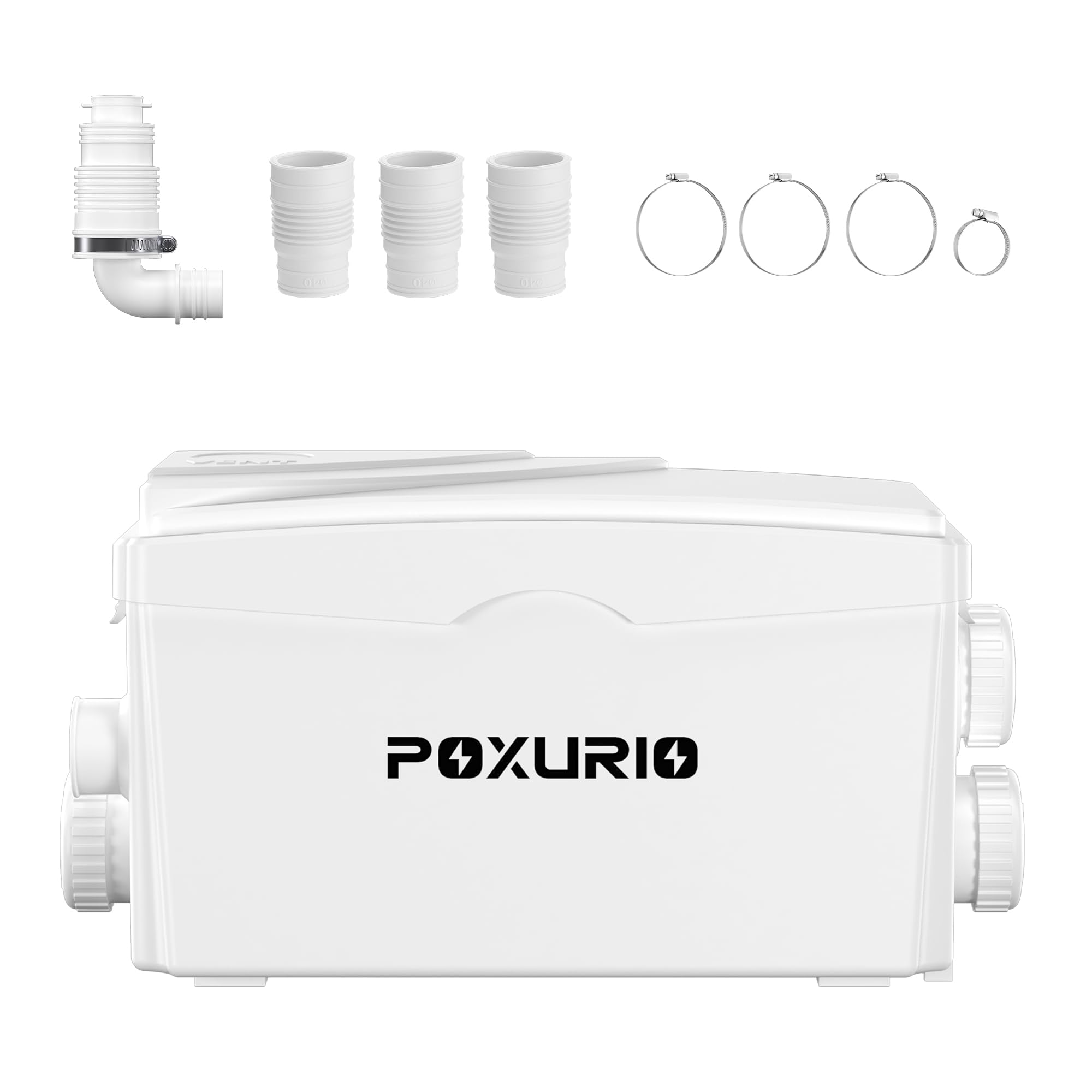
Image: The POXURIO Macerator Pump shown in a typical installation environment, connected to a toilet and other fixtures.
This manual provides essential information for the safe and efficient installation, operation, and maintenance of your POXURIO 400W Macerator Pump. This pump is designed to handle wastewater from toilets, sinks, laundry facilities, and bathtubs, allowing for the creation of new plumbing fixtures in locations below the main drain line or where gravity drainage is not feasible, such as basements.
Please read this manual thoroughly before installation and use to ensure proper function and to prevent damage or injury. Keep this manual for future reference.
2. Safety Instructions
WARNING: Failure to follow these safety instructions could result in electric shock, fire, serious injury, or property damage.
- Always disconnect the power supply before performing any installation, maintenance, or repair work on the pump.
- Ensure the electrical supply matches the voltage specified on the pump's rating label (110V, 60Hz).
- The pump must be properly grounded to prevent electric shock.
- Do not operate the pump if the power cord or plug is damaged. Contact qualified personnel for repair.
- Do not use the pump to handle flammable, explosive, or corrosive liquids.
- Ensure adequate ventilation around the pump.
- Keep children and unauthorized persons away from the pump during operation.
- The pump is designed for domestic wastewater. Do not dispose of foreign objects, chemicals, or excessive grease into the system, as this can cause blockages or damage.
- The maximum withstandable temperature for the pump is 194°F (90°C). Do not exceed this temperature.
3. Package Contents
Verify that all items listed below are present and undamaged before proceeding with installation.

Image: Contents of the POXURIO Macerator Pump package, including the pump unit and various connection accessories.
- 1 x POXURIO Macerator Pump Unit
- 1 x Check Valve
- 3 x Rubber Tube (for inlet connections)
- 3 x Snap Hoop (32mm-50mm)
- 1 x Snap Hoop (20mm-32mm)
- 1 x Plug Mounted On The Pump (for unused inlets)
4. Specifications

Image: A table detailing the technical specifications of the POXURIO Macerator Pump.
| Feature | Specification |
|---|---|
| Brand | POXURIO |
| Material | PP (Polypropylene) |
| Power | 400W, 1/2 HP |
| Max. Rated Flow | 1600 GPH (Gallons Per Hour) |
| Voltage | 110V, 60 Hz |
| Protection Class | IPX4 (Splash-proof) |
| Noise Level | 45 dB |
| Max Vertical Lift | 26.7 ft (approx. 8.1 meters) |
| Max Horizontal Lift | 267 ft (approx. 81 meters) |
| Max Temperature | 194°F (90°C) |
| Blade Material | Stainless Steel |
| Product Dimensions (L x W x H) | 11.8" x 6.5" x 7.1" (300mm x 165mm x 180mm) |
| Item Weight | 5.45 Kilograms |

Image: The pump is designed to withstand temperatures up to 194°F (90°C).
5. Installation Guide
Proper installation is crucial for the efficient and reliable operation of your macerator pump. If you are unsure about any step, consult a qualified plumber.
5.1 Placement Considerations
- The pump should be installed on a firm, level surface near the plumbing fixtures it will serve.
- Ensure easy access for maintenance and inspection.
- The pump is suitable for basement installations, allowing for vertical discharge up to 26.7 feet and horizontal discharge up to 267 feet.

Image: Illustration of the pump's maximum vertical lift (up to 7 meters) and horizontal discharge capabilities, demonstrating its suitability for basement installations.

Image: The macerator pump can be connected to various fixtures including toilets, sinks, laundry machines, and bathtubs.
5.2 Connecting Inlets and Outlets
The pump features three inlets and one outlet, allowing connection to multiple wastewater sources.

Image: The pump unit clearly showing its three inlet ports and one discharge outlet.

Image: Recommended external pipe diameters for the pump's connections: Inlets 1, 2, 3 are Ø40mm Ext; Inlet 4 is Ø32mm Ext; Outlet 5 is Ø25/32/40/48mm Ext.
- Inlet Connections: Connect the wastewater pipes from your fixtures (toilet, sink, laundry, bathtub) to the available inlet ports using the provided rubber tubes and snap hoops. Ensure a secure, watertight seal. Unused inlets must be sealed with the provided plugs.
- Outlet Connection: Connect the discharge pipe to the pump's outlet. Install the check valve on the discharge pipe to prevent backflow. The discharge pipe should have a minimum slope of 1% (or >3% for optimal performance) towards the main drain line to ensure proper gravity flow after the initial vertical lift.
- Pipe Sizing: Refer to the diagram for recommended pipe sizes. Ensure all connections are made with appropriate plumbing materials and sealed correctly.
5.3 Electrical Connection
- Connect the pump to a dedicated, grounded 110V, 60Hz electrical outlet.
- Do not use extension cords. If necessary, have a qualified electrician install a new outlet.
- Ensure the electrical connection is protected by a Ground Fault Circuit Interrupter (GFCI) for safety.
6. Operation
The POXURIO Macerator Pump operates automatically. When wastewater enters the pump chamber, a pressure switch activates the motor, which then macerates solids and pumps the liquid waste through the discharge pipe.
- Initial Start-up: After installation, ensure all connections are secure and the power is connected. Run water into the connected fixtures to test the pump's automatic activation.
- Normal Operation: The pump will activate as needed when wastewater flows into it. Its low noise level (45 dB) ensures quiet operation.
- What Not to Flush: To prevent blockages and damage, do not flush items such as sanitary products, wet wipes, cotton balls, dental floss, hair, grease, chemicals, or any non-biodegradable materials.

Image: The pump is designed for quiet operation, minimizing noise disturbances.
7. Maintenance
Regular maintenance helps ensure the longevity and optimal performance of your macerator pump.
- Monthly Check: Visually inspect the pump and all connections for any signs of leaks, damage, or unusual noises during operation.
- Cleaning: If the pump is used with a toilet, periodically use a macerator-safe descaler or cleaner to prevent mineral buildup. Follow the cleaner's instructions carefully.
- Power Disconnection: Always disconnect the power supply before attempting any cleaning or inspection inside the pump chamber.
- Avoid Harsh Chemicals: Do not use strong acids, alkalis, or abrasive cleaners, as these can damage the pump's components.
8. Troubleshooting
Before contacting customer support, review the following common issues and solutions.
| Problem | Possible Cause | Solution |
|---|---|---|
| Pump does not start. | No power supply; tripped circuit breaker; faulty wiring. | Check power connection, reset circuit breaker, ensure proper wiring. |
| Pump runs continuously. | Pressure switch malfunction; check valve stuck open; constant water inflow. | Inspect pressure switch, check valve, and ensure no continuous water source is feeding the pump. |
| Pump is noisy or vibrates excessively. | Foreign object in macerator blades; pump not securely mounted. | Disconnect power, inspect for foreign objects (caution advised), ensure pump is stable. |
| Water leakage. | Loose connections; damaged seals or pipes. | Tighten all connections, inspect seals and pipes for damage and replace if necessary. |
| Pump activates but does not discharge water. | Discharge pipe blockage; check valve installed incorrectly or stuck closed; airlock. | Check discharge pipe for obstructions, verify check valve orientation and function, bleed air if necessary. |
If the problem persists after attempting these solutions, please contact POXURIO customer support.
9. Warranty and Customer Support
POXURIO products are manufactured to high-quality standards. For warranty information, technical assistance, or to report a problem, please contact POXURIO customer support through the retailer where the product was purchased or visit the official POXURIO website.
Please have your model number (B0D4DV3D4G) and purchase date available when contacting support.