
typecase KB206130P
typecase Edge Keyboard Case User Manual
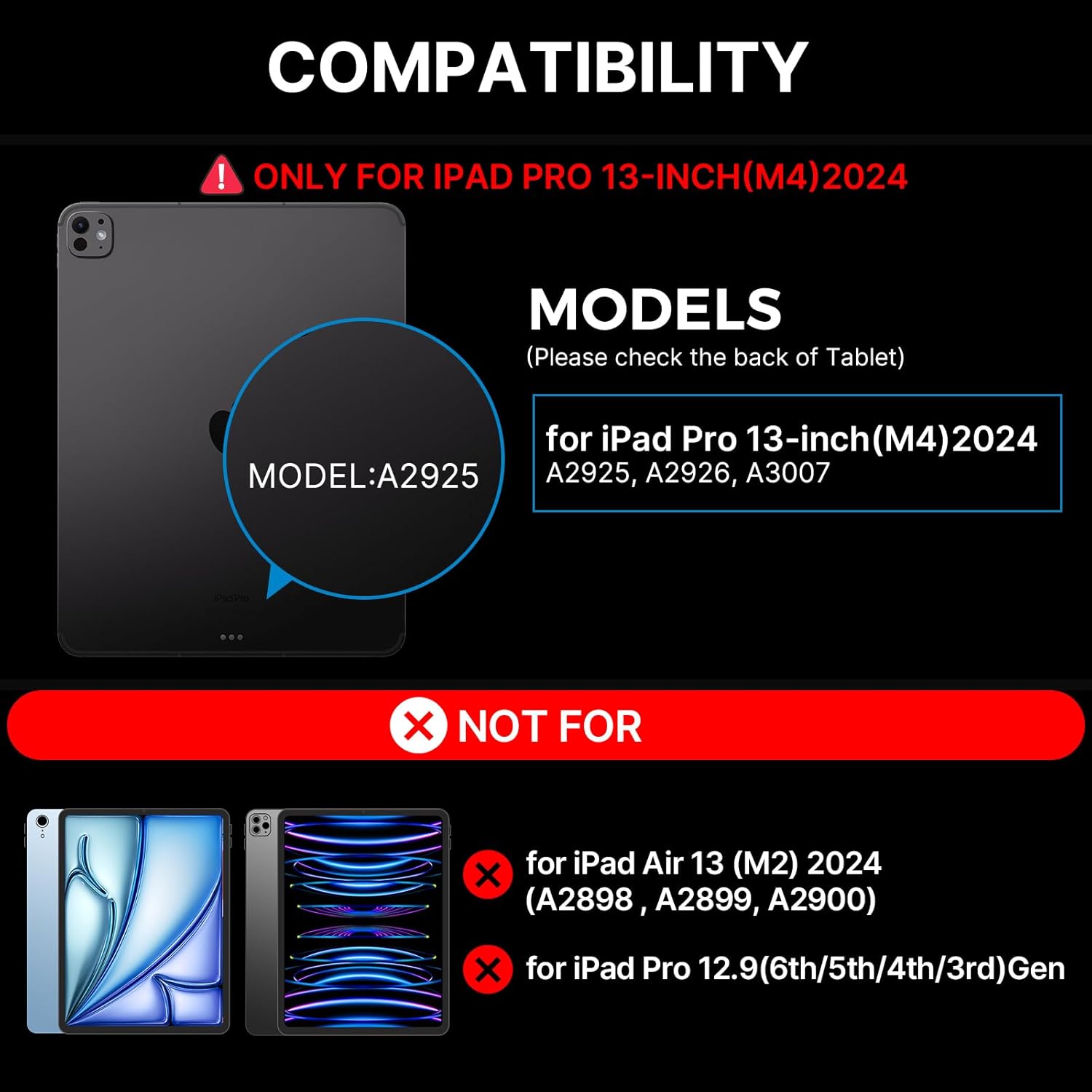
For iPad Pro 13-inch (M4) 2024
1. Introduction
The typecase Edge Keyboard Case is designed to enhance your iPad Pro 13-inch (M4) 2024 experience by transforming it into a versatile laptop-like device. It features a backlit wireless keyboard, a multi-touch trackpad, and a robust magnetic stand, offering comprehensive protection and improved productivity.
2. Compatibility
This keyboard case is specifically designed for the iPad Pro 13-inch (M4) 2024 models. Compatible iPad models include: A2925, A2926, A3007.
NOTE: This case is NOT compatible with iPad Air 13-inch (M2) 2024 (A2898, A2899, A2900) or iPad Pro 12.9-inch (6th/5th/4th/3rd Gen).
3. What's Included
Upon opening your package, please ensure all the following items are present:
- 1 x typecase Edge Magic Keyboard (Only for iPad Pro 13 inch 2024)
- 1 x USB Cable (for charging)
- 1 x User Manual

4. Setup
4.1 Quick Installation
- Place your iPad Pro 13-inch (M4) 2024 onto the magnetic surface of the keyboard case. Ensure proper alignment for a secure fit.
- Adjust the floating cantilever stand to your desired viewing angle. The magnetic grip will hold the iPad firmly in place.
- The keyboard will automatically connect to your iPad via Bluetooth. If not, proceed to Bluetooth Pairing.
4.2 Bluetooth Pairing
To pair your typecase Edge Keyboard Case with your iPad:
- Ensure the keyboard is charged.
- Turn on the keyboard using the power switch (usually located on the side or back of the keyboard).
- On your iPad, go to Settings > Bluetooth.
- Look for "typecase Edge Keyboard" or a similar name in the list of available devices and tap to connect.
- Once connected, the keyboard is ready for use.
5. Operating Instructions
5.1 Backlight Control
The keyboard features 11 backlight colors and 3 levels of brightness. You can adjust these settings using the dedicated backlight key on the keyboard.
- Press the backlight brightness key (often depicted with a sun icon) to cycle through high, medium, low brightness, or turn the backlight off.
- Press the backlight mode key (often depicted with a color palette icon) to change between the 11 available backlight colors.
5.2 Multi-Touch Trackpad
The integrated multi-touch trackpad allows for precise navigation and gesture control, similar to a laptop. Common gestures include:
- Single Finger Tap: Click/Select
- Two Finger Pinch: Zoom in/out
- Two Finger Scroll: Scroll up/down or left/right
- Three Finger Swipe Up: Open App Switcher
- Three Finger Swipe Down: Return to Home Screen
- Three Finger Swipe Left/Right: Switch between open apps
5.3 Magnetic Stand and Viewing Angles
The floating cantilever design allows for effortless adjustment of your iPad to various viewing angles, providing stability for typing, drawing, or media consumption. The strong magnetic clasp ensures your iPad is securely held and provides a dedicated spot for your Apple Pencil.

5.4 iPadOS Shortcuts
The keyboard includes handy iPadOS shortcuts for quick access to common functions, enhancing your productivity. Refer to the keyboard layout for specific shortcut keys.
5.5 Auto-Sleep/Wake Function
The typecase Edge Keyboard Case features an instant wake and sleep function. Your iPad's screen will automatically turn on when you open the case and turn off when you close it, conserving battery life.
6. Maintenance
To ensure the longevity and optimal performance of your typecase Edge Keyboard Case, follow these maintenance guidelines:
- Cleaning: Use a soft, lint-free cloth to wipe down the keyboard and case. For stubborn spots, slightly dampen the cloth with water. Avoid harsh chemicals or abrasive materials.
- Storage: When not in use, keep the case closed to protect the keyboard and iPad screen. Store in a cool, dry place away from direct sunlight and extreme temperatures.
- Charging: Charge the keyboard using the provided USB-C cable. Avoid overcharging or using damaged cables.
- Handling: While the case offers robust protection, avoid dropping or subjecting it to excessive force.
7. Troubleshooting
If you encounter issues with your typecase Edge Keyboard Case, refer to the following common solutions:
- Keyboard not responding/connecting:
- Ensure the keyboard is powered on and fully charged.
- Check your iPad's Bluetooth settings to confirm the keyboard is paired and connected. Try unpairing and re-pairing the device.
- Restart both your iPad and the keyboard.
- If the issue persists, a factory reset of the keyboard might be necessary (refer to specific instructions in the included user manual for your model).
- Backlight not staying on or not adjusting:
- Ensure the keyboard has sufficient battery charge.
- Press the backlight brightness key multiple times to cycle through all settings, including off, to ensure it's not just set to the lowest brightness.
- If the backlight functionality is inconsistent, try restarting the keyboard.
- iPad not securely attaching to the case:
- Ensure your iPad model is compatible with this specific case (iPad Pro 13-inch M4 2024).
- Verify that there are no obstructions (like debris or other accessories) between the iPad and the magnetic surface of the case.
For further assistance, please contact typecase customer support.
8. Specifications
| Feature | Detail |
|---|---|
| Model Number | KB206130P |
| Package Dimensions | 12.36 x 11.57 x 1.46 inches |
| Item Weight | 2 pounds |
| Manufacturer | typecase |
| Connectivity Technology | Wireless |
| Keyboard Description | Multi Functional |
| Special Features | Portable, Lightweight, Backlit, Foldable, Trackpad |
| Color | Black |
| Number of Keys | 78 |
| Keyboard Backlighting Color Support | RGB (11 colors) |
| Batteries | 1 Lithium Polymer battery (included) |
9. Warranty and Support
Your typecase Edge Keyboard Case comes with a 1-Year Manufacturer's Warranty. Please retain your proof of purchase for warranty claims.
For technical support, warranty inquiries, or any other questions, please contact typecase customer service through the vendor information provided at the point of purchase or visit the official typecase website.
Related documentsKB206130P


Ask a question about this manual
Ask about setup, troubleshooting, compatibility, parts, safety, or missing instructions. Manuals+ will review the question and use this page’s manual context to help answer it.