
1. Introduction
Thank you for choosing the VOLT PLUS TECH Pro Earbuds YD03. This manual provides essential information on how to set up, operate, and maintain your new wireless earbuds. Please read it carefully to ensure optimal performance and longevity of your device.
Package Contents
- Wireless Charging Case
- 2 x Earbuds (Left and Right)
- Charging Cable (USB-C)
- User Manual
- Ear Cushions (Multiple Sizes)

Image 1.1: The VOLT PLUS TECH Pro Earbuds YD03, showing both earbuds and the charging case with its LED display.
2. Getting Started
Charging the Earbuds and Case
Before first use, fully charge the earbuds and the charging case. The charging case also functions as a power bank for the earbuds.
- Connect the provided USB-C cable to the charging port on the case and to a compatible USB power source.
- The LED digital display on the case will show the charging status and battery percentage.
- Place the earbuds into their respective slots in the charging case. They will begin charging automatically. The LED display will indicate the charge level of each earbud (L for left, R for right).
- A full charge typically takes approximately 2 hours.

Image 2.1: The charging case connected via USB-C cable, illustrating the charging process and LED display.
Pairing with Your Device
Follow these steps to pair your earbuds with a Bluetooth-enabled device:
- Power On: Remove both earbuds from the charging case. They will automatically power on and enter pairing mode. A blue indicator light will flash on the earbuds. If they do not power on automatically, press and hold the touch area on each earbud for 3-5 seconds until the blue indicator light flashes.
- Activate Bluetooth: On your smartphone, tablet, or other device, go to the Bluetooth settings and ensure Bluetooth is turned on.
- Search for Device: In the list of available Bluetooth devices, search for "YD03".
- Connect: Select "YD03" to pair. The earbuds will provide a voice prompt "Connected" once pairing is successful.
- Single Earbud Mode: The earbuds feature an inaural separation design, allowing you to use either the left or right earbud independently. Simply remove one earbud from the case, and it will connect as a single unit.

Image 2.2: Illustration of the flexible single or dual earbud operation, allowing either earbud to function as the primary unit.
3. Operating the Earbuds
Touch Controls
The VOLT PLUS TECH Pro Earbuds feature intuitive touch controls on each earbud. The functions are as follows:
| Action | Left Earbud (L) | Right Earbud (R) |
|---|---|---|
| Play/Pause | Short press 1 time | Short press 1 time |
| Previous Song | Double-click | N/A |
| Next Song | N/A | Double-click |
| Volume Down | Triple-click | N/A |
| Volume Up | N/A | Triple-click |
| Answer/End Call | Short press 1 time | Short press 1 time |
| Reject Call | Long press for 2 seconds | Long press for 2 seconds |
| Activate Voice Assistant (e.g., Siri) | Long press for 1.5 seconds | Long press for 1.5 seconds |
| Game/Music/Video Mode Switch | Touch switch under 4 seconds | Touch switch under 4 seconds |

Image 3.1: Visual representation of the touch control functions for both left and right earbuds.
4. Features
The VOLT PLUS TECH Pro Earbuds YD03 are equipped with advanced features for an enhanced audio experience:
- Bluetooth 5.3 Technology: Provides a stable and efficient wireless connection with a range of up to 33 feet. The upgraded chip ensures faster pairing and more reliable transmission.
- Quad Microphones with CVC 8.1 Noise Reduction: Each earbud is equipped with two microphones, totaling four, which utilize CVC 8.1 technology to reduce ambient noise by up to 30 dB during calls, ensuring clear communication.
- IPX4 Water Resistance: The earbuds are designed with an IPX4 waterproof nano-coating, protecting them from splashes, sweat, and light rain. Note: The charging case is not waterproof.
- LED Digital Display Charging Case: The charging case features a clear LED screen that displays the battery percentage of the case and the individual charge levels of the left (L) and right (R) earbuds. This allows for easy monitoring of power status.
- Integrated Power Bank Functionality: The charging case has a 2000mAh battery capacity, providing multiple recharges for the earbuds, extending total playtime up to 25+ hours.
- High-Fidelity Audio: Enjoy immersive sound with 8D stereo surround effect and a graphene composite diaphragm for optimized high-frequency details.
- Touch Control: Manage music playback, calls, volume, and voice assistant activation directly from the earbuds.

Image 4.1: Diagram highlighting the advanced Bluetooth 5.3 core chip for stable connectivity.
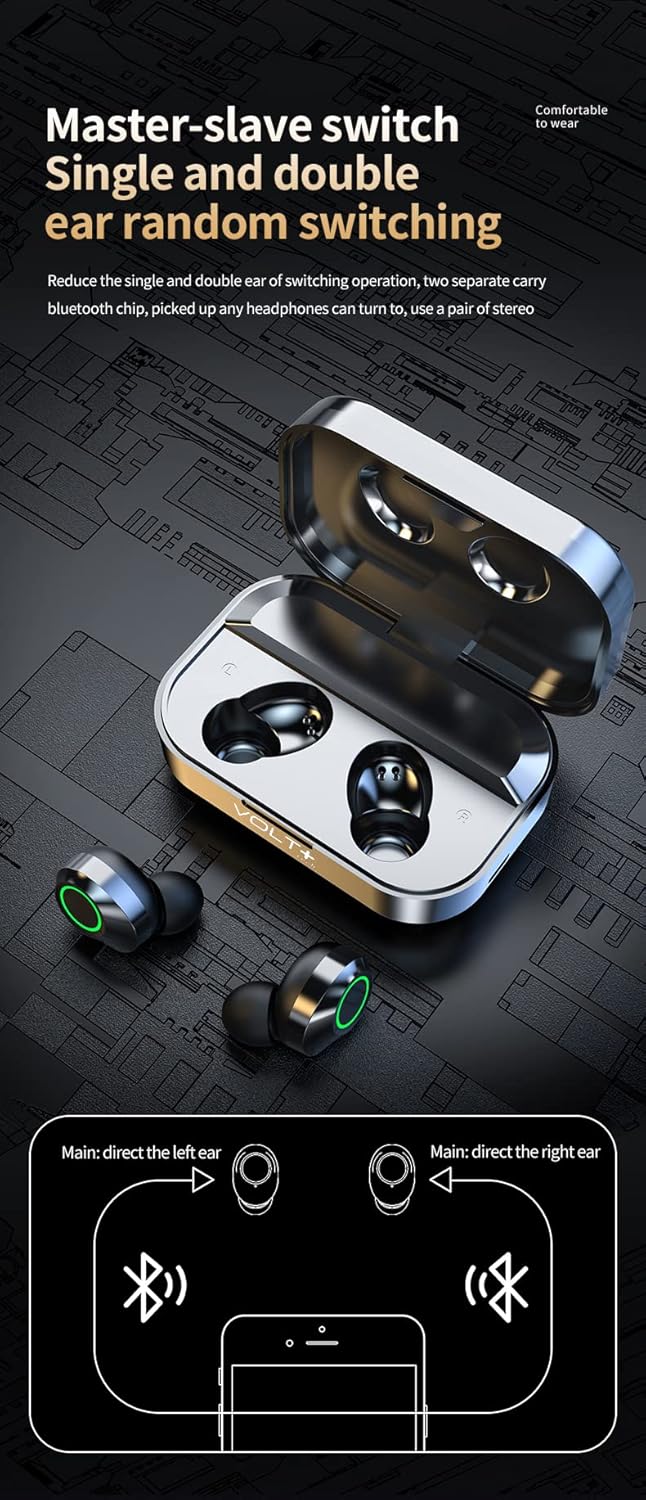
Image 4.2: Close-up of the LED digital display on the charging case, indicating battery levels for the case and individual earbuds.
5. Maintenance
Proper care ensures the longevity and performance of your earbuds:
- Cleaning: Regularly clean the earbuds and charging case with a soft, dry, lint-free cloth. Avoid using abrasive materials or harsh chemicals. Gently clean the ear tips and speaker mesh to prevent wax buildup.
- Storage: When not in use, store the earbuds in their charging case to protect them from dust and damage. Keep the case closed.
- Battery Care: To maintain battery health, avoid fully discharging the earbuds and case frequently. Charge them regularly, even if not used for extended periods. Store in a cool, dry place away from extreme temperatures.
- Water Exposure: While the earbuds are IPX4 water-resistant, avoid submerging them in water. Dry them thoroughly if they get wet before placing them back in the charging case. Ensure the charging port is dry before charging.
6. Troubleshooting
If you encounter any issues with your earbuds, refer to the following common solutions:
| Problem | Possible Solution |
|---|---|
| Earbuds not pairing with device |
|
| Only one earbud working |
|
| No sound or low volume |
|
| Charging case not charging |
|
7. Technical Specifications
| Feature | Specification |
|---|---|
| Model Name | YD03 |
| Bluetooth Version | 5.3 |
| Wireless Communication Technology | Bluetooth |
| Bluetooth Range | 33 Feet (10 meters) |
| Noise Control | Active Noise Cancellation, Passive Noise Cancellation, Sound Isolation (CVC 8.1) |
| Microphones | Quad Microphones (2 per earbud) |
| Water Resistance Level | IPX4 (Earbuds only) |
| Ear Placement | In Ear |
| Control Method | Touch |
| Charging Case Battery Capacity | 2000 mAh |
| Total Playtime (with case) | Up to 25+ Hours |
| Earbud Playtime (single charge) | 5+ Hours |
| Charging Time | Approx. 2 Hours |
| Headphones Jack | USB-C (for charging case) |
| Compatible Devices | Android, Apple iPhone (including iPhone 15 Pro), iOS, Mac, Windows |
| Item Weight | 4 Ounces (total) |
| Product Dimensions | 1.5 x 1 x 1.5 inches (approximate) |
8. Warranty and Support
For warranty information or technical support, please refer to the contact details provided with your purchase or visit the official VOLT PLUS TECH website. Keep your proof of purchase for any warranty claims.