
Introduction
The OREI BK-927 is an advanced 8K eARC HDMI Audio Extractor Converter designed to seamlessly integrate modern video sources with existing audio systems. This device allows you to extract high-quality audio from any HDMI source signal while passing through 8K or HDR video to a compatible display. It then outputs the extracted HDMI audio to an AV receiver with an HDMI input, enabling full eARC capabilities for your audio setup. This product is ideal for bridging the gap between newer media equipment and older home stereo systems.
Key Features
- Audio Extraction: Extracts full HDMI audio from any HDMI source signal and passes through 8K or HDR video to a compatible display/TV. Outputs HDMI Audio to AV Receiver with HDMI input for full eARC capabilities.
- 8K Ultra HD Support: HDMI 2.1 (48Gbps) and HDCP 2.3 compliant. Supports resolutions up to 8K@60Hz and 4K@120Hz, 4K@50/60Hz (YUV 4:4:4) HDR, DVI Compliant.
- Dedicated HDMI Audio Output: Connects to an AV Receiver supporting Dolby Atmos, Dolby True HD, Dolby Digital, DTS Digital, DTS HD Master, Dolby/DTS 7.1&5.1CH, PCM7.1&5.1&2.0 stereo audio.
- Advanced Video Features: Supports VRR, ALLM, QMS, QFT, SBTM, as specified in HDMI 2.1.
- eARC Mode Support: Extracts audio return from ARC or eARC port on TV/Display and sends HDMI audio only to a non-ARC AV Receiver for a full audio experience.
- Durable Construction: Features a heavy-duty cool metal enclosure for enhanced durability and heat dissipation.

Image: Key features of the OREI BK-927, including HDMI 2.1, HDCP 2.3, 48Gbps bandwidth, 8K/4K resolution support, VRR, ALLM, QMS, QFT, SBTM, HDR, Dolby Vision, HLG, various audio formats, ARC/eARC extraction, CEC control, and Advanced EDID Management.
Package Contents
- 1x BK-927 Extractor
- 1x Power Adapter
- 1x User Manual
Note: HDMI cables are not included.

Image: The OREI BK-927 48Gbps HDMI eARC Audio Extractor, shown with its included power adapter and user manual.
Product Overview
Front Panel

Video: A detailed look at the front panel of the OREI BK-927, highlighting the various indicators and controls.
- Power Indicator: Lights up when the device is powered on and passes its internal self-test.
- IN Indicator: Lights up when a valid HDMI input signal is detected from the source device.
- OUT Indicator: Lights up when a valid HDMI output signal is sent to the TV/Display.
- Amp Indicator: Lights up when a valid HDMI audio output signal is sent to the amplifier/AV receiver.
- eARC Indicator: Indicates the eARC compatibility status of the connected device. Solid light means eARC compatible, flashing means not eARC compatible, off means eARC is disabled.
- eARC Button: Toggles the eARC function on/off.
- EDID Switches: Used to adjust the frame rate, resolution, and audio standard between input and output media. Refer to the user manual for detailed configurations.
- Service Port: USB-C port for firmware updates.
Rear Panel
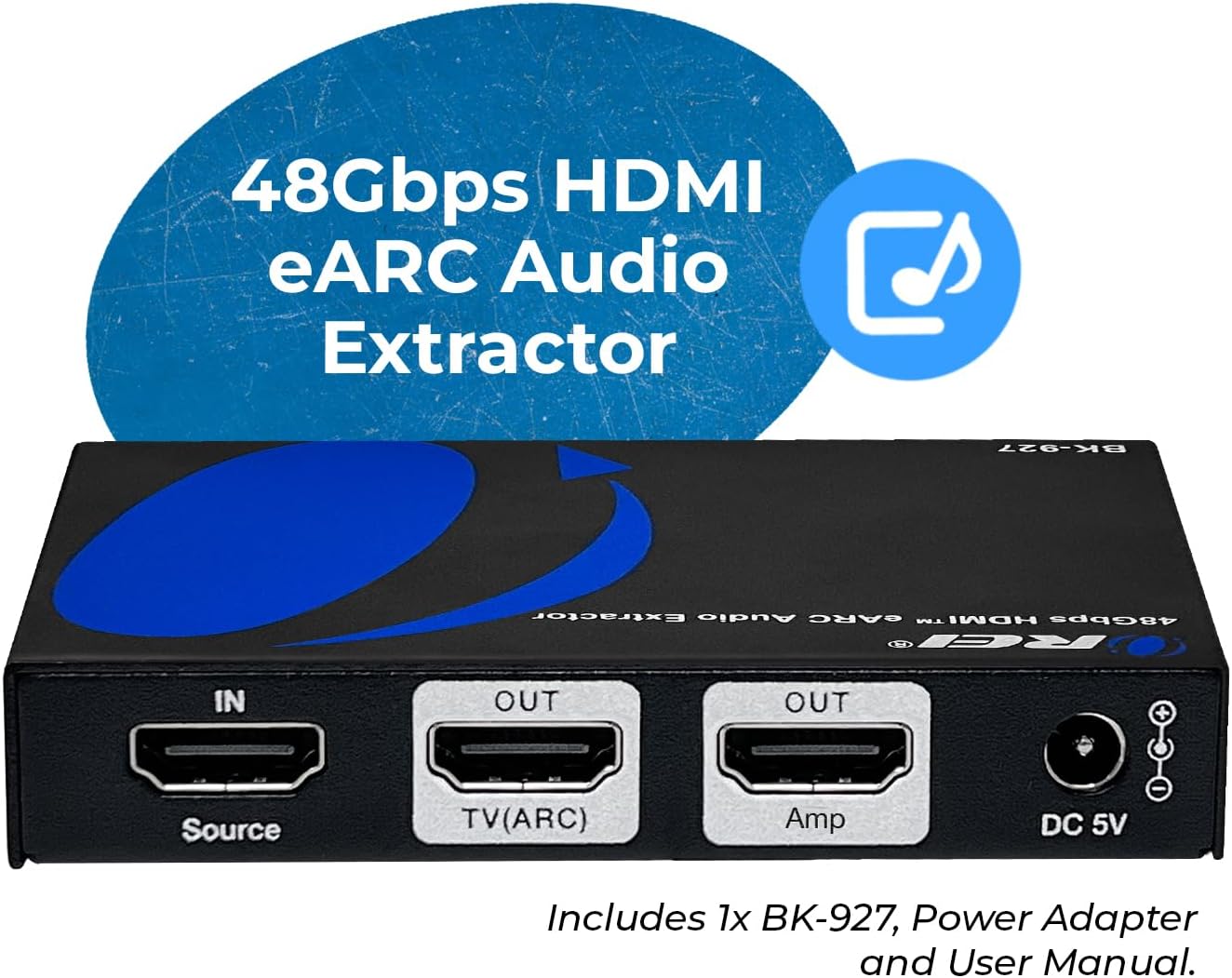
Image: The rear panel of the OREI BK-927, showing the HDMI input, two HDMI outputs (TV/ARC and Amp), and the DC 5V power input.
- IN (Source): HDMI input port for connecting your media source (e.g., cable box, gaming system).
- OUT (TV/ARC): HDMI output port for connecting to your TV or display's eARC/ARC port.
- AUDIO OUT (Amp): Dedicated HDMI audio output port for connecting to your AV receiver or amplifier.
- DC 5V: Power input port for the included 5V DC power adapter.
Setup and Connection
Follow these steps to set up your OREI BK-927:
- Connect your HDMI source device (e.g., Blu-ray player, gaming console, streaming device) to the IN (Source) port on the BK-927 using a high-quality HDMI cable.
- Connect the OUT (TV/ARC) port on the BK-927 to your TV or display's HDMI eARC/ARC input using a high-quality HDMI cable.
- Connect the AUDIO OUT (Amp) port on the BK-927 to your AV receiver or amplifier's HDMI input using a high-quality HDMI cable.
- Plug the included 5V DC power adapter into the DC 5V port on the BK-927, and then into a power outlet.
- Power on all connected devices. The BK-927 will perform a self-test, and the corresponding indicators on the front panel will light up.
Connection Examples

Image: Use Case 1 illustrates connecting an 8K TV with eARC to a DVD/Blu-ray source and an audio output device (Amp) via the OREI BK-927. When eARC is on, audio is extracted from the TV; when off, audio is extracted from the source device.

Image: Use Case 2 demonstrates connecting a new eARC TV to an old AV Receiver without an HDMI eARC port using the OREI BK-927. Note: Not compatible with eARC soundbars; designed for older AV receivers with HDMI input.
Supported Setups

Image: A visual guide showing supported setups (AV Receiver with HDMI input, Amplifier with HDMI input, TV with ARC/eARC passthrough, Projector, Streaming Devices) and not supported setups (Soundbars with ONLY ARC/eARC port, Sonos Arc/Beam/Bose 900, Optical (TOSLINK) audio systems, Multi HDMI input switching use, Advanced DAC-only audio setups).
Operating Instructions
eARC Function
The eARC button on the front panel allows you to toggle the eARC function. When eARC is enabled, the audio will be extracted from the connected ARC/eARC TV. When the eARC function is turned off, the audio will be extracted from the connected source device. The eARC indicator LED will show the current status.
EDID Management
The EDID switches on the front panel are used to configure the Extended Display Identification Data (EDID) settings. These settings control the video resolution, frame rate, and audio format that the source device sends to the display and audio system. Refer to the detailed instructions in the included user manual for specific EDID configurations to optimize compatibility and performance with your setup.
Technical Specifications
| Specification | Value |
|---|---|
| Brand | OREI |
| Model | BK-927 |
| Interface | HDMI |
| HDMI Version | HDMI 2.1 |
| HDCP Compliance | HDCP 2.3 |
| Video Bandwidth | 48Gbps |
| Max Resolution | 8K@60Hz, 4K@120Hz |
| Audio Output Mode | Dolby Atmos, Dolby True HD, Dolby Digital, DTS Digital, DTS HD Master, PCM stereo, eARC |
| Material Type | Metal |
| Dimensions (Approx.) | 3.74" L x 2.67" W x 0.7" H |
| Weight (Approx.) | 178g / 6.27oz |
| Power Supply | DC 5V |
Image: The OREI BK-927 with its compact dimensions and heavy-duty metal enclosure highlighted, along with technical specifications and warranty information.
Troubleshooting
- No Video/Audio: Ensure all HDMI cables are securely connected and are high-quality (HDMI 2.1 recommended for 8K/4K@120Hz). Verify power is supplied to the BK-927 and all connected devices are powered on. Check the input/output indicators on the front panel.
- Incorrect Resolution/Frame Rate: Adjust the EDID switches on the front panel according to your display and source device capabilities. Refer to the user manual for EDID settings.
- No eARC Audio: Ensure the eARC function is enabled via the eARC button. Verify your TV and AV receiver support eARC/ARC. Note that this device is not compatible with eARC soundbars.
- Intermittent Signal: Try using shorter, certified HDMI cables. Ensure there are no other devices interfering with the HDMI signal.
- Firmware Update: If issues persist, check the OREI website for potential firmware updates and follow the instructions using the service port.
Warranty and Support
The OREI BK-927 comes with a 12-Month Manufacturer's Warranty. OREI also provides Lifetime OREI Tech Support to assist you with any questions or issues you may encounter. For technical assistance or warranty claims, please contact OREI customer support through their official website or the contact information provided in the included user manual.
Official Product Video
Video: This official video from OREI Direct demonstrates how the OREI BK-927 8K eARC HDMI Audio Extractor can be used to connect a new 8K eARC TV to an older AV receiver, allowing for full audio experience without needing a new receiver.


