
1. Important Safety Information
Warning: This product is not suitable for children under 3 years due to small parts that could be swallowed, posing a choking hazard.
- Always operate the speedboat in open water areas, away from swimmers, animals, and other watercraft.
- Ensure the operating area is clear of obstacles such as weeds, rocks, or debris that could interfere with the jet drive.
- Do not operate the boat in saltwater, as this can damage internal components.
- Keep fingers and loose clothing away from the jet drive intake and outlet during operation.
- Always remove the battery from the boat and the transmitter when not in use.
- Supervise children during operation.
2. What's in the Box
Please check the contents of your package against the list below:
- Amewi Stingray Speedboat Model
- 2.4GHz Remote Control
- Li-ion 2S 7.4V 2000mAh 15C Battery
- USB Charging Cable
- Tool
- Boat Stand
- Instruction Manual (this document)
Required Accessories (Not Included): 3 x 1.5V AA batteries for the remote control.
3. Setup Guide
3.1. Charging the Boat Battery
The included Li-ion 2S 7.4V 2000mAh battery powers the speedboat.
- Connect the Li-ion battery to the USB charging cable.
- Plug the USB charging cable into a suitable USB power source (e.g., computer USB port, USB wall adapter).
- The charging indicator on the USB cable will show the charging status (refer to the charger's specific indicator behavior).
- Charging typically takes 90-120 minutes. Do not overcharge the battery.
- Once fully charged, disconnect the battery from the charger.
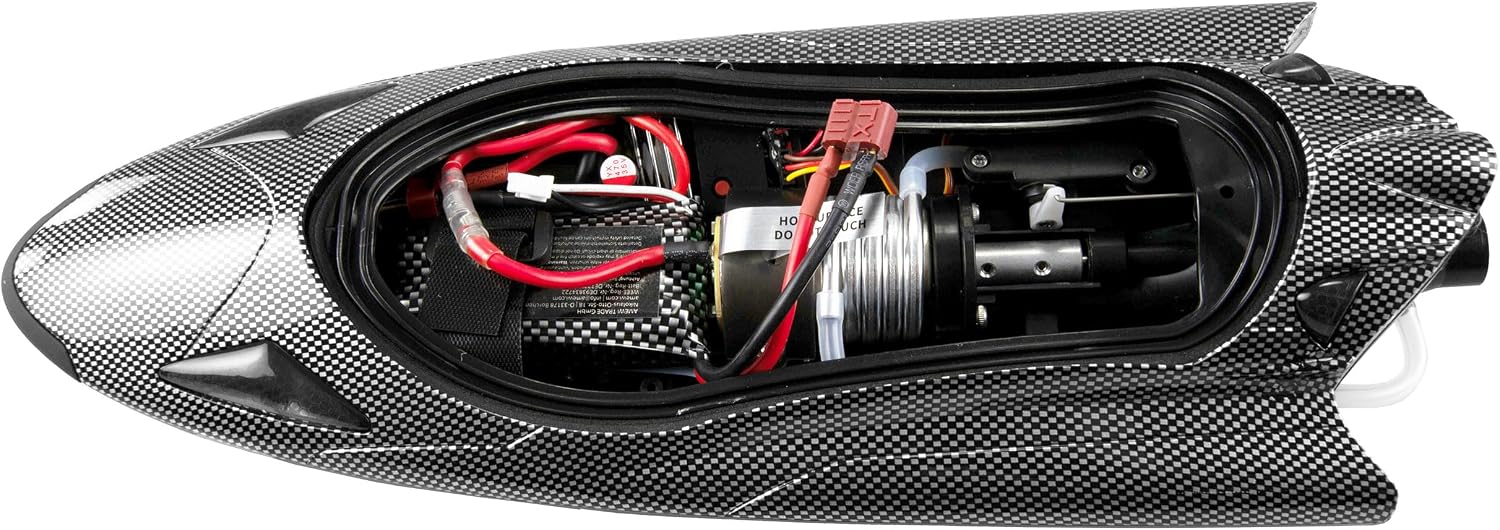
Image: Internal components of the speedboat, including the battery and motor assembly.
3.2. Installing Transmitter Batteries
The 2.4GHz remote control requires 3 x 1.5V AA batteries (not included).
- Open the battery compartment on the back of the remote control.
- Insert 3 AA batteries, ensuring correct polarity (+/-).
- Close the battery compartment securely.

Image: The 2.4GHz remote control for the speedboat.
3.3. Preparing the Speedboat
- Carefully remove the top hull cover(s) of the speedboat. The boat features a double hull cover for water protection.
- Connect the fully charged Li-ion battery to the boat's power connector.
- Carefully place the battery inside the hull, ensuring wires are not pinched.
- Securely reattach both hull covers to prevent water ingress. Ensure all latches or seals are properly engaged.

Image: Top view of the speedboat, showing the double hull cover design.
4. Operating Instructions
4.1. Powering On and Pairing
- Place the speedboat gently into the water. The boat's electronics will activate upon contact with water.
- Turn on the remote control. The remote control and boat should automatically pair. A successful pairing is usually indicated by a solid light on both devices.
- If pairing fails, turn off both devices and repeat the process.
4.2. Basic Controls
- Throttle Trigger: Pull the trigger to move forward, push to reverse (if applicable). The jet drive provides strong acceleration.
- Steering Wheel: Turn the wheel left or right to steer the boat. The thrust vector control allows for high agility and maneuverability.
- Trim Adjustments: Use the trim buttons on the remote control to fine-tune steering and throttle for straight running.
- Rash Limitation (Dual Rate): Adjust the sensitivity of the steering and throttle for different driving styles or conditions.

Image: Rear view of the speedboat, highlighting the jet drive mechanism.
4.3. Advanced Features
- Switchable LED Lighting: The boat features front and rear LED lighting, which can be switched on/off via the transmitter. This is useful for operation at dusk.
- Undervoltage Warning: The 2.4GHz transmitter system includes an undervoltage warning function to prevent the boat battery from being discharged too deeply. Pay attention to audible or visual warnings from the transmitter.
- Range Warning: The transmitter will alert you if the boat is approaching or exceeding its maximum operating range (60-80 meters). Bring the boat closer immediately if this warning activates.
- Self-Righting Function: In case of a rollover, the boat is designed to self-right, allowing it to continue operation without manual intervention.
The Amewi Stingray Speedboat can reach speeds of up to 40 km/h and offers a driving time of up to 12 minutes on a full charge.
5. Maintenance
- After Each Use:
- Remove the boat from the water and immediately disconnect the battery.
- Open the hull covers and carefully drain any accumulated water. Wipe the interior dry with a soft cloth.
- Inspect the jet drive intake for any debris (weeds, leaves, etc.) and remove them carefully.
- Clean the exterior of the boat with a damp cloth. Do not use harsh chemicals.
- Ensure the water cooling system's inlet and outlet are clear.
- Battery Care:
- Store Li-ion batteries in a cool, dry place, away from direct sunlight and extreme temperatures.
- Do not store batteries fully charged or fully discharged for extended periods. Aim for a storage charge of around 50%.
- Hull Seals: Regularly inspect the rubber seals around the hull covers for any signs of wear or damage. Damaged seals can lead to water ingress.
6. Troubleshooting
| Problem | Possible Cause | Solution |
|---|---|---|
| Boat does not respond to remote control. |
|
|
| Reduced speed or power. |
|
|
| Water inside the hull. |
|
|
| Boat goes out of range. |
|
|
7. Specifications
| Feature | Detail |
|---|---|
| Model Name | Stingray Speedboot |
| Model Number | 26108 |
| Brand | Amewi |
| Length | 335 mm (13.19 inches) |
| Width | 125 mm (4.92 inches) |
| Height | 75 mm (2.95 inches) |
| Weight (including battery) | 558 g |
| Body Material | ABS Plastic |
| Motor | 390 Brushed Motor (Water-cooled) |
| Controller | All-in-one unit brushed |
| Remote Control | 3 channels, 2.4GHz |
| Range | 60-80 meters |
| Battery | Li-ion 2S 7.4V 2000mAh 15C (18650 round cells, Deans plug) |
| Driving Time | Up to 12 minutes |
| Maximum Speed | 40 km/h |
| Charger | USB charging cable |
| Charging Time | 90-120 minutes |
| Indoor/Outdoor Usage | Outdoor |
| Age Range | Youth (Manufacturer Minimum Age: 168 months / 14 years) |
8. Warranty and Support
For warranty information, technical support, or replacement parts, please contact your retailer or the manufacturer directly. Keep your proof of purchase for warranty claims.
Manufacturer: Amewi
