
1. Important Safety Information
Please read all instructions carefully before assembling and using the Zipro Rave Hometrainer. Retain this manual for future reference. Failure to follow these instructions may result in injury or damage to the product.
- Consult a Physician: Before starting any exercise program, especially if you have pre-existing health conditions, consult your doctor.
- Maximum User Weight: This hometrainer is designed for users up to 120 kg (264 lbs). Do not exceed this weight limit.
- Proper Placement: Place the hometrainer on a stable, level surface. Ensure adequate clearance around the equipment (at least 0.6 meters or 2 feet).
- Children and Pets: Keep children and pets away from the equipment during operation. This product is not a toy.
- Regular Inspection: Periodically inspect the hometrainer for loose parts, wear, or damage. Do not use if damaged.
- Proper Attire: Wear appropriate exercise clothing and athletic shoes. Avoid loose clothing that could get caught in moving parts.
- Assembly: Ensure all bolts, nuts, and connections are securely tightened before use.
- Electrical Safety: The unit is wired. Ensure the power cord is not damaged and is connected to a suitable power outlet.
2. Package Contents
Carefully unpack all components and verify that you have received all parts listed below. If any parts are missing or damaged, do not proceed with assembly and contact customer support.
- Main Frame with Flywheel
- Front Stabilizer
- Rear Stabilizer
- Handlebar Post
- Handlebars
- Console (Display Unit)
- Seat Post
- Seat
- Left and Right Pedals
- Power Adapter
- Assembly Hardware (bolts, washers, nuts)
- Assembly Tools (wrenches, Allen keys)
- User Manual
3. Assembly Instructions
Follow these steps to assemble your Zipro Rave Hometrainer. It is recommended to have two people for some assembly steps.
- Unpack and Prepare: Remove all components from the packaging. Place them on a clean, flat surface. Identify all parts and hardware. Note that some hardware may be pre-attached to the main frame for shipping.
- Attach Stabilizers: Secure the front and rear stabilizers to the main frame using the provided bolts and washers. Ensure they are firmly tightened to provide a stable base.
- Install Pedals: Identify the left (L) and right (R) pedals. The left pedal screws counter-clockwise, and the right pedal screws clockwise. Thread them carefully into the crank arms and tighten securely with a wrench.
- Attach Seat Post and Seat: Insert the seat post into the main frame. Adjust to your desired height and secure with the adjustment knob. Attach the seat to the top of the seat post, ensuring it is level and tightened.
- Attach Handlebar Post and Handlebars: Insert the handlebar post into the main frame. Connect any internal cables if present. Attach the handlebars to the top of the handlebar post, securing them with the appropriate bolts.
- Connect Console Cables: Carefully connect the sensor and power cables from the main frame and handlebars to the corresponding ports on the back of the console. Ensure connections are snug.
- Attach Console: Mount the console onto the handlebar post, securing it with the provided screws.
- Final Check: Review all connections, bolts, and moving parts to ensure everything is securely fastened and properly aligned before first use.
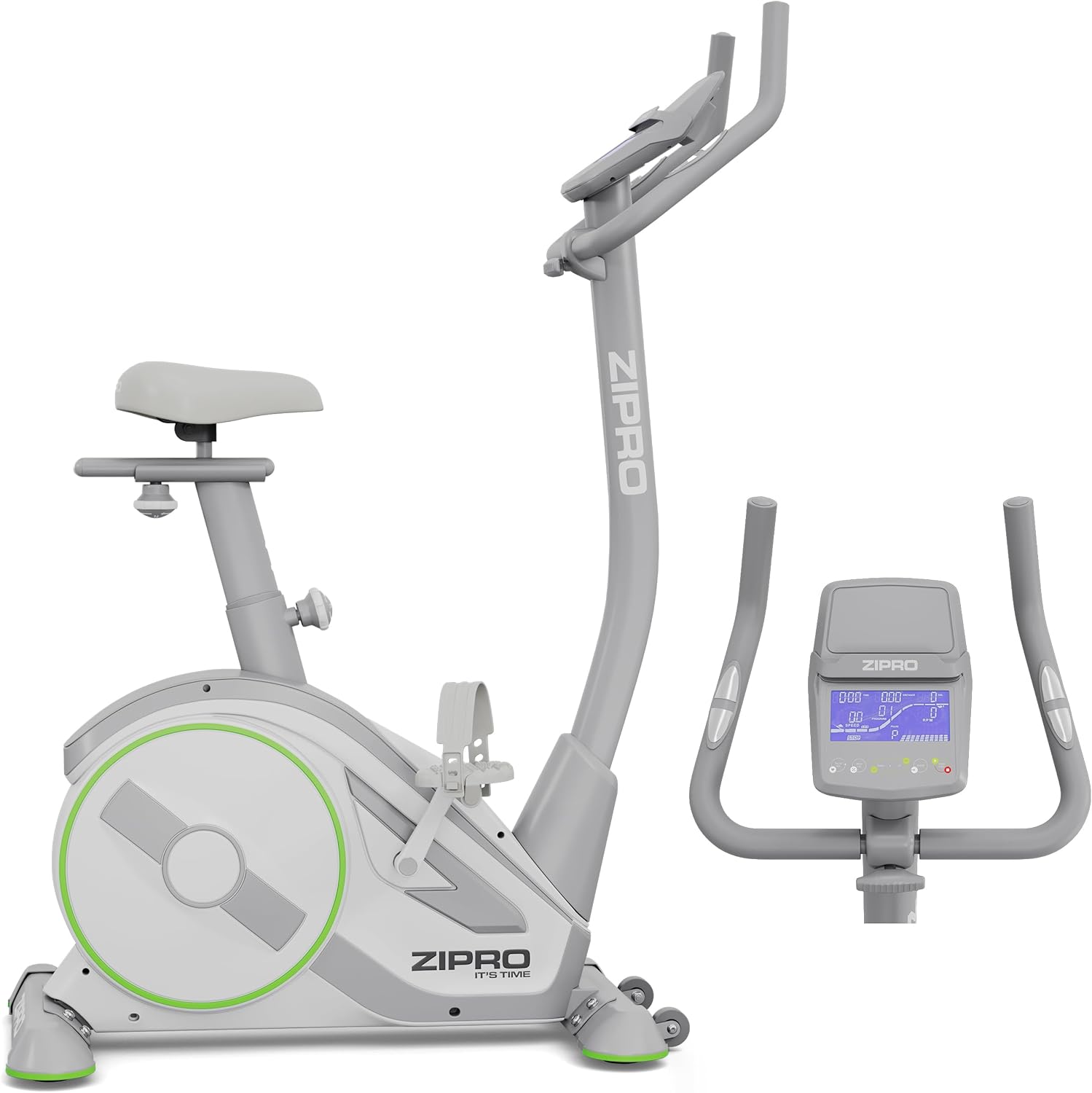
Figure 3.1: Fully assembled Zipro Rave Hometrainer.
4. Operating Instructions
This section details how to use your Zipro Rave Hometrainer for effective workouts.
4.1 Console Overview
The console displays key workout metrics and allows you to control resistance and programs.

Figure 4.1: Detailed view of the console display and control buttons.
- Display: Shows Time, Speed, Distance, Calories, RPM, and WATT.
- Buttons: Typically include START/STOP, MODE, RESET, UP/DOWN for resistance/program selection. Refer to the console's specific button layout for exact functions.
4.2 Power On/Off
Connect the power adapter to the hometrainer and a wall outlet. The console will typically power on automatically or by pressing any button. To turn off, disconnect the power adapter or the console may enter a low-power standby mode after a period of inactivity.
4.3 Adjusting Resistance
The Zipro Rave Hometrainer features 32 levels of electro-magnetic resistance. Use the UP/DOWN buttons on the console to increase or decrease the resistance level during your workout. Higher levels provide a more challenging workout.
4.4 Program Selection
The hometrainer offers various training programs to suit different fitness goals:
- Manual Mode: Control resistance manually.
- 11 Pre-programmed Workouts: Select from various pre-designed profiles for different intensity levels.
- 4 HRC Programs: Heart Rate Control programs adjust resistance to keep your heart rate within a target zone (requires a compatible heart rate monitor, if not built-in).
- WATT Program: Maintain a constant power output (WATT) regardless of pedaling speed.
- 3 Custom Programs: Create and save your own personalized workout profiles.
Use the MODE button to cycle through program options and the UP/DOWN buttons to select or adjust program parameters.
4.5 Bluetooth Connectivity
The integrated Bluetooth interface allows connection to popular fitness applications like Zwift and Kinomap, enhancing your training experience with virtual routes and interactive workouts. A tablet/smartphone holder is provided on the console.

Figure 4.2: Tablet mounted on the console, demonstrating Bluetooth app connectivity.
- Ensure Bluetooth is enabled on your smartphone or tablet.
- Open the desired fitness application (e.g., Zwift, Kinomap).
- Follow the app's instructions to search for and connect to your Zipro Rave Hometrainer.
4.6 Adjusting Seat and Handlebars
Proper adjustment ensures comfort and effective workout posture.
- Seat Adjustment: The seat can be adjusted both vertically and horizontally. Loosen the respective adjustment knobs, move the seat to the desired position, and tighten securely.

Figure 4.3: Adjusting the seat for optimal riding position.
- Handlebar Adjustment: The handlebars can be tilted to different angles. Loosen the adjustment knob, set the handlebars to a comfortable position, and tighten firmly.

Figure 4.4: Handlebar tilt adjustment for ergonomic comfort.
4.7 Using Pedals
The ergonomic pedals feature an anti-slip pattern and adjustable straps to ensure secure foot placement during your workout. Adjust the straps to fit your feet snugly before beginning your exercise.

Figure 4.5: Ergonomic pedals with adjustable straps.
5. Maintenance
Regular maintenance ensures the longevity and safe operation of your Zipro Rave Hometrainer.
- Cleaning: Wipe down the hometrainer with a damp cloth after each use to remove sweat and dust. Avoid abrasive cleaners or solvents.
- Check Connections: Periodically check all bolts, nuts, and screws to ensure they are tight. Tighten any loose fasteners.
- Inspect Moving Parts: Regularly inspect pedals, straps, and adjustment mechanisms for signs of wear or damage. Replace worn parts immediately.
- Storage: When not in use, store the hometrainer in a clean, dry environment away from direct sunlight and extreme temperatures. The integrated transport wheels allow for easy relocation.

Figure 5.1: Transport wheels for easy movement and storage.
6. Troubleshooting
This section addresses common issues you might encounter with your hometrainer.
| Problem | Possible Cause | Solution |
|---|---|---|
| Console not powering on | Power adapter not connected; loose cable connection; power outlet issue. | Ensure power adapter is securely plugged into the hometrainer and a working wall outlet. Check all console cable connections. |
| No resistance change | Loose resistance control cable; console malfunction. | Check the resistance control cable connection to the console. Restart the console. If the issue persists, contact customer support. |
| Inaccurate display readings (speed, distance) | Loose sensor cable connection. | Check the sensor cable connection to the console and the main frame. |
| Unusual noises during operation | Loose bolts; worn parts; internal component issue. | Inspect all visible bolts and tighten if loose. If noise persists or is internal, discontinue use and contact customer support. |
| Bluetooth connection issues | Bluetooth not enabled on device; app issues; interference. | Ensure Bluetooth is on and the app is updated. Try restarting both the hometrainer and your device. Move closer to the hometrainer. |
If you encounter a problem not listed here or if the suggested solutions do not resolve the issue, please contact customer support for further assistance.
7. Specifications
Detailed technical specifications for the Zipro Rave Hometrainer.
| Feature | Specification |
|---|---|
| Brand | ZIPRO |
| Model Number | 13112338 |
| Dimensions (L x W x H) | 104 x 53 x 133 cm (40.9 x 20.9 x 52.4 inches) |
| Product Weight | 30 kg (66.1 lbs) |
| Maximum User Weight | 120 kg (264 lbs) |
| Resistance System | Electro-magnetic |
| Resistance Levels | 32 |
| Drive System | Belt |
| Power Source | Wired |
| Training Programs | 11 pre-set, 4 HRC, 1 WATT, Manual, 3 custom |
| Connectivity | Bluetooth (Zwift, Kinomap compatible) |
| Adjustments | Vertical & horizontal seat, handlebar tilt |
| Display Parameters | Time, Speed, Distance, Calories, RPM, WATT |
| Color | White |
8. Warranty Information
Please refer to your purchase documentation or contact customer support for detailed warranty information regarding your Zipro Rave Hometrainer. Warranty terms and conditions may vary based on region and retailer.
9. Customer Support
For technical assistance, spare parts, or any questions regarding your Zipro Rave Hometrainer, please contact ZIPRO customer support through your retailer or the official ZIPRO website. When contacting support, please have your model number (13112338) and purchase date available.


