
sinocare Pro 25 Kit
sinocare Safe AQ Pro I Blood Sugar Testing Kit User Manual
Model: Pro 25 Kit
1. Introduction
The sinocare Safe AQ Pro I Blood Sugar Testing Kit is designed for convenient and accurate self-monitoring of blood glucose levels. This kit provides essential tools for individuals managing diabetes, offering reliable results in mmol/L.
The device features intelligent color indication, a blood ketone warning system, and a large memory capacity to help you track your blood glucose trends effectively.

Image: Complete sinocare Safe AQ Pro I Blood Sugar Testing Kit.
2. What's in the Box (Setup)
Your sinocare Safe AQ Pro I 25 Kit includes the following components:
- Sinocare Safe AQ Pro I Blood Sugar Monitor
- Blood Sugar Test Strips (x 25)
- Lancing Devices (x 25)
- Painfree Lancing Pen
- PU Carrying Bag
- User Manual (this document)
Before first use, ensure all components are present and undamaged.
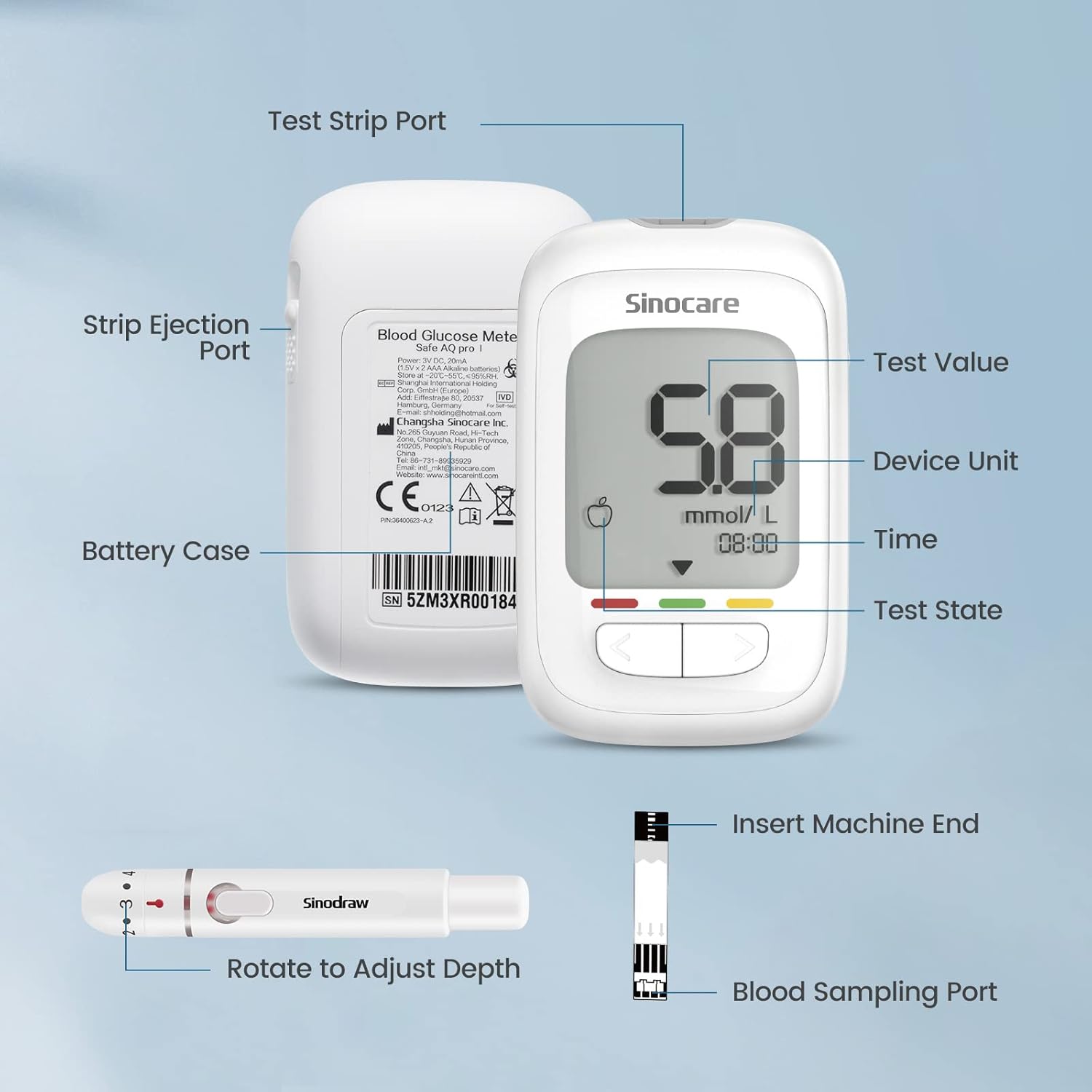
Image: Detailed view of the meter and lancing device components.
3. Product Features
- Accurate & Anti-interference: Utilizes composite silver electrode technology for better conductivity and FAD-GDH technology for enhanced stability and anti-interference. Features new hematocrit correction technology for a wide HCT range (10% - 70%).
- Intelligent Color Indication: The monitor provides visual cues (red, yellow, green) to indicate your blood glucose status, offering an intuitive understanding of your levels.
- Blood Ketone Warning: If blood glucose measurement is ≥ 13.9mmol/L, the monitor will display a reminder for blood ketone detection. (Note: The monitor provides a warning only; it does not perform blood ketone tests.)
- Convenient & Easy to Use: No coding required for test strips. Requires only 1 microliter of blood sample and provides results in 5 seconds.
- Data Management: Equipped with pre-meal, post-meal, and random blood sugar display. It can also show overall, pre-meal, and post-meal average blood glucose values for 7, 14, 30, and 90 days, aiding in trend analysis.
- Memory Capacity: Stores up to 500 test results.
- Design: Features a large LCD screen for clear readings and an anti-drop design for the battery cover.

Image: Key features of the Safe AQ Pro I meter.

Image: Design features of the Safe AQ Pro I meter.
4. Operating Instructions
4.1. Before Testing
- Confirm the condition of the test strips, ensuring they are in a sealed state and within the bottle opening period.
- Thoroughly clean and dry your hands. Do not use iodine for disinfection.
4.2. Performing a Blood Glucose Test
- Insert a new test strip into the meter's test strip port. The meter will turn on automatically.
- Prepare the lancing pen and prick your fingertip to obtain a blood sample. Suspend the arm briefly to allow blood to accumulate at the fingertips.
- Bring the finger close to the blood-sucking port of the test strip and allow the blood to be drawn in. Ensure the blood-sucking port is filled at once. Do not touch the blood-sucking part of the test strip with your fingers. Do not forcefully squeeze your fingers after puncturing the skin.
- The meter will display the result in 5 seconds.

Image: Using the lancing device.

Image: Applying blood to the test strip.
4.3. Understanding Results
The meter displays results in mmol/L. It also provides intelligent color indications:
- Green: Blood glucose value is within the normal range (e.g., >3.9mmol/L and <7.0mmol/L).
- Yellow: Blood glucose value requires attention (e.g., >7.0mmol/L and <13.9mmol/L).
- Red: Blood glucose value is outside the normal range (e.g., <3.9mmol/L or >13.9mmol/L).
Important: Do not solely rely on the indication display to judge whether blood sugar is normal. Always consult a healthcare professional for treatment and interpretation of results.

Image: Color Indicator Band explanation.

Image: Blood sugar level indications and advice.
5. Blood Ketone Warning
When the blood glucose measurement result is ≥ 13.9mmol/L, the sinocare Safe AQ Pro I blood glucose monitor will display a reminder for blood ketone detection on the screen. Please conduct blood ketone detection in time.
Note: The Safe AQ Pro I blood sugar monitor can only provide a warning of Blood Ketone; it does not have a Blood Ketone test function. Please test your blood ketones according to your doctor's recommendation. Blood glucose meter test results cannot be used as diagnostic criteria for ketosis.

Image: Blood Ketone Reminder screen.

Image: Blood Ketone Warning explanation.
6. Maintenance and Storage
6.1. Test Strip Storage
After removing a test strip, immediately seal the bottle cap tightly to protect the remaining strips from moisture. Pay attention to the expiration date printed on the vial.

Image: Test strip storage and environmental conditions.
6.2. Device Cleaning
Wipe the meter with a soft, damp cloth. Do not immerse the meter in water or use harsh cleaning agents.
7. Troubleshooting
If you encounter any issues with your sinocare Safe AQ Pro I kit, refer to the table below for common messages and their solutions.
| Message | What it Means | Action |
|---|---|---|
| E-1 | Low battery. A test cannot be performed. | Replace the batteries. |
| E-2 | Meter operation outside temperature range. | Move the meter and test strip vial to an appropriate location. Wait at least 30 minutes and test again. |
| E-3 | Wrong operation. For example, re-use a strip. | Use a new test strip and test again. |
| E-5 | Operation error. For example, the strip was ejected during test process. | Use a new test strip and test again. |
| E-7 | Insufficient blood sample. | Use a new test strip and test again with enough sample. |
| E-8 | Test process error. | Use a new test strip and test again. |

Image: System Troubleshooting Guide.
8. Specifications
| Specification | Value |
|---|---|
| Brand | sinocare |
| Model Name | Safe AQ Pro I |
| Item Model Number | Pro 25 Kit |
| Colour | Blue |
| Item Weight | 240 g |
| Package Dimensions | 16.3 x 13.1 x 5.2 cm |
| Batteries | 2 AAA batteries required (included) |
| Battery Cell Composition | Alkaline |
| Operating Time (Test Time) | 5 Seconds |
| Included Components | User Manual |
9. Important Safety Information & Precautions
9.1. General Precautions
- This device is intended for blood glucose measurement only.
- Always consult a healthcare professional for diagnosis and treatment decisions based on your blood glucose readings.
- Keep the device and all components out of reach of children.
9.2. Precautions for Blood Glucose Measurement
- Before Use: Confirm the condition of the test strips, ensuring they are in a sealed state and within the bottle opening period. Thoroughly clean and dry hands; remember not to use iodine for disinfection.
- During Use: Suspend the arm briefly to allow blood to accumulate at the fingertips. Do not touch the blood-sucking part of the test strip. Do not forcefully squeeze your fingers after puncturing the skin. Bring the finger close to the blood-sucking port and fill it up at once.

Image: Precautions for Blood Glucose Measurement.
10. Warranty and Support
For any issues or inquiries regarding your sinocare Safe AQ Pro I Blood Sugar Testing Kit, please contact the manufacturer or the seller directly. Refer to the packaging or purchase documentation for specific warranty details and contact information.
You can also visit the official sinocare store for more information and support resources.
Visit the sinocare StoreAsk a question about this manual
Ask about setup, troubleshooting, compatibility, parts, safety, or missing instructions. Manuals+ will review the question and use this page’s manual context to help answer it.