
1. Product Overview
The TECHTONGDA QE Commercial Meat Cutting Machine is designed for efficient processing of various meats into slices, shreds, or diced pieces. Constructed from food-grade stainless steel, this machine features a powerful 550W motor and a removable 18mm blade for versatile cutting. It is equipped with safety features and casters for ease of movement.

Image 1.1: The machine demonstrates its capability to produce meat slices, shreds, and diced meat through multiple passes.
2. Safety Instructions
Read all instructions carefully before operating the machine. Failure to follow these instructions may result in serious injury or damage to the equipment.
- Electrical Safety: Ensure the machine is connected to a grounded power outlet with the correct voltage (110V). Do not operate with wet hands or in wet environments.
- Blade Safety: The blades are extremely sharp. Always handle with care. Disconnect power before cleaning, assembling, or disassembling the blade unit.
- Emergency Stop: Familiarize yourself with the emergency stop switch (red button). In case of any malfunction or emergency, press this button immediately to stop operation.
- Proper Use: Only process boneless meat. Do not insert hands or foreign objects into the feed inlet while the machine is operating.
- Supervision: Never leave the machine unattended during operation. Keep children and unauthorized personnel away from the machine.
- Cleaning: Always unplug the machine before cleaning. Follow the cleaning instructions carefully to prevent injury and maintain hygiene.

Image 2.1: Control panel featuring the red emergency stop switch, green start switch, and automatic protection switch.
3. Product Components
The TECHTONGDA QE Meat Cutting Machine consists of the following main components:
- Stainless Steel Casing: Durable and easy-to-clean exterior.
- Feed Inlet: Top opening for inserting meat (5.7 x 3.15 inches / 145 x 80mm).
- Blade Unit: Removable 18mm stainless steel blades for cutting.
- Motor: 550W copper core motor for powerful operation.
- Control Panel: Includes emergency stop switch and start switch.
- Casters: Four wheels for easy transportation, with locking mechanism.
- Output Tray Area: Space below the blade unit for collecting processed meat.

Image 3.1: Overall dimensions of the meat cutting machine.
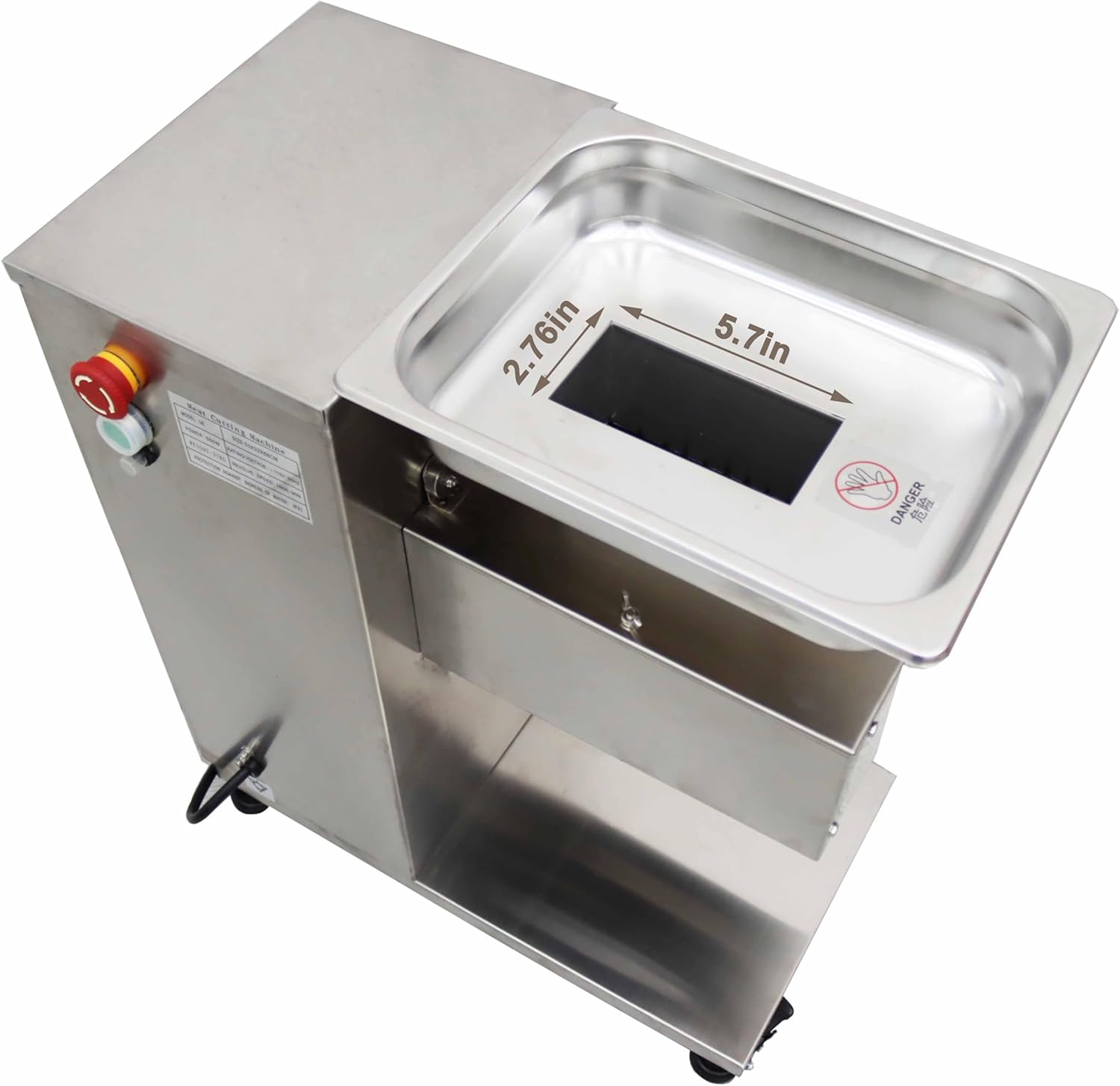
Image 3.2: Detailed view of the feed inlet with its dimensions.

Image 3.3: The 18mm blade unit, responsible for cutting meat.
4. Setup and Installation
Follow these steps to set up your meat cutting machine:
- Unpacking: Carefully remove the machine from its packaging. Inspect for any shipping damage.
- Placement: Place the machine on a stable, level surface capable of supporting its weight. Ensure adequate space around the machine for operation and cleaning.
- Caster Lock: Engage the locks on all four casters to prevent accidental movement during operation.
- Power Connection: Connect the power cord to a suitable 110V grounded electrical outlet.
- Blade Unit Inspection: Ensure the 18mm blade unit is correctly installed and secured. To access the blade unit, unscrew the butterfly nut and open the shield.

Image 4.1: The QE meat cutter ready for setup.
Video 4.1: This video demonstrates the setup and operation of the QE Commercial Meat Cutting Machine, including how to engage the tire lock, open the shield to access blades, and initiate operation.
5. Operating Instructions
This machine can process meat into slices, shreds, or diced pieces depending on the number of passes.
- Prepare Meat: Ensure meat is boneless and cut into pieces that fit comfortably into the 5.7 x 3.15 inch feed inlet.
- Start Machine: First, rotate the red emergency stop switch clockwise to release it. Then, press the green start switch to power on the machine.
- First Pass (Slices): Carefully feed the meat into the inlet. The machine will cut it into uniform slices. Collect the slices in a container placed below the output.
- Second Pass (Shreds): For shredded meat, take the slices from the first pass and feed them into the machine again. The machine will cut them into strips.
- Third Pass (Diced): For diced meat, take the shredded meat from the second pass and feed it through the machine a third time. This will result in diced meat.
- Stop Machine: After use, press the red emergency stop switch to turn off the machine.

Image 5.1: Visual guide for processing meat into different forms.
6. Maintenance and Cleaning
Regular cleaning and maintenance are essential for the longevity and hygienic operation of your machine.
- Disconnect Power: Always unplug the machine from the power outlet before any cleaning or maintenance.
- Blade Unit Removal: Unscrew the butterfly nut and open the shield. Carefully remove the blade unit.
- Blade Cleaning: Use warm, soapy water and a brush to thoroughly clean the blades. Rinse well and dry completely to prevent rust.
- Machine Body Cleaning: Wipe down the stainless steel exterior with a damp cloth and mild detergent. Avoid using abrasive cleaners or steel wool.
- Reassembly: Once all parts are clean and dry, carefully reassemble the blade unit and secure the shield with the butterfly nut.
- Storage: Store the machine in a clean, dry place when not in use.

Image 6.1: The blade unit can be easily removed for cleaning and maintenance.
7. Troubleshooting
If you encounter issues with your meat cutting machine, refer to the following common problems and solutions:
| Problem | Possible Cause | Solution |
|---|---|---|
| Machine does not start | 1. Power cord not plugged in. 2. Emergency stop switch engaged. 3. Power outage. | 1. Ensure power cord is securely plugged in. 2. Rotate the red emergency stop switch clockwise to release. 3. Check power supply. |
| Poor cutting quality (uneven slices/shreds) | 1. Meat not properly prepared (e.g., contains bones, too large). 2. Blades are dull or dirty. | 1. Ensure meat is boneless and cut to appropriate size for the inlet. 2. Clean blades thoroughly. If dull, consider replacing the blade unit. |
| Machine jams during operation | 1. Overloading the machine. 2. Foreign object in the feed inlet. | 1. Reduce the amount of meat fed at one time. 2. Immediately press the emergency stop, unplug, and inspect the blade unit for obstructions. Remove any foreign objects carefully. |
If the problem persists after attempting these solutions, please contact customer support.
8. Specifications
Key technical specifications for the TECHTONGDA QE Commercial Meat Cutting Machine:
| Feature | Detail |
|---|---|
| Brand | TECHTONGDA |
| Model | QE |
| Blade Size | 18mm (Other sizes 2.5-25mm available separately) |
| Power | 550W |
| Voltage | 110V |
| Material | Stainless Steel |
| Product Dimensions | 28.35"L x 13.78"W x 28.74"H |
| Feed Inlet Size | 5.7" x 3" (approx. 145mm x 80mm) |
| Item Weight | 99 Pounds |
| Cutting Capacity | Up to 1100 lbs/hour (500 Kg/hour) |
9. Warranty and Support
For warranty information, technical support, or to purchase replacement parts (including different blade sizes from 2.5mm to 25mm), please contact TECHTONGDA customer service. Refer to your purchase documentation for specific warranty terms and contact details.