
Introduction
Thank you for choosing the Swokely Smart Video Doorbell Camera. This device integrates a WiFi-enabled video doorbell with a 4.3-inch display monitor, offering enhanced security and convenience for your home. It features wireless night vision, PIR motion detection, and remote access via the Tuya APP. This manual provides detailed instructions for installation, operation, and maintenance to ensure optimal performance.
Package Contents
Please verify that all items listed below are included in your package:
- 1 x Indoor Mainframe (4.3-inch display monitor)
- 1 x Peephole Camera (Outdoor unit)
- 1 x Metal Suspension Plate
- 1 x Type-C Charging Cable
- 1 x Screw Package (various screws for installation)
- 1 x User Manual / APP Instructions
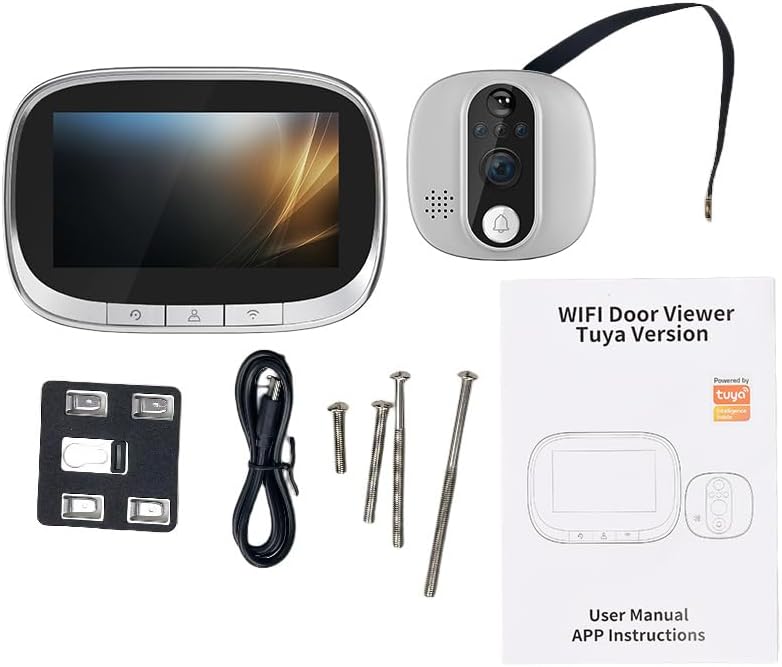
Image: Contents of the Swokely Smart Video Doorbell Camera package.
Product Overview
The Swokely Smart Video Doorbell Camera consists of an indoor display unit and an outdoor camera unit. The outdoor unit features a 170-degree wide-angle camera lens, a doorbell button, and infrared lights for night vision. The indoor unit houses a 4.3-inch color LCD screen for clear viewing and control buttons.

Image: The Swokely Smart Video Doorbell Camera system, featuring the indoor monitor and outdoor camera unit.
Setup and Installation
This doorbell camera is designed for easy installation and is compatible with a wide range of door sizes. Ensure your door meets the following specifications:
- Door Hole Diameter: 14-50mm
- Door Thickness: 35-120mm
Installation Steps:
- Prepare the Door: If you have an existing peephole, remove it. If not, drill a suitable hole according to the specified diameter.
- Install Outdoor Unit: Insert the outdoor camera unit through the peephole from the outside of the door. Ensure the camera is facing outwards and is level.
- Connect Indoor Unit: From the inside of the door, connect the cable from the outdoor unit to the designated port on the indoor monitor.
- Mount Indoor Unit: Secure the metal suspension plate to the door using the provided screws. Then, slide the indoor monitor onto the suspension plate until it clicks into place.
- Charge Battery: Before first use, fully charge the built-in 3500Ah lithium battery using the provided Type-C charging cable.

Image: Dimensions of the indoor monitor and outdoor camera unit for installation reference.
Operating Instructions
Basic Operation:
- Doorbell Press: When a visitor presses the doorbell button on the outdoor unit, the indoor monitor screen will automatically light up, displaying the live view from the camera.
- Manual View: You can manually activate the screen to view outside by pressing the appropriate button on the indoor monitor.
PIR Motion Detection:
The doorbell camera features Passive Infrared (PIR) motion detection. When motion is detected in the camera's field of view, the device will automatically capture photos or record videos and send real-time alerts to your smartphone via the Tuya app. This allows you to monitor your home's safety anytime, anywhere.

Image: The doorbell camera's motion detection feature in action, sensing a person at the door.
Night Vision:
Equipped with two infrared lights, the doorbell camera provides clear images even in low-light conditions or complete darkness. The night vision feature activates automatically, ensuring 24/7 protection and peace of mind.

Image: Day and night views demonstrating the infrared night vision capability of the camera.
Tuya App Connection
To utilize the smart features of your doorbell camera, download and connect to the Tuya APP:
- Download the App: Search for "Tuya Smart" or "Smart Life" in your smartphone's app store (iOS or Android) and download the application.
- Register/Log In: Create a new account or log in to your existing Tuya account.
- Add Device: Follow the in-app instructions to add your new doorbell camera. Ensure your smartphone is connected to a 2.4GHz Wi-Fi network during the pairing process. The device does not support 5GHz Wi-Fi.
- Remote Functions: Once connected, you can remotely view live footage, engage in two-way audio communication, take photos, and record videos directly from your smartphone.

Image: Remote monitoring and interaction with the doorbell camera via the Tuya app on a smartphone.
Maintenance
- Battery Charging: The device is powered by a built-in 3500Ah lithium battery. Recharge the battery using the provided Type-C charging cable when the battery level is low.
- Storage: The device supports a maximum of a 32GB memory card (not included) for storing recorded videos and photos. Regularly check and manage your storage to prevent data loss.
- Cleaning: Gently wipe the camera lens and display screen with a soft, dry cloth to remove dust or smudges. Avoid using harsh chemicals or abrasive materials.
- Operating Environment: The doorbell camera is designed to operate in temperatures ranging from -20°C to 55°C. Ensure it is not exposed to extreme conditions outside this range.
Troubleshooting
- Device Not Turning On: Ensure the battery is fully charged. Connect the device to the charging cable and allow it to charge for a few hours before attempting to power it on again.
- Cannot Connect to Tuya App:
- Verify your Wi-Fi network is 2.4GHz. The device does not support 5GHz Wi-Fi.
- Ensure your smartphone is connected to the same 2.4GHz Wi-Fi network during pairing.
- Check your Wi-Fi signal strength at the door.
- Restart both your router and the doorbell camera, then attempt the pairing process again.
- Poor Video Quality:
- Ensure the camera lens is clean and free from obstructions.
- Check your Wi-Fi connection stability. A weak signal can affect streaming quality.
- The video capture resolution is 720p.
- Short Battery Life:
- Frequent motion detection events or live viewing can consume battery faster. Adjust PIR sensitivity settings in the app if available.
- Ensure the battery is fully charged each time.
Specifications
| Brand | Swokely |
| Model | B0D48RPZCG |
| Display Screen | 4.3-inch Color LCD |
| Camera Sensor | 170-degree Wide-Angle |
| Video Resolution | 720p |
| Video Format | MPEG-4 |
| Connectivity | 2.4GHz Wi-Fi |
| Compatible Devices | Smartphone (Tuya APP) |
| Battery | Built-in 3500Ah Lithium Battery |
| Storage | Supports up to 32GB Memory Card (not included) |
| Door Hole Diameter | 14-50mm |
| Door Thickness | 35-120mm |
| Operating Temperature | -20°C to 55°C |
| Alert Type | Motion Only |
Warranty and Support
Specific warranty information is not provided in the product details. Please refer to the warranty card included in your package or contact the seller/manufacturer directly for details regarding warranty coverage and customer support.
For technical assistance or further inquiries, please reach out to Swokely customer service through the contact information provided in your product documentation or on the official Swokely website.