
Aprilboy Type-C Hardwire Kit (H50515)
Aprilboy Type-C Hardwire Kit User Manual
Model: Type-C Hardwire Kit (H50515)
1. Introduction
Thank you for choosing the Aprilboy Type-C Hardwire Kit. This kit is designed to provide a continuous power supply to your 2-channel dash cam, enabling 24-hour parking monitoring and protecting your vehicle. It features low voltage protection to prevent your car battery from draining completely.
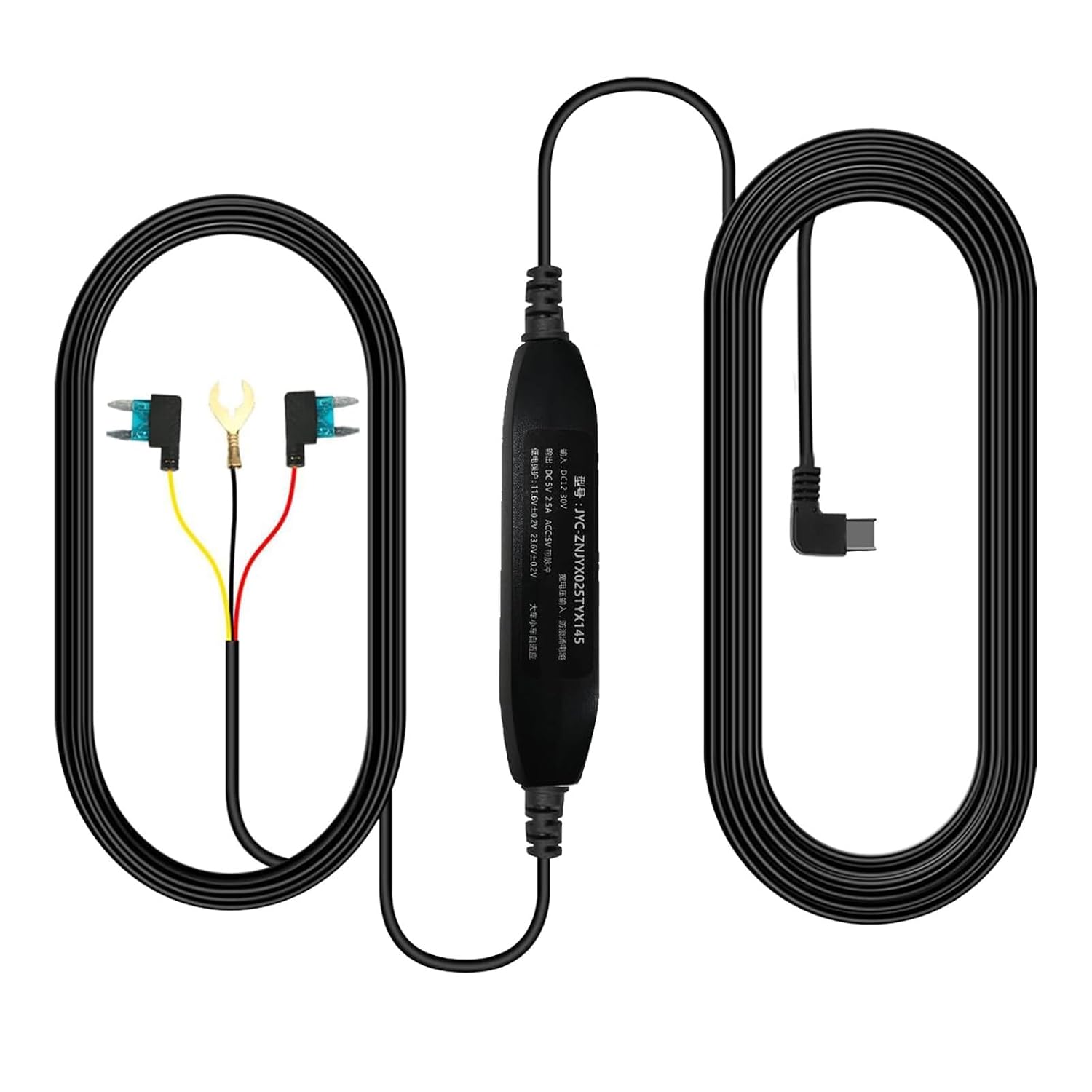
Image: The Aprilboy Type-C Hardwire Kit, showing the Type-C connector, the step-down converter, and the fuse tap cables.
2. What's in the Box
Your Aprilboy Type-C Hardwire Kit package includes the following items:
- Aprilboy Type-C Hardwire Kit (11ft cable)
- Fuse Taps (various sizes for compatibility)
- Installation Tools (clips and pry bars)

Image: Packaging and branding for Aprilboy Hardwire Kits, featuring the main product components.
3. Specifications
| Feature | Detail |
|---|---|
| Input Voltage | 12V-30V DC |
| Output Voltage/Current | 5V / 2.5A DC |
| Cable Length | 11 feet (approx. 3.35 meters) |
| Connector Type | USB Type-C |
| Low Voltage Protection | Dash cam automatically turns off if input voltage drops below 11.6V |
| Compatibility | Devices with Type-C port (Not for 3-channel dash cams) |
| Product Dimensions | 5 x 2 x 4 inches; 2.89 ounces |
4. Setup and Installation
Follow these steps to properly install your Aprilboy Type-C Hardwire Kit:
- Identify Fuse Box: Locate your vehicle's fuse box. Use the provided pry bars and clips to carefully open the fuse box cover if necessary.
- Connect Battery Cable (Red): The red wire of the hardwire kit is the battery cable. Connect this to a constant power fuse in your vehicle's fuse box. This fuse should provide power even when the ignition is off, enabling 24-hour monitoring.
- Connect ACC Cable (Yellow): The yellow wire is the ACC (Accessory) cable. Connect this to a fuse that receives power only when the vehicle's ignition is on. This allows the dash cam to detect when the car is running.
- Connect Ground Wire (Black): The black wire is the ground wire. Connect this to a metal part of the vehicle's chassis or a suitable ground point near the fuse box. Ensure a secure connection for proper operation.

Image: A diagram illustrating the connection points for the hardwire kit: Red wire to BAT (Battery), Yellow wire to ACC (Accessory), and Black wire to GND (Ground).

Image: An example fuse box diagram with highlighted points for BAT and ACC connections, and a note on connecting the negative pole to the car's metal frame.
Important Note: Ensure all connections are secure and properly insulated. If you are unsure about the installation process, it is recommended to seek professional assistance.
5. Operating Principles
The Aprilboy Hardwire Kit provides continuous power to your dash cam, enabling key features:
- 24-Hour Monitoring: By connecting to a constant power source (BAT), the kit allows your dash cam to remain powered and record even when the vehicle's engine is off. This is essential for parking surveillance, protecting your car from collisions, theft, and scratches while parked.
- Low Voltage Protection: The kit is equipped with a built-in low voltage protection mechanism. If the input voltage from your car battery drops below 11.6V, the hardwire kit will automatically cut off power to the dash cam. This ensures that enough power remains in your car battery for the vehicle to start normally, preventing battery drain.

Image: A visual representation of 24-hour parking monitoring, emphasizing continuous surveillance for vehicle protection.
6. Maintenance
The Aprilboy Type-C Hardwire Kit is designed for durability and minimal maintenance. To ensure optimal performance and longevity:
- Check Connections: Periodically inspect all connections (fuse taps, ground wire) to ensure they remain secure and free from corrosion.
- Cable Routing: Ensure the cable is routed safely and is not pinched or exposed to excessive heat or sharp edges.
- Cleanliness: Keep the area around the hardwire kit and fuse box clean and free of dust or debris.
7. Troubleshooting
If you encounter issues with your Aprilboy Type-C Hardwire Kit, consider the following:
- Dash Cam Not Powering On:
- Check all hardwire kit connections (BAT, ACC, GND) for looseness or improper installation.
- Verify that the fuse taps are correctly inserted into the fuse box and that the chosen fuses are functional.
- Ensure your car battery voltage is above 11.6V. The low voltage protection will prevent the dash cam from powering on if the voltage is too low.
- Confirm your dash cam uses a Type-C port and is a 2-channel model (not compatible with 3-channel dash cams).
- Dash Cam Not Recording in Parking Mode:
- Ensure the red (BAT) wire is connected to a constant power fuse that provides power even when the ignition is off.
- Check your dash cam's settings to ensure parking mode is enabled and configured correctly.
- Car Battery Drains:
- The hardwire kit has low voltage protection. If your battery still drains, ensure the protection is functioning. If the issue persists, consult a professional auto electrician.
If troubleshooting steps do not resolve the issue, please contact Aprilboy customer support.
8. Warranty and Support
Aprilboy products are manufactured with high quality standards. For warranty information and customer support, please refer to the documentation included with your purchase or visit the official Aprilboy website. For technical assistance or inquiries, you may also contact Aprilboy customer service through the retailer where you purchased the product.
Ask a question about this manual
Ask about setup, troubleshooting, compatibility, parts, safety, or missing instructions. Manuals+ will review the question and use this page’s manual context to help answer it.