
1. Introduction
The Vimtag 847-4 4MP CCTV Camera is a versatile security solution designed for both indoor and outdoor environments. It offers 2.5K resolution video, 360-degree coverage, and advanced features such as starlight night vision, two-way audio, and smart motion detection. This manual provides instructions for setting up, operating, maintaining, and troubleshooting your camera.
2. What's in the Box
Carefully unpack the box and ensure all items are present:
- 1x Vimtag 847 Outdoor and Indoor CCTV Camera
- 1x Adapter
- 1x Charging Cable
- 2x Auxiliary Positioning Stickers
- Mounting Screws
3. Product Overview
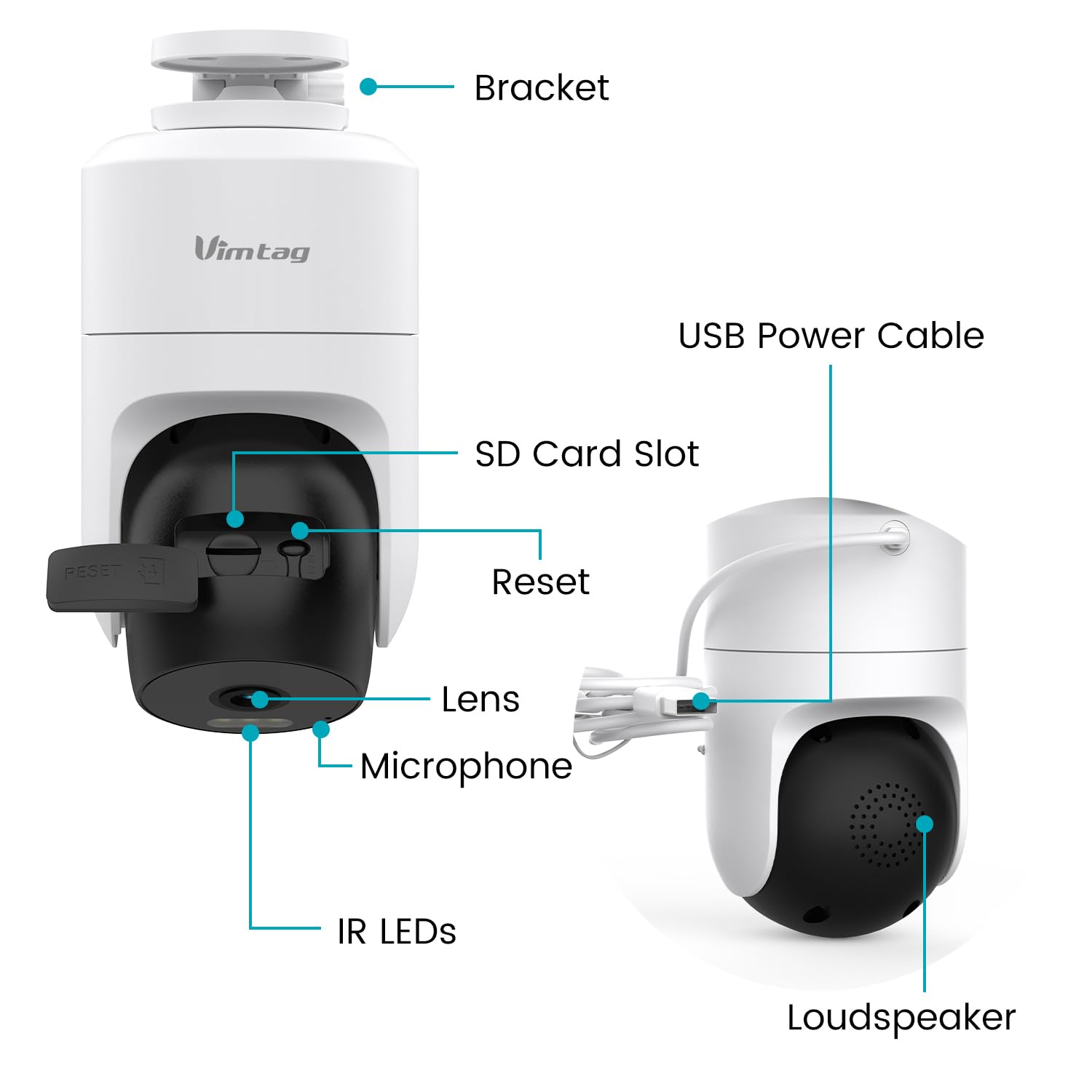
Familiarize yourself with the camera's components:

This image displays the various components of the Vimtag 847-4 camera, including the bracket, USB power cable, SD card slot, reset button, lens, microphone, IR LEDs, and loudspeaker.
- Bracket: For mounting the camera to a wall or ceiling.
- USB Power Cable: Connects the camera to the power adapter.
- SD Card Slot: Insert a Micro SD card (up to 512GB) for local storage.
- Reset Button: Used to reset the camera to factory settings.
- Lens: Captures video footage.
- Microphone: For audio input and two-way communication.
- IR LEDs: Infrared lights for night vision.
- Loudspeaker: For audio output and two-way communication.
4. Setup Instructions
Follow these steps to set up your Vimtag 847-4 camera:
- Power On the Camera:

Connect the charging cable to the camera and plug the adapter into a power outlet. The camera will power on and indicate readiness for setup.
- Download the Vimtag App:

Search for 'Vimtag' in your mobile device's app store (iOS or Android) and download the official application.
- Add Device in App:

Open the Vimtag app, create an account or log in, and tap the '+' icon to add a new device. Select the appropriate camera type (Dome Camera) and follow the on-screen instructions to connect the camera to your 2.4GHz Wi-Fi network.
- Verify Connection:

Once connected, you should see the live video feed from your camera in the app. This confirms successful setup.
- Mounting the Camera:
Use the included auxiliary positioning stickers and mounting screws to securely install the camera on a wall, ceiling, or other desired surface. Ensure the camera has a clear line of sight and is within Wi-Fi range.
5. Operating Instructions
5.1 Live View and Playback
Access the live video feed and review recorded footage through the Vimtag app. The camera supports 24/7 recording to an inserted Micro SD card (up to 512GB) or optional cloud storage.

This image shows the live video feed from the camera displayed on a smartphone, allowing remote monitoring.
5.2 Two-Way Audio
The camera features a built-in microphone and loudspeaker, enabling two-way communication. Use this feature to speak with individuals near the camera or deter intruders.

This image illustrates the two-way audio function, showing a user communicating with a delivery person via the camera and smartphone app.
5.3 Motion Detection and Alerts
Configure motion and sound detection settings within the Vimtag app. The camera can detect human movement and sounds, sending instant alerts to your device.

This image shows an on-screen notification indicating a motion detection alert from the camera.

This image displays the motion detection settings interface within the Vimtag app, allowing users to customize sensitivity and detection types.
5.4 Night Vision
The camera provides clear visibility in low-light conditions through its starlight night vision, offering both full-color and infrared night vision options.

This image compares the visual output of full-color night vision and infrared night vision modes, demonstrating enhanced clarity in low light.
5.5 Multi-Terminal Viewing
Share camera access with family members or view footage on multiple devices, including iOS, Android, Mac, iPad, and Windows platforms.
This image illustrates the capability to view camera footage across various devices and locations globally.
5.6 Voice Control with Amazon Alexa
Integrate your Vimtag camera with Amazon Alexa for convenient voice control. You can request Alexa to display the camera feed on compatible smart displays.

This image shows a smart display showing the camera feed after a voice command to Alexa.
6. Maintenance
6.1 Cleaning
Regularly clean the camera lens with a soft, dry cloth to ensure clear image quality. Avoid using harsh chemicals or abrasive materials that could damage the lens or casing.
6.2 Firmware Updates
Periodically check the Vimtag app for available firmware updates. Keeping your camera's firmware up-to-date ensures optimal performance, security, and access to new features.
7. Troubleshooting
- Camera not connecting to Wi-Fi: Ensure your Wi-Fi network is 2.4GHz. Verify the Wi-Fi password is correct. Move the camera closer to the router. Reset the camera using the reset button and try the setup process again.
- No video feed: Check if the camera is powered on. Ensure a stable Wi-Fi connection. Restart the camera and the app.
- Motion alerts not received: Verify motion detection is enabled in the app settings. Check app notification permissions on your mobile device. Ensure the camera has a clear view of the area you wish to monitor.
- Two-way audio not working: Check microphone and speaker permissions for the Vimtag app on your device. Ensure the camera's microphone and loudspeaker are not obstructed.
- SD card not recording: Ensure the Micro SD card is inserted correctly and is not full. Format the SD card through the app if issues persist.
8. Specifications
| Feature | Detail |
|---|---|
| Model Number | 847-4 |
| Video Capture Resolution | 1440p (2.5K) |
| Wireless Communication Technology | Wi-Fi (2.4Ghz) |
| Viewing Angle | 360 Degrees |
| Night Vision Range | 50 Feet |
| Frame Rate | 25 frames per second |
| Water Resistance Level | Waterproof (IP66) |
| Flash Memory Supported Size Maximum | 512 GB (Micro SD) |
| Alert Type | Audio and Motion |
| Control Method | App, Amazon Alexa |
| Power Source | Corded Electric (5 Volts DC) |
| Item Dimensions (L x W x H) | 10 x 10 x 10 Centimeters |
| Item Weight | 277 g |
| Indoor/Outdoor Usage | Indoor, Outdoor |
9. Warranty and Support
The Vimtag 847-4 CCTV Camera comes with a 2-year warranty. For technical support, warranty claims, or further assistance, please contact Vimtag customer service at customer@vimtag.com.


