
1. Introduction
This manual provides detailed instructions for the installation, operation, and maintenance of your Swokely Smart Fingerprint Door Lock with Handle. This advanced 4-in-1 keyless biometric door lock offers multiple access methods including fingerprint, password, Tuya APP, and physical key. Designed for standard American doors, it enhances security and convenience for various applications.

Image 1.1: Front and back view of the Swokely Smart Fingerprint Door Lock.

Image 1.2: Angled view of the Swokely Smart Fingerprint Door Lock, highlighting its smart features.
2. Package Contents
Please verify that all components are present in your package before proceeding with installation.
- Front Door Handle
- Rear Door Handle
- User Manual
- Screw Bag
- Pin (60/70mm)
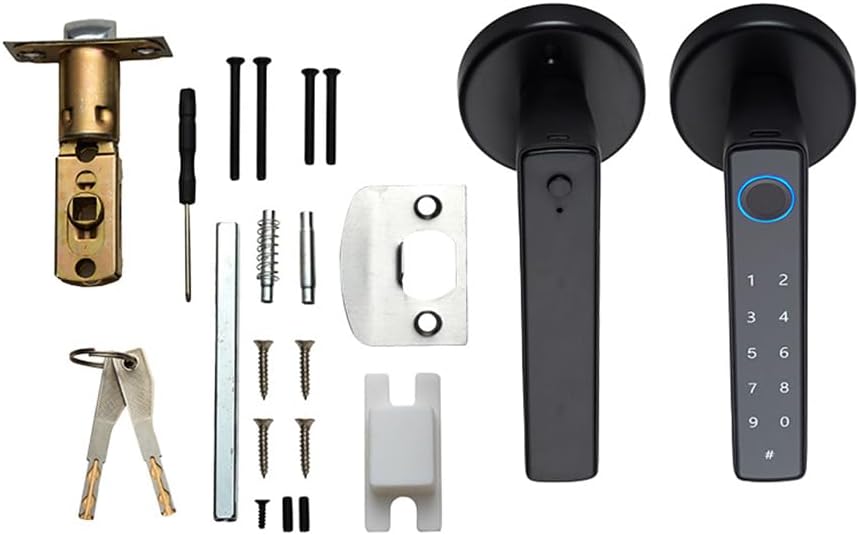
Image 2.1: All components included in the Swokely Smart Fingerprint Door Lock package.
3. Specifications
| Feature | Description |
|---|---|
| Brand | Swokely |
| Model Number | ZVI6187693488256HF |
| Lock Type | Biometric |
| Material | Metal |
| Dimensions (L x W x H) | 8.86 x 7.88 x 3.55 inches |
| Item Weight | 1.54 pounds |
| Door Thickness Compatibility | 1-3/8 inches to 2-1/8 inches (35mm-55mm) |
| Backset Compatibility | 2-3/8 inches (60mm) and 2-1/8 inches (70mm) |
| Unlock Methods | Fingerprint, Password, Tuya APP, Physical Key |
| Fingerprint Capacity | Up to 50 groups |
| Password Capacity | Up to 100 groups |
| Power Source | 4 AAA batteries (not included) |
| Emergency Power | Type-C interface |
| Connectivity | Wi-Fi (via Tuya App) |
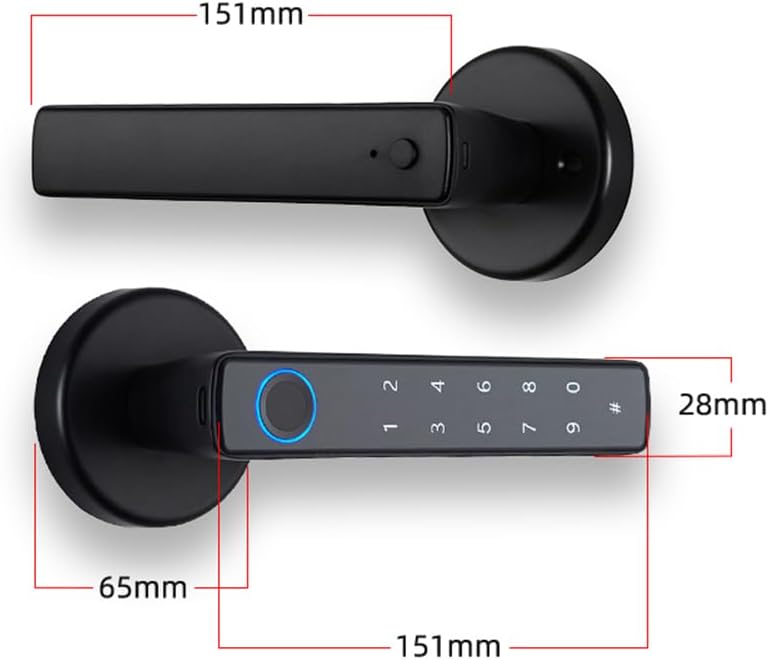
Image 3.1: Detailed dimensions of the Swokely Smart Fingerprint Door Lock handle.
4. Setup
4.1 Door Compatibility
This lock is designed for standard American doors with backsets of 2-3/8 inches (60mm) and 2-1/8 inches (70mm). It supports door thicknesses ranging from 1-3/8 inches to 2-1/8 inches (35mm-55mm). It can be installed on both left and right-hand doors without additional modifications.
4.2 Installation
The installation process does not require wiring or drilling for most standard door setups. Refer to the included user manual for detailed step-by-step instructions specific to your door type. Ensure the latch is correctly oriented for your door's swing direction.
4.3 Battery Installation
The lock requires 4 AAA batteries (not included). Locate the battery compartment on the rear handle, insert the batteries according to the polarity markings, and close the compartment. It is recommended to use high-quality alkaline batteries for optimal performance and lifespan.
5. Operating Instructions
The Swokely Smart Fingerprint Door Lock offers multiple convenient ways to unlock your door.

Image 5.1: Visual representation of the lock's various unlock methods and features.
5.1 Fingerprint Unlock
The lock features a high fingerprint recognition rate, allowing you to unlock the door in approximately 1 second. You can register up to 50 unique fingerprint groups. To register a fingerprint, follow the instructions in the detailed user manual. Once registered, simply place your finger on the sensor to unlock.

Image 5.2: Close-up of the fingerprint sensor, illustrating the quick recognition process.
5.2 Password Unlock
The lock supports up to 100 password groups. It includes an anti-peeping virtual password feature, allowing you to enter random digits before or after your actual password to prevent others from guessing your code. To unlock, enter your password followed by the '#' key.

Image 5.3: Demonstration of the password unlock feature, including the anti-peeping function.
5.3 Tuya APP Unlock
Control your lock remotely using the Tuya Smart/Life app (BLE). The app allows you to unlock the door, manage family access, and view access logs. You can also share dynamic, time-limited, or single-use passwords with guests or family members from anywhere.

Image 5.4: A smartphone displaying the Tuya app, demonstrating remote unlock capabilities.
5.4 Key Unlock
For traditional access or in case of electronic malfunction, physical keys are provided. Insert the key into the keyhole located on the handle and turn to unlock the door.
5.5 Normal Open Mode
This mode allows the door to remain unlocked for continuous access without requiring a fingerprint or password. To activate, press the black button on the rear handle. To deactivate, use a valid user credential (fingerprint, password, or app unlock) or press the button again.

Image 5.5: Instructions for enabling and disabling the Normal Open Mode.
6. Maintenance
6.1 Battery Replacement
The lock is powered by 4 AAA batteries. Depending on usage, batteries can last up to 6 months. The lock features a low power reminder, indicating when batteries need replacement. When the battery level drops below 20%, the lock will alert you.

Image 6.1: Visual indicator of a low battery warning on the lock.
6.2 Emergency Power Supply
In case of complete battery depletion, the lock is equipped with a Type-C interface for emergency power supply. Connect a portable power bank via a Type-C cable to temporarily power the lock and gain access.

Image 6.2: Using a Type-C cable for emergency power to the lock.
6.3 Cleaning
Clean the lock's surface with a soft, dry cloth. Avoid using abrasive cleaners or solvents that could damage the finish or electronic components.
7. Troubleshooting
- Lock not responding: Check battery levels. Replace batteries if low. Use the emergency Type-C power supply if needed.
- Fingerprint not recognized: Ensure your finger is clean and dry. Re-register your fingerprint if recognition issues persist.
- Password not working: Verify the correct password is being entered. Ensure the anti-peeping feature is not causing confusion.
- App connectivity issues: Ensure Bluetooth is enabled on your smartphone and the lock is within range. Check your Wi-Fi connection if using remote features.
- Door not locking/unlocking smoothly: Check for any obstructions in the door frame or latch mechanism. Ensure the lock is installed correctly and aligned with the strike plate.
For further assistance, please refer to the comprehensive troubleshooting section in the full user manual or contact customer support.
8. Warranty and Support
Your Swokely Smart Fingerprint Door Lock is covered by a manufacturer's warranty. Please refer to the warranty card included in your package for specific terms and conditions. For technical support, product inquiries, or warranty claims, please contact Swokely customer service through the contact information provided in your product documentation or on the official Swokely website.
