
1. Introduction
Thank you for choosing the HMF 46126-15 Small Furniture Safe. This manual provides essential information for the proper installation, operation, and maintenance of your safe. Please read these instructions carefully before using the product to ensure optimal security and functionality. Keep this manual for future reference.
2. Safety Information
- Do not store the emergency keys inside the safe. Keep them in a secure, separate location known only to trusted individuals.
- Ensure the safe is placed on a stable, level surface or securely mounted to a wall or floor.
- Avoid exposing the safe to extreme temperatures or high humidity.
- Replace batteries promptly when the low battery warning indicator appears to prevent lockouts.
- Keep the safe away from children to prevent unauthorized access.
3. Package Contents
Please check the package to ensure all items are present:
- 1 x HMF 46126-15 Small Furniture Safe
- 2 x Emergency Keys
- 2 x Metal Dowels
- 2 x Mounting Screws
- 1 x User Manual (this document)
Note: 4 x AA batteries are required for operation and are not included in the package.
4. Product Overview
The HMF 46126-15 safe is designed for secure storage of valuables, cash, and documents. It features a robust steel construction and an electronic combination lock for reliable protection.
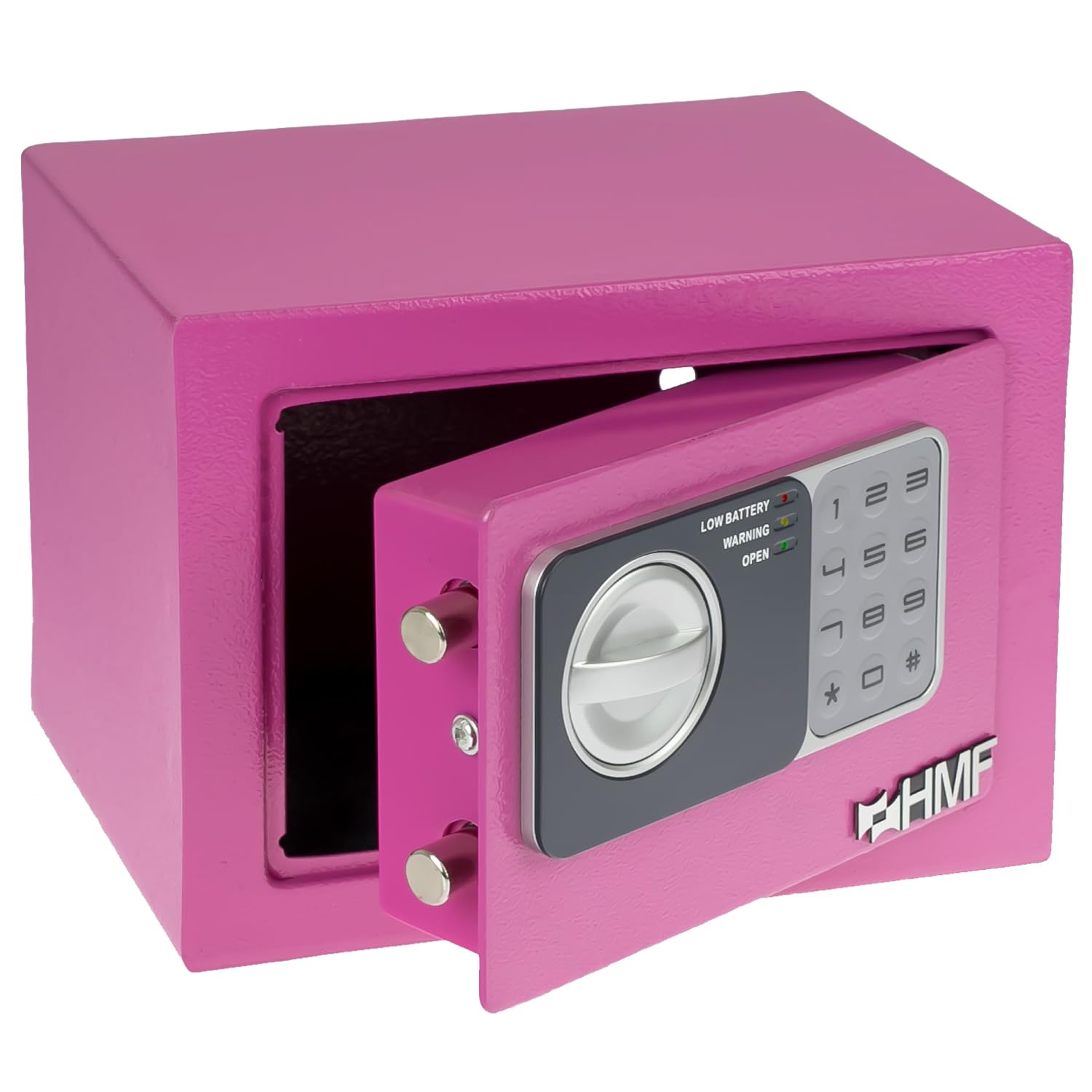
Image: The HMF 46126-15 safe in pink, showcasing its electronic keypad, rotary handle, and the emergency key slot. Insets show the open door, keypad operation, and emergency key usage.
Key Features:
- Electronic Combination Lock: Programmable with a 3 to 8-digit PIN code.
- Emergency Key System: Two manual override keys for access in case of forgotten code or battery failure.
- Robust Construction: Single-walled steel body (1 mm thickness) and steel door (3 mm thickness) with double bolt lock.
- Concealed Hinges: Enhances security against forced entry.
- Mounting Capability: Pre-drilled holes for securing the safe to a wall or floor.
- Compact Design: Ideal for home, office, or hotel use.
5. Setup
5.1. Battery Installation
- Locate the battery compartment on the inside of the safe door.
- Open the battery compartment cover.
- Insert 4 x AA batteries, ensuring correct polarity (+/-).
- Close the battery compartment cover. The safe will emit a beep, indicating successful battery installation.
5.2. Setting the Initial PIN Code
The safe comes with a factory default code (usually 1-5-9 or 1-2-3-4-5-6). It is crucial to change this immediately.

Image: A hand interacting with the electronic keypad of the HMF safe, demonstrating button presses for code entry.
- With the safe door open, press the red reset button located on the inside of the door, near the hinge. You will hear a beep.
- Within 5 seconds, enter your new 3 to 8-digit PIN code on the keypad.
- Confirm the new code by pressing the "#" button. The safe will beep twice, indicating the new code is set.
- Test the new code with the door open before closing it.
5.3. Mounting the Safe (Optional)
For enhanced security, the safe can be mounted to a wall or floor using the pre-drilled holes and included hardware.

Image: The rear of the HMF safe displaying the pre-drilled mounting holes, alongside the metal dowels and screws provided for installation.
- Choose a suitable location for mounting.
- Mark the drilling points through the pre-drilled holes on the back or bottom of the safe onto the wall or floor.
- Drill holes at the marked points using an appropriate drill bit.
- Insert the metal dowels into the drilled holes.
- Align the safe with the dowels and secure it using the mounting screws.
6. Operating the Safe
6.1. Opening the Safe with PIN Code
- Enter your 3 to 8-digit PIN code on the keypad.
- Press the "#" button.
- If the code is correct, the green "OPEN" light will illuminate, and you will hear a beep.
- Within 5 seconds, turn the rotary handle clockwise to open the door.
6.2. Closing the Safe
- Close the safe door.
- Turn the rotary handle counter-clockwise to engage the locking bolts.
6.3. Changing the PIN Code
You can change your PIN code at any time while the door is open.
- With the safe door open, press the red reset button on the inside of the door.
- Enter your new 3 to 8-digit PIN code.
- Confirm the new code by pressing the "#" button.
- Verify the new code works before closing the door.
6.4. Emergency Opening
In case of forgotten PIN code or battery failure, use the emergency keys.

Image: The HMF safe with an emergency key inserted into the hidden lock, demonstrating the manual override function.
- Locate the emergency keyhole, usually concealed behind a small cover on the keypad panel.
- Remove the cover.
- Insert one of the emergency keys into the keyhole and turn it clockwise.
- While holding the key turned, rotate the main handle clockwise to open the safe.
- Once open, you can replace the batteries or reset the code.
7. Maintenance
7.1. Battery Replacement
The safe will indicate a low battery condition with a red "LOW BATTERY" light on the keypad. Replace batteries immediately to avoid being locked out.
- Open the safe using your PIN code or emergency key.
- Follow the steps in Section 5.1 to replace the 4 x AA batteries.
7.2. Cleaning
Wipe the safe's exterior with a soft, damp cloth. Do not use abrasive cleaners or solvents, as these can damage the finish or electronic components.
8. Troubleshooting
- Safe does not open with PIN code:
- Ensure batteries are not low. Replace if necessary.
- Re-enter the code carefully.
- Use the emergency key to open the safe and reset the PIN code.
- Keypad is unresponsive:
- Check battery installation and replace batteries.
- If still unresponsive, use the emergency key to open.
- Door does not close properly:
- Ensure no obstructions are preventing the door from fully closing.
- Check that the locking bolts are retracting fully when the handle is turned.
9. Specifications

Image: A diagram illustrating the external and internal dimensions of the HMF 46126-15 safe.
| Feature | Specification |
|---|---|
| Model Number | 46126-15 |
| Brand | HMF |
| Lock Type | Electronic Combination Lock with Emergency Key |
| External Dimensions (W x H x D) | 23 x 17 x 17 cm (Depth including control panel: approx. 18 cm) |
| Internal Dimensions (W x H x D) | 22.5 x 16.5 x 16.5 cm (Suitable for DIN A5 documents) |
| Door Opening (W x H) | 16 x 12 cm |
| Capacity | 6 litres |
| Material | Alloy Steel |
| Body Wall Thickness | 1 mm |
| Door Thickness | 3 mm |
| Weight | 2.55 kg |
| Color | Pink |
| Mounting Type | Internal mounting, wall mounting (pre-drilled holes) |
| Power Source | 4 x AA Batteries (not included) |
10. Warranty and Support
For warranty information or technical support, please refer to the purchase documentation or contact HMF customer service directly. Contact details can typically be found on the manufacturer's official website or on the product packaging.

