
Introduction
This manual provides detailed instructions for the safe and efficient use of your BoostArea Dimmable Floor Lamp (Model 24515-YK30). This 30W LED torchiere lamp features stepless dimming, adjustable color temperature (2700K-6500K), and dual control methods via touch and remote. Please read this manual thoroughly before assembly and operation, and retain it for future reference.
Package Contents
Verify that all components are present before beginning assembly:
- Floor Lamp (Multiple sections for pole, base, and lamp head)
- Remote Control
- User Manual (This document)

Image: The BoostArea Dimmable Floor Lamp, showing the lamp assembled, along with its remote control and touch control panel on the pole.
Assembly Instructions
The BoostArea Dimmable Floor Lamp is designed for quick and easy assembly without the need for additional tools. Follow these steps:
- Carefully unpack all components from the packaging.
- Connect the pole sections by screwing them clockwise until secure. Ensure the power cord runs freely through the pole.
- Attach the lamp head to the top pole section, screwing it clockwise until firmly in place.
- Secure the base to the bottom pole section by screwing it clockwise. Ensure the power cord is not pinched.
- Plug the power adapter into a standard electrical outlet.
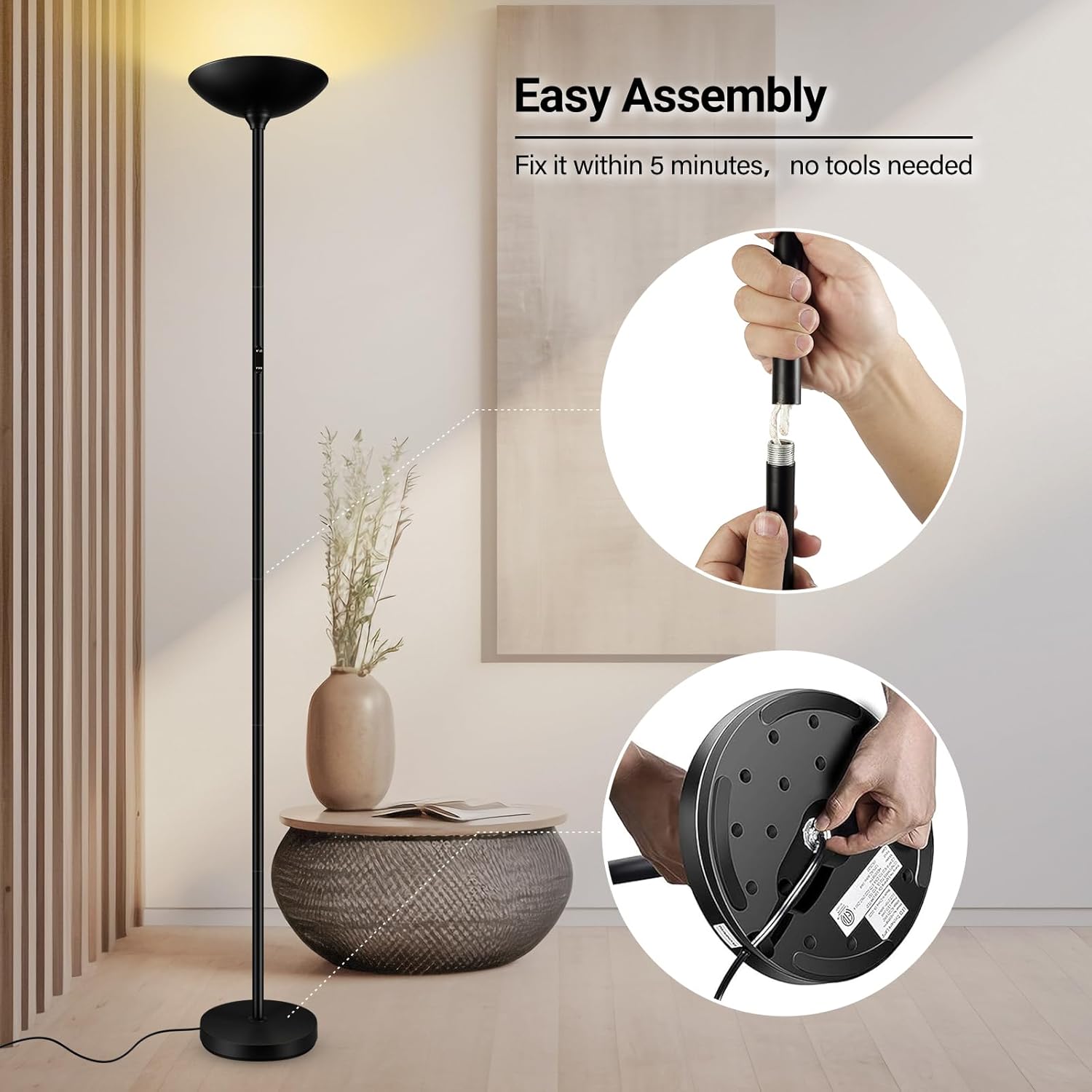
Image: Visual guide demonstrating the simple screw-together assembly process for the lamp pole and base.
Operating Instructions
Your BoostArea Dimmable Floor Lamp can be controlled using either the integrated touch control on the lamp pole or the included remote control.
Touch Control
- Power On/Off: Lightly touch the power symbol on the lamp pole to turn the lamp on or off.
- Brightness Adjustment: Press and hold the power symbol to steplessly adjust the brightness from 5% to 100% or 100% to 5%. Release when desired brightness is reached.
- Color Temperature Adjustment (CCT): Lightly touch the "CCT" button to cycle through different color temperatures (e.g., 2700K Warm White, 4000K Neutral Light, 5000K Daylight, 6500K Cool White).
Remote Control
The remote control offers comprehensive functionality, including power, brightness, color temperature, and preset lighting modes. Ensure the remote is paired with the lamp for full functionality.
- Power On/Off: Press the power button.
- Brightness Adjustment: Use the '+' and '-' buttons to increase or decrease brightness.
- Color Temperature Adjustment: Use the 'sun' icon buttons to adjust color temperature (e.g., turn to 6500K, turn to 2700K).
- Preset Modes: Select from various modes like Sleeping Mode, Nursery Mode, Reading Mode, Working Mode, Leisure Mode, and Night Light Mode.
- 1-Hour Timer: Press the '1H' button to activate a 1-hour timer.
- Memory Function: The lamp remembers the last brightness and color temperature setting used.

Image: Detailed view of the remote control and the touch-sensitive panel on the lamp's pole, highlighting control options.

Image: Diagram illustrating the various buttons on the remote control and their corresponding functions, such as dimming, color temperature adjustment, and preset modes.
Remote Pairing
If the remote control is not responding, it may need to be paired with the lamp:
- Unplug the lamp from the power outlet.
- Wait for any residual power in the lamp to dissipate (the indicator light on the lamp pole should turn off).
- Plug the lamp back into the power outlet.
- Immediately press and hold the "power" button (top right corner) on the remote control.
- Continue holding until the floor lamp flashes 3 times, indicating successful pairing.
Video: Demonstration of how to pair the remote control with the BoostArea Dimmable Floor Lamp, showing the steps of unplugging, waiting, plugging in, and holding the remote's power button until the lamp flashes.
Key Features
- Stepless Dimming & Dual Control: Adjust brightness from 5% to 100% using either the touch control on the lamp pole or the included remote control. The lamp retains your last setting.
- Energy-Saving LED Technology: Equipped with high-efficiency 30W LED beads (equivalent to a 250W incandescent lamp), providing 3000LM brightness with over 50,000 hours lifespan, significantly reducing electricity consumption.
- Adjustable Color Temperature: Offers a range of color temperatures from 2700K (Warm White) to 6500K (Cool White) to suit various environments and preferences.
- Robust and Safe Design: Constructed with a full metal body from base to head, ensuring stability and durability. Passed UL 8° Stability testing, making it safe for households with children or pets. The LED beads remain cool to the touch even after extended use.
- Easy Assembly: Designed for quick setup within 10 minutes, requiring no special tools.
- Modern and Versatile Design: Its sleek, compact design complements various home decor styles, suitable for bedrooms, living rooms, offices, and study areas.
- Smart Device Compatibility: Can be connected to smart devices (not included) for enhanced home automation and convenience.
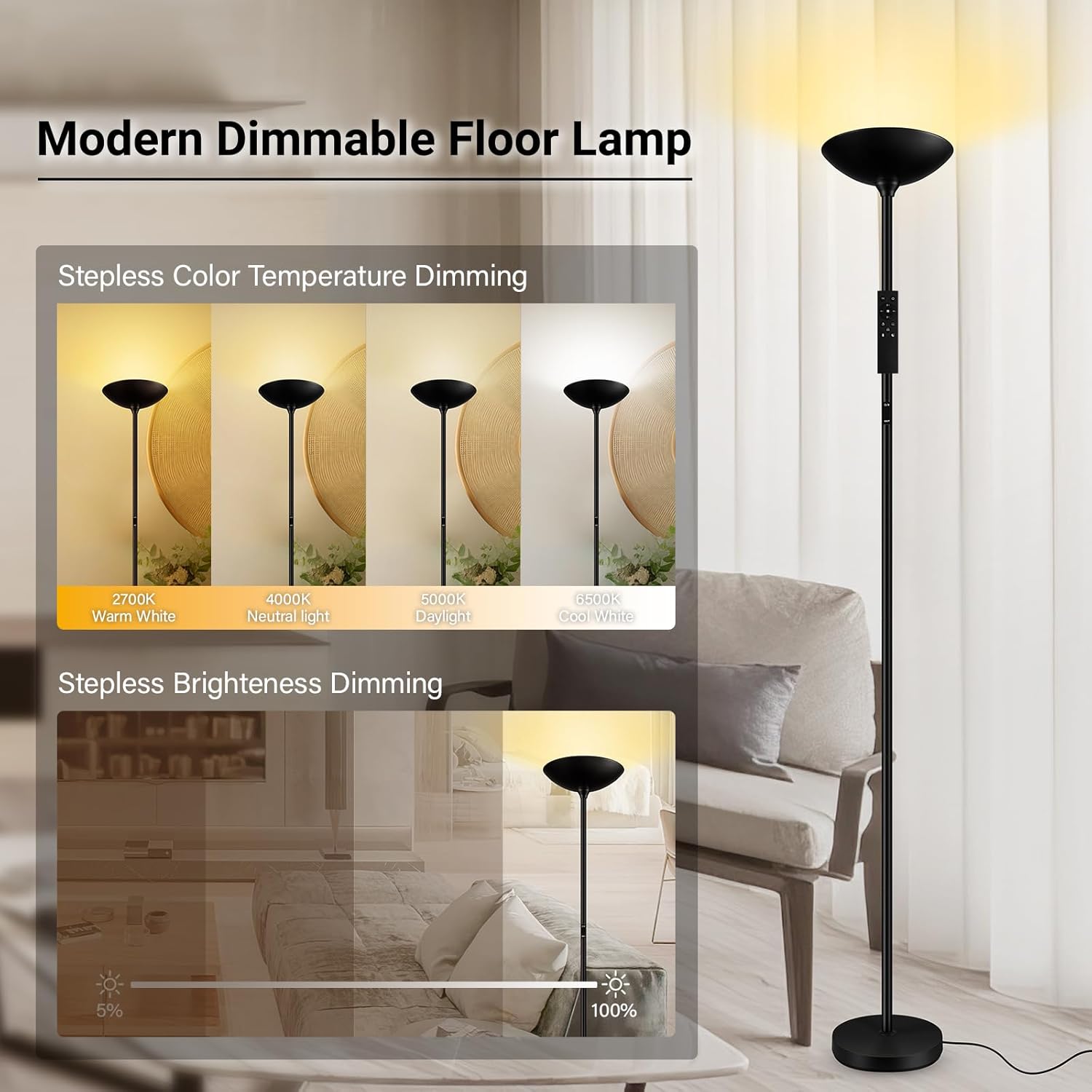
Image: Illustration of the lamp's stepless color temperature adjustment, displaying light from 2700K Warm White to 6500K Cool White.

Image: Illustration of the lamp's stepless brightness adjustment, demonstrating light intensity from 5% to 100%.

Image: Visual representation of five distinct lighting modes (Sleeping, Nursery, Reading, Working, Leisure) available with the lamp.
Specifications
| Problem | Possible Cause | Solution |
|---|---|---|
| Lamp does not turn on. | Not plugged in; power outage; faulty outlet. | Ensure the power cord is securely plugged into a working outlet. Check the circuit breaker. |
| Remote control is not working. | Remote not paired; low battery; remote out of range. | Replace remote battery. Ensure remote is within 16.5ft range. Re-pair the remote as per "Remote Pairing" instructions in the Operating section. |
| Brightness or color temperature cannot be adjusted. | Incorrect button usage; remote not paired. | Refer to the "Operating Instructions" for correct button functions. Re-pair the remote if necessary. |
| Lamp flickers or blinks. | Unstable power supply; internal connection issue. | Try plugging the lamp into a different outlet. If the problem persists, contact customer support. |
Maintenance
To ensure the longevity and optimal performance of your BoostArea Dimmable Floor Lamp, follow these simple maintenance guidelines:
- Cleaning: Disconnect the lamp from the power source before cleaning. Use a soft, dry cloth to wipe down the lamp pole and head. Avoid abrasive cleaners, solvents, or harsh chemicals, as these can damage the finish.
- Bulb Replacement: The LED light source is integrated and designed for a long lifespan (over 50,000 hours), therefore, it is not user-replaceable.
- Storage: If storing the lamp for an extended period, disassemble it carefully and store it in its original packaging in a dry, cool place.
Troubleshooting
If you encounter any issues with your BoostArea Dimmable Floor Lamp, refer to the following common problems and solutions:
| Problem | Possible Cause | Solution |
|---|---|---|
| Lamp does not turn on. | Not plugged in; power outage; faulty outlet. | Ensure the power cord is securely plugged into a working outlet. Check the circuit breaker. |
| Remote control is not working. | Remote not paired; low battery; remote out of range. | Replace remote battery. Ensure remote is within 16.5ft range. Re-pair the remote as per "Remote Pairing" instructions in the Operating section. |
| Brightness or color temperature cannot be adjusted. | Incorrect button usage; remote not paired. | Refer to the "Operating Instructions" for correct button functions. Re-pair the remote if necessary. |
| Lamp flickers or blinks. | Unstable power supply; internal connection issue. | Try plugging the lamp into a different outlet. If the problem persists, contact customer support. |
Warranty and Customer Support
BoostArea is committed to providing high-quality products. For information regarding warranty coverage, technical assistance, or any other inquiries, please refer to the contact information provided on your product packaging or visit the official BoostArea website.
Please have your model number (24515-YK30) and purchase date available when contacting support.


