
1. Introduction
Thank you for choosing the Oliboni Commercial Blender B-90A. This heavy-duty blender is designed for both commercial and home use, offering powerful blending capabilities with a focus on noise reduction and ease of use. Featuring a robust 2200W motor, 6-leaf stainless steel blade, and a large 2200ml capacity, it is ideal for preparing smoothies, ice cream, sauces, and more. The integrated soundproof cover ensures a quieter operation, making it suitable for various environments.
2. Product Components
Your Oliboni Commercial Blender package includes the following items:
- Blender Base with Soundproof Cover
- 2200ml (80oz) BPA-Free Pitcher with Lid
- Blending Tamper
- Cleaning Brush
- User Manual

Figure 2.1: Oliboni Commercial Blender with key components highlighted.
3. Setup
- Unpack: Carefully remove all components from the packaging.
- Position the Base: Place the blender base on a clean, dry, and stable surface. Ensure it is away from heat sources and water.
- Place the Pitcher: Securely place the 2200ml pitcher onto the blender base. Ensure it is properly seated.
- Position the Soundproof Cover: Lower the soundproof cover over the pitcher. Ensure it is correctly aligned to maximize noise reduction.
- Connect Power: Plug the power cord into a suitable electrical outlet. The power indicator light will illuminate.
4. Operating Instructions
4.1 Filling the Pitcher
Add your desired ingredients to the pitcher. For optimal blending performance, do not exceed the 74oz (approximately 2200ml) maximum fill line indicated on the pitcher.
4.2 Securing the Lid and Soundproof Cover
Place the lid firmly on the pitcher. Ensure the soundproof cover is closed over the pitcher before operating the blender to minimize noise.

Figure 4.1: Product dimensions and components including the pitcher and tamper.
4.3 Speed Control and Pulse Function
The blender features a rotary knob with 15 speed settings (Low 1 to High 15) for precise control over blending consistency. Use lower speeds for softer ingredients or gentle mixing, and higher speeds for tougher ingredients like ice or nuts.
For quick bursts of power or to break down stubborn ingredients, use the Pulse function. This provides intermittent blending at high speed.
Video 4.1: Demonstration of the Oliboni smoothie blender in operation, showcasing its blending capabilities and soundproof cover.
4.4 Using the Feeding Lid
The lid includes a removable cap, allowing you to add additional ingredients during blending without pausing the machine. Use the blending tamper through this opening to push ingredients towards the blades if necessary.

Figure 4.2: Adding ingredients through the feeding lid during blending.
4.5 Soundproof Cover Operation
The soundproof cover is designed to limit operational noise to 75dB, providing a quieter blending experience. Ensure the cover is properly closed during operation.
Video 4.2: Demonstration of the commercial heavy-duty blender for smoothies, highlighting its soundproof cover and blending performance.
5. Cleaning and Maintenance
5.1 Self-Cleaning Function
For effortless cleaning, utilize the self-cleaning function. Add a bit of water and a drop of dish soap to the pitcher, then blend for several seconds. Rinse thoroughly afterward.
5.2 Hand Washing
The pitcher and lid can be hand washed with warm, soapy water. The soundproof cover is removable for easy cleaning. Ensure all parts are completely dry before reassembling or storing.
6. Safety Features
6.1 Motor Overheat Protection
To prevent damage from overheating, the blender is equipped with an automatic overheat protection system. If the motor overheats due to continuous heavy use, it will stop blending automatically. Allow the machine to cool down, then press the reset button located on the bottom of the base to restart operation.
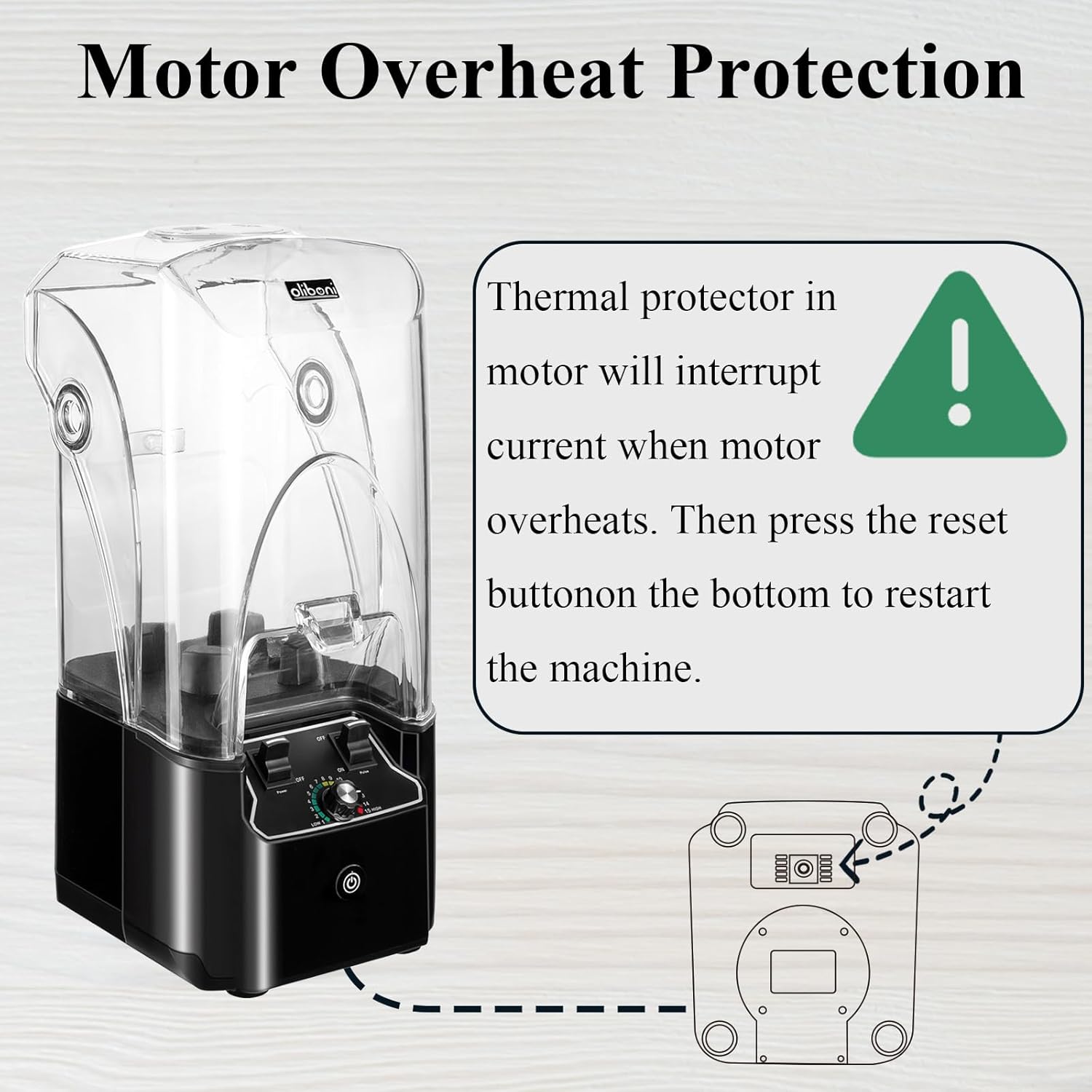
Figure 6.1: Motor Overheat Protection and Reset Button Location.
7. Specifications
| Feature | Specification |
|---|---|
| Brand | Oliboni |
| Model Number | B-90A |
| Color | Black |
| Power | 2200W |
| Capacity | 2200 Milliliters (80oz) |
| Number of Speeds | 15 |
| Blade Material | Stainless Steel (6-leaves) |
| Container Material | PC (BPA Free, Lead Free, PFOA Free, PTFE Free, PVC Free) |
| Product Dimensions | 9.5"D x 9"W x 19.7"H |
| Item Weight | 15 pounds |
| Special Features | Adjustable Speed Control, Automatic Cleaning, Ergonomic Handle, Thermal Protection System, Touch Control Panel |
8. Troubleshooting
- Blender does not start: Ensure the power cord is securely plugged in and the pitcher and soundproof cover are correctly assembled. Check if the overheat protection has been activated (see Section 6.1).
- Ingredients not blending smoothly: Increase the speed setting or use the Pulse function. Ensure there is enough liquid in the pitcher. Use the blending tamper to push ingredients towards the blades.
- Excessive noise: Ensure the soundproof cover is properly closed and sealed.
9. Warranty and Support
The Oliboni Commercial Blender B-90A comes with a 3-Year Limited Warranty. Oliboni is committed to providing superior services and quality guarantees to our customers. If you have any questions or concerns about the product or require warranty service, please do not hesitate to contact us at any time.