
Introduction
The YINMIK YK-S06EU is a versatile 6-in-1 digital soil tester designed for comprehensive analysis of soil and environmental conditions. This device accurately measures soil pH, soil moisture, electrical conductivity (EC), light intensity, air humidity, and temperature. It is an essential tool for plant enthusiasts, gardeners, and farmers to monitor and optimize growing conditions for various plants, both indoors and outdoors, in gardens, greenhouses, and hydroponic systems.

Image: YINMIK brand banner showcasing the soil pH meter and a small plant, indicating professional instruments since 2008.
Safety Information
- Read all instructions before use.
- Keep the device out of reach of children.
- Do not immerse the main body of the meter in water or any liquid. Only the probe is designed for soil insertion.
- Handle the probe with care to prevent damage. Avoid excessive force when inserting into hard soil.
- Store the device in a cool, dry place when not in use.
- Dispose of batteries according to local regulations.
Package Contents
Verify that all items are present in the package:
- YINMIK YK-S06EU 6-in-1 Digital Soil pH Meter
- User Manual (this document)
- Calibration solutions (pH 7.00, 4.00, 10.01, EC 1413 µS/cm) - Note: Check specific packaging for included solutions.
Product Overview
The YINMIK YK-S06EU features a sensitive probe and a clear LCD display with backlight for easy reading in various conditions. It integrates multiple measurement functions into a single, portable device.
Key Features:
- 6-in-1 Functionality: Measures soil pH, soil moisture, EC, light intensity, air humidity, and temperature.
- Fast and Accurate Readings: High-sensitivity probe provides quick and precise results.
- Data Hold Function: Allows locking of readings for convenient recording.
- Backlit LCD Display: Ensures readability in low-light environments.
- Durable Probe Design: Conical metal probe tip for easy insertion into soil without damage.
Components:
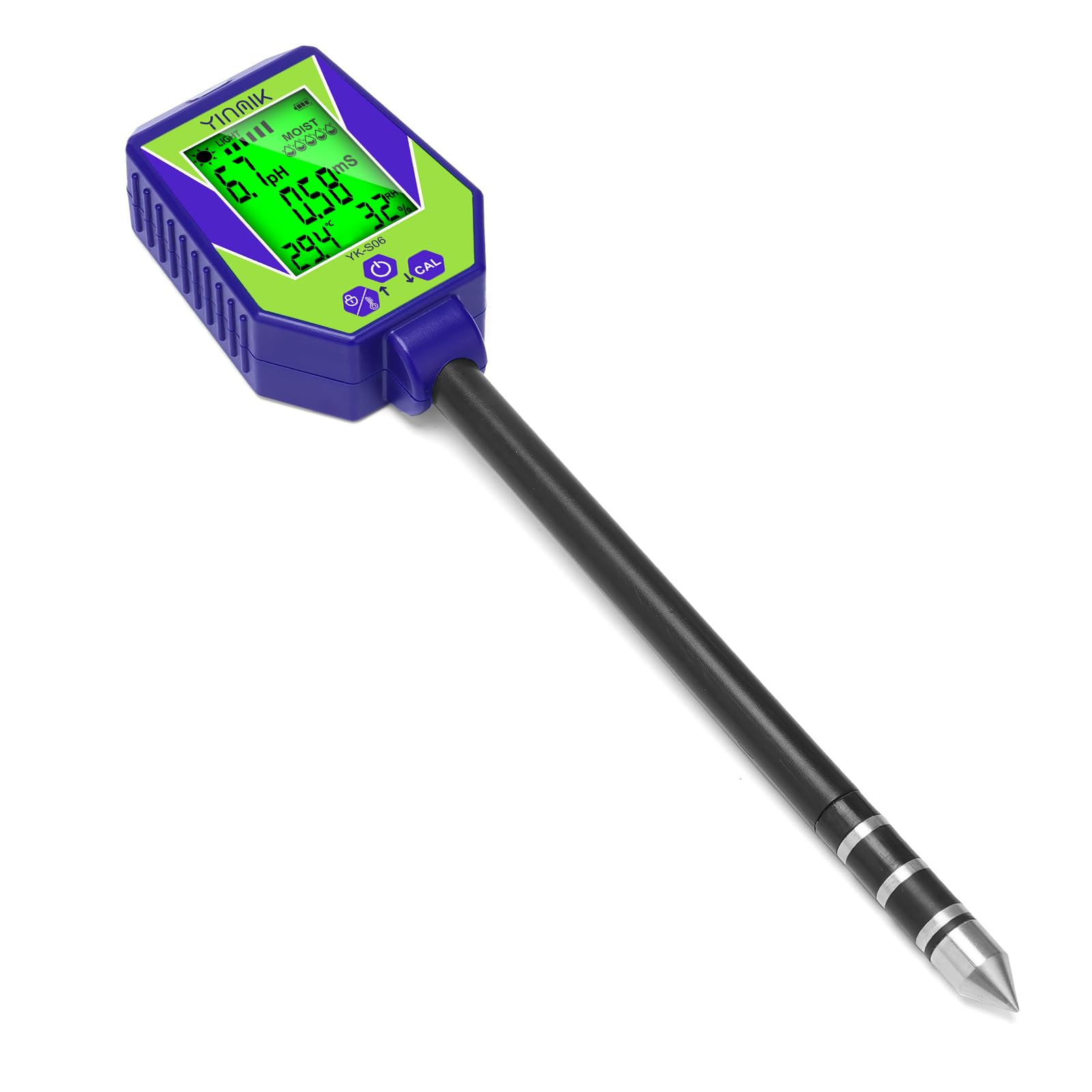
Image: The YINMIK YK-S06EU 6-in-1 Digital Soil pH Meter, showing its main body, LCD screen, control buttons, and the elongated probe.
- LCD Display: Shows measurement readings.
- Control Buttons: For power, hold, temperature unit selection, and calibration.
- Probe: The elongated part inserted into the soil for measurements.
- Light Sensor: Located on the top part of the device for light intensity measurement.
- Battery Compartment: Located at the top, under the cap.
Setup
Battery Installation:
- Unscrew the battery compartment cap at the top of the device.
- Insert the required batteries (typically AAA, refer to the battery compartment for polarity) ensuring correct orientation.
- Securely screw the cap back on.
Initial Preparation:
- Remove the protective cap from the probe tip.
- Clean the probe tip with distilled water and a soft cloth before first use and after each use.
Operating Instructions
To ensure accurate readings, always clean the probe before and after each use. For soil measurements, ensure the soil is moist enough for the probe to penetrate easily.

Image: The YINMIK soil pH tester inserted into soil next to a potted plant, demonstrating its use for soil analysis.
General Usage:
- Press the power button to turn on the device.
- Insert the probe vertically into the soil to the recommended depth (usually 2-4 inches or 5-10 cm), ensuring the entire probe tip is covered. Avoid touching rocks or hard objects.
- Wait approximately 30 seconds for the reading to stabilize.
- Press the 'HOLD' button to lock the current reading on the display. Press again to release.
- After measurement, gently pull out the probe and clean it thoroughly.
- Press the power button to turn off the device. It may also have an auto-off function.
Specific Measurements:
- Soil pH: Insert the probe into moist soil. The pH value will be displayed.
- Soil Moisture: Insert the probe into the soil. The moisture level will be indicated. Note: This meter measures soil moisture, not water moisture.
- Electrical Conductivity (EC): Insert the probe into moist soil. The EC value will be displayed.
- Light Intensity: Ensure the light sensor on the top of the device is exposed to the light source. The light intensity will be displayed.
- Air Humidity: The device measures ambient air humidity. No probe insertion is needed for this.
- Temperature: The device measures ambient temperature. Press the 'HOLD/TEMP' button to switch between Celsius (°C) and Fahrenheit (°F).
Calibration
The YINMIK YK-S06EU is pre-calibrated from the factory. However, regular calibration is recommended to maintain accuracy, especially for pH and EC measurements, or if readings appear inconsistent.

Image: The YINMIK pH meter displayed alongside various calibration solutions, indicating its calibration capability.
pH Calibration:
- Prepare pH 7.00, pH 4.00, and pH 10.01 buffer solutions.
- Clean the probe with distilled water and dry it.
- Immerse the probe into the pH 7.00 buffer solution. Press and hold the 'CAL' button until the display shows 'CAL' and then '7.00'. Release the button. Wait for the reading to stabilize and confirm calibration.
- Rinse the probe with distilled water.
- Repeat the process for pH 4.00 and pH 10.01 solutions, following the device's specific calibration prompts (refer to the on-screen instructions during calibration).
EC Calibration:
- Prepare an EC 1413 µS/cm standard solution.
- Clean the probe with distilled water and dry it.
- Immerse the probe into the EC 1413 µS/cm solution. Follow the device's specific calibration procedure for EC (usually involves pressing and holding the 'CAL' button and confirming the reading).
Maintenance
- Cleaning the Probe: Always clean the probe thoroughly with distilled water and a soft cloth after each use to prevent residue buildup, which can affect accuracy. Do not use abrasive materials.
- Storage: Store the device in a cool, dry place with the protective cap on the probe. Avoid extreme temperatures and direct sunlight.
- Battery Replacement: Replace batteries when the low battery indicator appears on the display to ensure continuous operation and accurate readings.
Troubleshooting
| Problem | Possible Cause | Solution |
|---|---|---|
| Inaccurate or unstable readings | Dirty probe; dry soil; uncalibrated sensor; damaged probe. | Clean the probe; moisten the soil; perform calibration; inspect probe for damage. |
| Display not turning on | Dead batteries; incorrect battery installation. | Replace batteries; check battery polarity. |
| Probe difficult to insert | Soil is too hard or dry. | Moisten the soil before insertion. Do not force the probe, as this may cause damage. |
| No reading for a specific parameter | Incorrect mode selected; sensor blocked or damaged. | Ensure correct mode for measurement; check if the sensor is clean and unobstructed. |
Specifications
| Parameter | Value |
|---|---|
| Model Number | YK-S06EU |
| Dimensions (L x W x H) | 7.8 x 2.3 x 27.3 cm |
| Weight | 320 grams |
| Power Source | Battery Powered |
| Functions | pH, Soil Moisture, EC, Light, Air Humidity, Temperature |
Warranty and Support
YINMIK offers a 12-month warranty for this product. If you encounter any issues or have questions within this period, please contact YINMIK customer service directly through Amazon. They will assist with troubleshooting or arrange for a replacement if necessary.
For further assistance, please visit the YINMIK store on Amazon or contact their support team via the Amazon platform.


