
1. Introduction
This manual provides essential information for the safe and effective installation, operation, and maintenance of your Southwire 41301 30A Reverse Polarity Transfer Switch. Please read all instructions carefully before proceeding with installation or use. Retain this manual for future reference.
2. Safety Information
WARNING: More than one live circuit may be present. Disconnect all sources of supply before servicing this unit to prevent electric shock or injury.
CAUTION: Do not remove the cover with voltage present. Do not mount the unit with the cover face down (parallel to earth) as this may compromise its intended function and safety.
This product may contain materials cautioned by California Proposition 65. Always follow local electrical codes and safety regulations during installation and operation.
3. Product Overview
The Southwire 41301 is an automatic transfer switch designed for use in optional standby systems. It provides reverse polarity protection and automatically switches between two power sources, typically generator and shore power, ensuring a continuous and safe electrical supply.
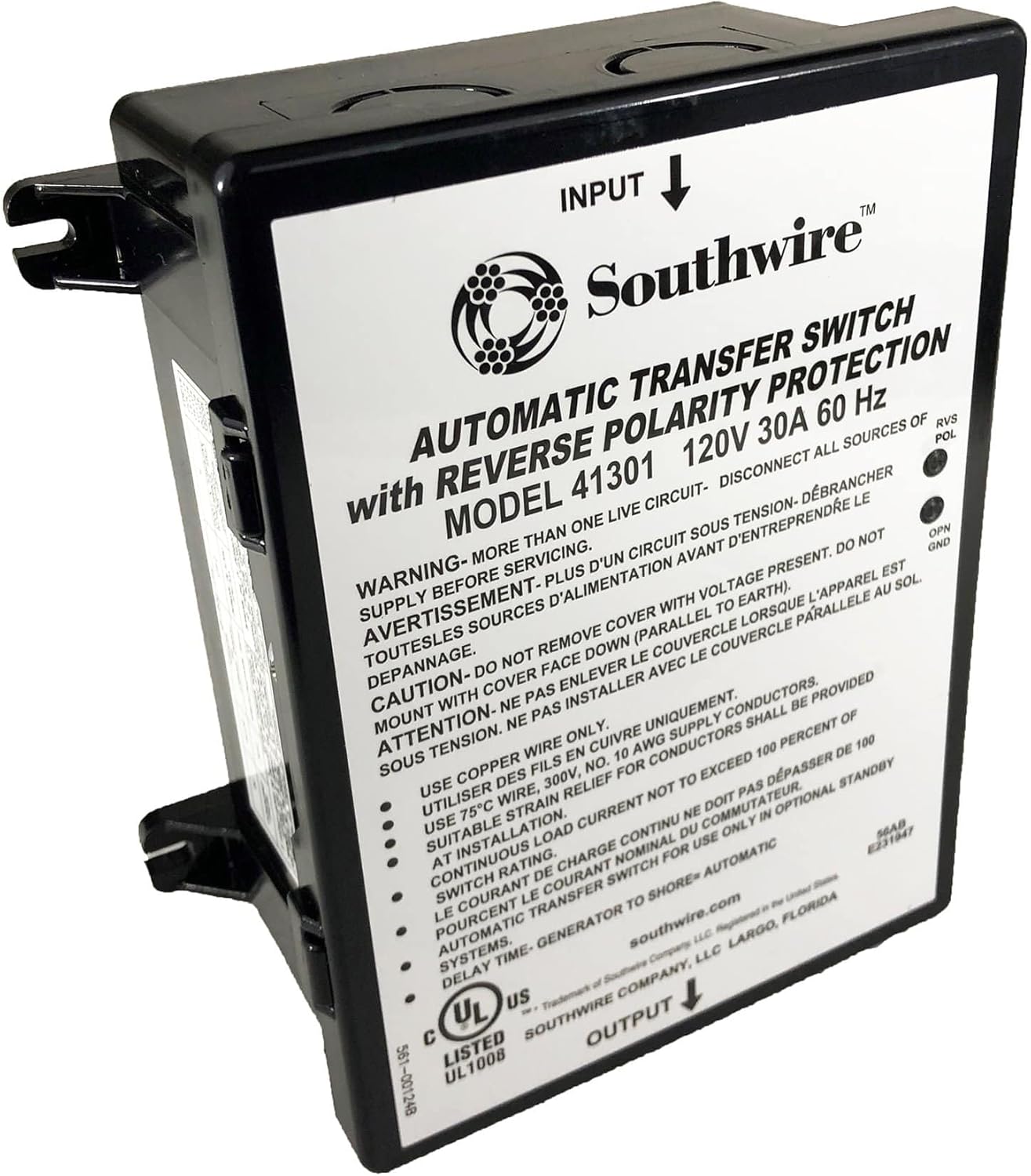
Key features include:
- Automatic power source switching
- Reverse polarity protection
- Designed for 120V, 30A, 60 Hz systems
- Suitable for optional standby systems
4. Installation
Installation should only be performed by a qualified electrician in accordance with all applicable national and local electrical codes.
4.1 Wiring Requirements
- Use copper wire only.
- Utilize 75°C wire, 300V, No. 10 AWG supply conductors.
- Ensure continuous load current does not exceed 100 percent of the switch rating (30A).
- A suitable strain relief for conductors must be provided at the installation point.
4.2 Mounting
Mount the transfer switch securely in an upright position. Avoid mounting with the cover facing downwards (parallel to the earth) to ensure proper operation and safety.
5. Setup
The Southwire 41301 is an automatic transfer switch designed for seamless operation in optional standby systems. Once correctly wired and mounted, the unit will automatically manage the power transfer between your primary (shore) power and secondary (generator) power sources.
The delay time for generator to shore transfer is automatic, ensuring a smooth transition without manual intervention.
6. Operation
The transfer switch operates automatically. When shore power is available, the unit will connect to it. If shore power is lost and a generator is connected and producing power, the switch will automatically transfer the load to the generator after a brief delay.
Indicator lights on the unit provide status information:
- RVS POL (Reverse Polarity): Illuminates if a reverse polarity condition is detected, indicating a wiring fault that needs immediate attention.
- OPN GND (Open Ground): Illuminates if an open ground condition is detected, indicating a potential safety hazard that requires immediate inspection.
Always address any illuminated indicator lights promptly by consulting a qualified electrician.
7. Maintenance
The Southwire 41301 transfer switch is designed for minimal maintenance. However, periodic inspection is recommended to ensure continued safe and reliable operation.
- Annual Inspection: Have a qualified electrician inspect the unit annually.
- Check Connections: Ensure all electrical connections are tight and free from corrosion.
- Cleanliness: Keep the exterior of the unit clean and free from dust and debris. Do not use harsh chemicals or solvents.
- Environmental Conditions: Ensure the operating environment remains within specified temperature and humidity ranges.
Always disconnect all power sources before performing any inspection or maintenance.
8. Troubleshooting
If you experience issues with your transfer switch, consider the following basic troubleshooting steps. For complex issues, always consult a qualified electrician.
- No Power Transfer: Verify that both shore power and generator power sources are active and providing correct voltage. Check all circuit breakers.
- Indicator Lights On: If the RVS POL or OPN GND lights are illuminated, immediately disconnect all power and have a qualified electrician inspect the wiring for faults.
- Intermittent Operation: Check for loose connections at the transfer switch and at the power sources. Ensure the unit is not exposed to excessive moisture or extreme temperatures.
Do not attempt to repair the unit yourself. Refer all servicing to authorized personnel.
9. Specifications
| Specification | Detail |
|---|---|
| Model Number | 41301 |
| Brand | Southwire |
| Current Rating | 30 Amps |
| Voltage | 120V |
| Frequency | 60 Hz |
| Operation Mode | Automatic |
| Wattage | 3600 Watts |
| Connector Type | 2 Pin |
| Terminal Type | Screw |
| Circuit Type | 1-way |
| Actuator Type | Push Button |
| Contact Material | Copper |
| Item Dimensions (L x W x H) | 1 x 1 x 1 inches |
| Item Weight | 2.77 pounds |
| UPC | 032886731631 |
10. Warranty and Support
Southwire products are manufactured to high-quality standards and are backed by a manufacturer's warranty. For specific warranty details, please refer to the documentation included with your purchase or visit the official Southwire website.
For technical support, product information, or warranty claims, please contact Southwire directly:
- Website: southwire.com
- Manufacturer: Southwire Company, LLC, Largo, Florida


