
Portronics POR-2257
Portronics Luxcell MagClick 10k Power Bank User Manual
Model: POR-2257
1. Introduction
Thank you for choosing the Portronics Luxcell MagClick 10k Power Bank. This device is designed to provide convenient and fast charging for your electronic devices, featuring both magnetic wireless charging and wired output options. Please read this manual carefully to ensure proper use and to maximize the product's lifespan.
2. Package Contents
Verify that all items are present in your package:
- 1N Portronics Luxcell MagClick 10k Power Bank
- 1N USB Type-C to Type-C Charging Cable
- 1N User Documentation
3. Product Overview
Familiarize yourself with the components of your power bank:

Image 3.1: Front view of the Portronics Luxcell MagClick 10k Power Bank in Dark Grey, showing the digital display and Portronics logo.

Image 3.2: Close-up of the power bank's transparent casing revealing the digital battery display and the side-mounted wake button.
- Digital Display: Shows the current battery percentage of the power bank.
- Wake Button: Press to activate the display and initiate charging.
- USB Type-C Port (Input & Output): Used for charging the power bank and for wired output to devices.
- USB-A Port (Output): Used for wired output to devices.
- Magnetic Wireless Charging Pad: Located on the back, for magnetic wireless charging of compatible devices.
4. Setup
4.1 Initial Charging of the Power Bank
Before first use, fully charge your Portronics Luxcell MagClick 10k Power Bank.
- Connect the provided USB Type-C to Type-C cable to the power bank's Type-C port.
- Connect the other end of the cable to a compatible USB wall adapter (not included).
- The digital display will show the charging progress. Charge until the display shows 100%.
A full charge typically takes several hours, depending on the power adapter used.
5. Operating Instructions
5.1 Checking Battery Level
Press the wake button on the side of the power bank. The digital display will illuminate, showing the remaining battery percentage.
5.2 Magnetic Wireless Charging (15W)
This feature is compatible with Qi-enabled devices that support magnetic alignment, such as iPhone 12 and above, and certain Samsung S series models.

Image 5.1: A smartphone magnetically attached to the power bank, indicating active wireless charging.
- Ensure your device is compatible with magnetic wireless charging.
- Align your device's wireless charging area with the magnetic charging pad on the back of the power bank. The magnets will help snap it into place.
- The power bank will automatically begin charging your device. The digital display may show a charging indicator.
- Remove your device once charging is complete or when you wish to stop.
5.3 Wired Charging (22.5W Max Output)
The power bank offers fast wired charging via its USB Type-C (PD) and USB-A (MACH) ports.
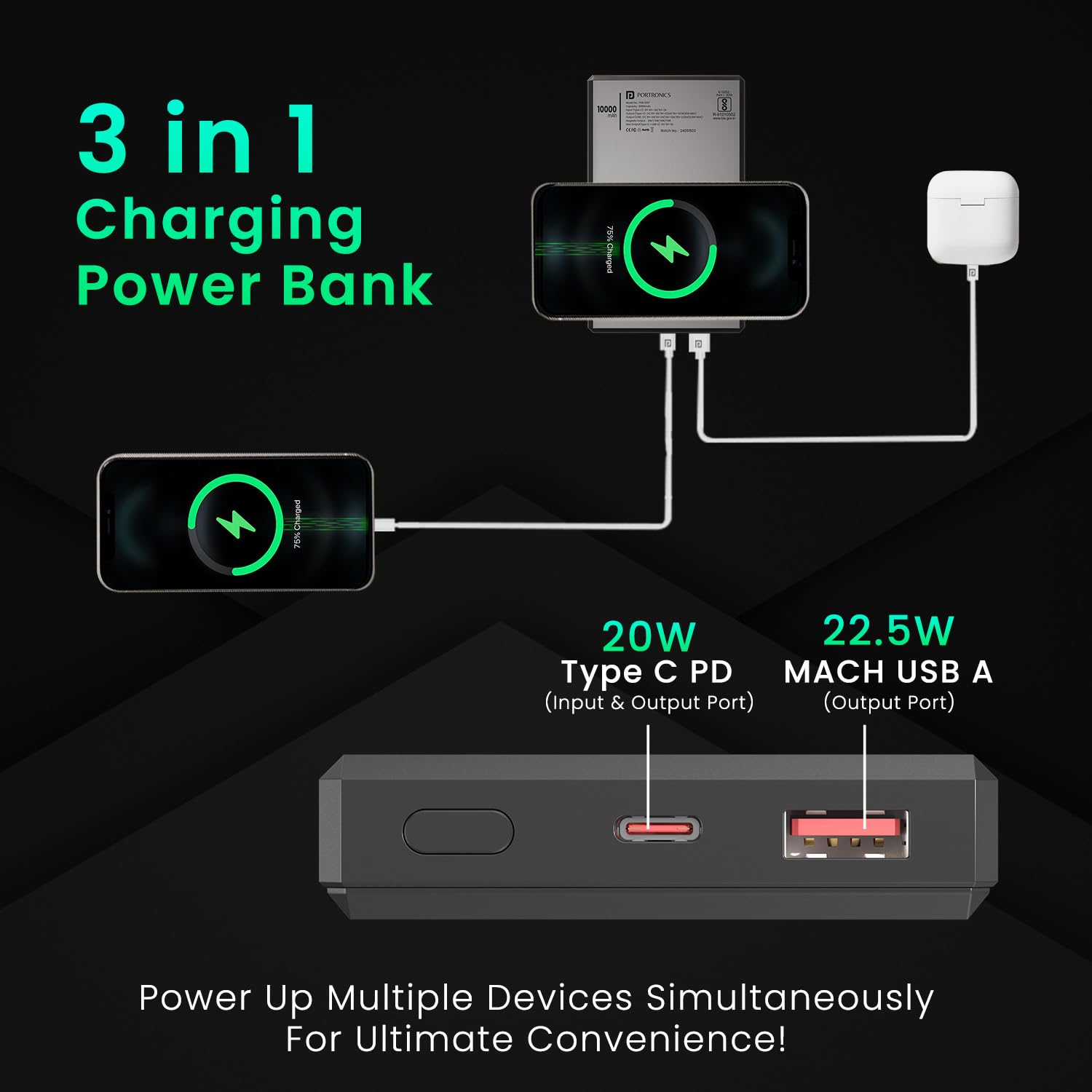
Image 5.2: Close-up of the USB Type-C (Input & Output) and USB-A (Output) ports on the power bank.
- Connect your device to either the USB Type-C port or the USB-A port using an appropriate charging cable.
- The power bank will automatically detect the connected device and begin charging.
- You can charge multiple devices simultaneously using both wired ports and wireless charging.
- Disconnect your device once charging is complete.
6. Safety Information
To ensure safe operation and prevent damage to the device or injury, please observe the following precautions:

Image 6.1: Visual representation of the power bank's built-in safety protections.
- Do not expose the power bank to extreme temperatures, direct sunlight, or fire.
- Avoid dropping, hitting, or disassembling the device.
- Keep the power bank away from water and other liquids.
- Do not use the power bank if it is damaged or shows signs of swelling.
- Use only approved charging cables and adapters.
- Keep out of reach of children.
- The power bank is BIS certified and includes advanced protection layers against short circuits, over-temperature, and over-voltage issues.
7. Maintenance
7.1 Cleaning
Wipe the power bank with a soft, dry cloth. Do not use harsh chemicals or abrasive cleaners.
7.2 Storage
Store the power bank in a cool, dry place away from direct sunlight and extreme temperatures. If storing for extended periods, charge the power bank to approximately 50% every three months to maintain battery health.
8. Troubleshooting
- Power bank not charging:
Ensure the charging cable is securely connected to both the power bank and the power adapter. Try a different cable or adapter. - Device not charging from power bank:
Press the wake button to activate the power bank. Ensure your device's cable is properly connected to the power bank's output port. For wireless charging, ensure proper alignment and device compatibility. Check if the power bank has sufficient charge. - Slow charging:
Ensure you are using a fast-charging compatible cable and your device supports fast charging. For wireless charging, ensure optimal alignment and that no foreign objects are between the power bank and your device. - Digital display not working:
Press the wake button. If it still doesn't light up, the power bank might be completely discharged or require service.
9. Specifications
| Model Number | POR-2257 |
| Battery Capacity | 10000 mAh (Lithium Polymer) |
| Wireless Output | 15W Magnetic Wireless Charging |
| Wired Output (Max) | 22.5W |
| Input Port | USB Type-C (PD) |
| Output Ports | USB Type-C (PD), USB-A (MACH) |
| Special Features | Digital Display, Fast Charging, BIS Certified, Multi-layer Protection |
| Dimensions | 18.3 x 8.6 x 2.3 cm |
| Weight | 250 g |
| Country of Origin | India |
10. Warranty and Support
Portronics products are designed for reliability and performance. For warranty information or technical support, please contact Portronics Digital Pvt. Ltd. using the details below:
- Email: help@portronics.com
- Phone: +91 9555-245-245
- Address: First Floor Property No D 8 Upper Basement Sector 8 Noida Uttar Pradesh 201301, India
Please retain your purchase receipt for warranty claims.
Related documentsPOR-2257


Ask a question about this manual
Ask about setup, troubleshooting, compatibility, parts, safety, or missing instructions. Manuals+ will review the question and use this page’s manual context to help answer it.