
1. Introduction
This manual provides detailed instructions for the installation, operation, and maintenance of your Eonon UA13-PLUS Android 13 Double Din Car Stereo. Please read this manual thoroughly before using the product to ensure proper functionality and safety.

Image: The Eonon UA13-PLUS car stereo unit, showcasing its 10.1-inch display with icons for CarPlay, Android Auto, IPS, WiFi, and GPS, along with the Android 13 logo.
2. Applicable Models and Compatibility
The UA13-PLUS is a 10.1-inch Universal Double DIN Head Unit designed for broad compatibility. It can be installed in vehicles with a dashboard opening size of 178mm x 100mm (7.01" x 3.94") and an ISO power cord. For other dimensions, an additional installation kit may be required.
- Direct Installation: If your original car radio's mounting size is 178x100mm and it uses an ISO power cord, direct installation is possible.
- Additional Accessories: If your car's center console dimensions do not match, or if your factory radio is single DIN, you will need to purchase extra accessories (e.g., a dash kit, wiring harness adapter) for proper installation.
- ISO Power Cable: Ensure your factory car radio's power cable connector is an ISO standard connector. If not, a separate adapter cable (not included) will be necessary.

Image: Diagrams illustrating the compatible dashboard opening size (178x100mm) for the UA13-PLUS, along with a note about ISO power cable compatibility and the need for extra kits if dimensions do not match.
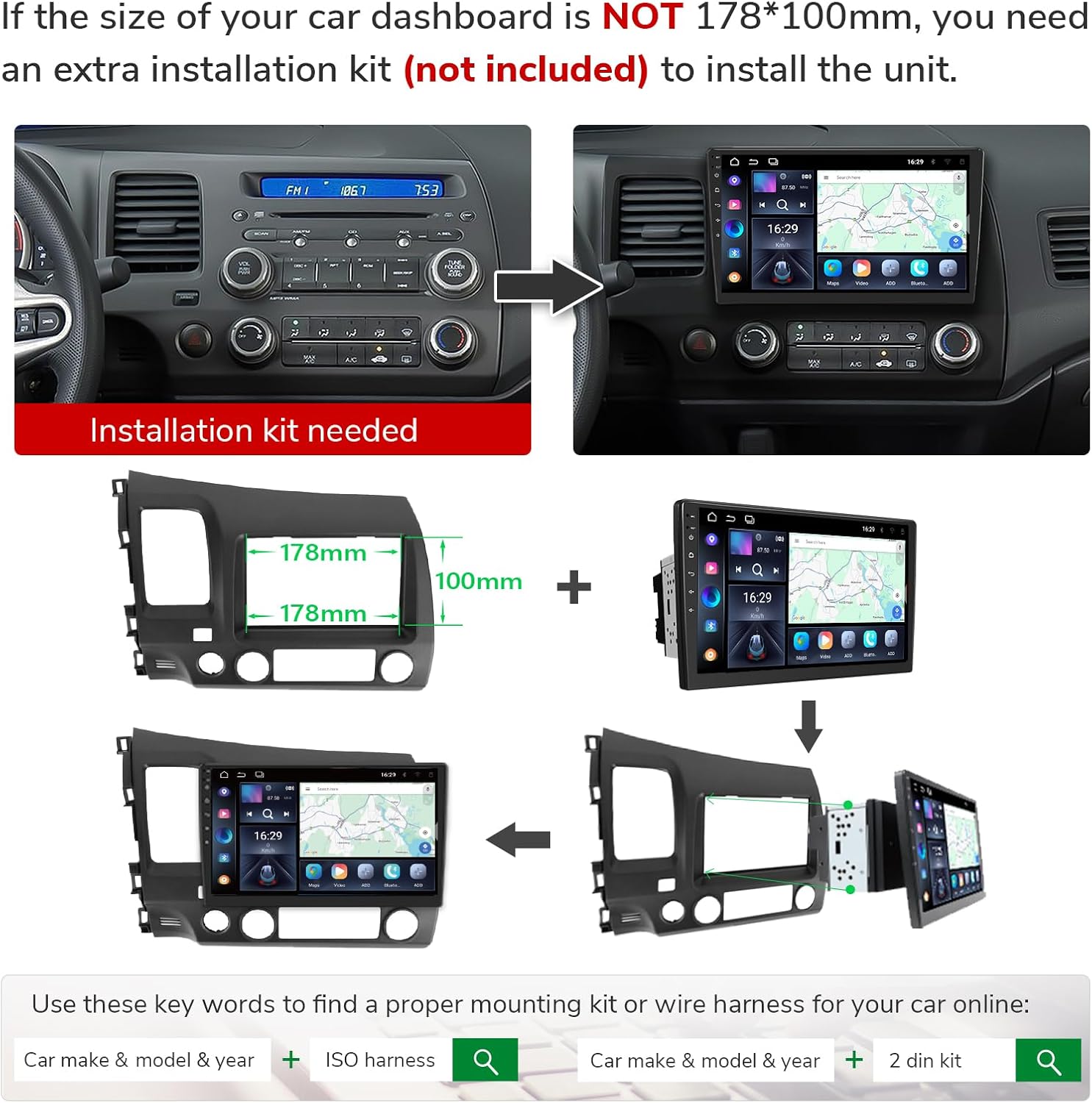
Image: Visual guide showing a car dashboard before and after installation, emphasizing that an installation kit is needed if the dashboard size is not 178x100mm. It also shows how to combine the unit with a 2-DIN kit.
3. Key Features
- Real Android 13 System: Equipped with the latest Android 13 (API level 33) and a Rockchip processor for enhanced performance and energy efficiency. Supports convenient online firmware updates.
- Wireless/Wired CarPlay & Android Auto: Offers hands-free control of music, navigation, calls, and messages via voice commands ("Hey Siri" or "Hey Google"). Supports screen mirroring from your phone to the stereo display.
- Exceptional Display: Features a 10.1-inch IPS HD screen with a 178° viewing angle, ensuring clear visibility even in bright sunlight. Provides swift and precise touch operations with multi-touch capacitive touchscreens.
- Superior Audio Performance: Built-in 4x45W amplifier and 36-band equalizer adjustment for rich, immersive sound.
- Connectivity: Supports Bluetooth 5.0, 18 FM/AM channels, AUX audio input, and three USB ports for flash drive use.
- SWC & More Connect: Supports analog Steering Wheel Control (SWC) signals. For digital signal controlled cars, a separate SWC adapter cable (not included) is required. Also supports HD 720P/1080P backup camera input, front camera input, and OBD scanner connectivity (accessories not included).

Image: An internal view of the car stereo's circuit board, highlighting key components such as Samsung/Micron DDR Memory, ARM Cortex-A53 processor, and Siliconco eMMC Storage. It emphasizes the 4-layer automotive PCB design for durability.

Image: Diagram showing the Wi-Fi 6 & Independent Bluetooth 5.4 Module, ST 4x45W Amplifier, and Silicon Labs Si4755 Radio Module, detailing their functions and benefits.

Image: A car interior showing the UA13-PLUS display with various applications running, demonstrating the integration of CarPlay and Android Auto for navigation, music, and other functions.
4. Installation Guide
4.1. Wiring Diagram
Refer to the following diagram for proper wiring connections. Ensure all connections are secure before powering on the unit.

Image: A detailed wiring diagram for the Eonon UA13-PLUS car stereo, labeling each connection point such as SWC wires, reverse trigger, audio outputs, USB ports, GPS antenna, and external microphone.
4.2. Included Accessories
Verify that all components listed below are included in your package:
| Item | Quantity |
|---|---|
| Power cord | 1 |
| GPS antenna | 1 |
| USB adapter cable | 2 |
| Audio/video adapter cable | 2 |
| Reverse video input cable | 1 |
| 15A fuse | 1 |
| External microphone | 1 |
| Manual | 1 |
| Screws | 8 |

Image: A visual representation of all accessories included with the UA13-PLUS car stereo, such as various adapter cables, GPS antenna, external microphone, screws, spare fuse, and the user manual.
5. Operating Instructions
5.1. Wireless CarPlay & Android Auto
Connect your smartphone wirelessly or via USB to access CarPlay or Android Auto. Use voice commands like "Hey Siri" or "Hey Google" for navigation, music playback, phone calls, and messaging. This feature enhances driving safety by minimizing manual interaction with the device.
5.2. Bluetooth Connectivity
The unit supports Bluetooth 5.0 for seamless audio streaming and hands-free calling. Pair your device through the Bluetooth settings menu on the stereo. You can also sync contacts for easy access.
5.3. FM/AM Radio
Access the built-in FM/AM radio tuner to listen to local broadcasts, news, and traffic information. The unit supports 18 FM/AM channels.
5.4. Screen Mirroring
Mirror your smartphone's screen directly onto the car stereo display. This allows you to view content from your phone on the larger screen.
5.5. Software Updates (OTA)
The UA13-PLUS supports Over-The-Air (OTA) firmware updates. This allows you to keep the unit's software up-to-date, addressing issues and enhancing security without needing a USB stick. Navigate to the system update section in the settings to check for and apply updates.

Image: A screenshot of the car stereo's system update interface, showing the current software version and options to check for updates. It highlights that updates are for software, not Android system upgrades.
6. Specifications
| Feature | Detail |
|---|---|
| Product Dimensions | 3.15"D x 7"W x 3.93"H (80mm x 178mm x 100mm) |
| Item Weight | 4.4 pounds (2 kg) |
| Model Number | UA13-PLUS |
| Operating System | Android 13 (API level 33) |
| Processor | Rockchip |
| Display Size | 10.1 inches |
| Display Type | IPS HD Screen with 178° viewing angle |
| Connectivity Technology | Bluetooth 5.0, USB, Wi-Fi 6 |
| Special Features | Android Auto, Apple CarPlay, Built-In Bluetooth, Built-In Wi-Fi, Voice Control, 36-band equalizer |
| Audio Output Mode | Stereo |
| Amplifier Output | 4x45W |
| Video Encoding Support | MPG, DAT, TS, AVI, MP4, MOV, 3GP, ASF, VOB, MKV, FLV, RM, RMVB |
| Compatible Devices | Smartphone |
| Manufacturer | Eonon |
7. Troubleshooting
This section provides solutions to common issues you might encounter with your Eonon UA13-PLUS car stereo.
7.1. No Power / Unit Not Turning On
- Check Power Connections: Ensure all power cables are securely connected according to the wiring diagram. Verify that the ISO power cord is correctly plugged in.
- Check Fuse: Inspect the 15A fuse located on the power cord. If blown, replace it with a new 15A fuse.
- Vehicle Battery: Confirm your vehicle's battery has sufficient charge.
7.2. No Sound Output
- Volume Level: Ensure the volume is not muted or set to minimum.
- Speaker Connections: Verify that all speaker wires are correctly connected to the unit and are not short-circuited.
- Audio Source: Confirm the correct audio source (e.g., Radio, Bluetooth, CarPlay) is selected.
7.3. CarPlay/Android Auto Not Connecting
- USB Cable: If using a wired connection, ensure the USB cable is original or MFi certified (for Apple CarPlay) and in good condition.
- Bluetooth/Wi-Fi: For wireless connections, ensure Bluetooth and Wi-Fi are enabled on both your phone and the stereo, and that they are properly paired.
- Phone Settings: Check your phone's settings to ensure CarPlay/Android Auto is enabled and allowed to connect to the stereo.
- Restart Devices: Try restarting both your phone and the car stereo.
7.4. Touchscreen Unresponsive or Lagging
- Restart Unit: Perform a soft reset of the unit (refer to the main unit's physical reset button if available, or turn off the car ignition and restart).
- Software Update: Ensure the unit's software is up to date. Outdated software can sometimes cause performance issues.
- Overheating: Ensure proper ventilation around the unit to prevent overheating, which can affect performance.
8. Warranty and Support
For warranty information and technical support, please refer to the official EONON website or contact their customer service directly. Keep your purchase receipt as proof of purchase for any warranty claims.
Manufacturer: Eonon
Brand: EONON
For further assistance, visit the EONON Store on Amazon.
