1. Introduction
Thank you for choosing the Mibro Earbuds AC1 Wireless Earbuds. These earbuds combine an elegant design with exceptional audio performance, offering clear, immersive sound for your favorite music. With stable Bluetooth connectivity and a comfortable ergonomic fit, they are designed for convenience and quality audio on the go. This manual provides detailed instructions to help you get the most out of your new earbuds.
2. Safety Information
Please read all safety instructions before using this product.
- Do not expose the earbuds or charging case to extreme temperatures, humidity, or liquids.
- Avoid dropping, impacting, or disassembling the device.
- Keep away from children and pets.
- Use only the provided or certified charging cable.
- Prolonged listening at high volume levels may cause hearing damage.
3. Package Contents
Ensure all items are present in your package:
- Mibro Earbuds AC1 (Left and Right)
- Charging Case
- Charging Cable
- User Manual (this document)
4. Product Overview
Familiarize yourself with the components of your Mibro Earbuds AC1.

Figure 4.1: Mibro Earbuds AC1 removed from their open charging case, displaying the earbuds and the case.
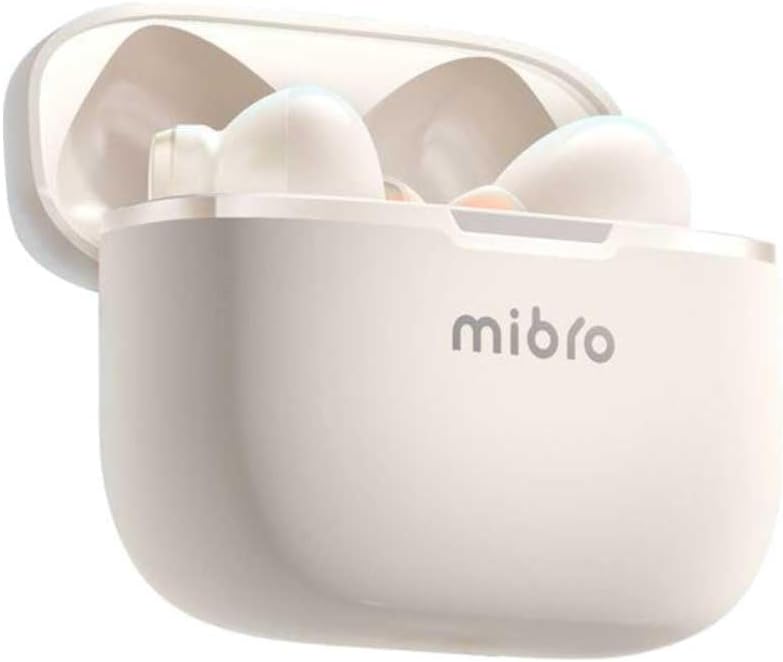
Figure 4.2: Mibro Earbuds AC1 placed inside their open charging case, showing the compact design.
The earbuds feature an ergonomic design for a secure and comfortable fit. The charging case protects the earbuds and recharges them on the go.
5. Setup
5.1 Charging the Earbuds and Case
Before first use, fully charge the earbuds and the charging case.
- Place the earbuds into the charging case.
- Connect the charging cable to the charging port on the case and to a USB power source.
- The indicator light on the case will show charging status. A full charge may take up to 1 day (Note: This is an unusual specification, typically measured in hours. Please refer to product packaging for precise charging time).
- Once fully charged, disconnect the cable.
5.2 Pairing with a Bluetooth Device
To connect your Mibro Earbuds AC1 to your smartphone or other Bluetooth-enabled device:
- Ensure the earbuds are charged and placed in the charging case.
- Open the charging case lid. The earbuds will automatically enter pairing mode (indicator lights will flash).
- On your device, go to Bluetooth settings and turn Bluetooth on.
- Search for available devices and select "Mibro AC1" from the list.
- Once connected, the indicator lights on the earbuds will stop flashing.
- The earbuds will automatically reconnect to the last paired device when removed from the case, if Bluetooth is enabled on the device.
6. Operating Instructions
6.1 Power On/Off
- Power On: Open the charging case lid, or take the earbuds out of the case. They will power on automatically.
- Power Off: Place the earbuds back into the charging case and close the lid. They will power off automatically and begin charging.
6.2 Music Playback
Use the touch controls on the earbuds to manage music:
- Play/Pause: Single tap on either earbud.
- Next Track: Double tap on the right earbud.
- Previous Track: Double tap on the left earbud.
6.3 Call Management
Manage phone calls with the touch controls:
- Answer/End Call: Single tap on either earbud.
- Reject Call: Press and hold either earbud for 2 seconds.
6.4 Noise Cancellation
The Mibro AC1 Earbuds feature noise cancellation. Specific controls for activating or deactivating this feature are typically managed via a long press or a specific tap sequence. Refer to the quick start guide included in your package for precise instructions, as these can vary.
7. Maintenance
7.1 Cleaning
- Wipe the earbuds and charging case with a soft, dry, lint-free cloth.
- Do not use abrasive cleaners, alcohol, or chemical solvents.
- Ensure charging contacts are clean and dry.
7.2 Storage
When not in use, store the earbuds in their charging case to protect them and keep them charged. Store in a cool, dry place away from direct sunlight.
8. Troubleshooting
If you encounter issues with your Mibro Earbuds AC1, try the following solutions:
| Problem | Solution |
|---|---|
| Earbuds not pairing |
|
| No sound from earbuds |
|
| Earbuds not charging |
|
9. Specifications
| Feature | Detail |
|---|---|
| Model Name | XPEJ010WW (AC1) |
| Brand | Mibro |
| Connectivity Technology | Wireless (Bluetooth) |
| Special Features | Noise Cancellation |
| Color | Warm White |
| Form Factor | In-Ear |
| Material | Plastic |
| Water Resistance Level | Not waterproof |
| Charging Time | Up to 1 day (Note: This is an unusual specification, typically measured in hours. Please refer to product packaging for precise charging time.) |
10. Warranty and Support
Mibro products are designed and manufactured to the highest quality standards. For detailed warranty information, please refer to the warranty card included with your purchase or visit the official Mibro website.
For further assistance, technical support, or to explore other Mibro products, please visit the Mibro Store on Amazon.


