
1. Introduction
The Govee Christmas Lights 2 (Model H70C7) are smart RGBWIC string lights designed for both indoor and outdoor decorative lighting. These lights offer advanced features including app control, voice control compatibility, AI-generated lighting effects, and shape mapping functionality, providing a versatile lighting solution for various occasions.

Image 1: Govee Christmas Lights 2 product packaging and coiled string lights.
2. Safety Information
- Operating Temperature: Designed to work in temperatures ranging from -20°C to 40°C.
- Water and Dust Proof: The string lights themselves are waterproof and dustproof.
- Power Adapter: The power adapter is not designed to be immersed in water. For outdoor use, place the power adapter within a watertight box to ensure safety and product longevity.
- Series Connection: These string lights do not support series connection. Do not attempt to connect multiple strings end-to-end.
3. Package Contents
The Govee Christmas Lights 2 package includes:
- 164ft string lights x 1
- User Manual x 1
- Power Adapter x 1
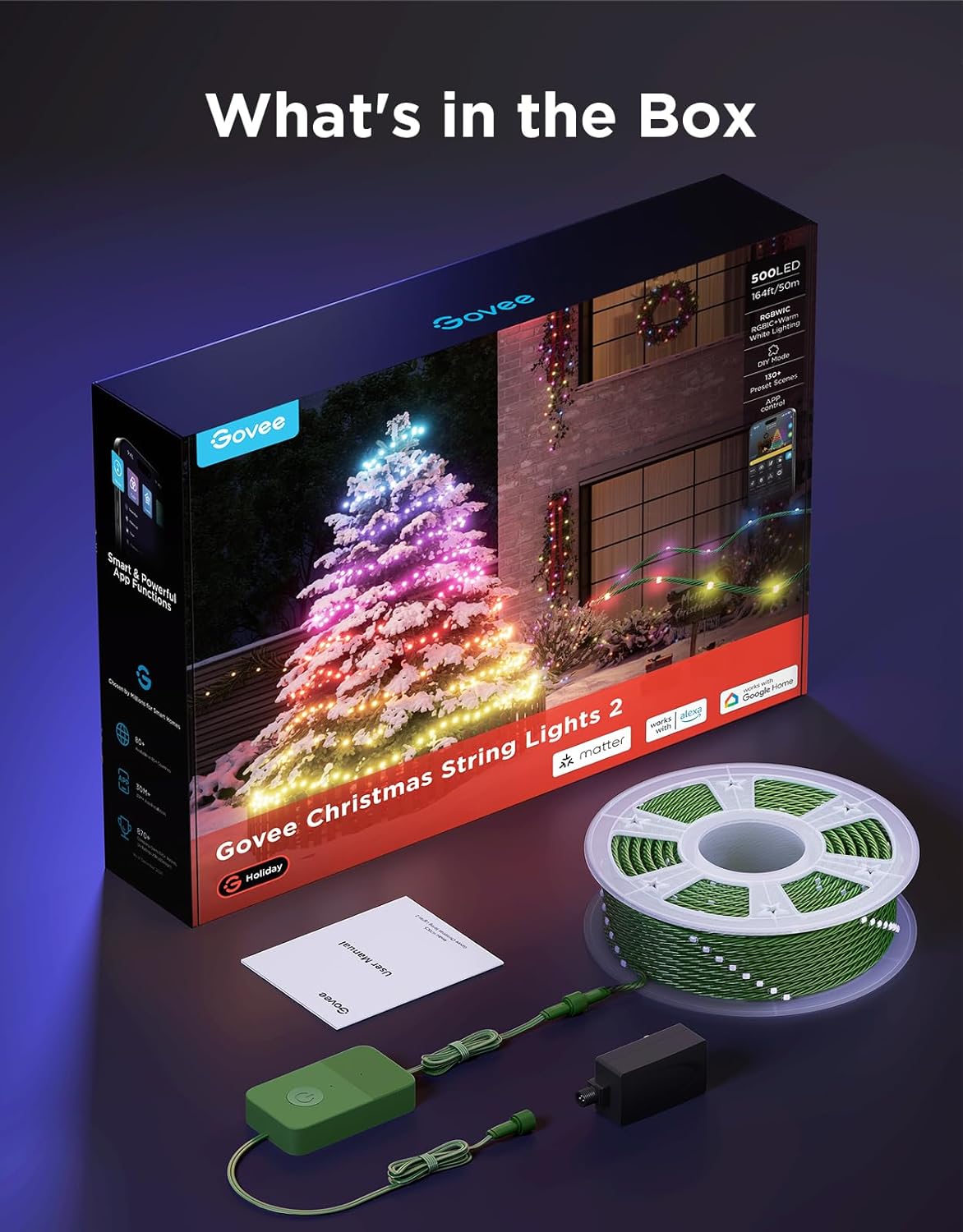
Image 2: Contents of the Govee Christmas Lights 2 box, showing the coiled string lights, power adapter, and user manual.
4. Setup
- Unpack and Uncoil: Carefully remove the string lights from the packaging and uncoil them.
- Placement: Position the string lights according to your desired decoration. Ensure the power adapter is placed in a dry, protected area, especially for outdoor installations.
- Power Connection: Connect the string lights to the power adapter, then plug the adapter into a suitable power outlet.
- App Download: Download the Govee Home app from your device's app store.
- Device Pairing: Open the Govee Home app, create an account or log in, and follow the on-screen instructions to add your Govee Christmas Lights 2. This typically involves enabling Bluetooth and Wi-Fi on your device.
- Shape Mapping: Utilize the app's Shape Mapping function to accurately map the physical layout of your lights. This feature allows for precise control and dynamic lighting effects tailored to your specific setup (e.g., a Christmas tree).

Image 3: The Govee app demonstrating the Shape Mapping feature for customizing light patterns on a Christmas tree.
5. Operating Instructions
Control your Govee Christmas Lights 2 using the Govee Home app or voice commands.
5.1 App Control
The Govee Home app provides comprehensive control over your lights:
- Brightness Adjustment: Easily adjust the intensity of the lights.
- Color Selection: Choose from millions of colors and various white tones (RGBWIC).
- Preset Scenes: Access over 130 optional preset animated scenes for different occasions and moods.
- DIY Lighting Effects: Create and save your own custom lighting patterns and animations.
- Timer Function: Set schedules for your lights to turn on/off automatically.
- DreamView: Synchronize your string lights with other Govee devices for an immersive lighting experience.

Image 4: An illustration highlighting the 130+ dynamic light effects available through the Govee app.
5.2 Voice Control
The lights are compatible with popular voice assistants:
- Amazon Alexa: Integrate with Alexa for voice commands (e.g., "Alexa, turn on the Christmas lights").
- Google Assistant: Control your lights using Google Assistant voice commands.
- Matter Compatibility: Supports Matter for broader smart home integration, offering basic controls.

Image 5: Demonstrating hands-free smart control of Govee lights via voice commands.
5.3 AI Light Show
Leverage the AI Lighting Bot within the Govee app to generate unique lighting effects:
- Chat Interface: Describe your desired lighting effects by chatting with the AI Lighting Bot.
- Image Upload: Upload images to inspire AI-generated scenes.
- Save DIY: Save your favorite AI-generated effects to the DIY page for future use.
Video 1: A demonstration of using the AI Lighting Bot in the Govee app to generate custom lighting effects for Christmas string lights.
5.4 Shape Mapping Function
The Smart Shape Mapping feature allows you to customize lighting effects based on the physical arrangement of your lights:
- Custom Layouts: Map out the shape of your lights (e.g., on a tree, along a wall) within the app.
- Dynamic Presets: Unlock dynamic preset scenes that flow according to your mapped shape, enhancing visual appeal.
6. Maintenance
- Cleaning: Gently wipe the lights with a soft, dry cloth. Avoid harsh chemicals or abrasive materials.
- Storage: When not in use, carefully coil the string lights and store them in their original packaging or a suitable container in a cool, dry place.
- Water Protection: While the lights are waterproof, always ensure the power adapter is protected from water, especially during outdoor use.
- Durability: The upgraded green wire enhances durability and stretch resistance for long-term use.

Image 6: Close-up view of the lights on a tree, emphasizing their water and dustproof features for year-round use.
7. Troubleshooting
If you encounter issues with your Govee Christmas Lights 2, consider the following:
- No Power: Ensure the power adapter is securely connected to both the lights and a working power outlet. Check if the outlet is functional.
- App Connectivity: Verify that Bluetooth and Wi-Fi are enabled on your smartphone and that the lights are within range of your router. Restart the Govee Home app or your smartphone if necessary.
- Incorrect Effects: If lighting effects are not displaying as expected, re-run the Shape Mapping process in the Govee Home app to ensure accurate light positioning.
- Voice Control Issues: Confirm that your Govee lights are properly linked to your Alexa or Google Assistant account and that your voice commands are clear.
8. Specifications
| Feature | Detail |
|---|---|
| Brand | Govee |
| Model Number | H70C7 |
| Light Source Type | LED (RGBWIC) |
| Number of Light Sources | 500 |
| Item Length | 164 Feet |
| Power Source | Corded Electric |
| Voltage | 24 Volts |
| Wattage | 36 watts |
| Control Method | App, Voice (Alexa, Google Assistant, Matter) |
| Indoor/Outdoor Usage | Indoor, Outdoor |
| Special Features | AIGC, RGBWIC, Soft White, Shape Mapping Function, Timer, End-to-End Unconnectable, Water & Dust Proof |
| Item Weight | 5.39 pounds |
9. Warranty and Support
For warranty information or technical support, please refer to the official Govee website or contact Govee customer service directly. Keep your purchase receipt for any warranty claims.


