
Firecore F95T-3G
Firecore F95T-3G Pro Laser Level Instruction Manual
Your guide to precise leveling and layout.
Introduction
Thank you for choosing the Firecore F95T-3G Pro Laser Level. This advanced tool is designed to provide highly accurate and visible green laser lines for a wide range of leveling and alignment tasks in construction, home improvement, and professional settings. Its 3 x 360° laser planes offer comprehensive coverage, making your work more efficient and precise. Please read this manual thoroughly before operation to ensure safe and effective use of your new laser level.
Safety Information
Always adhere to the following safety guidelines to prevent injury and damage to the device:
- Laser Radiation: This product emits laser radiation. Do not stare directly into the laser beam. Avoid direct eye exposure.
- Class II Laser Product: Complies with 21 CFR 1040.10 and 1040.11 except for deviations pursuant to Laser Notice No. 50, dated June 24, 2007.
- Operating Environment: Use the device in a well-lit area. Avoid using in extremely dusty or wet conditions unless specified by its IP rating.
- Battery Safety: Use only the specified rechargeable Li-ion batteries. Do not attempt to open, crush, or expose batteries to extreme temperatures. Dispose of batteries properly.
- Maintenance: Do not attempt to disassemble or repair the device yourself. Refer all servicing to qualified personnel.
Package Contents
Verify that all items listed below are included in your package:
- 1 x Firecore F95T-3G Pro Laser Level with Integrated Magnetic Bracket
- 1 x Laser Track Clip
- 2 x Li-ion Battery
- 1 x Power Adapter
- 1 x Type-C Cable
- 1 x Laser Target Plate
- 1 x User Manual (this document)
- 1 x Hard Carry Case

Image: The complete Firecore F95T-3G Pro package, including the laser level, two batteries, charging accessories, laser target plate, track clip, user manual, and hard carry case.
Product Overview
The Firecore F95T-3G Pro is a robust and versatile laser level designed for various applications. Key features include:
- 3 x 360° Green Laser Lines: Provides one horizontal and two vertical 360° laser planes for full room coverage.
- Upgraded Direct Emitting Green Diode Technology: Produces bright, thin, and clearly visible laser lines with reduced speckle.
- LCD Screen: Displays status for power, brightness, pendulum, and pulse mode.
- Self-Leveling Mode: Automatically levels up to 4 degrees for quick and easy setup.
- Manual Mode: Locks laser lines for use at any angle.
- Pulse Mode: Extends working range up to 197 ft with a Firecore Laser Receiver (sold separately).
- 3 Stage Brightness Setting: Adjustable brightness (Eco, Normal, High) to suit various lighting conditions and extend runtime.
- Durable Construction: Robust over-molded design with IP54 rating for water and dust resistance, capable of withstanding a 3.3 ft drop.
- Flexible Mounting: Integrated magnetic bracket, 1/4"-20 & 5/8"-11 threads for tripod mounting, and a laser track clip.

Image: The Firecore F95T-3G Pro laser level showcasing its ability to project three 360-degree green laser lines, providing full coverage for various leveling tasks.

Image: The laser level demonstrating its precision 360° full plane coverage, with horizontal and two vertical green laser lines enabling universal use for alignment.

Image: An illustration of the laser level's industrial strength glass window and robust construction, designed to withstand drops and harsh jobsite conditions.
Setup
1. Battery Installation and Charging
The Firecore F95T-3G Pro comes with two removable and rechargeable Li-ion battery packs. Ensure batteries are fully charged before first use.
- Locate the battery compartment on the side of the laser level.
- Insert a charged Li-ion battery pack into the compartment until it clicks securely into place.
- To charge, connect the Type-C cable to the battery pack and the power adapter, then plug into a power outlet. The LCD screen will indicate charging status.
- A full charge provides up to 20 hours of continuous run time.
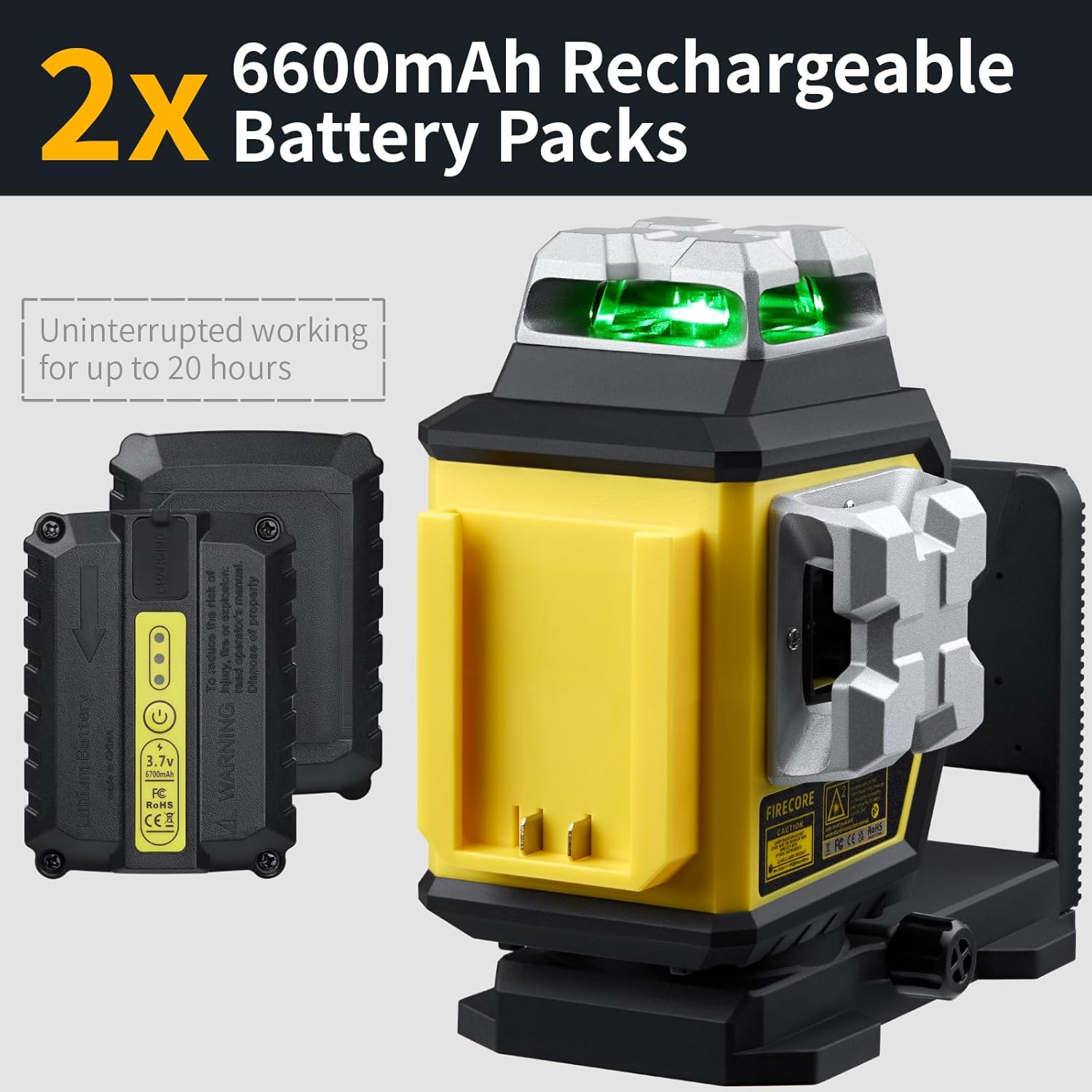
Image: Two 6600mAh rechargeable battery packs, highlighting their long-lasting power for uninterrupted operation of the laser level.
2. Mounting the Laser Level
The F95T-3G Pro offers multiple mounting options:
- Integrated Magnetic Bracket: The strong magnets on the back allow direct attachment to metal surfaces like steel studs or beams.
- Tripod Mounting: Use the 1/4"-20 or 5/8"-11 threads on the base to attach the level to a standard tripod or laser pole.
- Laser Track Clip: For ceiling grid or drywall track alignment, attach the laser level to the included track clip.

Image: The laser level mounted on a laser pole, demonstrating its versatility for aligning profiles on ceilings and walls.

Image: The laser track clip with quick connect, an ideal solution for professionals installing drop ceilings, providing stable mounting for the laser level.
Operating Instructions
1. Powering On/Off and Mode Selection
To power on the device, slide the pendulum lock switch to the unlocked position. The laser level will automatically enter Self-Leveling Mode. To power off, slide the switch back to the locked position. To power off, slide the switch back to the locked position.
Press the control buttons on the top panel to cycle through different laser line combinations (horizontal, vertical, or all three planes). The LCD screen will show the active modes.
2. Self-Leveling Mode
When the pendulum lock is unlocked, the device automatically self-levels within ±4° of true level. If the device is outside this range, the laser lines will flash rapidly, indicating it cannot self-level. Adjust the position of the laser level until the lines become steady.
3. Manual Mode
To activate Manual Mode, slide the pendulum lock switch to the locked position. In this mode, the laser lines are locked and can be projected at any angle. This is useful for tasks like aligning stairs or non-level surfaces. The laser lines will not flash in Manual Mode, even if the device is tilted.
4. Pulse Mode
Press the 'P' button on the control panel to activate Pulse Mode. This mode is designed for use with a Firecore Laser Receiver (sold separately) to extend the working range up to 197 ft, especially in bright outdoor conditions. The laser lines will appear slightly dimmer to the naked eye in Pulse Mode.

Image: The laser level operating in outdoor pulse mode, extending its range up to 197 ft when used with a compatible detector (sold separately).
5. Brightness Adjustment
The laser level features 3 brightness settings: Eco, Normal, and High. Cycle through these settings by pressing the brightness control button. Adjusting brightness can help optimize visibility in different lighting conditions and conserve battery life.
6. Fine Adjustment Knob
The 360° rotating base includes a micro adjustment knob. This knob allows for precise fine-tuning of the vertical line position, ensuring increased accuracy and precision for your alignment tasks.

Image: A hand adjusting the integrated micro control knob for faster point-to-point alignment, demonstrating the fine adjustment capability of the laser level.
Maintenance
- Cleaning: Use a soft, damp cloth to clean the device. Do not use harsh chemicals or abrasive cleaners. Keep the laser apertures clean for optimal performance.
- Storage: When not in use, store the laser level in its hard carry case with the pendulum locked to protect the internal components. Store in a dry, cool place away from direct sunlight.
- Battery Care: If storing for extended periods, remove the batteries. Recharge batteries periodically to maintain their lifespan.
Troubleshooting
| Problem | Possible Cause | Solution |
|---|---|---|
| Laser lines are flashing rapidly. | Device is outside its self-leveling range (±4°). | Adjust the position of the laser level until it is within the self-leveling range. |
| Laser lines are dim or not visible. | Low battery; Bright ambient light; Pulse mode active without receiver. | Recharge or replace batteries; Use in lower light conditions or activate Pulse Mode with a receiver; Adjust brightness setting to High. |
| Device does not power on. | Pendulum lock is engaged; Battery is not inserted correctly or is depleted. | Slide the pendulum lock switch to the unlocked position; Ensure battery is fully charged and correctly inserted. |
| Inaccurate measurements. | Device is not properly calibrated; Surface is unstable. | Contact customer support for calibration assistance; Ensure the mounting surface is stable and free from vibrations. |
Specifications
| Feature | Detail |
|---|---|
| Brand | Firecore |
| Model Number | F95T-3G |
| Material | Thermoplastic Elastomers, Acrylonitrile Butadiene Styrene |
| Color | Green Beam |
| Style | 3 X 360 Laser Level w/Two Batteries |
| Operation Mode | Automatic Self-Leveling Mode / Manual Mode / Pulse Mode |
| Accuracy | +/-1/9” at 33’ |
| Working Range | Up to 100’ (197’ with Firecore Laser Receiver) |
| Self-Leveling Range | ±4° |
| Power Source | Battery Powered (2 Lithium Ion batteries included) |
| Continuous Run Time | Up to 20 hours |
| IP Rating | IP54 (protection against water and dust) |
| Mounting Threads | 1/4"-20 & 5/8"-11 |
| Item Weight | 6.51 pounds |
| Package Dimensions | 13.58 x 11.69 x 5.67 inches |
Warranty and Support
Firecore provides a 24-Month after-sale service and lifetime technical support for the F95T-3G Pro Laser Level. If you encounter any issues or have questions regarding your product, please do not hesitate to contact Firecore customer support. You can find contact information on the Firecore official website or through your purchase platform.
For further assistance, please visit the Firecore Store on Amazon.
Ask a question about this manual
Ask about setup, troubleshooting, compatibility, parts, safety, or missing instructions. Manuals+ will review the question and use this page’s manual context to help answer it.