
1. Introduction
This manual provides detailed instructions for the installation, operation, and maintenance of your Binardat 5-Port Gigabit PoE Switch (Model 5x1G POE). Please read this manual thoroughly before using the device to ensure proper functionality and safety.

Figure 1: Top-down view of the Binardat 5-Port Gigabit PoE Switch. The device features a compact black metal casing with LED indicators on the top panel and ports on the front.
Key Features:
- 5 Gigabit Ports: Includes 4 Gigabit PoE ports and 1 Gigabit Uplink port (non-PoE), supporting 10/100/1000Mbps speeds.
- IEEE 802.3af/at Standard: Compliant with PoE standards, providing up to 30W per port with a total 65W power budget.
- Unmanaged Plug & Play: Automatic detection of PoE devices and compatibility with non-PoE devices for data transmission, requiring no configuration.
- Durable Metal Casing: Ensures longevity and efficient heat dissipation with a fanless design for silent operation.
- Flexible Installation: Supports desktop placement, weak current boxes, cabinets, and wall mounting.
- Port-based VLAN: Enhanced network segmentation for improved security and performance.
2. Package Contents
Please verify that all items are present and in good condition upon opening the package:
- Binardat 5-Port Gigabit PoE Switch (Model 5x1G POE)
- Power Adapter
- User Manual (this document)

Figure 2: Example of the product packaging for the Binardat Ethernet Switch. The box contains the switch and its accessories.
3. Physical Description
Front Panel Layout:

Figure 3: Detailed view of the front panel and LED indicators. From left to right, it shows the VLAN switch, Uplink port, four PoE ports (1-4), and the DC power input. Above the ports are LED indicators for Power, VLAN, Uplink, and Link/Act for ports 1-4.
- VLAN Switch: Toggles Port-based VLAN mode ON/OFF.
- Uplink Port: 1 Gigabit RJ45 port for connecting to a router or main network. This port does not provide PoE.
- PoE Ports (1-4): 4 Gigabit RJ45 ports supporting IEEE 802.3af/at PoE. These ports provide both data and power to compatible devices.
- DC Input: Power input for the external power adapter (12V/1.0A).
LED Indicators:
- PWR (Power): Green light indicates the device is powered on.
- VLAN: Green light indicates VLAN mode is enabled.
- Uplink: Green light indicates the Uplink port is active.
- 1-4 Link/Act: Green light indicates a successful link and activity on the corresponding PoE port.
4. Setup and Installation
The Binardat 5-Port Gigabit PoE Switch is designed for easy plug-and-play installation. No complex configuration is required.
4.1 Connecting the Switch:
- Power Connection: Connect the provided power adapter to the DC input port on the switch and then plug the adapter into a standard electrical outlet. The PWR LED should illuminate.
- Uplink Connection: Connect an Ethernet cable from your router or main network device to the "Uplink" port on the switch. The Uplink LED should illuminate.
- PoE Device Connection: Connect your PoE-compatible devices (e.g., IP cameras, Wireless Access Points, IP phones) to any of the PoE ports (1-4) using standard Ethernet cables. The corresponding Link/Act LED for each connected device should illuminate, and the device will receive power.
- Non-PoE Device Connection: You can also connect non-PoE network devices (e.g., computers, routers for data only) to the PoE ports. The switch will automatically detect that no power is needed and only transmit data.

Figure 4: The Binardat PoE Switch connected to multiple network devices via yellow Ethernet cables, demonstrating its plug-and-play functionality.
4.2 Mounting Options:
The compact design and metal casing allow for versatile placement:
- Desktop Placement: Simply place the switch on a flat, stable surface.
- Wall Mounting: The switch includes mounting holes on its underside for secure wall installation. Use appropriate screws (not included) for your wall type.


Figure 5: Left: The switch shown mounted vertically on a wall, highlighting its wall-mountable design. Right: A close-up of the switch's side vents, illustrating its fanless and quiet operation.
5. Operating the Switch
Once connected, the Binardat PoE Switch operates automatically. It is an unmanaged switch, meaning it requires no software configuration.
5.1 Power over Ethernet (PoE) Functionality:
The switch automatically detects and supplies power to IEEE 802.3af/at compliant PoE devices connected to ports 1-4. If a non-PoE device is connected, only data transmission occurs.

Figure 6: Illustration of PoE and non-PoE device compatibility. The switch provides power to IP cameras, wireless APs, and IP phones (PoE devices) while providing data to routers, computers, and NVRs (non-PoE devices).
5.2 Port-based VLAN Mode:
The switch features a physical VLAN switch on the front panel. When enabled, this mode isolates communication between PoE ports (1-4), preventing them from communicating directly with each other. All traffic from ports 1-4 will only be able to communicate with the Uplink port. This can enhance network security and reduce broadcast storms in specific scenarios.
- VLAN ON: Ports 1-4 are isolated from each other and can only communicate with the Uplink port.
- VLAN OFF: All ports (1-4 and Uplink) can communicate freely with each other.

Figure 7: Visual representation of port-based VLAN mode. When enabled, devices connected to ports 1-4 are isolated from each other but can still access the network via the Uplink port.
6. Maintenance
The Binardat 5-Port Gigabit PoE Switch is designed for reliable, low-maintenance operation.
- Cleaning: Use a soft, dry cloth to clean the exterior of the switch. Do not use liquid or aerosol cleaners.
- Ventilation: Ensure adequate airflow around the switch. Although fanless, proper ventilation helps maintain optimal operating temperature.
- Firmware: As an unmanaged switch, no firmware updates are typically required or available for user installation.
- Environmental Conditions: Operate the switch within its specified temperature and humidity ranges to ensure longevity.
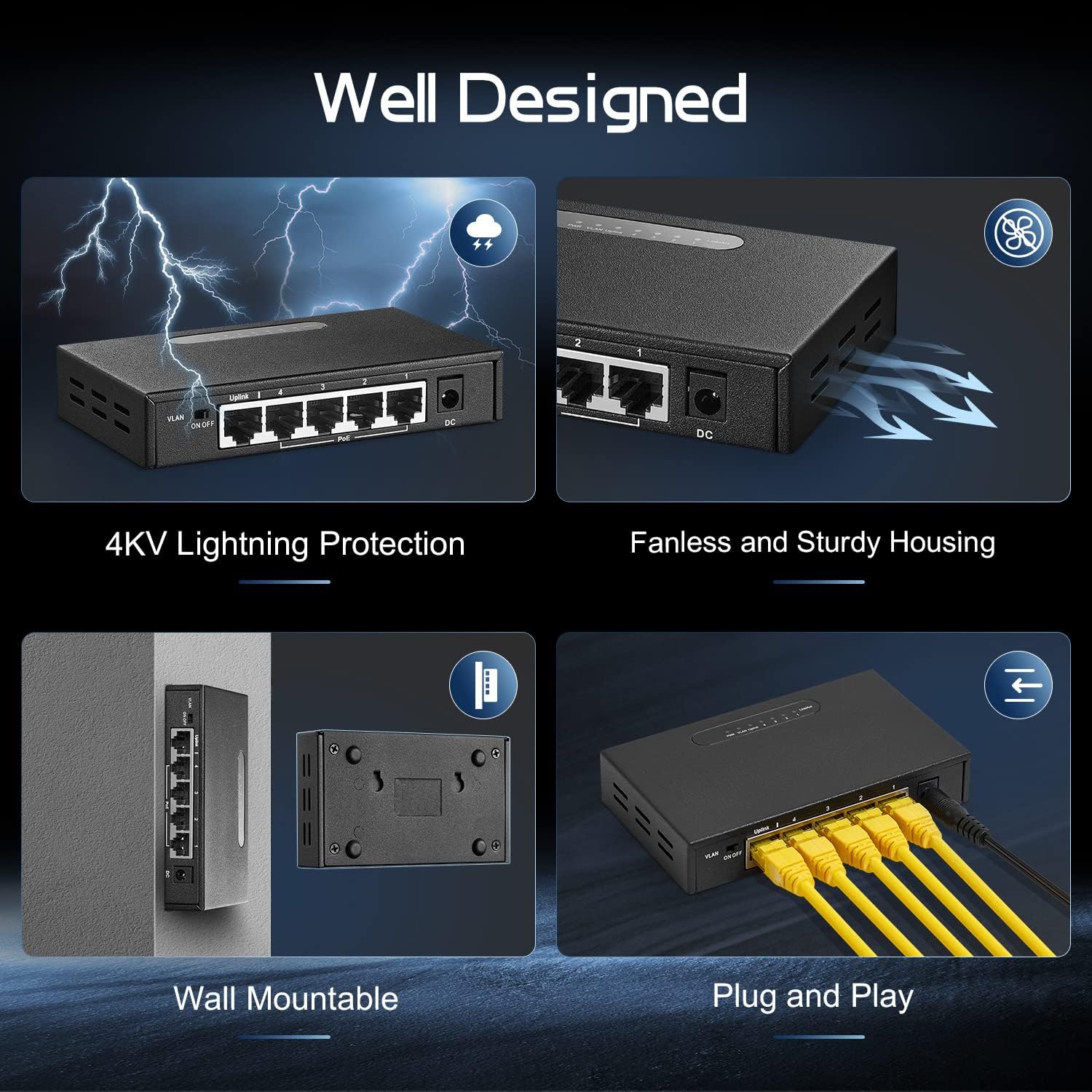
Figure 8: Features of the switch including 4KV lightning protection and a fanless, sturdy metal housing for durability and silent operation.
7. Troubleshooting
If you encounter issues with your Binardat PoE Switch, please refer to the following common problems and solutions:
| Problem | Possible Cause | Solution |
|---|---|---|
| No Power (PWR LED off) | Power adapter not connected or faulty; power outlet issue. | Ensure the power adapter is securely connected to the switch and a working power outlet. Try a different outlet. |
| Device not receiving power from PoE port | Device is not PoE compatible; cable issue; power budget exceeded. | Verify the device is IEEE 802.3af/at compliant. Check Ethernet cable for damage. Ensure total power consumption of connected PoE devices does not exceed 65W. |
| No network connectivity | Ethernet cable issue; Uplink port not connected; VLAN mode enabled incorrectly. | Check all Ethernet cables for secure connection and damage. Ensure the Uplink port is connected to your main network. If experiencing isolation, check the VLAN switch position. |
| Slow network speed | Cable quality; network congestion; device limitations. | Use high-quality Cat5e or Cat6 Ethernet cables. Ensure connected devices support Gigabit speeds. |
If the problem persists after trying these solutions, please contact Binardat customer support.
8. Specifications
| Feature | Detail |
|---|---|
| Model | 5x1G POE |
| Ports | 4 x 10/100/1000Mbps PoE RJ45 Ports, 1 x 10/100/1000Mbps Uplink RJ45 Port |
| PoE Standard | IEEE 802.3af/at |
| Total PoE Power Budget | 65W |
| Max Power Per Port | 30W |
| Backplane Bandwidth | 10Gbps |
| Packet Forwarding Rate | 7.44Mpps |
| Jumbo Frame | 4096 bytes |
| MAC Address Table Size | 2K |
| Case Material | Metal |
| Cooling | Fanless |
| Power Supply | External Power Adapter (Input: 100-240V AC, Output: 12V DC) |
| Dimensions | 7.48 x 3.62 x 3.43 inches (Package Dimensions) |
| Item Weight | 1.21 pounds (0.55 kg) |
| Compatible Devices | IP Camera, Wireless Access Point, IP Phone, Desktop, Router, NVR |

Figure 9: Diagram illustrating key performance metrics such as 10Gbps backplane bandwidth, 65W PoE budget, 7.44Mpps packet forwarding rate, and 4096 bytes jumbo frame support.
9. Warranty and Support
9.1 Warranty Information:
Binardat products are designed for reliability and performance. For specific warranty details, please refer to the warranty card included with your product or visit the official Binardat website. Keep your purchase receipt for warranty claims.
9.2 Technical Support:
If you require further assistance or encounter issues not covered in this manual, please contact Binardat technical support:
- Email: support@binardat.com
- Website: www.binardat.com
Please have your product model (5x1G POE) and purchase information ready when contacting support.