
Introduction
This manual provides essential information for the safe and effective operation, maintenance, and troubleshooting of your Ingco 20V 1/2" Brushless 400NM Cordless Impact Wrench, model CIWLI20401. Please read these instructions carefully before using the tool and retain them for future reference.

Image: The Ingco 20V 1/2" Brushless Cordless Impact Wrench CIWLI20401, a powerful tool designed for various fastening and loosening tasks.
Important Note: The Ingco CIWLI20401 impact wrench is a bare unit. It requires a compatible Ingco 20V lithium-ion battery and charger, which are sold separately. This tool is part of the Ingco 20V li-ion power tool system.
Safety Instructions
Always follow basic safety precautions when using power tools to reduce the risk of fire, electric shock, and personal injury.
- Work Area Safety: Keep your work area clean and well-lit. Cluttered or dark areas invite accidents. Do not operate power tools in explosive atmospheres, such as in the presence of flammable liquids, gases, or dust.
- Electrical Safety: Avoid body contact with earthed or grounded surfaces. Do not expose power tools to rain or wet conditions.
- Personal Safety: Always wear eye protection. Use hearing protection when operating the tool for extended periods. Dress properly; avoid loose clothing or jewelry that can get caught in moving parts.
- Tool Use and Care: Do not force the power tool. Use the correct power tool for your application. Disconnect the battery pack from the tool before making any adjustments, changing accessories, or storing power tools.
- Battery Tool Use and Care: Recharge only with the charger specified by the manufacturer. Use power tools only with specifically designated battery packs.
Product Components
Familiarize yourself with the various parts of your Ingco Impact Wrench.
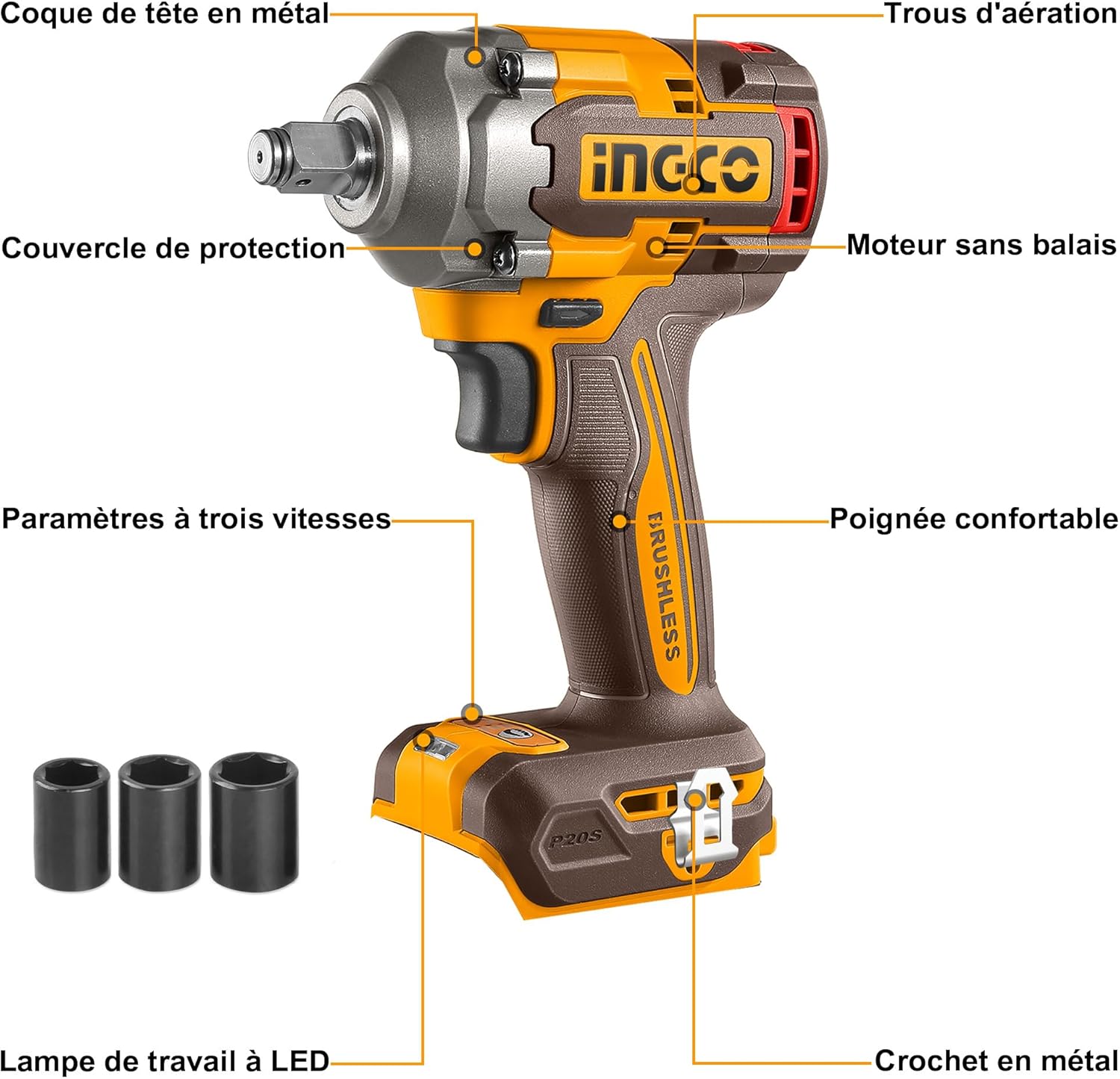
Image: Diagram illustrating the key components of the Ingco Impact Wrench, including the metal head housing, ventilation holes, brushless motor, three-speed settings, comfortable handle, LED work light, and metal hook.
- Metal Head Housing
- Ventilation Holes
- Protective Cover
- Brushless Motor
- Three-Speed Settings Selector
- Comfortable Handle
- LED Work Light
- Metal Hook
Technical Specifications
Detailed specifications for the Ingco CIWLI20401 Impact Wrench.

Image: A visual representation of the key technical parameters for the Ingco Impact Wrench, including motor type, drive size, speed, impact rate, and torque.
| Parameter | Value |
|---|---|
| Model Number | CIWLI20401 |
| Motor Type | Brushless |
| Voltage | 20V |
| Drive Square | 1/2" |
| No-load Speed | 0-1600 / 0-1900 / 0-2300 rpm |
| Impact Rate | 0-2100 / 0-2500 / 0-2900 bpm |
| Fastening Torque | 400 Nm |
| Nut-busting Torque | 550 Nm |
| Included Accessories | 3 Sockets (17mm, 19mm, 21mm) |
| Item Weight | 1.58 kg |
| Product Dimensions | 10 x 20 x 37 cm |
Setup
1. Battery Installation (Battery Not Included)
Ensure the tool is switched off before installing or removing the battery.
- Align the battery pack with the battery port on the base of the impact wrench.
- Slide the battery pack into the port until it clicks securely into place.
- To remove, press the battery release button and slide the battery pack out.
2. Socket Attachment
The impact wrench uses a 1/2" square drive for sockets.
- Select the appropriate socket size (e.g., 17mm, 19mm, 21mm) for your application.
- Push the socket firmly onto the square drive spindle until it locks into place.
- To remove, pull the socket off the spindle.
Operating Instructions
1. Powering On/Off
The tool is activated by pressing the trigger switch. Release the trigger to turn off the tool.
2. Variable Speed Control
The impact wrench features 3 variable speed settings for precise control over various applications.
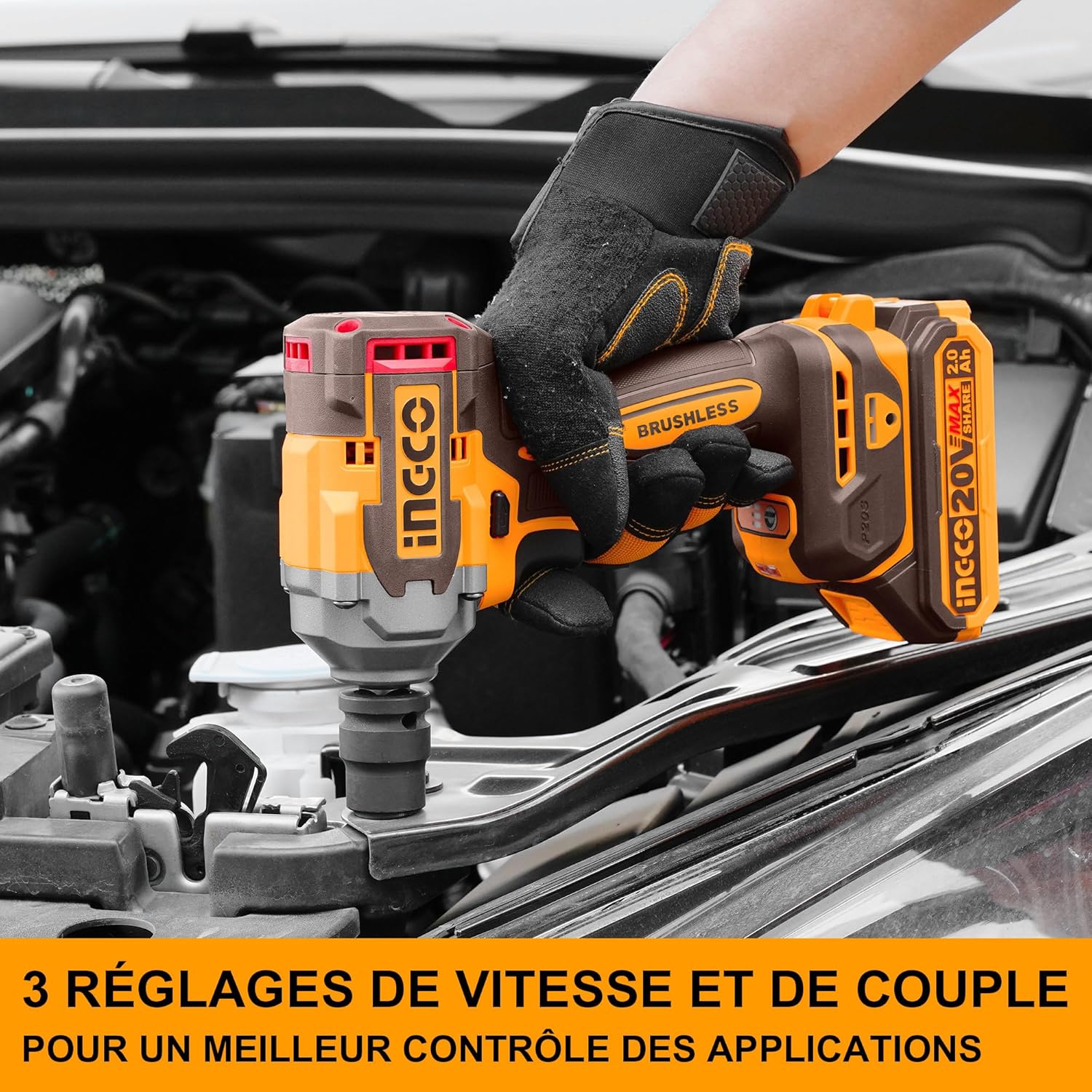
Image: The Ingco Impact Wrench highlighting its three-speed and torque settings, allowing for better control across different tasks.
- Use the speed selector button (refer to Product Components diagram) to cycle through the three available speed settings: 0-1600 rpm, 0-1900 rpm, and 0-2300 rpm.
- Lower speeds are suitable for delicate tasks or when starting to prevent overtightening.
- Higher speeds provide maximum power for stubborn fasteners.
3. Using the LED Work Light
The integrated LED work light illuminates the work area for improved visibility.

Image: The Ingco Impact Wrench demonstrating its LED work light, which is useful for working in dimly lit environments.
- The LED work light activates automatically when the trigger is pressed.
- It remains on for a short period after the trigger is released to help you see your work.
4. General Usage Tips
- Ensure the fastener and socket are clean and free of debris.
- Apply steady pressure to the tool while operating.
- For loosening stubborn nuts, use the highest speed setting and allow the impact mechanism to work.

Image: A user operating the Ingco Impact Wrench to fasten components on a metal structure, demonstrating its application in construction or assembly tasks.
Maintenance
Regular maintenance ensures optimal performance and extends the life of your tool.
- Cleaning: Keep the ventilation openings clear and free of dust. Use a soft, damp cloth to clean the tool's exterior. Do not use harsh chemicals or abrasive cleaners.
- Storage: Store the tool in a dry, secure place out of reach of children. Remove the battery pack before storing for extended periods.
- Inspection: Periodically check for damaged parts. If any part is damaged, have it repaired by a qualified service technician.
Troubleshooting
Before contacting customer support, try these common troubleshooting steps.
| Problem | Possible Cause | Solution |
|---|---|---|
| Tool does not start | Battery not charged or improperly installed | Ensure battery is fully charged and correctly inserted. |
| Reduced power or performance | Low battery charge; incorrect speed setting | Recharge battery; select a higher speed setting. |
| Excessive vibration or noise | Loose socket; damaged internal components | Check socket attachment; discontinue use and seek professional service if noise persists. |
Warranty and Support
For warranty information or technical support, please refer to the warranty card included with your purchase or visit the official Ingco website. Keep your proof of purchase for any warranty claims.


