
MEDION E701
MEDION Mobile Air Conditioner E701 User Manual
Model: E701 | Brand: MEDION
1. Introduction
Thank you for choosing the MEDION Mobile Air Conditioner E701. This manual provides essential information for the safe and efficient operation of your new appliance. Please read it thoroughly before use and keep it for future reference.

Image: The MEDION Mobile Air Conditioner E701, a sleek white unit with its remote control and exhaust hose accessories.
2. Safety Information
Always observe the following safety precautions to reduce the risk of fire, electric shock, or injury:
- Ensure the power supply matches the voltage specified on the appliance's rating label.
- Do not operate the air conditioner with a damaged cord or plug.
- Keep the appliance away from heat sources and direct sunlight.
- Do not block air inlets or outlets.
- Do not insert objects into the air outlets.
- Always unplug the unit before cleaning or maintenance.
- This appliance uses R290 refrigerant. Servicing should only be performed by qualified personnel.
3. Package Contents
Verify that all items are present and undamaged:
- MEDION Mobile Air Conditioner Unit
- Remote Control
- Exhaust Hose
- Window Sealing Kit (Window film, Window outlet, Adapter for exhaust hose, Velcro tape)
- Condensation Drain Hose
- User Manual

Image: All included accessories for the MEDION Mobile Air Conditioner, including the exhaust hose, window sealing kit components, remote control, and condensation hose.
4. Setup and Installation
For optimal performance, place the unit on a flat, stable surface. Ensure there is at least 30 cm of space around the unit for proper airflow.
4.1 Exhaust Hose Installation
- Attach the exhaust hose to the air outlet on the back of the unit.
- Connect the other end of the exhaust hose to the window outlet adapter.
- Install the window sealing kit: Apply the self-adhesive velcro tape around the window frame. Attach the window film to the velcro. Insert the window outlet adapter through the opening in the window film and seal it tightly.
4.2 Condensation Drain Hose
During dehumidification or in high humidity, the unit will collect condensation. Connect the condensation drain hose to the drain port and direct it into a suitable container or drain.

Image: The air conditioner positioned in a room, illustrating its compact dimensions (300mm x 290mm x 690mm) and its cooling coverage for rooms up to 25 square meters.
5. Operating Instructions
The MEDION E701 offers three primary operating modes: Cooling, Dehumidifying, and Ventilating.

Image: Close-up of the air conditioner highlighting its three practical functions: Cooling, Dehumidifying, and Ventilating.
5.1 Control Panel and Remote Control
The unit can be controlled via the touch control panel on top or the included remote control.

Image: Top view of the air conditioner's control panel displaying the temperature setting (20 degrees Celsius) and various function icons, alongside the remote control for convenient operation.
5.2 Mode Selection
- Cooling Mode: Select the snowflake icon. Adjust the desired temperature using the up/down arrows. The unit will cool the room to the set temperature.
- Dehumidifying Mode: Select the water drop icon. The unit will remove excess moisture from the air.
- Fan Mode: Select the fan icon. The unit will circulate air without cooling.
5.3 Temperature and Fan Speed Adjustment
In Cooling mode, use the temperature buttons to set your preferred room temperature. The unit offers two fan speed levels for flexible adjustment.

Image: The MEDION Mobile Air Conditioner, highlighting its 7,000 BTU cooling capacity, suitable for quickly reaching a comfortable temperature in rooms up to 25 square meters.
5.4 Sleep Mode and Timer Function
Activate Sleep Mode for quieter operation during the night. The Timer function allows you to set a specific time for the unit to turn on or off automatically.

Image: The air conditioner operating in a bedroom at night, demonstrating its quiet sleep mode and timer function for undisturbed rest.
6. Maintenance
Regular maintenance ensures optimal performance and extends the lifespan of your air conditioner.
6.1 Cleaning the Air Filter
The air filter should be cleaned every two weeks or more frequently depending on usage. A dirty filter reduces efficiency.
- Unplug the unit from the power outlet.
- Remove the air filter from the back of the unit.
- Clean the filter with a vacuum cleaner or wash it with warm water and mild detergent.
- Allow the filter to dry completely before reinserting it.
6.2 Draining Condensation
The unit has an internal water collection tank. When full, the unit will stop operating and display an error code. Drain the water using the condensation drain hose as described in the setup section.
7. Troubleshooting
Before contacting customer support, try the following solutions for common issues:
| Problem | Possible Cause | Solution |
|---|---|---|
| Unit does not turn on | No power, plug loose, power outage. | Check power connection, wall outlet, and circuit breaker. |
| Insufficient cooling | Dirty air filter, blocked air intake/outlet, room too large, windows/doors open. | Clean filter, ensure clear airflow, close windows/doors, check room size suitability (up to 25m²). |
| Unit is noisy | Unit not on a flat surface, fan speed too high. | Place on a stable, flat surface. Consider an anti-vibration mat. Reduce fan speed if possible. |
| Water leakage | Condensation tank full, drain hose improperly connected or blocked. | Drain water tank. Check and secure drain hose connection. |
8. Technical Specifications
| Feature | Specification |
|---|---|
| Brand | MEDION |
| Model Number | E701 |
| Cooling Capacity | 7,000 BTU (2051 Watt) |
| Recommended Room Size | Up to 25 m² |
| Operating Modes | Cooling, Dehumidifying, Ventilating |
| Refrigerant | R290 (Propane) |
| Noise Level | 50 dB |
| Power Consumption (Input) | Approx. 789 Watt (Based on 2051W cooling capacity and EER 2.6) |
| Voltage | 230 Volt |
| Dimensions (L x W x H) | 28.2 x 30.2 x 69.2 cm |
| Weight | 20 Kilograms |
| Energy Efficiency Class | A |
| Filter Type | Dust Filter |
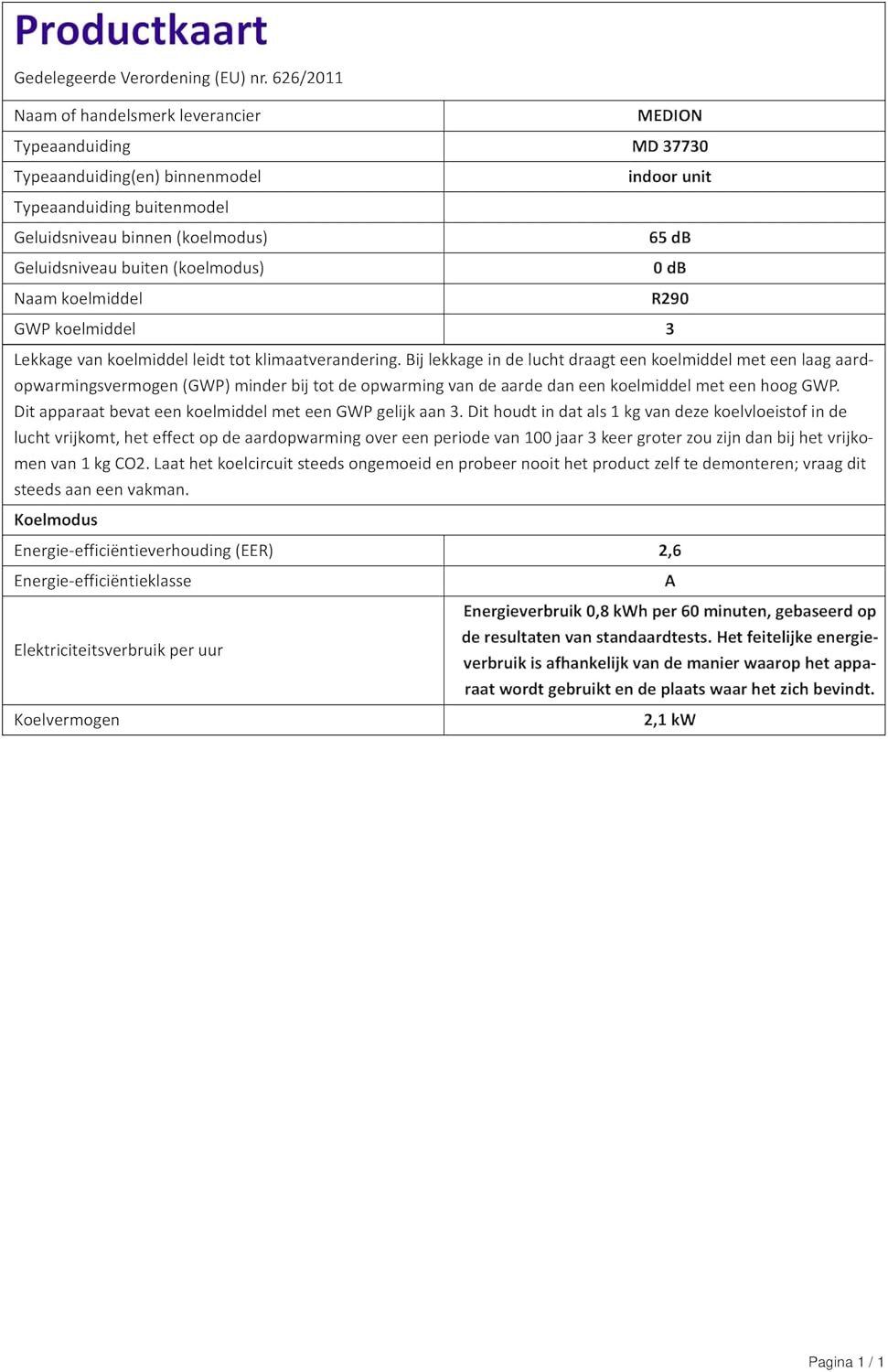
Image: The product card detailing technical specifications and energy efficiency information.
9. Warranty and Support
9.1 Manufacturer's Warranty
This MEDION product comes with a manufacturer's warranty of 24 months from the date of purchase. Please retain your proof of purchase for warranty claims.
9.2 Customer Support
For technical assistance, troubleshooting beyond this manual, or warranty inquiries, please contact MEDION customer support. MEDION is committed to providing excellent service and support 365 days a year. If an issue cannot be resolved via phone or email, their repair service is available.
Visit the official MEDION website or refer to the contact information provided with your product documentation for the most up-to-date support details.
Visit the MEDION Store on AmazonRelated documentsE701


Ask a question about this manual
Ask about setup, troubleshooting, compatibility, parts, safety, or missing instructions. Manuals+ will review the question and use this page’s manual context to help answer it.