
1. Introduction
Thank you for choosing the Ingco CSDLI08025 8V Cordless Screwdriver. This manual provides essential information for the safe and efficient operation, maintenance, and troubleshooting of your new tool. Please read these instructions carefully before use and keep them for future reference.
The Ingco CSDLI08025 is a versatile 8V cordless screwdriver designed for various tasks, including furniture assembly, drawer installation, and general DIY projects. It features a powerful 220 RPM motor, 6 Nm of torque, an integrated LED work light, and comes with 17 essential accessories for immediate use.
2. Safety Instructions
Always follow basic safety precautions to reduce the risk of fire, electric shock, and personal injury.
- Work Area Safety: Keep your work area clean and well-lit. Cluttered or dark areas invite accidents. Do not operate power tools in explosive atmospheres, such as in the presence of flammable liquids, gases, or dust.
- Electrical Safety: Avoid body contact with earthed or grounded surfaces (e.g., pipes, radiators, ranges, refrigerators). Do not expose power tools to rain or wet conditions.
- Personal Safety: Always wear eye protection. Use hearing protection when operating for extended periods. Dress properly; avoid loose clothing or jewelry. Keep hair, clothing, and gloves away from moving parts.
- Tool Use and Care: Do not force the power tool. Use the correct power tool for your application. Disconnect the plug from the power source and/or the battery pack from the power tool before making any adjustments, changing accessories, or storing power tools.
- Battery Safety: Recharge only with the charger specified by the manufacturer. Do not use battery packs other than those specifically designated for the tool. Do not open, crush, or expose the battery to fire or high temperatures.
3. Package Contents
Verify that all items are present upon unpacking:
- 1 x Ingco CSDLI08025 8V Cordless Screwdriver
- 1 x USB Charging Cable
- 1 x Storage Case
- 10 x 25mm Cr-V Screwdriver Bits (SL4, SL6, PH1, PH2, PH3, PZ1, PZ2, PZ3, T20, T25)
- 1 x 60mm Bit Connector/Extension
- 4 x HSS Drill Bits with Hex Shank (2.0mm, 2.5mm, 3.0mm, 4.0mm)
- 1 x CRV PH2 Screwdriver Bit
- 1 x CRV 6 Screwdriver Bit
4. Product Overview
Familiarize yourself with the main components of your Ingco CSDLI08025 cordless screwdriver:

Figure 1: Diagram showing the Ingco CSDLI08025 cordless screwdriver with labeled components: self-locking chuck, LED light, on/off switch, rotation button (forward/reverse), and USB port.
- Self-locking Chuck: For quick and secure bit changes.
- LED Light: Illuminates the work area for improved visibility in dark spaces.
- On/Off Switch: Activates and deactivates the screwdriver.
- Rotation Button (Forward/Reverse): Controls the direction of rotation for driving or removing screws.
- USB Port: For charging the internal battery.
- Adjustable Handle: Allows the tool to be used in a pistol grip or straight configuration for versatility.
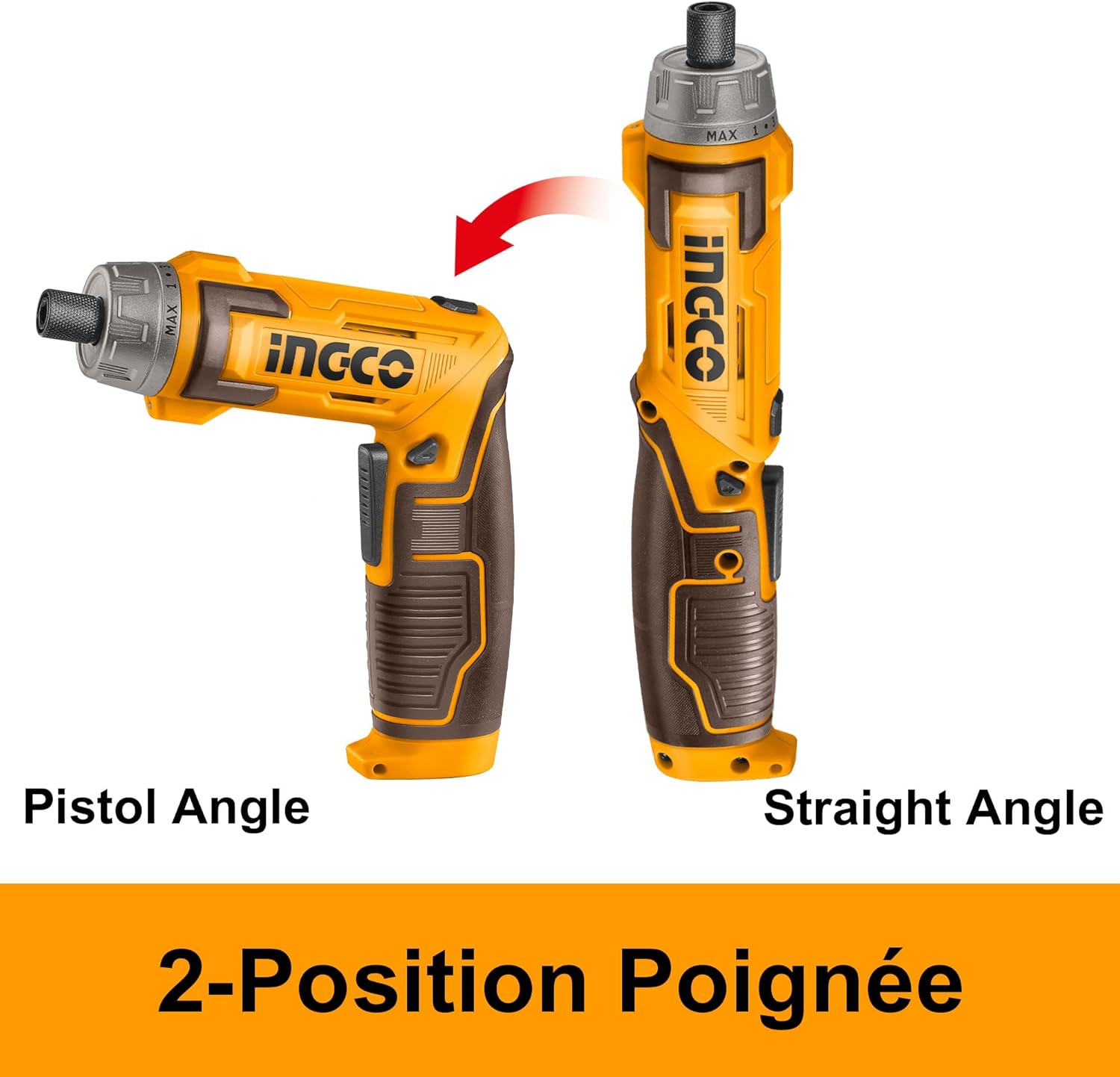
Figure 2: Illustration demonstrating the two-position handle of the Ingco CSDLI08025 screwdriver, showing both pistol grip and straight configurations.
5. Setup
5.1. Charging the Battery
The screwdriver is powered by an integrated Lithium-ion battery. Before first use, fully charge the battery.
- Locate the USB charging port on the screwdriver.
- Connect the provided USB charging cable to the screwdriver's USB port.
- Plug the other end of the USB cable into a compatible USB power adapter (not included) or a powered USB port.
- Allow the battery to charge until the charging indicator (if present) shows a full charge. Charging time may vary.
5.2. Installing/Changing Bits
The self-locking chuck allows for quick and easy bit changes.
- Ensure the screwdriver is turned off and the rotation button is in the neutral (locked) position.
- Insert the desired hex shank bit directly into the chuck until it clicks into place.
- To remove a bit, pull the chuck collar forward and pull the bit out.
6. Operating Instructions
6.1. Powering On/Off
Press the On/Off switch to activate the screwdriver. Release the switch to turn it off.
6.2. Selecting Rotation Direction
Use the rotation button (forward/reverse switch) to select the desired direction:
- Push the button to the left for forward rotation (driving screws).
- Push the button to the right for reverse rotation (removing screws).
- Ensure the button is in the center position when not in use to prevent accidental activation.
6.3. Adjusting Handle Position
The handle can be adjusted for different working angles:
- Hold the screwdriver firmly.
- Gently twist the handle to unlock its position.
- Adjust the handle to either the pistol grip or straight configuration.
- Twist the handle back to lock it in the desired position.
6.4. Using the LED Light
The integrated LED light automatically activates when the screwdriver is in operation, illuminating your work area. It can also function as a flashlight to light up dark corners or confined spaces.

Figure 3: Close-up of the Ingco CSDLI08025 cordless screwdriver in use, highlighting the activated LED light illuminating the work area in a dimly lit space.
6.5. Screwdriving and Drilling
Select the appropriate bit for the task. For screwdriving, ensure the bit fits snugly into the screw head to prevent stripping. For drilling, use the provided HSS drill bits and apply steady, even pressure.

Figure 4: A person wearing safety gear using the Ingco CSDLI08025 cordless screwdriver to drive a screw into a wooden beam, demonstrating its application.

Figure 5: A hand holding the Ingco CSDLI08025 cordless screwdriver in its straight configuration, driving a screw into an overhead wooden surface.
7. Maintenance
Regular maintenance ensures optimal performance and extends the life of your tool.
- Cleaning: Keep the tool's ventilation openings clean to prevent overheating. Wipe the tool with a soft, damp cloth. Do not use harsh chemicals or abrasive cleaners.
- Battery Care: Store the battery in a cool, dry place away from direct sunlight. Do not store the battery in a discharged state for extended periods.
- Bit Maintenance: Clean bits after use. Replace worn or damaged bits to ensure efficient operation and prevent damage to fasteners.
- Storage: Store the screwdriver and its accessories in the provided storage case in a dry, secure location out of reach of children.
8. Troubleshooting
If you encounter issues, refer to the following common problems and solutions:
| Problem | Possible Cause | Solution |
|---|---|---|
| Screwdriver does not turn on. | Battery is discharged. | Charge the battery fully. |
| Screwdriver lacks power. | Low battery charge. | Recharge the battery. |
| Bit slips or strips screw head. | Incorrect bit size or worn bit. | Use the correct bit size for the screw. Replace worn bits. |
| Handle does not lock in position. | Handle not twisted to lock. | Ensure the handle is twisted firmly to lock it after adjustment. |
If the problem persists after trying these solutions, please contact customer support.
9. Specifications
Technical specifications for the Ingco CSDLI08025 8V Cordless Screwdriver:

Figure 6: A detailed image of the Ingco CSDLI08025 cordless screwdriver with an overlay of its technical specifications, including voltage, speed, torque, and included accessories.
| Feature | Detail |
|---|---|
| Model Number | CSDLI08025 |
| Brand | Ingco |
| Voltage | 8 Volts |
| No-load Speed | 220 RPM |
| Max. Torque | 6 Newton Meters |
| Torque Settings | 15+1 |
| Chuck Size | Max 25 mm |
| Hex Shank | 6.35mm (1/4") |
| Power Source | Battery Powered |
| Battery Type | Lithium-ion |
| Material | Plastic |
| Product Dimensions (L x W x H) | 25 x 24 x 7 cm |
| Item Weight | 1.16 Kilograms |
| Recommended Uses | Furniture assembly, drawer installation, DIY projects |
10. Warranty and Support
For warranty information or technical support, please refer to the documentation provided with your purchase or contact your retailer. Keep your proof of purchase for any warranty claims.


