
SZBOX N305
SZBOX N305 NAS Motherboard User Manual
Model: N305
1. Product Overview
The SZBOX N305 NAS Motherboard is a compact Mini-ITX solution designed for network-attached storage (NAS) systems, firewalls, and other embedded applications. It integrates an Intel Alder Lake-N N305 processor, offering a balance of performance and power efficiency. This motherboard features extensive connectivity options, including multiple 2.5G Ethernet ports and SATA 3.0 interfaces, making it suitable for various home and small business server needs.
Key features include:
- Integrated Intel Alder Lake-N N305 CPU (8 Cores/8 Threads, 6MB Cache, up to 3.8 GHz).
- Mini-ITX form factor (17 x 17 cm) compatible with 115X series radiators.
- 4 x Intel i226 2.5G RJ45 network ports for high-speed networking.
- 6 x SATA 3.0 6Gbps slots for ample storage expansion.
- 2 x M.2 NVMe PCIe 3.0x1 SSD slots for fast storage.
- 1 x SO-DIMM DDR5 4800MHz RAM slot, supporting up to 32GB.
- Display outputs: 1 x HDMI 2.1, 1 x DisplayPort 1.4b, supporting dual 4K@60Hz displays.
- I/O ports: 2 x USB 2.0, 1 x USB 3.0, 1 x Type-C (USB 2.0 rate), 1 x 3.5mm audio interface.
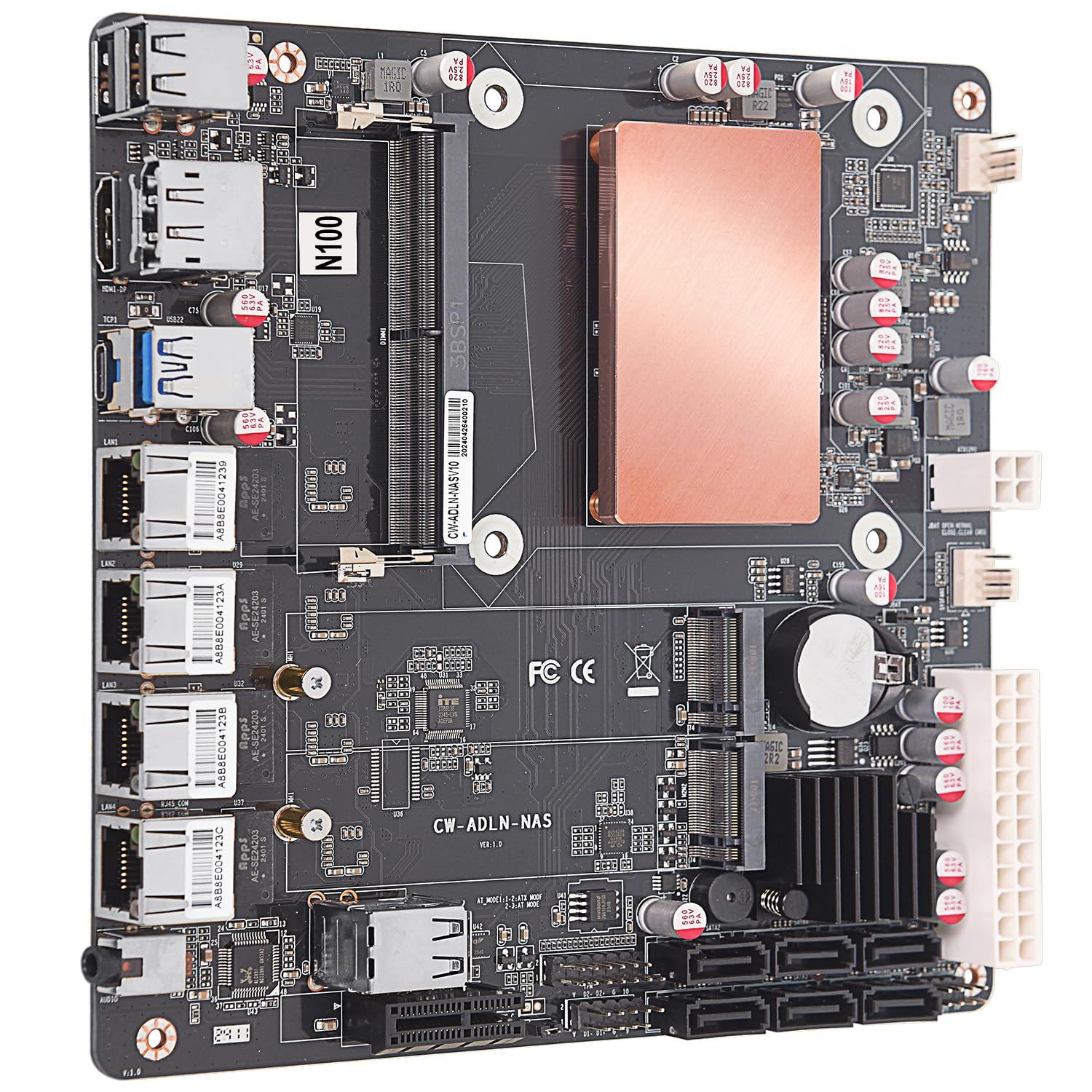
Figure 1: Top view of the SZBOX N305 NAS Motherboard, highlighting key features and initial setup notices.
2. Setup Instructions
2.1 Important Notices
- Power Supply: Use a 24-pin and 4-pin power supply. A rated power between 250W and 450W is suitable, with 300W recommended. Always use a new, reliable power supply.
- Initial Boot Time: For the first boot, or after re-plugging memory, the motherboard requires additional time (approximately 3-5 minutes) to detect hardware information. Please be patient and allow this process to complete.
- Handling Precautions: When handling the motherboard, avoid touching metal cable parts to prevent short circuits. Ensure no loose screws or metal parts are present on the motherboard or within the computer case during assembly.
2.2 Component Installation
Refer to the diagrams below for component locations.
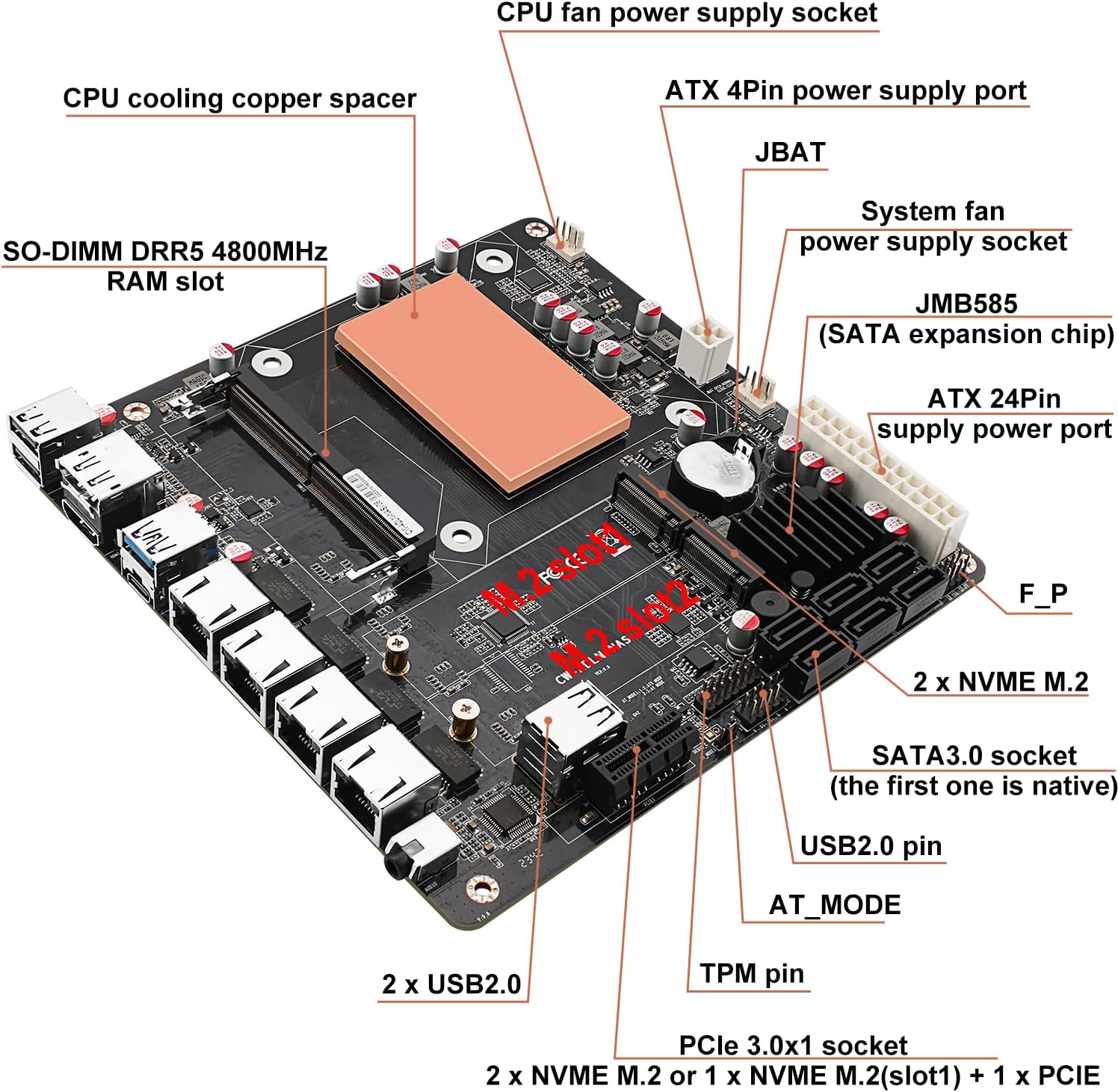
Figure 2: Internal component layout of the N305 motherboard, showing power sockets, RAM slot, and storage interfaces.
- RAM Installation: Insert a DDR5 SO-DIMM module into the designated slot. Ensure it is seated correctly. The motherboard supports up to 32GB of DDR5 4800MHz RAM.
- Storage Installation:
- SATA Drives: Connect up to six SATA 3.0 (6Gbps) drives to the SATA sockets.
- M.2 NVMe SSDs: Install M.2 NVMe SSDs into the two M.2 slots. Note that one M.2 slot shares bandwidth with the PCIe 3.0x1 slot.
- Power Connections: Connect the 24-pin ATX power connector and the 4-pin ATX power connector from your power supply to the motherboard.
- Cooling: The motherboard features a CPU cooling copper spacer. Ensure adequate airflow within your case, especially if using a passive cooler.
- Front Panel Connectors: Connect your case's front panel headers (power button, reset button, USB, audio) to the corresponding pins on the motherboard.
3. Operating Instructions
3.1 Compatible Operating Systems
This motherboard supports a variety of operating systems, primarily for server and network applications:
- Windows 10/11 (64-bit)
- Linux distributions
- FreeBSD
- pfSense
- OPNsense
- VMware
- Proxmox
Note: The system supports UEFI boot only.
3.2 Initial Boot and BIOS Configuration
After assembling your system, power it on. During the initial boot, access the BIOS/UEFI settings by pressing the designated key (usually DEL or F2) during startup. Here you can configure boot order, storage settings, and other system parameters.
The BIOS is extensive and allows for detailed configuration in various areas. Ensure your network and storage settings are correctly configured for your intended application (e.g., NAS, firewall).
3.3 Network Connectivity
The motherboard is equipped with four Intel i226 2.5G RJ45 network ports. Connect your network cables to these ports. Drivers for these network cards may require updates depending on your chosen operating system to ensure optimal performance and stability.

Figure 3: Rear I/O panel of the N305 motherboard, showing USB, HDMI, DisplayPort, Type-C, RJ45 2.5G network ports, and audio port.
4. Maintenance
- Dust Removal: Regularly clean dust from the motherboard and case to prevent overheating and ensure optimal performance. Use compressed air for this purpose.
- BIOS Updates: Check the manufacturer's website for BIOS updates. Updating the BIOS can improve stability, add new features, or resolve compatibility issues.
- Driver Updates: Keep your operating system drivers, especially for network interfaces, updated to ensure the best performance and stability.
- Physical Inspection: Periodically inspect the motherboard for any loose connections, damaged components, or signs of wear.
5. Troubleshooting
5.1 System Instability or Random Freezes
Some users have reported random system freezes or reboots. If you experience such issues, consider the following:
- Memory (RAM):
- Ensure the RAM module is correctly seated in its slot.
- Test the RAM module using memory diagnostic tools (e.g., MemTest86). If errors are found, try a different, compatible DDR5 SO-DIMM module.
- Verify that the RAM speed and timings are compatible with the motherboard's specifications.
- Power Supply:
- Ensure your power supply provides sufficient and stable power (300W recommended). An underpowered or faulty power supply can cause instability.
- Check all power connections to the motherboard and components.
- BIOS Settings:
- Reset BIOS settings to default.
- Check for and install the latest BIOS update from the manufacturer.
- Overheating: Ensure proper cooling. Check CPU temperatures and case airflow.
- Storage: If using M.2 NVMe SSDs, ensure they are properly installed and not overheating.
5.2 Network Interface Issues
- Driver Updates: Ensure the latest drivers for the Intel i226 network cards are installed for your operating system.
- Cable Connections: Verify that network cables are securely connected to both the motherboard and your network device.
- BIOS Settings: Check BIOS settings related to network controllers to ensure they are enabled.
6. Specifications

Figure 4: Detailed list of main board core features and specifications.
| Feature | Detail |
|---|---|
| Brand | SZBOX |
| Model Number | N305 |
| Form Factor | Mini-ITX (17 x 17 cm) |
| Processor | Integrated Intel Alder Lake-N N305 (8 Cores/8 Threads, up to 3.8 GHz, 6MB Cache) |
| Processor Socket | Socket M (Integrated) |
| Memory Type | 1 x SO-DIMM DDR5 4800MHz slot |
| Max Memory Supported | 32GB |
| Storage Interfaces | 6 x SATA 3.0 6Gbps, 2 x M.2 NVMe PCIe 3.0x1 SSD slots |
| Network Interfaces | 4 x Intel i226 2.5G RJ45 Ethernet ports |
| Video Outputs | 1 x HDMI 2.1, 1 x DisplayPort 1.4b (supports dual 4K@60Hz) |
| USB Ports | 2 x USB 2.0, 1 x USB 3.0, 1 x Type-C (USB 2.0 rate) |
| Audio Interface | 1 x Realtek ALC897 2-in-1 3.5mm audio jack |
| PCIe Expansion | 1 x PCIe 3.0x1 slot (shared signal with second M.2) |
| Product Dimensions | 17 x 17 x 5 cm |
| Item Weight | 610 grams |
7. Warranty and Support
For warranty information and technical support, please refer to the documentation provided with your purchase or visit the official SZBOX website. Keep your proof of purchase for warranty claims.
If you encounter issues not covered in this manual, please contact SZBOX customer support for assistance.
Related documentsN305


Ask a question about this manual
Ask about setup, troubleshooting, compatibility, parts, safety, or missing instructions. Manuals+ will review the question and use this page’s manual context to help answer it.