
Introduction
The EaseZen EMS Foot Massager is an innovative device utilizing advanced Electrical Muscle Stimulation (EMS) and Transcutaneous Electrical Nerve Stimulation (TENS) technologies. It is designed to stimulate muscle contractions, enhance blood circulation, and provide relief from pain, swelling, and cramping in the feet, ankles, and legs. This manual provides essential information for safe and effective use of your device.
Safety Information
It is crucial to read and understand all safety warnings before using the device.
- Do not use if you have deep vein thrombosis, a pacemaker, heart disease, or are pregnant.
- Ensure both bare feet are placed on the EMS foot stimulator simultaneously for proper operation.
- When using electrode pads, connect both pads to the main unit via electrode cables and stick both pads on your body to form a complete electrical circuit.
- Keep the device away from water.
- Do not use while driving or operating heavy machinery.
- This device is FDA-cleared as a Class II medical device for alleviating pain, reducing muscle spasms, and improving blood circulation.

This image illustrates conditions and situations where the EMS foot massager should not be used, such as during pregnancy, with heart conditions, or if you have metal implants.
Product Components
The EaseZen EMS Foot Massager system includes the main foot stimulator unit, a wireless remote control, electrode pads, and a Type-C USB charging cable.

This image displays the main EMS foot massager unit, featuring the foot placement areas, central control panel, and the accompanying wireless remote control.
Setup
- Charging the Device: Before first use, fully charge the foot massager using the provided Type-C USB cable. The charging port is located on the main unit. A full charge ensures optimal performance.
- Placing the Device: Place the foot massager on a flat, stable surface, such as the floor in front of a chair or sofa.
- Preparing Electrode Pads (Optional): If using the electrode pads for body stimulation, ensure they are clean. Connect them to the main unit via the electrode cables.
This image illustrates the cordless and rechargeable nature of the foot massager, showing the Type-C USB charging cable.
Operating Instructions
Basic Operation
- Power On: Long press the power button on the main unit or the remote control to turn on the device.
- Foot Placement: Place both bare feet on the designated footpads of the stimulator. Ensure full contact for effective stimulation.
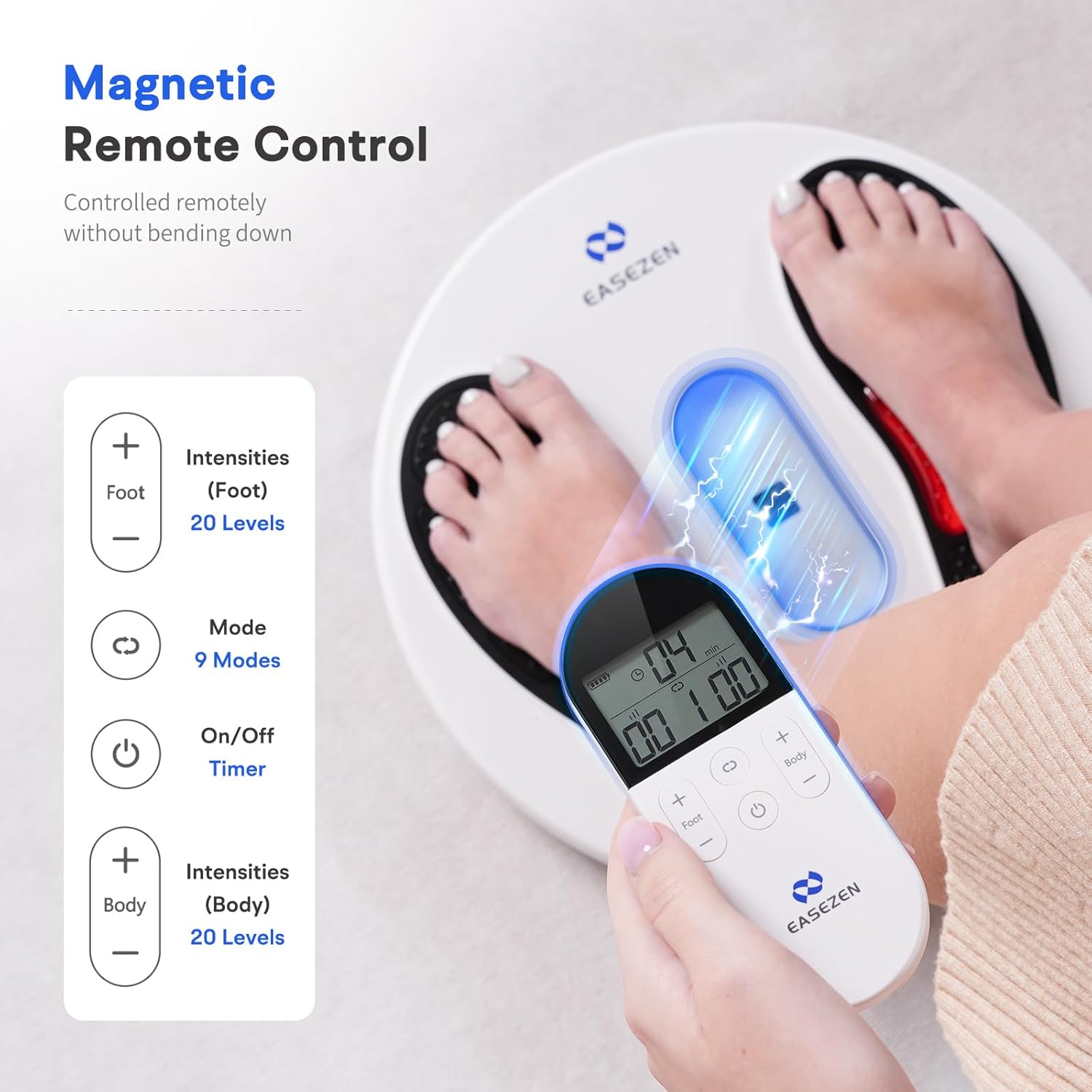
- Selecting Mode: Use the "Mode" button on the remote control to cycle through the 9 available massage modes.
- Adjusting Intensity: Use the "+" and "-" buttons on the remote control to adjust the intensity level (20 levels available) for both foot and body stimulation independently. Start with a low intensity and gradually increase to a comfortable level.
- Setting Timer: Short press the power button on the main unit to change the auto-off timer (15, 30, 45, or 60 minutes).
- Power Off: Long press the power button to turn off the device after use.
Using Electrode Pads (for Body)
- Attach Pads: Connect the two electrode pads to the main unit using the electrode cables.
- Apply to Body: Stick both electrode pads onto the desired area of your body (e.g., neck, shoulder, back, arm, hip, calf, joint). Ensure both pads are applied to form a complete electrical circuit.
- Adjust Intensity: Use the body intensity controls on the remote to adjust the stimulation level for the pads.

This image demonstrates the use of the wireless remote control to operate the foot massager, highlighting its magnetic attachment and controls for foot and body intensity, mode selection, and timer.

This image shows the versatility of the device, functioning as both a foot massager and a body massager using the included electrode pads.
Modes and Intensities
The EaseZen EMS Foot Massager offers 9 distinct modes and 20 intensity levels, allowing for a personalized massage experience. The pulse frequency ranges from 1Hz to 100Hz.
- Modes 1-5: Soft Massage (Gentle stimulation for relaxation)
- Modes 6-10: Relaxing Massage (Moderate stimulation for muscle relaxation)
- Modes 11-15: Deep Massage (Stronger stimulation for deeper muscle penetration)
- Modes 16-20: Professional Massage (Most intense stimulation for advanced relief)

This image visually represents the different massage modes and intensity levels, from soft to professional, with corresponding waveform patterns.
Red Light Therapy
The foot massager incorporates red light therapy, which utilizes infrared rays to generate thermal effects. This feature is designed to accelerate blood circulation and promote cell metabolism in the treated areas.

This image highlights the ergonomic design of the foot massager, including the integrated red light therapy lamps within the footpads.
Maintenance
To ensure the longevity and proper functioning of your EaseZen EMS Foot Massager, follow these maintenance guidelines:
- Cleaning: Wipe the main unit and electrode pads with a soft, damp cloth after each use. Do not use abrasive cleaners or immerse the device in water.
- Storage: Store the device in a cool, dry place away from direct sunlight and extreme temperatures. Keep it in its original packaging or a protective case when not in use.
- Battery Care: Recharge the device regularly, even if not used frequently, to maintain battery health. Avoid fully depleting the battery before recharging.
Troubleshooting
| Problem | Possible Cause | Solution |
|---|---|---|
| Device does not turn on. | Low battery or not charged. | Charge the device fully using the provided USB cable. |
| No stimulation felt on feet. | Only one foot on the device, or poor contact. | Ensure both bare feet are placed firmly on the footpads. Increase intensity gradually. |
| No stimulation felt with electrode pads. | Only one pad connected/applied, or poor contact. | Ensure both electrode pads are connected to the unit and firmly applied to the skin to form a complete circuit. Increase intensity. |
| Remote control not working. | Remote battery low or out of range. | Replace remote battery if applicable (check manual for battery type). Ensure remote is pointed towards the main unit and within range. |
Specifications
- Model Number: 785366492293
- Product Dimensions: 16.18 x 13.27 x 7.2 inches; 3.04 Pounds (1.38 Kilograms)
- Power Source: Battery Powered (1 Lithium Ion battery included)
- Material: ABS Plastic, Silica Gel
- Modes: 9
- Intensity Levels: 20
- Pulse Frequency: 1Hz-100Hz
- Battery Capacity: 2200mAh (approx. 60 days use at 30 mins/day, 3 hrs charging time)
- FDA Clearance: Class II Medical Device
Warranty and Support
The EaseZen EMS Foot Massager comes with a free 30-day trial period and a one-year warranty. For any questions or support needs, please contact EaseZen customer service.
Legal Disclaimer: Statements regarding dietary supplements have not been evaluated by the FDA and are not intended to diagnose, treat, cure, or prevent any disease or health condition.