
Introduction
This manual provides essential instructions for the safe and effective use of your Fujifilm X-T50 Mirrorless Digital Camera with the XF16-50mmF2.8-4.8 R LM WR Lens Kit. Please read this manual thoroughly before using the camera to ensure proper operation and to maximize your photographic experience. Keep this manual in a safe place for future reference.
Safety Information
Observe the following precautions to prevent injury or damage to the camera and its accessories:
- Do not disassemble or modify the camera: Unauthorized repairs can lead to electric shock or malfunction.
- Keep away from water: This camera is not waterproof. Exposure to water can cause damage.
- Use only approved batteries and chargers: Using incompatible power sources can cause overheating, fire, or explosion.
- Avoid extreme temperatures: Do not expose the camera to direct sunlight for extended periods or to very high or low temperatures.
- Handle with care: Avoid dropping or subjecting the camera to strong impacts.
- Lens care: Do not look at the sun or bright light sources through the lens, as this can cause permanent vision impairment.
What's in the Box
Verify that all items are present in the packaging:
- Fujifilm X-T50 Camera Body
- FUJINON XF16-50mmF2.8-4.8 R LM WR Lens
- Rechargeable Li-ion Battery
- USB Cable
- Shoulder Strap
- Body Cap
- Lens Front Cap
- Lens Rear Cap
- Lens Hood
Camera Parts and Controls
Familiarize yourself with the various parts and controls of your Fujifilm X-T50 camera.
Front View

This image displays the front of the Fujifilm X-T50 camera with the XF16-50mmF2.8-4.8 R LM WR lens attached. Key features visible include the lens, the lens release button, the front command dial, and the Fujifilm logo.
Side View (Ports)

The side view of the camera reveals the various input/output ports, including the microphone input, remote release terminal, USB-C port for charging and data transfer, and the HDMI output for connecting to external displays.
Rear View

This image shows the back of the camera, featuring the electronic viewfinder, the LCD monitor, and various control buttons such as the AF ON button, AEL button, Q (Quick Menu) button, Menu/OK button, and the DISP/BACK button. The joystick for navigation is also visible.
Top View
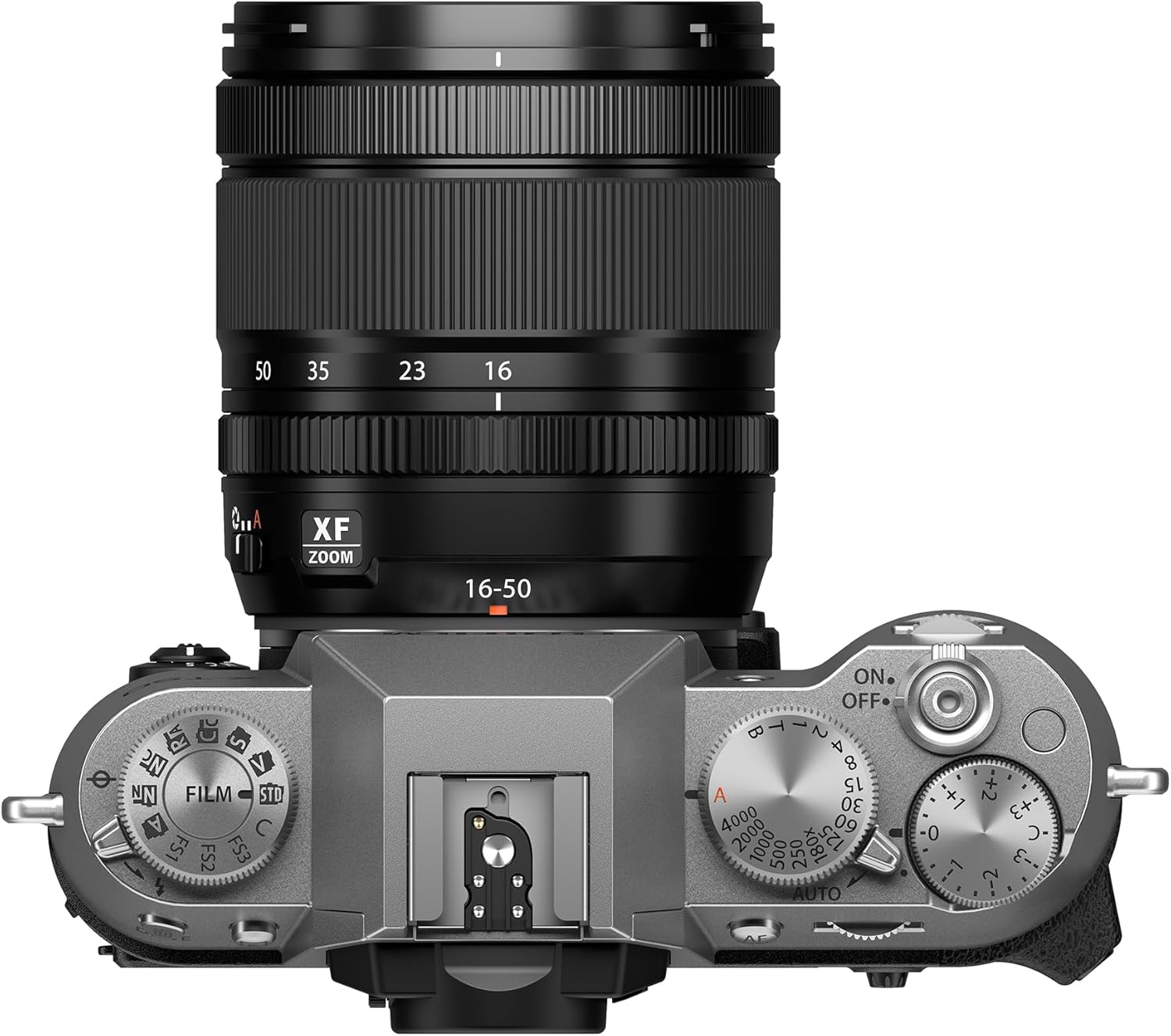
The top panel of the X-T50 features several key dials for quick adjustments: the Film Simulation dial, shutter speed dial, exposure compensation dial, and the ON/OFF switch integrated with the shutter button. The hot shoe for external flash units is also visible.
Articulating LCD Monitor

The X-T50 features a tilting LCD monitor, as shown in this image, allowing for flexible shooting angles, especially useful for waist-level or high-angle photography. The screen can be tilted upwards for easier viewing.

This image further demonstrates the versatility of the tilting LCD monitor, showing it angled downwards. This articulation is beneficial for shooting from low perspectives or for video recording.
Setup
1. Inserting the Battery and Memory Card

This image shows the open battery and memory card compartment located at the bottom of the camera. The battery is partially inserted, and the memory card slot is visible.
- Open the battery/memory card compartment cover on the bottom of the camera.
- Insert the battery with the contacts facing as shown in the diagram inside the compartment, pushing until it clicks into place.
- Insert a compatible SD/SDHC/SDXC memory card into the slot until it clicks. Ensure the card is facing the correct direction.
- Close the compartment cover securely.
2. Attaching the Lens
- Remove the body cap from the camera and the rear cap from the lens.
- Align the white mounting marks on the lens and the camera body.
- Mount the lens on the camera body and rotate it clockwise until it clicks into place.
- Attach the lens hood by aligning the mark on the hood with the mark on the lens, then rotate until it locks.
3. Initial Settings
- Turn the camera on using the ON/OFF switch.
- Follow the on-screen prompts to set the date, time, and language.
Basic Operation
1. Powering On/Off
- To turn on the camera, rotate the ON/OFF switch located around the shutter button to the 'ON' position.
- To turn off the camera, rotate the switch to the 'OFF' position.
2. Taking Photos
- Select a Shooting Mode: Use the mode dial to select a desired shooting mode (e.g., P for Program, A for Aperture Priority, S for Shutter Priority, M for Manual).
- Focus: Press the shutter button halfway down to activate autofocus. The camera will focus on the subject.
- Shoot: Press the shutter button fully down to take a picture.
3. Using Film Simulations
- The X-T50 features a dedicated Film Simulation dial on the top plate. Rotate this dial to instantly apply one of Fujifilm's 20 unique Film Simulations, including REALA ACE.
- Each Film Simulation emulates the look and feel of classic photographic films, offering distinct color and tonal characteristics.
4. Video Recording
- To start video recording, ensure the camera is in a video-compatible mode.
- Press the dedicated video recording button (if available) or select video mode via the mode dial and press the shutter button.
- The X-T50 supports video recording up to 6.2K/30P, 4K/60P, and FHD/240P with 4:2:2 10-Bit color.
Advanced Features
In-Body Image Stabilization (IBIS)
The X-T50 incorporates 7.0 stops of in-body image stabilization, which helps reduce camera shake for sharper images and smoother video, especially in low light or when using longer focal lengths. This allows for handheld shooting in conditions that would typically require a tripod.
Digital Teleconverter
Utilize the 1.4x and 2x Digital Teleconverter functions to extend the reach of your lens without physically changing it. This feature crops the image sensor to simulate a longer focal length, providing additional framing versatility.
Frame.io Camera to Cloud Integration
The X-T50 offers native Frame.io Camera to Cloud connectivity, enabling instant sharing of photos and videos directly from the camera to cloud-based workflows. This streamlines collaboration and content delivery without the need for additional accessories.
Maintenance
Cleaning the Camera and Lens
- Camera Body: Use a soft, dry cloth to wipe the camera body. For stubborn dirt, lightly dampen the cloth with water or a mild cleaning solution.
- Lens: Use a lens blower brush to remove dust. For smudges, use a specialized lens cleaning solution and a microfiber cloth. Avoid touching the lens surface with your fingers.
- Sensor: Sensor cleaning should ideally be performed by a qualified service technician.
Battery Care
- Charge the battery fully before first use.
- Store batteries in a cool, dry place when not in use.
- Do not expose batteries to extreme heat or cold.
Storage
- When storing the camera for extended periods, remove the battery.
- Store the camera in a dry, well-ventilated area, away from direct sunlight and high humidity.
- Use a desiccant to prevent mold growth if storing in humid environments.
Troubleshooting
If you encounter issues with your camera, refer to the following common problems and solutions:
- Camera does not turn on: Ensure the battery is fully charged and correctly inserted. Check if the battery contacts are clean.
- Cannot take pictures: Verify that a memory card is inserted and has sufficient free space. Check the lens attachment and ensure it is securely locked.
- Images are blurry: Confirm that the lens is clean. Check focus settings and ensure the camera is properly focused on the subject. Consider using a higher shutter speed or enabling image stabilization in low light.
- Memory card error: Reinsert the memory card. If the error persists, try a different compatible memory card. Ensure the card is not locked (write-protected).
- Battery drains quickly: Reduce screen brightness, limit Wi-Fi/Bluetooth usage, and turn off the camera when not in use. Ensure the battery is not old or damaged.
For more complex issues, consult the official Fujifilm support website or contact customer service.
Specifications
Key technical specifications for the Fujifilm X-T50 Mirrorless Digital Camera:
| Feature | Specification |
|---|---|
| Model Name | X-T50 Body, Silver with XF16-50mmF2.8-4.8 R LM WR Lens Kit |
| Brand | Fujifilm |
| Photo Sensor Resolution | 40.2 MP |
| Image Stabilization | Sensor-shift (7.0 stops) |
| Video Resolution | Up to 4320p (6.2K/30P, 4K/60P, FHD/240P) |
| Compatible Mountings | Fujifilm X |
| Screen Size | 3 Inches |
| Display Type | Tilting LCD, Touch Screen Capacitive |
| Connectivity Technology | Bluetooth, Wi-Fi |
| Maximum Shutter Speed | 1/8000 seconds |
| Item Weight | 438 Grams |
| Battery Cell Type | Lithium Ion |
| Autofocus Technology | Hybrid (Contrast Detection, Phase Detection) |
| Supported File Format | RAW, JPEG |
Warranty and Support
Warranty Information
The Fujifilm X-T50 Mirrorless Digital Camera comes with a 1-year manufacturer's warranty. This warranty covers defects in materials and workmanship under normal use. Please retain your proof of purchase for warranty claims.
Customer Support
For technical assistance, service, or further inquiries, please visit the official Fujifilm support website or contact their customer service department. Contact information can typically be found on the Fujifilm website or in the documentation included with your product.


