
1. Safety Guidelines
Read this manual thoroughly before operating the scooter. Failure to follow instructions may result in serious injury or property damage.
- Always wear a helmet and appropriate safety gear (knee pads, elbow pads) when riding.
- Ensure all screws and locking mechanisms are securely tightened before each ride.
- This scooter features a Push Start function. The acceleration throttle will only engage once the scooter reaches a speed of 3 km/h.
- Do not ride in wet conditions, on uneven surfaces, or near water.
- Adhere to local traffic laws and give way to pedestrians.
- Supervise young riders at all times.
- Maximum weight capacity: 175 lbs (80 kg).
2. Setup
The WEELMOTION E2 Ranger electric scooter requires minimal assembly. Follow these steps to prepare your scooter for its first ride.
2.1 Unboxing and Component Check
Carefully remove all components from the packaging. Verify that all parts are present as listed below:
- E-Scooter (main body)
- Handlebars
- Charger
- Allen Keys (Big and Small)
- Instruction Manual

Image: WEELMOTION Kids Electric Scooter Ride to Shine banner, showing the scooter and its key features.
2.2 Front Stem Assembly
The front stem may come pre-installed. If not, insert the front stem into the scooter base and secure it with the folding lock. Ensure the two silver bars and the center black screw are securely tightened using the provided Allen keys.
Video: Step-by-step guide on installing the front stem and handlebars.
2.3 Handlebar Installation
Unscrew the pre-installed locking screws slightly from the handlebars. Carefully insert the handlebars into the aligned holes on the front stem. Use the small Allen key to tighten the screws until the handlebars are firmly secured.
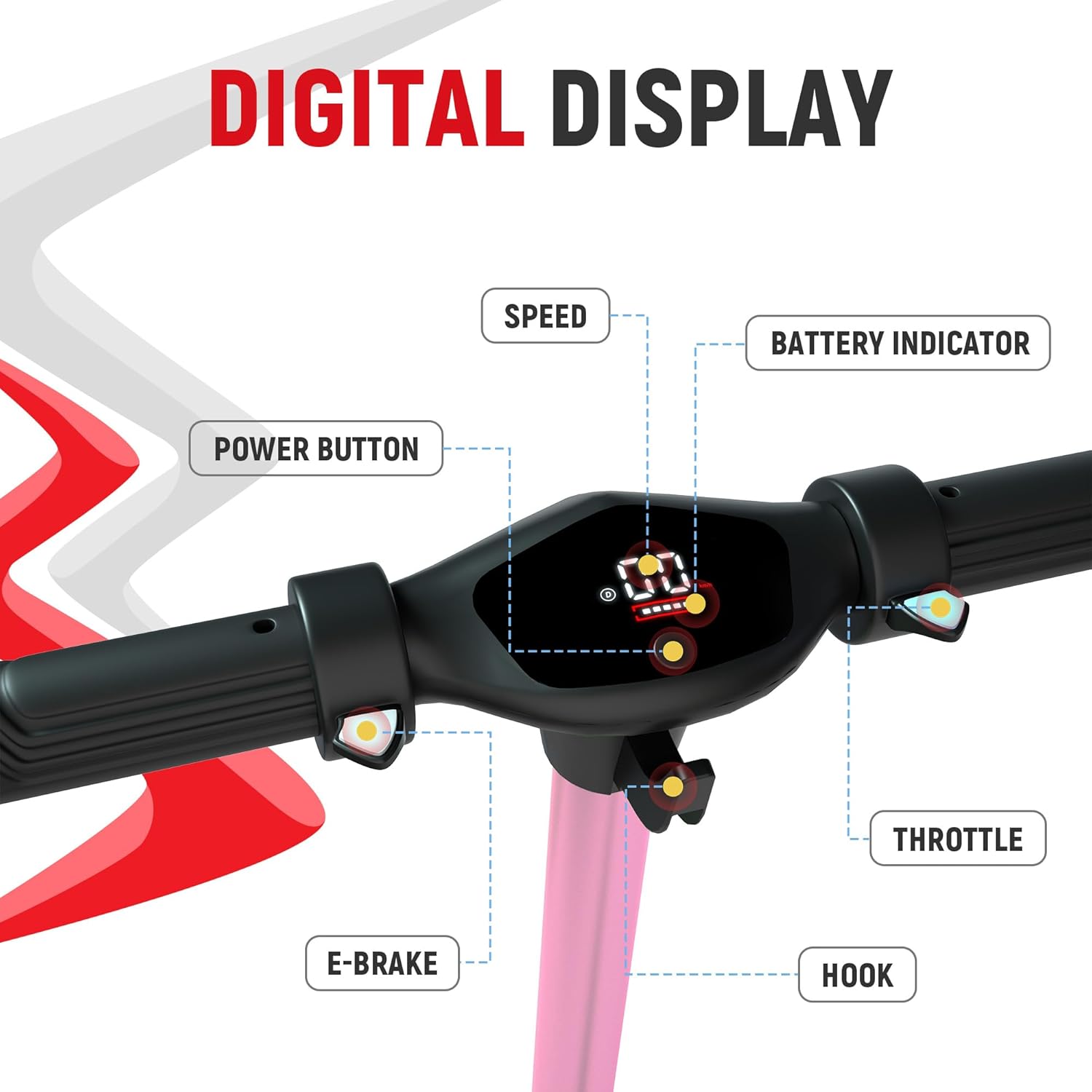
Image: Close-up of the digital display on the handlebar, indicating speed, battery level, power button, throttle, E-brake, and hook.
2.4 Initial Charging
Before first use, fully charge the scooter's battery. Locate the charging port, typically covered by a rubber flap, and connect the provided charger. The LED display will indicate charging status.
3. Operation
Operating your WEELMOTION E2 Ranger scooter is straightforward. Follow these instructions for a safe and enjoyable ride.
3.1 Powering On/Off
Press and hold the power button on the digital display for 2-3 seconds to turn the scooter on or off. The display will illuminate upon activation.
3.2 Push Start Function
For safety, the scooter features a Push Start function:
- Place one foot firmly on the scooter deck.
- Propel the scooter forward manually by pushing with your other foot until it reaches approximately 3 km/h.
- Once coasting, gently push down the acceleration throttle with your right-hand thumb.
- Place both feet on the deck and enjoy your ride.

Image: Visual guide illustrating the four steps of the Push Start function for the scooter.
3.3 Braking System
The scooter is equipped with dual braking systems for enhanced safety:
- Front Electronic Brake: Located on the left handlebar. Press gently with your left-hand thumb for quick stops. Apply more pressure for a complete stop.
- Rear Fender Brake: Press down gently on the rear fender with your riding foot to slow down.

Image: Illustration of the dual braking system, highlighting the rear foot brake and the digital brake on the handlebar.
3.4 Digital Display and Lighting
The LED display shows your current riding speed and battery level. The scooter features vibrant RGB paddle lights, bright front head and bar lights for visibility and style. Press the power button three times after turning on the scooter to switch the speed unit (km/h or mph).

Image: The E2 Ranger scooter showcasing its bright front head and bar lights, enhancing visibility.

Image: The E2 Ranger scooter displaying its vibrant LED pedal lights, adding to its visual appeal and safety.
4. Maintenance
Regular maintenance ensures the longevity and safe operation of your scooter.
4.1 General Care
- Keep the scooter clean and dry. Wipe down with a damp cloth after use.
- Avoid exposing the scooter to extreme temperatures or direct sunlight for prolonged periods.
- Store the scooter in a cool, dry place when not in use.
4.2 Tightening Screws
Periodically check and tighten all screws, especially those on the front stem and handlebars, using the provided Allen keys. This prevents loosening during use and ensures stability.
4.3 Battery Care
- Charge the battery fully before its first use and after each ride.
- Do not overcharge the battery. Unplug the charger once the battery is full.
- If storing the scooter for an extended period, charge the battery to about 50-70% every 2-3 months to maintain battery health.
- The scooter has multiple security measures including Overheat Protection, Over Charge Protection, Short Circuit Protection, and a Fire Protection Shell.
5. Troubleshooting
If you encounter issues with your scooter, refer to this section for common solutions.
| Problem | Possible Cause | Solution |
|---|---|---|
| Scooter does not turn on | Low battery; Power button not pressed correctly | Charge the battery; Press and hold the power button for 2-3 seconds |
| Motor does not engage | Scooter not moving at 3 km/h; Throttle not engaged | Perform the Push Start function correctly; Ensure throttle is fully pressed |
| Lights are not working | Loose connection; Electrical fault | Check connections; Contact customer support if issue persists |
| Reduced speed or range | Low battery; Overweight rider; Riding on inclines | Fully charge battery; Ensure rider is within weight limit; Avoid steep inclines |
| Loose handlebars/stem | Screws are loose | Tighten all screws on the stem and handlebars using the provided Allen keys |
6. Specifications
Detailed technical specifications for the WEELMOTION E2 Ranger Kids Electric Scooter.
- Model Name: E2 Ranger
- Item Model Number: S31
- Product Dimensions (Unfolded): 36" L x 13" W x 30" H (91.44 x 33.02 x 76.2 cm)
- Product Dimensions (Folded): 36" L x 13" W x 14" H
- Item Weight: 15.4 lbs (7 kg)
- Motor: 150W
- Max Speed: Up to 16 km/hr
- Max Range: Up to 8 km per charge (actual range may vary)
- Max Climbing Angle: 15°
- Maximum Weight Capacity: 175 lbs (80 kg)
- Age Range: Kids
- Brake Type: Front Electronic + Rear Fender Braking
- Wheel Size: 6.5 Inches
- Wheel Material: Rubber
- Frame Material: Aluminum
- Suspension: Rigid
- Special Features: Foldable, Front LED Lights, Head Lights, Multicolor Lighting Pad, Digital Display

Image: Banner highlighting key performance features: 150W motor, 16 km/h max speed, 175 lbs max load, and 6-8 km max range.

Image: The scooter in both unfolded and folded states, illustrating its compact design and dimensions for portability.
7. Warranty & Support
WEELMOTION is committed to providing high-quality products. For warranty information and customer support, please refer to the contact details below.
7.1 Product Warranty
This product comes with a limited manufacturer's warranty. Please retain your proof of purchase for any warranty claims. Details regarding the warranty period and coverage are typically provided in the packaging or on the official WEELMOTION website.
7.2 Customer Support
For technical assistance, parts replacement, or any other inquiries, please contact WEELMOTION customer support through their official website or the contact information provided in your product packaging.