1. Product Overview
The Optoma GT3500HDR is a 1080p Full HD home laser projector designed for immersive viewing experiences. It features an ultra-short throw lens, allowing for large images from a short distance. This projector incorporates DuraCore Laser Technology for extended operational life and supports 4K HDR input for enhanced visual quality.
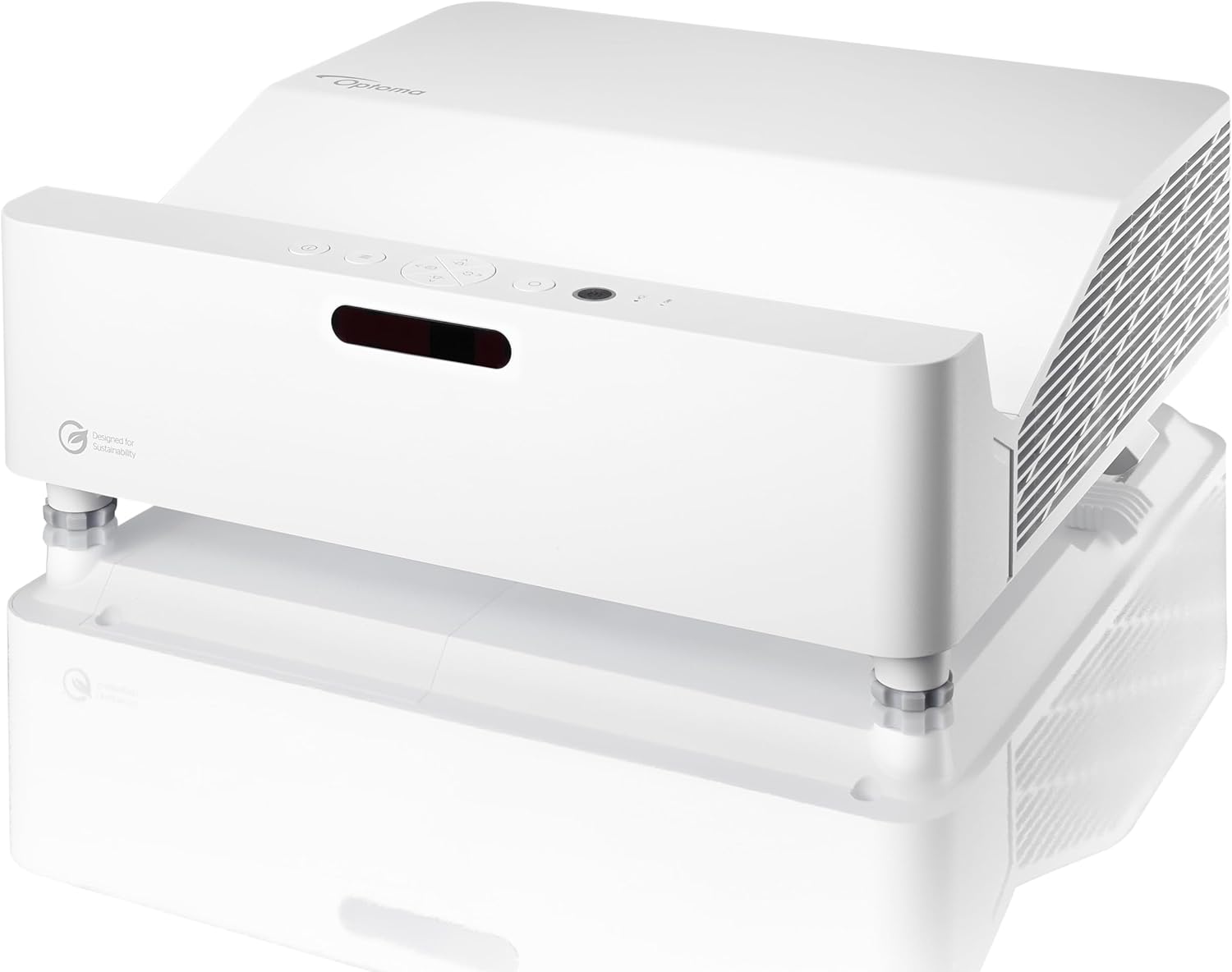
Figure 1: Optoma GT3500HDR Projector, front view.
Key Features:
- Ultra Short Throw Lens: Projects a 100-inch image from less than a foot away.
- Brightness: 3800 lumens for clear viewing in various lighting conditions.
- Resolution: Native 1080p Full HD (1920 x 1080).
- Contrast Ratio: 500,000:1.
- DuraCore Laser Technology: Provides up to 30,000 hours of maintenance-free operation.
- Enhanced Gaming Mode: Offers an 8ms input lag at 1080p 120Hz for responsive gaming.
- 4K HDR Input Compatibility: Supports HDR content for improved detail and color.
- Built-in Speaker: Integrated 15W speaker for audio output.
2. Setup Guide
2.1 Unpacking
Carefully remove the projector and all accessories from the packaging. Retain the original packaging for future transport or storage.
2.2 Placement
Position the projector on a stable, flat surface directly in front of your projection screen or wall. Due to its ultra-short throw design, the projector should be placed very close to the projection surface. For a 100-inch image, the projector typically sits less than a foot away from the wall.
2.3 Connectivity
Connect your source devices (e.g., gaming console, Blu-ray player, streaming device) to the projector using the appropriate ports. Refer to the diagram below for port locations.
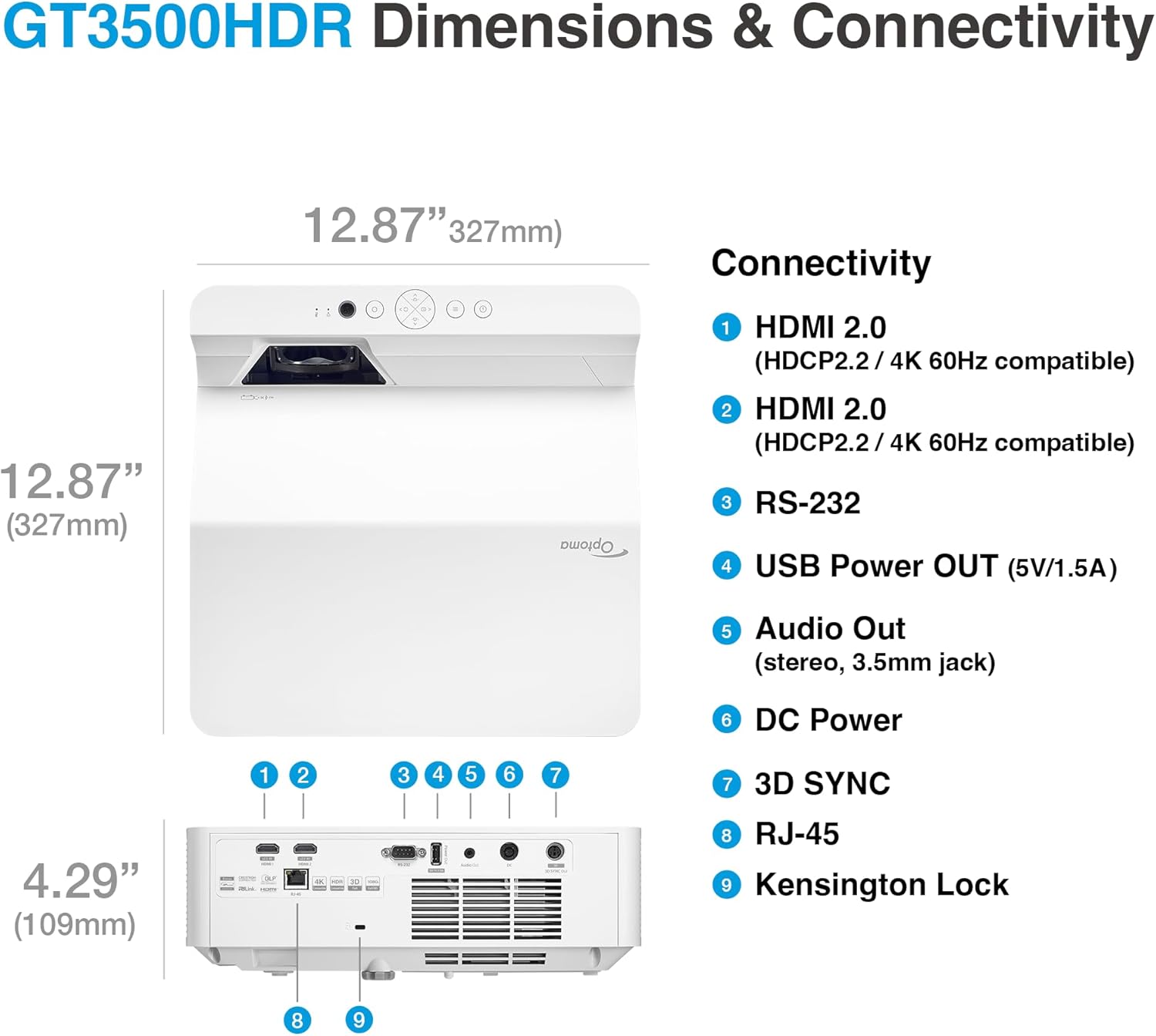
Figure 2: GT3500HDR Dimensions and Connectivity Ports.
Available ports include:
- HDMI 2.0 (x2): For connecting digital video and audio sources (HDCP2.2 / 4K 60Hz compatible).
- RS-232: For control system integration.
- USB Power OUT (5V/1.5A): For powering external devices.
- Audio Out (stereo, 3.5mm jack): For connecting to external audio systems.
- DC Power: Power input.
- 3D SYNC: For 3D synchronization.
- RJ-45: For network control.
- Kensington Lock: For security.
2.4 Initial Power On
- Connect the power cable to the projector and a power outlet.
- Press the power button on the projector or remote control to turn it on.
- The projector will display the Optoma logo and then search for an input source.
3. Operating Instructions
3.1 Basic Operation
- Power On/Off: Use the power button on the projector or remote. Allow the projector to cool down properly after use before unplugging.
- Input Selection: Use the 'Source' button on the remote or projector control panel to cycle through available input sources (HDMI 1, HDMI 2, etc.).
3.2 Image Adjustment
The GT3500HDR offers several options for optimizing the projected image:
- Focus: Adjust the focus ring or setting to achieve a sharp image.
- Keystone Correction: Use the keystone adjustment (horizontal and vertical) to correct trapezoidal image distortion if the projector is not perfectly perpendicular to the screen.
- 4-Corner Adjustment: Fine-tune the image shape by adjusting each corner independently for a perfectly rectangular image.
- Digital Zoom: Adjust the image size digitally if physical placement is limited.
3.3 Enhanced Gaming Mode
Activate the Enhanced Gaming Mode for reduced input lag, which is beneficial for fast-paced video games. This mode delivers a lightning-fast 8ms input lag at 1080p 120Hz.
3.4 Audio Output
The projector includes a built-in 15W speaker. For a more immersive audio experience, connect external speakers or a sound system to the 3.5mm Audio Out jack.

Figure 3: Projector audio output illustration.
4. Maintenance
4.1 DuraCore Laser Technology
The GT3500HDR utilizes DuraCore Laser Technology, providing up to 30,000 hours of light source life. This eliminates the need for lamp replacements, reducing maintenance requirements.
4.2 Cleaning
- Exterior: Use a soft, lint-free cloth to wipe the projector's exterior. Do not use abrasive cleaners or solvents.
- Lens: Gently clean the projector lens with a lens cleaning cloth and specialized lens cleaning solution. Avoid touching the lens directly.
- Air Vents: Ensure air vents are clear of dust and obstructions to maintain proper airflow and cooling.
4.3 Airflow and Fan Noise
The projector requires adequate ventilation. Ensure there is sufficient space around the unit for air circulation. Fan noise may vary depending on the operating mode (e.g., 'Bright' mode may produce more fan noise than 'Eco' mode).

Figure 4: Eco+ mode for energy efficiency and reduced fan noise.
5. Troubleshooting
If you encounter issues with your Optoma GT3500HDR projector, refer to the following common problems and solutions:
- No Image Displayed:
- Ensure the projector is powered on and the power cable is securely connected.
- Verify that the input source is correctly connected and selected on the projector.
- Check the source device (e.g., laptop, console) to ensure it is outputting a signal.
- Image is Distorted or Not Rectangular:
- Adjust the keystone correction settings.
- Use the 4-corner adjustment feature for precise image shaping.
- Ensure the projection surface is flat and smooth, especially for ultra-short throw projectors.
- Fan Noise is Loud:
- Check if the projector is in 'Bright' mode. Switching to 'Eco' mode can reduce fan noise.
- Ensure air vents are not blocked and there is sufficient space for ventilation.
- Infrequent Flashes in Eco Mode:
- Some users have reported infrequent flashes in Eco mode. Running the projector in 'Bright' mode for a period may resolve this. If the issue persists, contact Optoma support.
For further assistance, consult the official Optoma support resources or contact customer service.
6. Specifications
| Feature | Specification |
|---|---|
| Model Number | GT3500HDR |
| Display Resolution | 1920 x 1080 (Full HD) |
| Brightness | 3800 Lumens |
| Contrast Ratio | 500,000:1 |
| Light Source Life | Up to 30,000 hours (DuraCore Laser) |
| Input Lag (Enhanced Gaming Mode) | 8ms @ 1080p 120Hz |
| Connectivity Technology | RCA, HDMI (x2), RS-232, USB Power OUT, Audio Out, RJ-45, 3D SYNC |
| Product Dimensions | 12.87 x 12.87 x 4.29 inches (327 x 327 x 109 mm) |
| Item Weight | 13.35 pounds |
| Power Source | AC Power |
| Batteries Required | 1 Lithium Metal battery (for remote control) |
7. Warranty and Support
7.1 Warranty Information
The Optoma GT3500HDR projector is covered by a manufacturer's warranty. Please refer to the warranty card included with your product or visit the official Optoma website for detailed terms and conditions regarding warranty coverage, duration, and service procedures.
7.2 Customer Support
For technical support, troubleshooting assistance, or service inquiries, please contact Optoma customer support. Contact information and support resources can be found on the official Optoma website:


