
LEXENT LC7W-NEW
LEXENT 7000BTU Portable Air Conditioning Unit User Manual
Model: LC7W-NEW
1. Important Safety Information
Please read this manual thoroughly before operating your LEXENT Portable Air Conditioning Unit. Keep this manual for future reference.
- Ensure the unit is placed on a flat, stable surface.
- Do not block air inlets or outlets. Maintain at least 30cm clearance around the unit.
- Only use the unit with a properly grounded electrical outlet.
- Do not operate the unit with a damaged power cord or plug.
- Unplug the unit before cleaning or performing any maintenance.
- Keep children and pets away from the unit during operation.
- This unit uses R290 refrigerant. Do not puncture the refrigerant circuit.
- If the unit is tipped, allow it to stand upright for at least 2 hours before turning it on.
2. Product Overview
2.1 Components Included
- Portable Air Conditioning Unit
- Exhaust Hose
- Window Sealing Kit (suitable for sliding/double/single hung windows)
- Remote Control
- Drainage Pipe
2.2 Key Features
- 3-in-1 Functionality: Cooling, Dehumidifier, and Fan modes.
- Powerful Cooling: 7000 BTU capacity, minimum cooling temperature of 16℃.
- Efficient Dehumidification: Removes up to 19 liters of water daily.
- Fan Mode: Two adjustable speeds for enhanced air circulation.
- Low Noise Operation: Produces noise levels between 53-64 dB.
- Energy Efficient: Rated Grade A for low energy consumption.
- Convenient Mobility: Equipped with wheels for easy movement. Suitable for spaces up to 75m³.
- User-Friendly Controls: LED display, touch panel, and remote control.
- 24-Hour Timer: Allows for scheduled operation.
- Eco-Friendly Refrigerant: Uses R290 refrigerant.
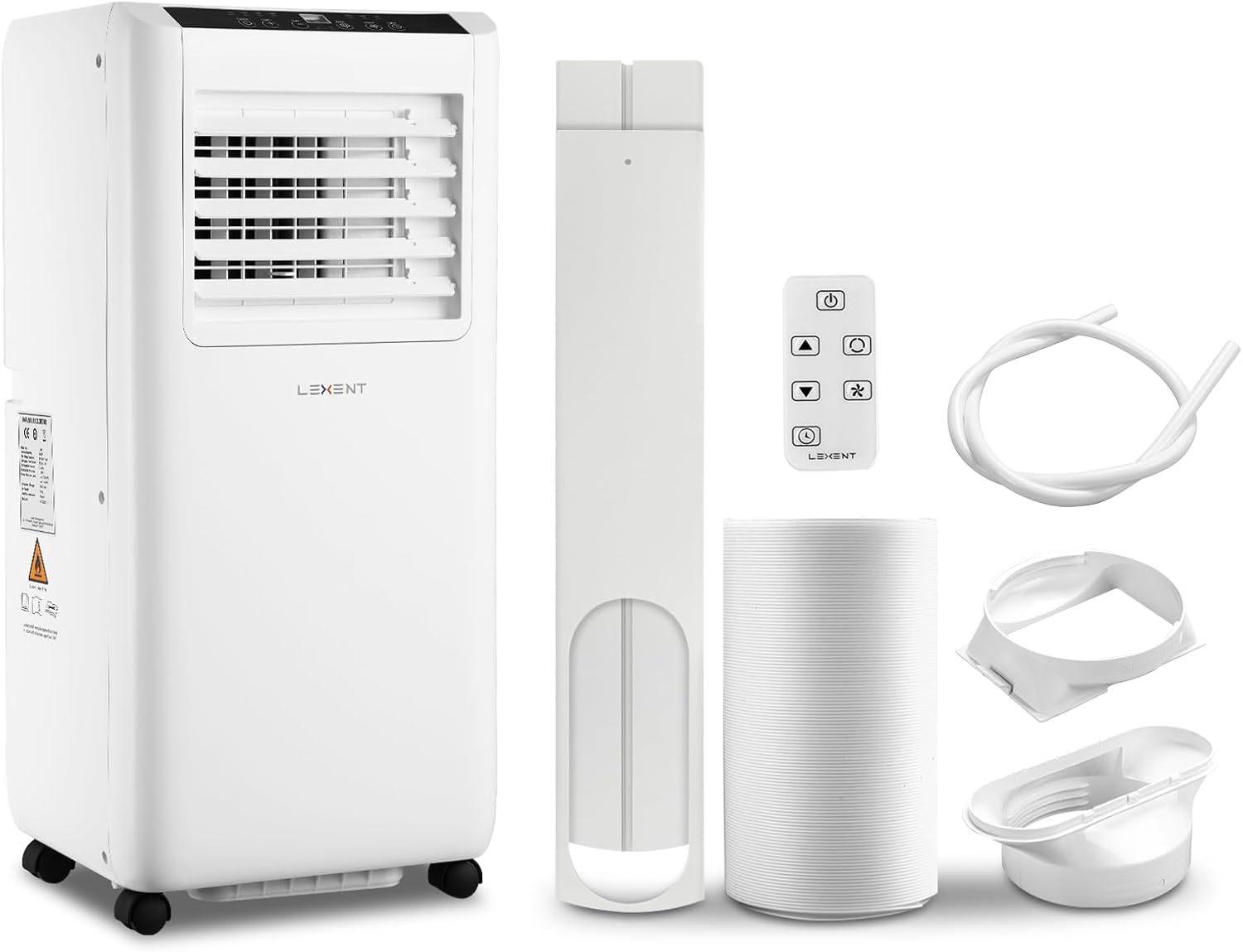
Image: The LEXENT portable air conditioning unit shown with its included accessories: exhaust hose, window kit components, remote control, and drainage pipe.
3. Setup and Installation
Follow these steps to set up your portable air conditioning unit for optimal performance.
3.1 Exhausting Hot Air
The unit must be vented to the outside to remove hot air. The included window kit is designed for sliding, double-hung, and single-hung windows.
- Install the Window Kit: Adjust the window kit panel to fit your window opening. Secure it in place.
- Connect Exhaust Hose to Unit: Attach one end of the exhaust hose to the air outlet on the back of the air conditioning unit.
- Connect Exhaust Hose to Window Kit: Attach the other end of the exhaust hose to the adapter on the window kit panel. Ensure all connections are secure to prevent hot air from re-entering the room.

Image: Step-by-step diagram illustrating the installation of the window kit and exhaust hose for the portable air conditioner. It shows fitting the kit to the window, connecting the hose to the unit, and then to the window kit.
Note: The window kit is not suitable for tilting and casement windows. A separate kit may be required for these window types.
3.2 Drainage Outlet
The unit has a drainage outlet for continuous dehumidification or manual draining. For dehumidifier mode, connect the drainage pipe to the outlet.

Image: A close-up view of the unit's drainage outlet, which includes a sealing cover to prevent leaks when not in use.
3.3 Mobility
The unit is equipped with 4 universal casters for easy movement between rooms.

Image: A detailed view of one of the removable casters, highlighting the unit's design for easy portability.
4. Operating Instructions
Your LEXENT portable air conditioner offers multiple modes for various climate control needs.
4.1 Control Panel and Remote Control
The unit can be operated via the touch control panel on top or the included remote control.
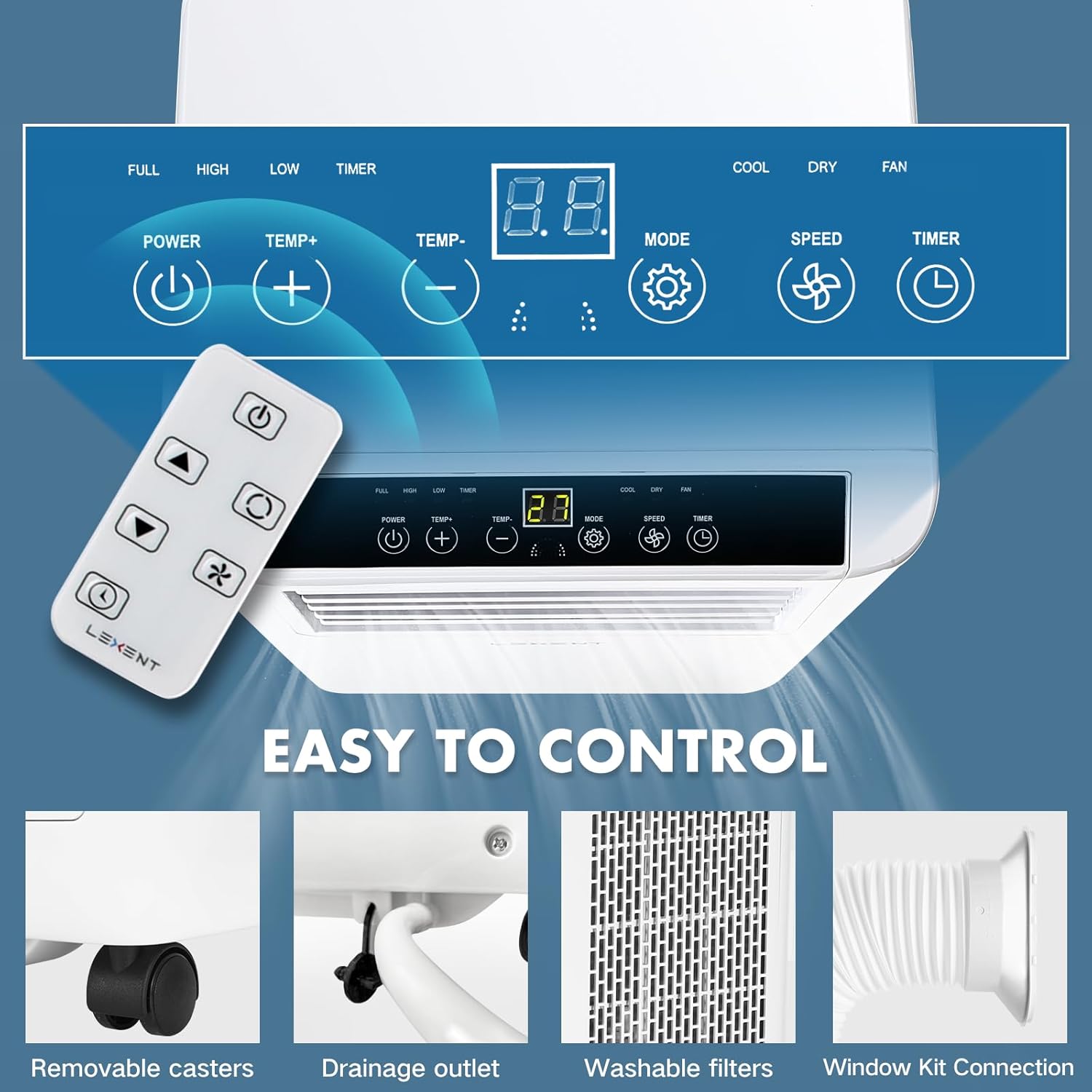
Image: A detailed view of the unit's control panel with LED display and touch buttons, alongside the remote control, illustrating the various functions available for operation.
| Button | Function |
|---|---|
| POWER | Turns the unit On/Off. |
| MODE | Cycles through Cooling, Dehumidifier, and Fan modes. |
| TEMP+ / TEMP- | Adjusts desired temperature in Cooling mode. |
| SPEED | Adjusts fan speed (High/Low). |
| TIMER | Sets the 24-hour On/Off timer. |
4.2 Operating Modes
Press the MODE button to select your desired operating mode:
- Cooling Mode: Provides powerful cooling to lower room temperature. Set desired temperature using TEMP+ / TEMP-.
- Dehumidifier Mode: Removes excess moisture from the air, up to 19 liters per day. Connect the drainage pipe for continuous operation.
- Fan Mode: Circulates air without cooling. Choose between high and low fan speeds.

Image: Visual representation of the three operating modes: Cooling mode for fast temperature reduction, Drying mode for dehumidification and keeping the room dry, and Fan mode for accelerated air circulation.
4.3 Timer Function
The 24-hour timer allows you to set a specific time for the unit to turn on or off automatically.
- Press the TIMER button.
- Use TEMP+ / TEMP- buttons to set the desired time in hours.
- The timer will activate after a few seconds of inactivity.
5. Maintenance
Regular maintenance ensures optimal performance and extends the lifespan of your unit.
5.1 Cleaning the Air Filter
The air filter should be cleaned every two weeks or more frequently depending on usage and air quality.
- Unplug the unit from the power outlet.
- Locate and remove the washable filter screen from the back of the unit.
- Clean the filter with warm water and a mild detergent. Rinse thoroughly.
- Allow the filter to air dry completely before reinserting it into the unit. Do not expose to direct sunlight.

Image: A close-up view of the removable and washable filter screen, emphasizing its accessibility for routine cleaning.
5.2 Draining Water
The unit will accumulate condensate water. In dehumidifier mode, continuous drainage is recommended using the provided pipe. Otherwise, the internal tank will fill, and the unit may stop operating (e.g., E4 error).
- Unplug the unit.
- Place a shallow pan or container under the drainage outlet.
- Remove the sealing cover from the drainage outlet.
- Allow all water to drain completely.
- Replace the sealing cover securely.
5.3 Storage
When storing the unit for an extended period:
- Drain all accumulated water.
- Clean the air filter.
- Unplug the power cord and coil it neatly.
- Store the unit in a dry, cool place, away from direct sunlight and extreme temperatures.
6. Troubleshooting
Refer to this section for common issues and their solutions.
| Problem | Possible Cause | Solution |
|---|---|---|
| Unit does not turn on. | No power, power cord unplugged, circuit breaker tripped. | Check power connection, ensure outlet is working, reset circuit breaker. |
| Unit displays "E4" error. | Water tank is full. | Drain the water from the unit's drainage outlet. |
| No cooling or insufficient cooling. | Window kit not properly installed, air filter dirty, room too large, doors/windows open. | Ensure exhaust hose is properly vented, clean air filter, close doors/windows, check room size against unit capacity. |
| Unit is noisy. | Unit not on a flat surface, fan speed too high. | Place unit on a level surface, try a lower fan speed. (Note: Portable ACs generate some noise during operation). |
| Remote control not working. | Batteries dead or incorrectly inserted, obstruction between remote and unit. | Replace batteries, ensure clear line of sight to the unit's receiver. |
If the problem persists after attempting these solutions, please contact customer support.
7. Specifications
Technical details of the LEXENT Portable Air Conditioning Unit.
| Specification | Value |
|---|---|
| Brand | LEXENT |
| Model | LC7W-NEW |
| Cooling Capacity | 7000 BTU |
| Dehumidification Capacity | 19 litres/day |
| Product Dimensions | 28 x 33 x 68 cm |
| Item Weight | 25 kg |
| Energy Efficiency Class | A |
| Annual Energy Consumption | 1900 Kilowatt Hours Per Year |
| Noise Level | 53-64 dB (Operating), 65 dB (Max) |
| Voltage | 230 Volts |
| Wattage | 2000 watts |
| Refrigerant | R290 |
| Suitable Room Size | Up to 75m³ |
8. Warranty and Support
For warranty information or technical support, please refer to the product packaging or contact LEXENT customer service directly. Keep your purchase receipt as proof of purchase.
For further assistance, please visit the official LEXENT website or contact their support channels.
Related documentsLC7W-NEW

Ask a question about this manual
Ask about setup, troubleshooting, compatibility, parts, safety, or missing instructions. Manuals+ will review the question and use this page’s manual context to help answer it.