
SEDETA 64.5" Reversible U-Shaped Computer Desk Instruction Manual
Model: office desk white
1. Introduction
Thank you for choosing the SEDETA 64.5" Reversible U-Shaped Computer Desk. This manual provides essential information for the safe and efficient assembly, operation, and maintenance of your new desk. Please read these instructions carefully before beginning assembly and retain them for future reference.
This versatile desk features a reversible U-shaped design, integrated power outlets, USB ports, LED lighting, fabric storage drawers, and multi-tier shelving, making it an ideal solution for home offices, gaming setups, or study areas.
2. Setup and Assembly
Assembly of the SEDETA U-Shaped Computer Desk requires careful attention to detail. It is recommended to have at least two people for assembly.
2.1 Before You Begin
- Unpack all components and verify against the parts list provided in the separate installation instruction paper.
- Ensure you have the included installation tool. Additional tools may be required (e.g., a Phillips head screwdriver).
- Clear a spacious area for assembly to prevent damage to components or flooring.
2.2 Assembly Steps
- Follow the step-by-step instructions provided in the dedicated installation instruction paper.
- When attaching tabletops and other large components, initially loosen all screws. This allows for minor adjustments to align parts correctly.
- Gently pat the tabletop sections to ensure they are level and properly seated before tightening any screws.
- Once all parts are correctly aligned and in place, gradually tighten all screws securely. Avoid over-tightening.
- The desk is designed to be reversible. Determine your preferred L-shape orientation (left or right) before assembling the main desk sections.

Figure 1: The desk can be configured in a reversible U-shape to fit various room layouts.
3. Operating Instructions
3.1 Integrated Power Outlet and USB Ports
The desk includes a built-in charging station for convenience and safety.
- 4 AC Outlets (125V/12A): Connect your computer, monitors, and other AC-powered devices.
- 2 USB Ports (5V/2A): Charge mobile phones, tablets, and other USB-powered devices.
- On/Off Switch: Use the red switch to power on or off all connected devices simultaneously. This enhances safety and conserves energy.

Figure 2: Integrated power outlet with AC and USB ports for convenient device charging.
3.2 RGB LED Lighting System
Enhance your workspace ambiance with the integrated RGB LED strip lights.
- Control: The LED lights can be controlled via a dedicated remote control or a smartphone application. Refer to the LED light instruction manual for specific app download and pairing instructions.
- Color Options: Choose from over 60,000 colors to match your mood or decor.
- Flashing Modes: Select from 29 different flashing modes for dynamic lighting effects.
- Music Sync Function: The built-in microphone allows the LED lights to change color and rhythm in sync with music or ambient sounds. Adjust sensitivity via the app.
- Timing Function: Set schedules for the lights to turn on or off automatically.

Figure 3: The RGB LED lighting system offers extensive customization and smart features.
3.3 Fabric Storage Drawers
The desk includes three fabric drawers designed for organized storage.
- One drawer is specifically designed to hold Legal, Letter, or A4 size files.
- The other two drawers are suitable for general office supplies, documents, or personal items.
- Ensure drawers are properly seated in their tracks for smooth operation.
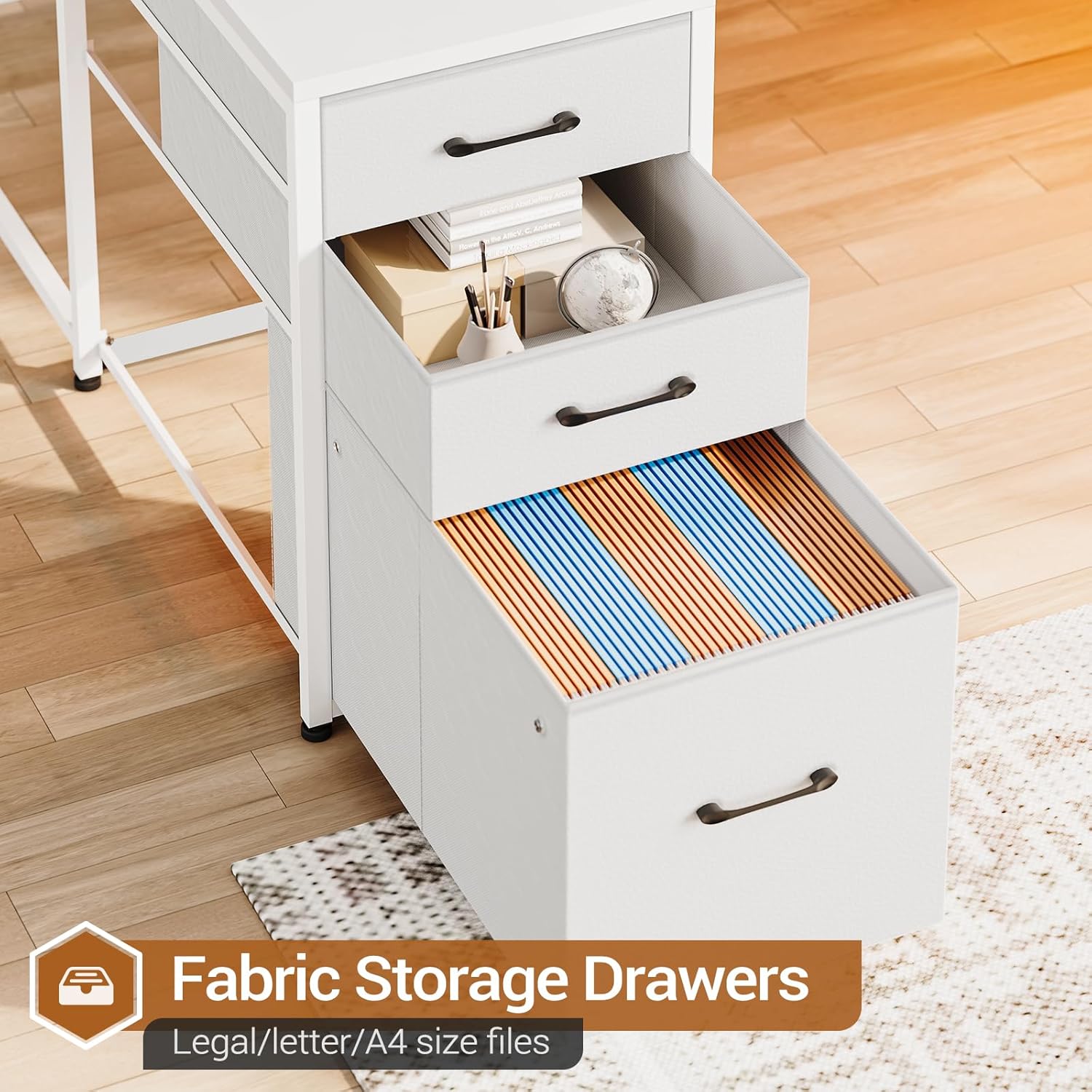
Figure 4: Fabric storage drawers provide organized space for files and office essentials.
3.4 Storage Shelves
The desk features a 5-tier storage shelf unit, providing ample space for books, printers, decorative items, and other office necessities.

Figure 5: The 5-tier bookshelf offers extensive storage capacity.
4. Maintenance
Proper care and maintenance will extend the life and appearance of your desk.
- Cleaning: Wipe surfaces with a soft, damp cloth. Avoid abrasive cleaners or harsh chemicals, as these can damage the PVC surface and metal finish.
- Spills: Immediately wipe up any spills to prevent staining or damage to the engineered wood.
- Hardware: Periodically check all screws and fasteners to ensure they remain tight. Re-tighten as necessary to maintain stability.
- Environment: Avoid placing the desk in direct sunlight or near heat sources, which can cause material degradation or discoloration.
5. Troubleshooting
5.1 Desk Stability Issues
- Wobbling: Ensure all screws are securely tightened. Check that the desk is placed on a level surface. Adjustable feet (if present) can be used to compensate for uneven floors.
- Uneven Tabletop: If the tabletop appears uneven after initial assembly, loosen the screws connecting the tabletop sections, gently adjust and level, then re-tighten.
5.2 Power Outlet/USB Issues
- No Power: Ensure the main power cord is securely plugged into a functional wall outlet. Verify the red On/Off switch on the power strip is in the 'On' position.
- Device Not Charging: Check the device's charging cable and ensure it is properly connected to both the device and the USB port/AC outlet. Test with another device or cable if possible.
5.3 LED Light Malfunctions
- Lights Not Turning On: Ensure the LED strip is properly connected to its power source and controller. Check the remote control battery or app connection.
- App Connectivity: If using the app, ensure Bluetooth is enabled on your device and the app is correctly paired with the LED controller. Refer to the separate LED light manual for pairing instructions.
- Incorrect Colors/Modes: Reset the LED controller by unplugging it for a few seconds and then reconnecting. Re-calibrate or re-select settings via the remote or app.
6. Specifications

Figure 6: Detailed product dimensions for the SEDETA U-Shaped Computer Desk.
| Brand | SEDETA |
| Model Number | office desk white |
| Color | White |
| Material | Engineered Wood (P2 class particle board with PVC surface), Iron (heavy-duty metal leg) |
| Product Dimensions | 110D x 163.8W x 110H Centimetres (approx. 43.3D x 64.5W x 43.3H inches) |
| Item Weight | 34.5 kg (approx. 76 lbs) |
| Special Feature | Reversible design, Integrated Power Outlet (4 AC, 2 USB), LED Strip Lights, Fabric File Drawers, Storage Shelves |
| Power Outlet Specs | 4 AC Outlets (125V/12A), 2 USB Ports (5V/2A), On/Off Switch |
| LED Light Features | RGB, APP/Remote Control, 60000+ Colors, 29 Flashing Modes, Music Sync, Timing Function |
7. Warranty and Support
SEDETA is committed to providing quality products and customer satisfaction.
- Damaged or Missing Parts: If your item arrives damaged, scratched, or with missing parts, please contact SEDETA customer support immediately. We will arrange for a free replacement or offer a partial refund as appropriate.
- Warranty Information: For specific warranty terms and conditions, please refer to the documentation included with your purchase or contact SEDETA customer service directly.
- Contact Information: Please refer to your purchase receipt or the SEDETA official website for the most current customer support contact details.


