
Simmons SPTTD120
Simmons PRO Target 1X20MM Tube RED DOT
Instruction Manual
1. Introduction and Overview
The Simmons Pro Target Reflex Red Dot is designed for precision and durability, featuring an aircraft-grade aluminum housing and a multi-coated glass lens. It provides a clear sight picture with true-tone coatings to eliminate blue tint, ensuring optimal visibility in various conditions.
Key features include:
- Aircraft-grade aluminum housing and glass lens construction, ensuring waterproof and fog-proof performance.
- Integrated Weaver mount for versatile attachment.
- A 3 MOA dot with 11 brightness settings for adaptable visibility.
- Side-loading battery compartment for easy access, providing over 5000 hours of battery life on mid-brightness setting.
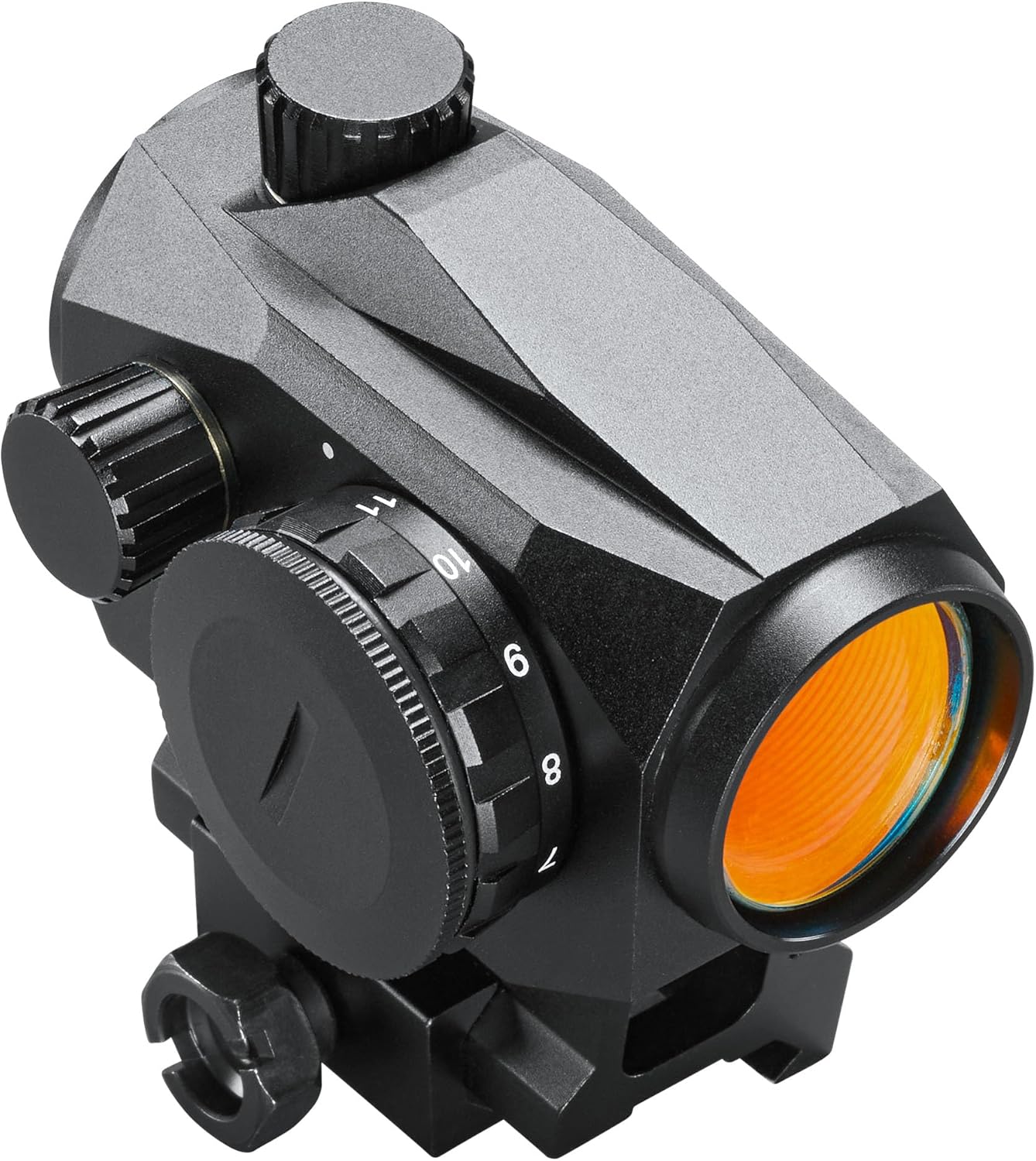
Figure 1: Overall view of the Simmons PRO Target 1X20MM Tube Red Dot Sight, showcasing its compact and robust design with the objective lens visible.
2. What's in the Box
Upon opening your Simmons Pro Target Reflex Red Dot package, please verify that all the following components are included:
- Simmons PRO Target 1X20MM Tube Red Dot Sight
- Weaver Low-Rise Mount
- Protective Shroud
- CR2032 Battery
- Mounting Screws
- Tools (e.g., Allen wrench for mounting)
- Lens Cleaning Cloth

Figure 2: Front view of the red dot sight, clearly showing the objective lens and the integrated Weaver mount at the base.
3. Setup
3.1 Battery Installation
The Simmons Pro Target Red Dot uses a CR2032 battery. The battery compartment is conveniently located on the side of the unit for easy access.
- Locate the battery cap on the side of the red dot sight.
- Using a coin or appropriate tool, unscrew the battery cap counter-clockwise.
- Insert the CR2032 battery with the positive (+) side facing outwards (towards the cap).
- Carefully screw the battery cap back on clockwise until it is finger-tight. Do not overtighten.

Figure 3: Side view of the red dot sight, highlighting the side-loading battery compartment for easy battery replacement.
3.2 Mounting the Red Dot Sight
The Pro Target Red Dot comes with an integrated Weaver low mount, allowing direct attachment to compatible pistol slides (with Delta Point Pro footprint) or rifles/shotguns with Weaver/Picatinny rails.
- Ensure your firearm is unloaded and safe before proceeding.
- Align the integrated Weaver mount on the red dot sight with the Weaver/Picatinny rail on your firearm.
- Slide the red dot sight onto the rail until it is in the desired position.
- Tighten the mounting screws securely using the provided tools. Ensure the sight is firmly attached and does not wobble.
- For pistol slide mounting with a Delta Point Pro footprint, ensure proper adapter plates or direct compatibility as required by your specific pistol model.
4. Operating Instructions
4.1 Powering On/Off and Brightness Adjustment
The red dot sight features 11 brightness settings for the 3 MOA dot, allowing you to adjust visibility based on ambient light conditions.
- To turn on the sight, rotate the brightness adjustment dial (typically located on the side) from the "0" (off) position to your desired brightness level (1-11).
- To increase brightness, rotate the dial clockwise.
- To decrease brightness, rotate the dial counter-clockwise.
- To turn off the sight, rotate the dial back to the "0" position.
4.2 Windage and Elevation Adjustment
The sight features 1 MOA detented elevation and windage turrets with 100 MOA of total travel, allowing for precise zeroing.

Figure 4: Close-up view of the windage and elevation adjustment turrets, along with the brightness control dial.
- Elevation Adjustment: The top turret adjusts the vertical point of impact. Turning the turret clockwise will move the point of impact down, and counter-clockwise will move it up.
- Windage Adjustment: The side turret adjusts the horizontal point of impact. Turning the turret clockwise will move the point of impact right, and counter-clockwise will move it left.
- Each click of the turret typically represents 1 MOA (Minute of Angle) of adjustment.
- Use a small flat-head screwdriver or the edge of a coin to make adjustments.
It is recommended to perform a proper zeroing procedure at your preferred distance after mounting the sight.
5. Maintenance
Proper maintenance will ensure the longevity and optimal performance of your Simmons Pro Target Red Dot Sight.
- Lens Cleaning: Use the provided lens cleaning cloth or a soft, lint-free cloth to gently wipe the objective and ocular lenses. For stubborn smudges, a small amount of lens cleaning solution designed for optics can be applied to the cloth, not directly to the lens. Avoid using abrasive materials or harsh chemicals.
- Body Cleaning: Wipe the aluminum housing with a damp cloth to remove dirt and debris. Do not use solvents that may damage the finish.
- Battery Replacement: Replace the CR2032 battery when the red dot appears dim or flickers, or if the sight fails to power on. Always dispose of used batteries responsibly.
- Storage: When not in use, store the red dot sight in a cool, dry place, ideally in its original packaging or a protective case. Ensure the sight is turned off to conserve battery life.
- Inspection: Periodically check all screws and mounting hardware to ensure they remain tight.
6. Troubleshooting
| Problem | Possible Cause | Solution |
|---|---|---|
| Red dot does not appear or is dim. | Battery is dead or incorrectly installed. Brightness setting is too low. | Check battery orientation and replace if necessary. Increase brightness setting. |
| Red dot flickers or turns off intermittently. | Low battery. Loose battery cap. | Replace battery. Ensure battery cap is securely tightened. |
| Sight loses zero or is inaccurate. | Mounting screws are loose. Impact or rough handling. | Check and tighten all mounting screws. Re-zero the sight. |
| Fogging on lenses. | Extreme temperature changes. | Allow the sight to acclimate to the temperature. Ensure lens caps are used when not in use. |
7. Specifications
| Feature | Detail |
|---|---|
| Model Name | PRO TARGET 1X20MM TUBE RED DOT |
| Part Number | SPTTD120 |
| Magnification | 1x |
| Objective Lens Diameter | 20mm |
| Reticle Type | 3 MOA Red Dot |
| Brightness Settings | 11 |
| Battery Type | CR2032 |
| Battery Life | 5000+ hours (mid setting) |
| Housing Material | Aircraft-grade Aluminum |
| Mounting Type | Weaver Mount (integrated) |
| Waterproof/Fogproof | Yes |
| Item Weight | 11.2 Ounces |
| Color | Black |
8. Warranty Information
The Simmons PRO Target 1X20MM Tube Red Dot Sight comes with a 2-Year Manufacturer Warranty.
This warranty covers defects in materials and workmanship under normal use. For specific terms, conditions, and to initiate a warranty claim, please refer to the official Simmons website or contact their customer support directly.
9. Customer Support
For further assistance, technical support, or inquiries regarding your Simmons PRO Target Red Dot Sight, please contact Simmons customer service.
Please visit the official Simmons website for the most up-to-date contact information, FAQs, and additional resources.
Website: www.simmonsoptics.com
Related documentsSPTTD120


Ask a question about this manual
Ask about setup, troubleshooting, compatibility, parts, safety, or missing instructions. Manuals+ will review the question and use this page’s manual context to help answer it.