
1. Overview
The PARD Night Stalker 4K NS4-70/940/LRF is an advanced day/night vision rifle scope designed for enhanced target recognition and precision. Featuring a 4K CMOS sensor, integrated ballistic calculator, and a 1000m rangefinder, this scope provides clear imaging and essential data for various outdoor activities. Its robust design includes ED lenses for superior optical performance and a 100mm long eye-relief for user comfort and safety.

Image: PARD Night Stalker 4K scope in use, demonstrating its application in the field.
2. Setup
2.1 Unboxing and Component Identification
Upon unboxing, verify all components are present as shown in the diagram below. The package typically includes the Night Vision Scope, scope cover, Type-C cable, Allen wrench, mount rings, rubber eyepiece, and user manual.

Image: All components of the PARD Night Stalker 4K package.
2.2 Battery Installation and Charging
The device requires one 18650 Type 3.7V 2600mAh Lithium Ion battery (included). Ensure the battery's positive terminal is facing outwards when inserting. For initial use, fully charge the battery using the provided charger and power adapter. A plastic piece may be present upon the battery to prevent accidental activation; remove it before use.
Video: Instructions on how to correctly install and remove the battery.
Video: Guide on how to charge the NVG30 battery correctly.
2.3 Mounting the Scope
Mount the scope onto your rifle using the provided mount rings. Ensure the scope is securely fastened and properly aligned. It is recommended to perform initial setup off the rifle for easier access to adjustment screws. The scope features a 100mm long eye-relief for comfortable and safe viewing.

Image: Illustration of the 100mm long eye-relief.
Video: Demonstrates the night vision scope display, use effects, and installation process.
Video: Detailed DIY night vision installation instructions.
3. Operating Instructions
3.1 Power On/Off and Mode Selection
Press and hold the power button to turn the device on or off. The scope supports both day and night vision modes. Switch between modes as needed for optimal viewing conditions.

Image: Day and Night vision comparison through the scope.
3.2 Display and Reticle
The PARD Night Stalker 4K features a round display with an always-centered reticle, providing a viewing experience consistent with traditional day scopes. Multiple reticle options are available to suit user preference.
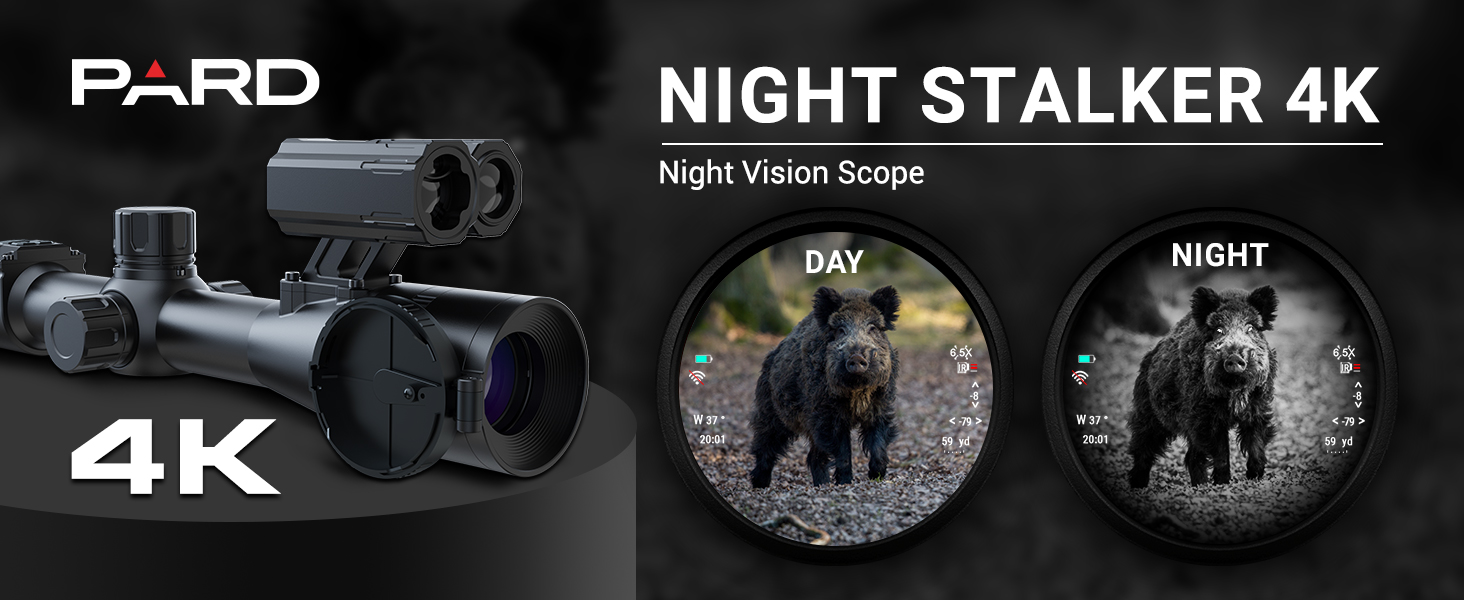
Image: Round display with always-centered reticle.

Image: Different reticle options.
3.3 Ballistic Calculator and Rangefinder
Utilize the integrated ballistic calculator to determine precise aiming points by inputting trajectory parameters such as velocity, bullet weight, and zero range. The 1000m (up to 1200m) rangefinder allows for quick and accurate distance measurement to targets.

Image: Ballistic calculator in action.

Image: Rangefinder display showing target distance.
3.4 Zeroing Procedure
The scope offers a swift and simple zeroing process. Aim at your target, operate the controls to move the reticle to the impact point, and save. The device can store up to 5 sets of zeroing data.

Image: Swift and simple zeroing process.
3.5 IR Illuminator and Other Functions
The integrated and directional IR Illuminator enhances visibility in complete darkness. Other functions include Picture-in-Picture (PIP) mode, video recording, Wi-Fi connectivity, and firmware update capabilities.

Image: Integrated IR Illuminator.

Image: Picture-in-Picture mode.
Video: Introduction to using the night vision scope, covering various functions.
4. Maintenance
4.1 Cleaning
Regularly clean the lenses and body of the scope with a soft, lint-free cloth. Avoid abrasive materials or harsh chemicals that could damage the optical coatings or housing. Use a lens brush or compressed air to remove dust from lenses before wiping.
4.2 Battery Care
Always use the recommended 18650 Lithium Ion batteries. Store batteries in a cool, dry place. If the device will not be used for an extended period, remove the battery to prevent discharge or damage.
4.3 Storage
Store the scope in its protective cover in a dry environment, away from direct sunlight and extreme temperatures. Ensure all caps are on the lenses to protect them from dust and scratches.
5. Troubleshooting
5.1 No Power/Display Issues
- Ensure the battery is fully charged and correctly inserted with the positive terminal facing outwards.
- Check all cable connections if using external accessories or power sources.
- Remove any plastic pieces or stickers that might be blocking battery contact.
5.2 Unclear Image
- Adjust the focus and diopter settings on the scope.
- Ensure the magnification is set to the lowest setting for initial clarity, then adjust as needed.
- Clean the lenses thoroughly.
- Verify the eye relief is correctly set for your viewing comfort.
5.3 Zeroing Problems
- Confirm the scope is securely mounted and not shifting.
- Follow the swift zeroing procedure carefully, ensuring each step is completed before saving.
6. Specifications
| Feature | Specification |
|---|---|
| Model Number | Night Stalker 4K (NS4-70/940/LRF) |
| Sensor Resolution | 3840 * 2160 (4K CMOS) |
| Max Magnification | 70x |
| Objective Lens Diameter | 30 mm |
| Eye-Relief | 100 mm |
| Rangefinder | 1000m (up to 1200m) |
| IR Illuminator | Integrated and Directional |
| Display Type | Round Display |
| Battery Type | 1x 18650 Lithium Ion (included) |
| Material | Aluminum |
| Weight | 495 g |
| Dimensions | 35L x 8.8W x 9.5H Centimetres |
| Waterproof Rating | IP65 |
| Recoil Resistance | 6000J |
7. Warranty and Support
PARD offers a 2-year limited warranty covering any manufacturer defects. For warranty claims, maintenance services, or technical support, please contact PARD customer service. A branch company in the United States is available to provide maintenance services.
For further assistance, please refer to the official PARD website or contact their authorized service centers.


