
1. Introduction
The EKYLIN Wireless Parking Sensor System (Model: WS-LED068-SET-BK) is designed to enhance parking safety by providing accurate distance detection and audible warnings. This system features a wireless LED display and four high-performance ultrasonic sensors, making it suitable for various vehicles including cars, vans, RVs, and trailers. Its durable, weatherproof design ensures reliable performance in diverse conditions.

This image illustrates the EKYLIN Wireless Parking Sensor System's LED display integrated into a car's dashboard, highlighting its key features: a digital colored LED display, sensors with audible detection, weatherproof design, and high performance.
2. Package Contents
Please verify that all the following components are included in your package:
- Central Control Box x 1
- LED Display x 1
- Parking Assist Sensor x 4
- 22mm Hole Saw x 1
- Power Cord x 1
- 12V Cigarette Lighter Power Cord x 1
- 3M Sticker x 2
- User Manual x 1

This image displays all the components of the EKYLIN Wireless Parking Sensor System kit. It includes the central control unit, the LED distance display, four ultrasonic parking sensors, necessary power connection cables, and a 22mm hole saw for installation.
3. Specifications
| Feature | Specification |
|---|---|
| Rated Voltage | 12V DC |
| Rated Operating Range | 10.5V - 16V DC |
| Rated Current | 100mA - 300mA |
| Detection Distance | 0.3 - 2.0 meters |
| Ultrasonic Frequency | 40KHz |
| Control Box Operating Temperature | -30°C to 80°C |
| Display Operating Temperature | -20°C to 70°C |
| Sensor Size (D x H) | 25mm x 19mm |
| Main Control Box Size | 90 x 60 x 23 mm |
| Main Control Box Weight | 63g |
4. Setup and Installation
The EKYLIN Wireless Parking Sensor System is designed for straightforward installation without complex wiring between the display and sensors. Follow these steps for proper setup:
- Prepare Sensor Locations: Identify suitable locations on your vehicle's rear bumper for the four parking sensors. Ensure they are evenly spaced and at an appropriate height for optimal detection.
- Drill Holes: Use the included 22mm hole saw with an electric drill to create precise holes at the marked sensor locations. Ensure the holes are clean and free of debris.
- Install Sensors: Insert each parking sensor into its respective hole. Confirm the correct orientation of each sensor as indicated in the diagram to ensure proper detection. Secure them firmly.
- Connect Sensors to Control Box: Connect the cables from the four parking sensors to the corresponding ports on the Central Control Box.
- Power Connection: Connect the Central Control Box to your vehicle's 12V power supply. This can typically be done using the provided 12V cigarette lighter power cord or by wiring directly to the reverse light circuit (professional installation recommended for direct wiring).
- Mount LED Display: Place the LED display in a visible location on your dashboard or rearview mirror using the provided 3M stickers. The display communicates wirelessly with the control box.
- Test System: After installation, engage reverse gear (with the engine running) and slowly approach an obstacle to test the system's functionality. Verify that the LED display shows distance readings and audible alerts are active.

This visual guide outlines the simple installation process for the EKYLIN parking sensors. It shows preparing the 22mm hole saw and sensor, confirming the correct sensor orientation, drilling the hole in the vehicle bumper, and finally, confirming the secure installation of the sensor.

This diagram provides the precise dimensions of the EKYLIN parking sensors (25mm diameter, 19mm depth, 22mm height) and demonstrates the system's universal compatibility with a wide range of vehicles such as cars, vans, RVs, and trailers.
5. Operating Instructions
Once installed and powered, the EKYLIN Wireless Parking Sensor System operates automatically when your vehicle is in reverse gear.
- Activation: The system activates automatically when the vehicle's reverse gear is engaged.
- Detection: The four ultrasonic sensors continuously scan the area behind your vehicle for obstacles within a range of 0.3 to 2.0 meters.
- LED Display: The LED display provides a real-time visual indication of the distance to the nearest obstacle. The display typically shows a numerical distance and colored segments (e.g., green for far, yellow for closer, red for very close).
- Audible Warning: As you approach an obstacle, the system emits an audible warning. The frequency of the beeps increases as the distance to the obstacle decreases, becoming a continuous tone when the obstacle is very close (e.g., within 0.3 meters).
- Safety: The combination of visual and audible alerts helps drivers accurately perceive their surroundings, especially in low-visibility conditions, enhancing safety during reversing maneuvers.
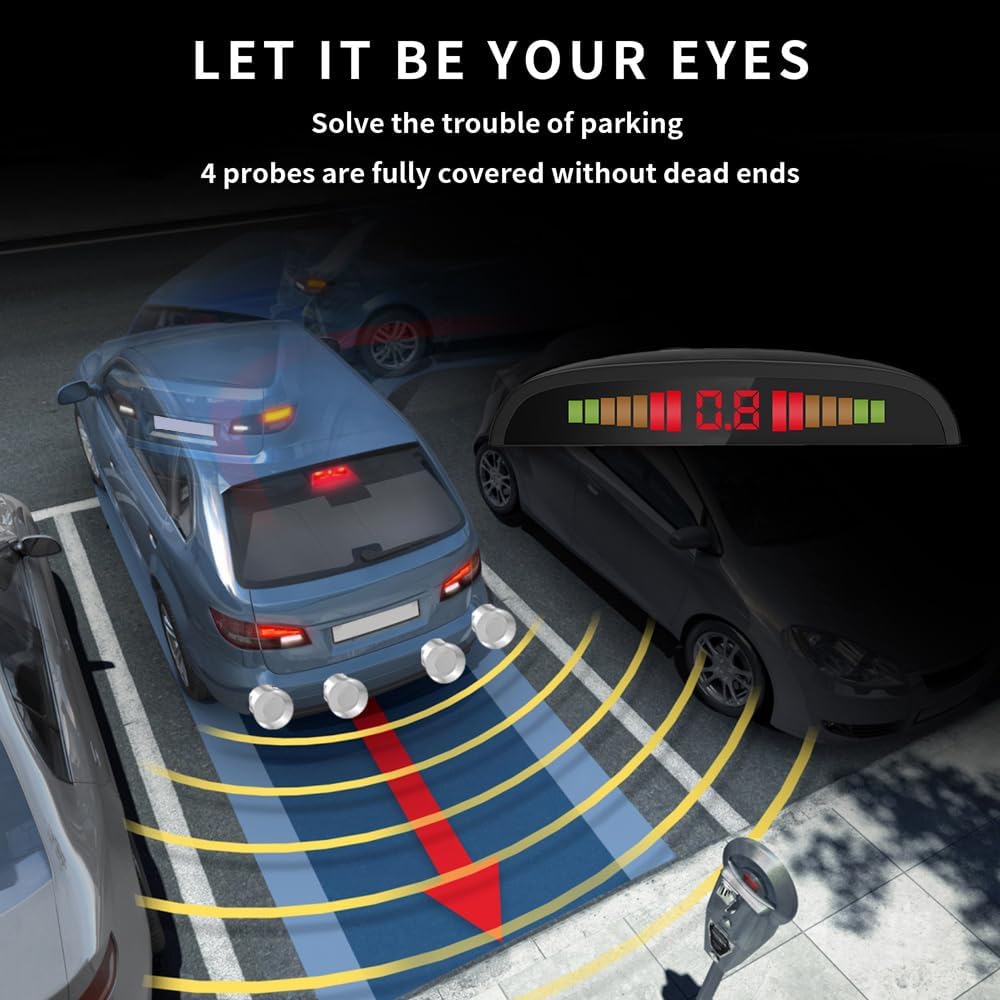
This illustration demonstrates the EKYLIN parking sensor system in action, showing a vehicle reversing. The four sensors provide comprehensive coverage, detecting obstacles and displaying the distance on the LED screen with visual and audible alerts to assist in safe parking.
6. Maintenance
To ensure the longevity and optimal performance of your EKYLIN Wireless Parking Sensor System, follow these simple maintenance guidelines:
- Sensor Cleaning: Regularly inspect the parking sensors on your bumper for dirt, mud, ice, or snow. Clean them gently with a soft, damp cloth. Avoid using abrasive cleaners or high-pressure water jets directly on the sensors, as this may damage them.
- Connection Check: Periodically check all cable connections to the Central Control Box and sensors to ensure they are secure and free from corrosion.
- Weather Resistance: The system is designed to be weatherproof. However, extreme weather conditions (e.g., heavy snowfall, thick ice) can temporarily impair sensor performance. Ensure sensors are clear of obstructions before use.
- General Care: Keep the LED display clean and free from dust. Avoid exposing the control box to excessive moisture or extreme temperatures.
7. Troubleshooting
If you encounter issues with your EKYLIN Wireless Parking Sensor System, refer to the following troubleshooting tips:
- No Power/Display Not Lighting Up:
- Check the power connection to the Central Control Box. Ensure the 12V cigarette lighter adapter is fully inserted or direct wiring is correctly connected to the reverse light circuit.
- Verify that the vehicle's reverse gear is engaged.
- Inspect the power cord for any visible damage.
- Inaccurate Distance Readings or False Alarms:
- Clean the surface of all parking sensors. Dirt, mud, ice, or water droplets can interfere with ultrasonic waves.
- Ensure no objects are directly in front of or very close to the sensors when the system activates.
- Check that sensors are securely mounted and not loose or angled incorrectly.
- Verify that the sensors are not obstructed by vehicle accessories (e.g., tow hitch, bike rack) when in use.
- No Audible Warning:
- Ensure the LED display is receiving power and functioning correctly. The buzzer is typically integrated into the display unit.
- Confirm that the system is detecting an obstacle and the distance is within the audible warning range.
- Intermittent Operation:
- Check all wiring connections for looseness or corrosion.
- Ensure there are no strong electromagnetic interference sources near the control box or display.
If these steps do not resolve the issue, please contact customer support for further assistance.
8. Warranty and Support
EKYLIN products are manufactured to high-quality standards. For any warranty claims or technical support, please refer to the contact information provided with your purchase or visit the official EKYLIN support website. Keep your purchase receipt as proof of purchase for warranty services.