
Della 27K+T9912_2
Della Mini Split Air Conditioner User Manual
Model: 27K+T9912_2 | Brand: Della
Your guide to efficient multi-zone climate control with smart features.
Product Overview
The Della Mini Split Air Conditioner is a highly efficient, multi-zone heat pump system designed to provide personalized comfort across multiple rooms. Featuring DC Inverter technology, it offers significant power savings and operates quietly. This system includes three indoor air handlers (9000 BTU + 9000 BTU + 12000 BTU) and one outdoor condenser, capable of cooling and heating up to 1350 Sq. Ft. It integrates with smart home systems like Alexa for convenient control.
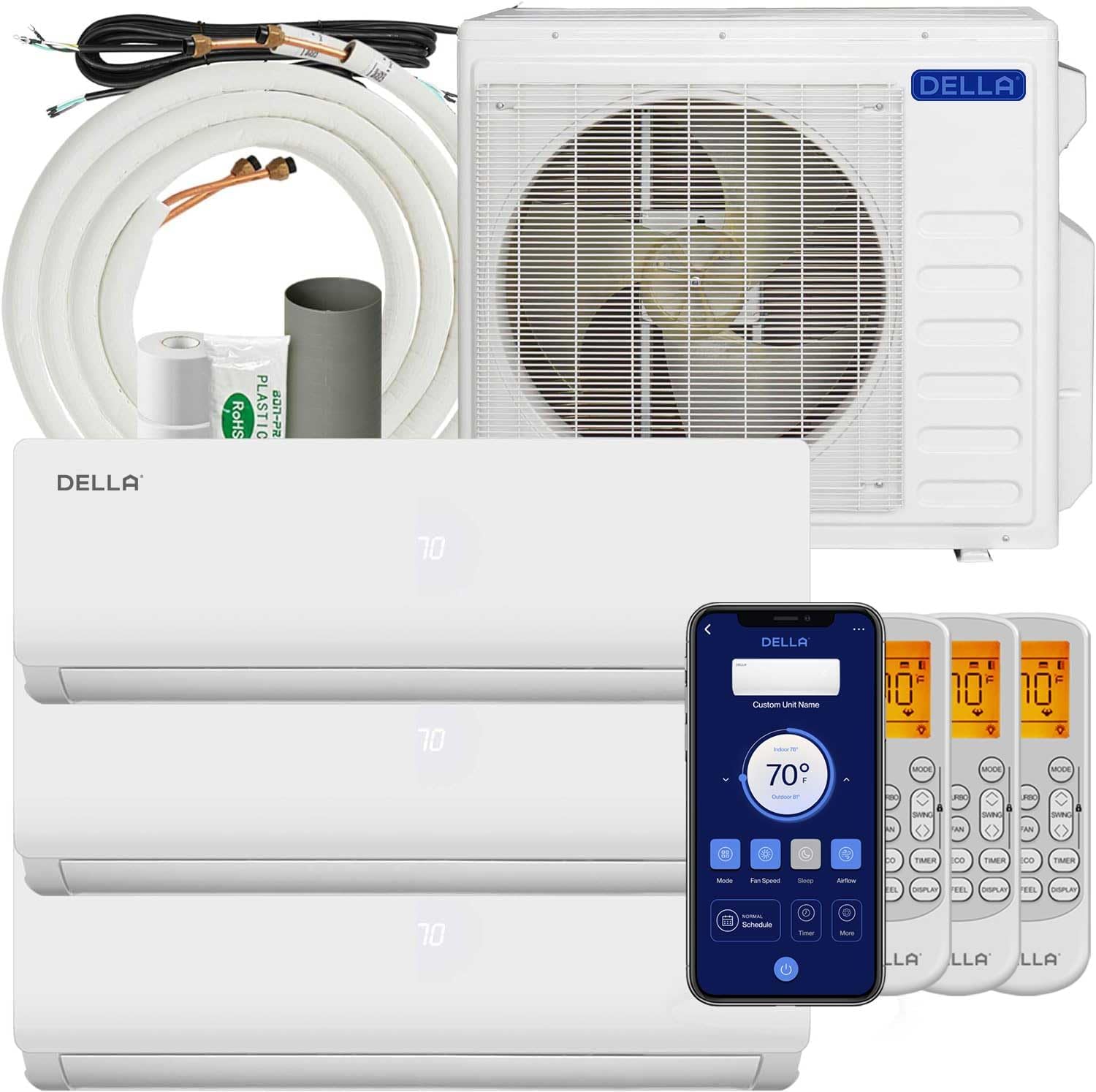
Figure 1: Complete Della Mini Split Air Conditioner system with indoor units, outdoor unit, and remote controls.
Key Features:
- Energy Efficient Cooling: 19 SEER2 rating with DC Inverter technology for up to 30% power savings. Features a heat pump for heating down to -4°F (-20°C).
- Multi-Room Comfort: Three indoor air handlers (9K+9K+12K BTU) with individual controls for zoned climate management.
- Smart Functions: Includes turbo function, 4D air flow, dry modes, I Feel mode, sleep mode, eco energy saving mode, 24-hour timer, and multiple fan speeds.
- Wide Coverage: Cools and heats up to 1350 Sq. Ft. and operates effectively in temperatures as low as 5°F.
- Quiet Operation: Operates at an ultra-silent 41 dBa.
- Smart Home Integration: Works with Alexa and features Wi-Fi connectivity for remote control via the Della+ app.

Figure 2: Comparison illustrating 36% energy savings with 19 SEER2 technology.

Figure 3: Diagram showing individual temperature control in multiple rooms with 9K, 9K, and 12K BTU units.
Setup and Installation
Proper installation is crucial for the optimal performance and longevity of your Della Mini Split system. It is highly recommended that this system be installed by qualified professionals. Any alteration of line-set length requires adjusting freon levels, and line-set vacuuming is required during installation. This is not a DIY mini split AC.
Important Pre-Installation Steps:
Video 1: "5 Urgent Steps Need to Know Before Installing Della Mini Split" - This video provides critical information regarding installation location, handling refrigerant pipes, bundling line sets, vacuum pumping the refrigerant circuit, and ensuring safe electrical connections.
- Installation Location:
- The indoor model must be at least 6 inches below the ceiling for proper airflow.
- Verify proper clearances for your specific model in the user manual's "Installation Preview Section".
- Ensure the wall is sturdy enough to hold the unit's weight without vibrating.
- Keep inlet and outlet clear of any obstructions.
- Install the indoor model 10 feet (3 meters) away from any TVs or radio appliances to prevent interference.
- Handling Refrigerant Pipes:
- Use a bending tool if available. If not, bend pipes very slowly to avoid damage. Damaged pipes can lead to leaks.
- Bundling the Line Set:
- After installing the indoor model, ensure the line set is angled downward and the drain pipe is pointed straight down to allow proper liquid flow and prevent leaks.
- Vacuum Pumping the Refrigerant Circuit:
- This is a critical step to remove air and moisture for maximum efficiency.
- Vacuum for at least 15 minutes for each line set, depending on your pump's strength.
- For multi-zone systems, vacuum each line set separately for varying amounts of time based on length.
- Recommended vacuum levels: 500 Microns (with micron gauge) or -30 PSI (with manifold gauge).
- Ensuring Safe Electrical Connection:
- Always verify your connection for safety.
- Check your home's voltage (110V or 220V) and select the appropriate breaker size and UL-listed wire quality for the mini split system.
General Installation Steps:
Video 2: "Install Your DELLA Mini Split Unit" - This video demonstrates the physical installation process of the indoor and outdoor units.
- Use the provided template to mark locations for the line set wall hole and mini split bracket.
- Use provided screws to drill the mini split bracket to the wall.
- Use a leveler to ensure the bracket is properly leveled.
- Run line set, drain hose, and electricals through the wall hole.
- Mount the mini split unit to the bracket.
- Tape the drain hose and line sets together.
- Zip tie electrical wires around taped line sets and drain hose.
- Set the outdoor condenser in place.
- Remove electrical port and valve covers.
- Remove valve covers.
- Connect unit line set to condenser line set and tighten down.
- If available, use a digital torque wrench to ensure line sets are properly tightened.
- Tighten down line set to outdoor condenser.
Wiring Instructions:
Video 3: "How to wire your Della mini split unit" - This video provides detailed steps for connecting the electrical wiring.
- Before connecting any wires, ensure all power sources are turned off.
- Remove the electrical compartment cover.
- Plug in the ground wire (Green) first and then each corresponding numbered wire (Black, White & Yellow wires are numbered, connect to correlating number on electrical block).
- Make sure the outlet box is powered off before continuing.
- Plug in the ground (Green) wire first, then continue with Leg (Black) and Neutral (Red) wires.
- Make sure you are using the correct adapter and connect it to the unit.
- Ensure you have the correct vacuum.
- Connect the hose from the unit to the gauge.
- Correctly connect the hose from the vacuum to the gauge.
- Open valves on the gauge and turn the vacuum on.
- Pay attention to the micron number, close valves once it reaches 350.
- Turn off the vacuum.
- Turn the outlet back on.
- Turn the mini split unit on and set it to the lowest cold setting.
- Wait for the outdoor condenser fan to start (this process could take a few minutes).
- Use a service wrench and slowly open the High Side (Top Valve).
- Pay attention to the gauge as numbers will drop in the negative when opening the High Side (This is a Good Thing).
- After the High Side has been opened, quickly open the Low Side (Bottom Valve).
- After the High Side has been opened, pay attention to the gauge as the numbers will spike (This is a Good Thing).
Operating Instructions
Your Della Mini Split system offers various modes and smart features for optimal comfort and convenience.
Remote Control Functions:

Figure 4: Remote control with labeled buttons for various functions like mode, fan speed, swing, timer, and sleep.
- On/Off: Power the unit on or off.
- Temp Up/Down: Adjust the desired temperature.
- Mode: Cycle through Auto, Cool, Dry, Heat, and Fan Only modes.
- Fan Speed: Select desired fan speed (High, Mid, Low, Auto).
- Swing: Control vertical and horizontal airflow direction.
- Sleep Mode: Adjusts temperature automatically for comfortable sleep.
- Timer: Set a specific time for the unit to turn on or off.
- Eco Mode: Energy-saving operation.
- Display Light: Turn the unit's display light on or off.
- Turbo: Activates maximum cooling/heating for rapid temperature change.
- iFeel: Senses temperature at the remote's location for precise comfort.
- PureClean: Initiates a self-cleaning cycle (Note: This model does not support the Self-Cleaning Function, despite the button being present).
Della+ App Control:
The free Della+ app allows you to control your unit from anywhere, anytime, offering a sleek, user-friendly interface.

Figure 5: Della+ App showing various control options for the mini split unit.
Video 4: "Geo Location Function" - Learn how to set up and customize Geo Location features for automatic AC control based on your presence.
Video 5: "Della Mini split app 3.0" - A comprehensive overview of the Della+ app's features, including scheduling, timer, and mode selection.
- Geo Location: Automatically turns your AC on or off based on your location, ensuring comfort when you arrive home and saving energy when you leave.
- Schedules & Timer: Set weekly schedules or custom countdown timers to maintain desired temperatures.
- Multiple Modes: Easily switch between Cool, Heat, Auto, Dehumidify, and Fan Only modes directly from your smartphone.
- Voice Control Compatibility: Seamlessly integrates with voice assistants like Alexa and Google Assistant for hands-free operation.
Maintenance
Regular maintenance ensures the efficiency and longevity of your Della Mini Split system. While professional installation is required, some routine checks can be performed by the user.
- Filter Cleaning: Regularly clean the air filters in the indoor units to maintain optimal airflow and air quality. Refer to the detailed user manual for specific instructions on filter removal and cleaning frequency.
- Outdoor Unit Clearance: Ensure the outdoor condenser unit remains clear of debris, plants, and other obstructions to allow for proper airflow and heat dissipation.
- Professional Servicing: It is recommended to have a qualified HVAC technician perform annual maintenance checks, including refrigerant level verification, coil cleaning, and overall system inspection.
Troubleshooting
If you encounter any issues with your Della Mini Split system, please refer to the comprehensive troubleshooting guide in the full user manual (PDF link available on the product page). For common issues, consider the following:
- Unit Not Turning On: Check power supply, circuit breaker, and ensure the remote control batteries are not depleted.
- Insufficient Cooling/Heating: Verify temperature settings, ensure filters are clean, and check for any obstructions around indoor or outdoor units.
- Unusual Noises: Minor noises during operation are normal. If loud or persistent noises occur, consult the troubleshooting section of the manual or contact customer support.
- Water Leaks: Ensure the drain pipe is correctly angled and free from blockages.
If problems persist, please contact Della customer support for assistance.
Specifications
| Feature | Detail |
|---|---|
| Manufacturer | Della |
| Part Number | 27K+T9912_2 |
| Item Weight | 186.2 pounds |
| Product Dimensions | 31.92 x 11.49 x 8.07 inches |
| Country of Origin | China |
| Size | Tri Zone(3) 27000 BTU 9+9+12 |
| Color | White |
| Power Source | Corded Electric |
| Voltage | 230 Volts |
| Installation Method | Split System |
| Sound Level | 41 dB |
| Special Features | Energy Efficient, Alexa and WiFi Enabled, Heating And Cooling Function, Sleep Mode, Dehumidifier |
Warranty and Support
Della is committed to providing best-in-class support and unmatched warranty coverage for your peace of mind.
- Limited Lifetime Warranty: Enjoy comprehensive coverage with no additional costs.
- 24/7 Customer Support: Our expert support team is available 24/7 via live chat on the Della+ app or website.
- In-House Technicians: Reach our technicians Monday to Friday for specialized assistance.

Figure 6: Della's commitment to lifetime coverage and 24/7 customer support.
For further assistance, please visit the Della Store on Amazon or refer to the official User Manual (PDF).
Related documents27K+T9912_2


Ask a question about this manual
Ask about setup, troubleshooting, compatibility, parts, safety, or missing instructions. Manuals+ will review the question and use this page’s manual context to help answer it.