
1. Introduction
The Moman FS04B Semiconductor Camera Cooling Fan is designed to prevent camera overheating during extended use, especially when recording 4K footage, live streaming, or operating in warm environments. This manual provides essential information for the proper setup, operation, and maintenance of your device.

Image: The Moman FS04B Camera Cooling Fan actively working to prevent camera overheating, shown with a camera in a cool, icy environment.
2. Product Overview
2.1 Key Features
- Semiconductor Cooling System: Utilizes advanced semiconductor refrigeration for efficient heat dissipation.
- Compact and Lightweight: Constructed from high-quality aluminum alloy, measuring 70x50x21mm and weighing only 114g.
- Low Noise Operation: Operates at a low noise level of 26dB, suitable for various shooting environments.
- USB Type-C Power Supply: Allows for continuous operation via an external power source like a power bank.
- Two Adjustable Speeds: Offers low and high-speed settings for varied cooling needs.
2.2 Physical Components
The Moman FS04B features a durable aluminum alloy casing, a cooling fan, a power button, and a USB Type-C input port. Indicator lights show the current operating speed.

Image: The Moman FS04B cooling fan held in a hand, illustrating its compact size (70mm x 50mm x 21mm) and lightweight design (114g), made from aluminum alloy for efficient heat dissipation.

Image: Diagram illustrating the advanced semiconductor cooling system of the Moman FS04B, showing airflow and cooling effect with low noise operation at 26dB.
3. Compatibility
The Moman FS04B is compatible with various camera models featuring a flipping-out screen. It includes four mounting clips to ensure a secure fit. Please confirm your camera model is listed below for optimal performance.
3.1 Compatible Camera Models
- A7M4/ZVE1 D Series: A7M4, ZV-E1, A6700, A7C2, 70D
- ZVE10/D Series: ZV-E10, ZV1, A7C, FX3
- R6/D Series: R6, R7
- X-T4/D Series: X-T4, XS10

Image: Visual representation of the Moman FS04B attached to different camera models with flipping screens, highlighting its wide compatibility.
4. Setup Instructions
4.1 Attaching the Cooling Fan
- Select the appropriate mounting clip for your camera model.
- Gently slide the cooling fan into the chosen mounting clip until it is securely seated.
- Attach the mounting clip with the cooling fan to the back of your camera, ensuring it does not obstruct the camera's screen or controls. The fan should be positioned to draw heat away from the camera body.
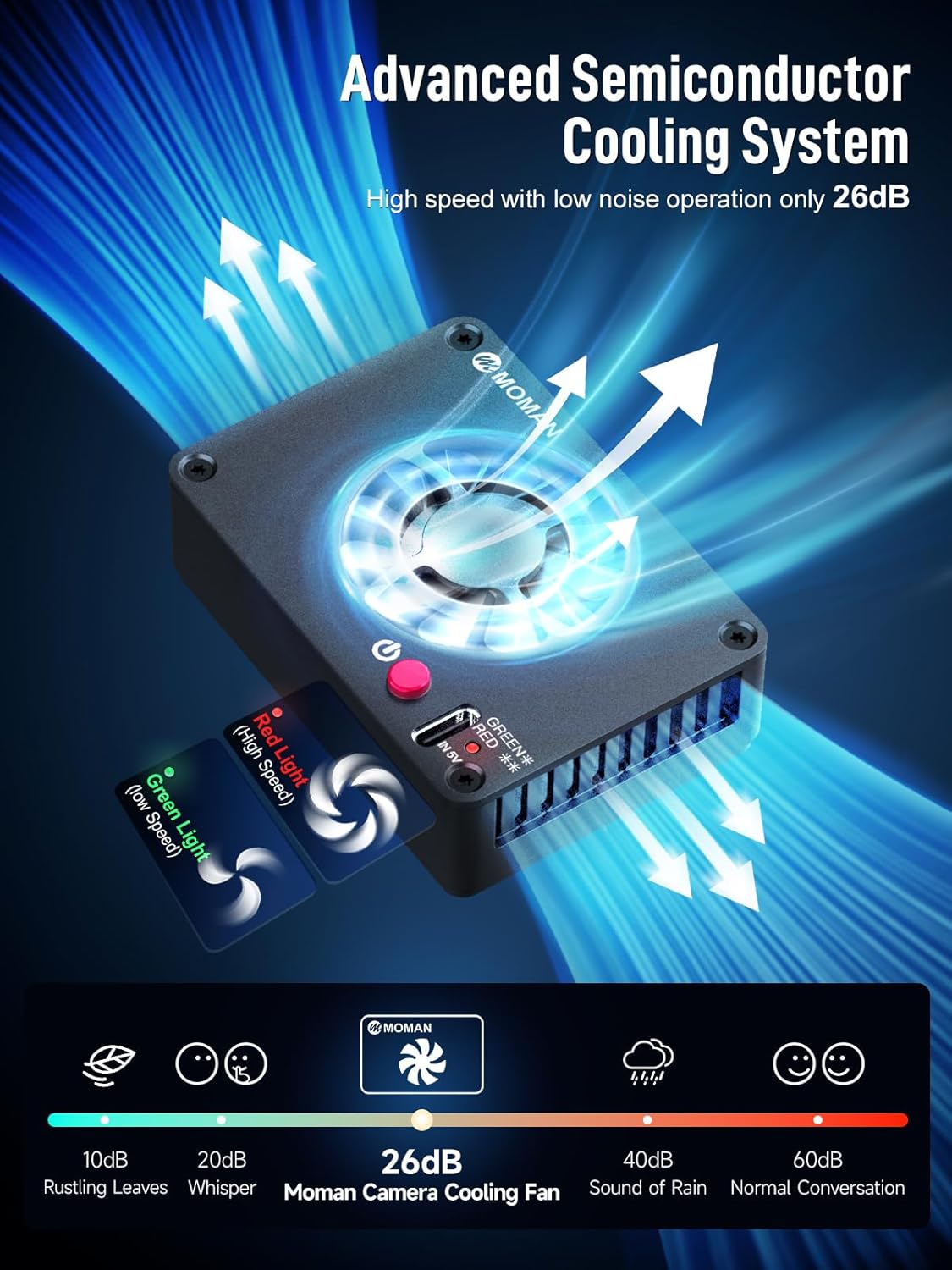
Image: The Moman FS04B cooling fan securely attached to the back of a camera, demonstrating proper mounting for effective cooling.
4.2 Power Connection
The Moman FS04B is powered via a USB Type-C cable. Connect the provided cable to the fan's USB Type-C port and to an external power source (e.g., power bank, USB wall adapter, V-Mount battery).

Image: The Moman FS04B cooling fan connected to a USB Type-C power cable, illustrating the power input method for continuous operation.
5. Operating Instructions
5.1 Powering On/Off and Speed Adjustment
After connecting the power, press the power button on the fan to turn it on. The fan has two adjustable speeds:
- Low Speed Mode: Indicated by a green light. Provides quiet cooling for less demanding situations.
- High Speed Mode: Indicated by a red light. Offers maximum cooling performance for intense recording sessions.
Press the power button repeatedly to cycle between off, low speed, and high speed modes.
5.2 Noise Level
The Moman FS04B operates with a low noise level of approximately 26dB. While designed to be quiet, fan noise can be audible depending on the sensitivity of your microphone and the recording environment. Consider using the low-speed mode for critical audio recording situations.

Image: The Moman FS04B cooling fan in use during different recording scenarios, including outdoor shooting in the sun, video sessions, live streaming, and 4K footage recording, demonstrating its utility in preventing camera overheating.
5.3 Official Product Video
Video: An official product video demonstrating the features and usage of the Moman FS04B Camera Cooling Fan, including its installation, power connection, and cooling capabilities.
6. Maintenance
To ensure the longevity and optimal performance of your Moman FS04B cooling fan, follow these maintenance guidelines:
- Cleaning: Regularly clean the fan blades and air vents to prevent dust accumulation, which can hinder cooling efficiency. Use a soft, dry cloth or a small brush. Do not use liquid cleaners directly on the device.
- Storage: When not in use, store the cooling fan in a cool, dry place away from direct sunlight and extreme temperatures.
- Handling: Avoid dropping the device or subjecting it to strong impacts, as this may damage the internal components.
7. Troubleshooting
If you encounter issues with your Moman FS04B cooling fan, refer to the following common problems and solutions:
| Problem | Possible Cause | Solution |
|---|---|---|
| Fan does not turn on. | No power or loose connection. | Ensure the USB Type-C cable is securely connected to both the fan and the power source. Verify the power source is active. |
| Fan is running but camera still overheats. | Fan speed too low, extreme ambient temperature, or improper mounting. | Switch to high-speed mode. Ensure the fan is properly positioned to exhaust hot air. Reduce camera usage in extremely hot conditions if possible. |
| Excessive noise from the fan. | Dust accumulation or fan obstruction. | Clean the fan blades and vents. Ensure nothing is obstructing the fan's rotation. If the issue persists, contact customer support. |
| Fan does not fit camera. | Incorrect mounting clip or incompatible camera model. | Ensure you are using the correct mounting clip for your camera. Refer to the compatibility list in Section 3. |
8. Specifications
Below are the technical specifications for the Moman FS04B Semiconductor Camera Cooling Fan:
| Feature | Specification |
|---|---|
| Product Dimensions | 1.97"L x 0.83"W x 2.76"H (70mm x 50mm x 21mm) |
| Brand | Moman |
| Power Connector Type | USB Type-C |
| Wattage | 2 watts |
| Cooling Method | Semiconductor |
| Compatible Devices | Cameras (specific models listed in Section 3) |
| Noise Level | 26 Decibels |
| Maximum Rotational Speed | 1800 RPM |
| Material | Aluminum Alloy |
| Weight | 114g |
9. Package Contents
The Moman FS04B Camera Cooling Fan package includes the following items:
- Moman FS04B Camera Cooling Fan x 1
- 2M USB-Type-C Power Cable x 1
- Mounting Clips x 4

Image: A visual representation of the Moman FS04B package contents, including the cooling fan, USB Type-C power cable, and four mounting clips.
10. Warranty and Support
10.1 Warranty Information
The Moman FS04B Camera Cooling Fan comes with a 365-day warranty from the date of purchase. This warranty covers manufacturing defects and ensures product quality. Please retain your proof of purchase for warranty claims.
10.2 Customer Support
For any technical assistance, troubleshooting not covered in this manual, or warranty inquiries, please contact Moman customer support. Our team aims to provide solutions within 24 hours on working days.
You can typically find contact information on the official Moman website or through the retailer where you purchased the product.