
Introduction
Thank you for choosing the Tornado Lumina Analog Men’s Watch, Model T22001-TBTH. This manual provides essential information for the proper setup, operation, maintenance, and care of your timepiece. Please read these instructions carefully to ensure optimal performance and longevity of your watch.

Image: Front view of the Tornado Lumina T22001-TBTH watch, showcasing its green dial and two-tone bracelet.
Product Overview
The Tornado Lumina T22001-TBTH is a sophisticated analog watch designed for reliability and style. It features a robust construction and precise timekeeping capabilities.
- Case: 42mm 316L Stainless Steel case with gold-tone crown and accents.
- Dial: Solid green dial with luminous markers and hands for visibility in low light.
- Bezel: Smooth-click black ceramic unidirectional bezel with engraved markings.
- Movement: Reliable Miyota 2115 Japanese Quartz analog movement for accurate timekeeping.
- Crystal: Sapphire-coated crystal, designed to resist scratches, with a magnifier over the date display.
- Bracelet: Two-tone presidential bracelet made from 316L stainless steel, featuring short, rounded links and a push-button deployant clasp.
- Water Resistance: 10 ATM (100 meters) water resistant.

Image: Illustration highlighting the luminous markers, hands, and bezel ring for enhanced visibility.
Setup
1. Unboxing
Your Tornado Lumina watch comes securely packaged in a box, accompanied by a warranty card. Please retain the box and warranty card for future reference and service needs.

Image: The Tornado watch presentation box.
2. Setting Time and Date
- Pull out the crown: Gently pull the crown (the knob on the side of the watch) to position 2 for date adjustment, or position 3 for time adjustment.
- Set the date: In position 2, rotate the crown clockwise or counter-clockwise until the correct date appears in the date window.
- Set the time: In position 3, rotate the crown to move the hands clockwise until the desired time is set. Ensure you differentiate between AM and PM when setting the time, especially if the watch has a 24-hour indicator or if you are setting the date.
- Push in the crown: Once the time and date are set, push the crown back into position 1 (normal operating position) to start the watch and ensure water resistance.
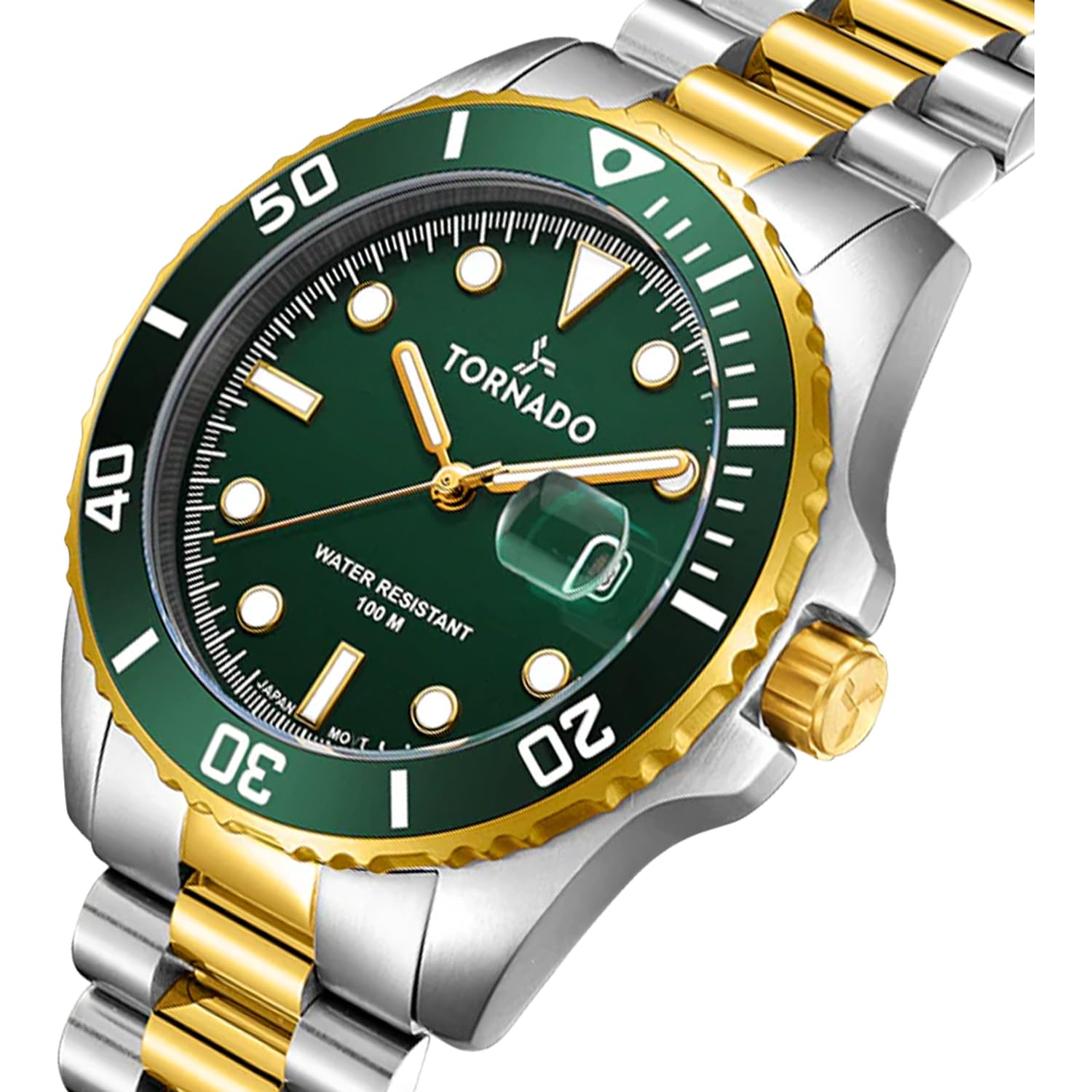
Image: Detailed view of the watch dial and crown, illustrating the setting mechanism.
3. Adjusting the Bracelet
The two-tone presidential bracelet features a push-button deployant clasp for secure fastening. To adjust the bracelet size, links may need to be added or removed. This procedure typically requires specialized tools and is best performed by a qualified watch technician to avoid damage.

Image: Rear view of the watch, highlighting the push-button deployant clasp and the stainless steel bracelet.
Operating Instructions
Timekeeping
Once the time is set and the crown is pushed back into position 1, your watch will begin accurate timekeeping thanks to its Japanese Quartz movement.
Date Function
The date display automatically advances once every 24 hours. If the date changes during the day, it means the AM/PM was incorrectly set. Adjust the time by 12 hours as described in the 'Setting Time and Date' section.
Unidirectional Bezel
The ceramic bezel rotates in one direction only. This feature can be used to measure elapsed time. Align the bezel's zero marker with the minute hand at the start of an event. The minute hand's position on the bezel will then indicate the elapsed time.
Maintenance and Care
Cleaning
To maintain the appearance of your watch, wipe the case and bracelet regularly with a soft, dry cloth. For stubborn dirt, a slightly damp cloth can be used, followed by immediate drying. Avoid using harsh chemicals or abrasive materials.
Battery Replacement
Your watch is powered by a Japanese Quartz movement, which uses a battery. The battery life typically ranges from 2 to 3 years. When the watch stops or the second hand begins to jump erratically, it indicates a low battery. Battery replacement should be performed by a qualified watch technician to ensure proper sealing and maintain water resistance.
Water Resistance
The Tornado Lumina T22001-TBTH is water-resistant up to 100 meters (10 ATM). This means it is suitable for everyday use and can withstand splashes, rain, and brief immersion in water. However, it is not suitable for high-velocity water activities, hot water environments (like showers or saunas), or prolonged swimming. Always ensure the crown is fully pushed in before any contact with water. Avoid operating the crown while the watch is wet.

Image: Visual representation of the watch's 10 ATM water resistance.
General Precautions
- Avoid exposing the watch to extreme temperatures or sudden temperature changes.
- Keep the watch away from strong magnetic fields, as these can affect the accuracy of the quartz movement.
- Handle with care to avoid damage from sudden impacts or drops.
Troubleshooting
Watch Not Running
- Check the crown: Ensure the crown is fully pushed into position 1. If it is pulled out, the watch will not run.
- Battery: The battery may be depleted. Refer to the 'Battery Replacement' section.
Date Not Changing at Midnight
- The AM/PM setting might be incorrect. Adjust the time by 12 hours as described in the 'Setting Time and Date' section.
Inaccurate Timekeeping
- Magnetic fields: The watch may have been exposed to a strong magnetic field. Consult a watch technician for demagnetization.
- Battery: A low battery can affect accuracy. Consider battery replacement.
For issues not covered here, please contact customer support.
Specifications
| Feature | Detail |
|---|---|
| Model Number | T22001-TBTH |
| Case Diameter | 42 Millimetres |
| Case Thickness | 13.5 Millimetres |
| Band Width | 22.5 Millimetres |
| Case Material | 316L Stainless Steel |
| Band Material | Stainless Steel (Two-Tone Gold) |
| Dial Colour | Green |
| Crystal Material | Sapphire Coated Glass |
| Movement Type | Japanese Quartz (Miyota 2115) |
| Display Type | Analog |
| Water Resistance Depth | 100 Metres (10 ATM) |
| Clasp Type | Push Button Deployant Clasp |
| Item Weight | 300 Grams |
| Product Dimensions | 10 x 10 x 10 cm |
| Country of Origin | USA |

Image: Watch dimensions indicating a 42mm case size.
Warranty and Support
Warranty Information
Your Tornado Lumina Analog Men’s Watch T22001-TBTH is covered by a 2-Year Manufacturer Warranty from the date of purchase. This warranty covers manufacturing defects under normal use. It does not cover damage resulting from improper handling, accidents, unauthorized repairs, or normal wear and tear.
Please retain your proof of purchase and the warranty card provided with your watch for any warranty claims. Items cannot be returned if the security tag is removed. Returns are accepted within 14 days if the security tag remains intact and the item is in its original condition.
Customer Support
For any questions, service requests, or technical assistance, please contact Tornado customer support. Refer to the contact information provided on your warranty card or visit the official Tornado website for support details.
Manufacturer: Time House Trading LLC, Tornado
Packer: Time House Enterprise Private Limited