1. Product Overview
The VICTOR 04S is a versatile multi-function calibrator designed for precise measurement and generation of voltage, current, and temperature signals. It features a large LCD display with backlight, ensuring clear readability in various conditions. This device is engineered for high accuracy (0.05% basic accuracy) and ease of use, making it suitable for a wide range of industrial and laboratory applications.
Key features include:
- Voltage and Current Signal Generation
- High Definition Large Screen Display with Backlight
- Basic Accuracy of 0.05%
- Flashlight Lighting Function
- Automatic Shut-down for Power Saving
- Clear (ZERO) Function
- Waveform Output Capability

Figure 1: Front view of the VICTOR 04S Multi-function Calibrator, showing the large LCD display, control buttons, and input/output terminals.
2. Safety Information
Please read all safety warnings and operating instructions before using this instrument. Failure to follow these instructions may result in electric shock, fire, or serious injury.
- General Safety: Always operate the calibrator within its specified limits. Do not use the device if it appears damaged or is not operating correctly.
- Electrical Safety: Before opening the battery compartment or replacing fuses, ensure the device is turned off and all test leads are disconnected from any circuits. Avoid contact with live circuits.
- Battery Safety: Use only the specified battery type (3 x 1.5V AA batteries). Do not mix old and new batteries, or different types of batteries. Dispose of batteries properly.
- Environment: Do not use the calibrator in explosive atmospheres, near flammable gases, or in wet conditions.
3. Package Contents
Carefully unpack the calibrator and check for any damage. If any item is missing or damaged, contact your supplier immediately.
- VICTOR 04S Multi-function Calibrator
- Industrial Test Leads (Red and Black)
- Alligator Clips
- Latch Key
- Fuses (Spare)
- User Manual (this document)
- Product Qualification Certificate

Figure 2: Overview of the packaging accessories included with the VICTOR 04S.
4. Device Layout
Familiarize yourself with the various parts of the VICTOR 04S calibrator for efficient operation.
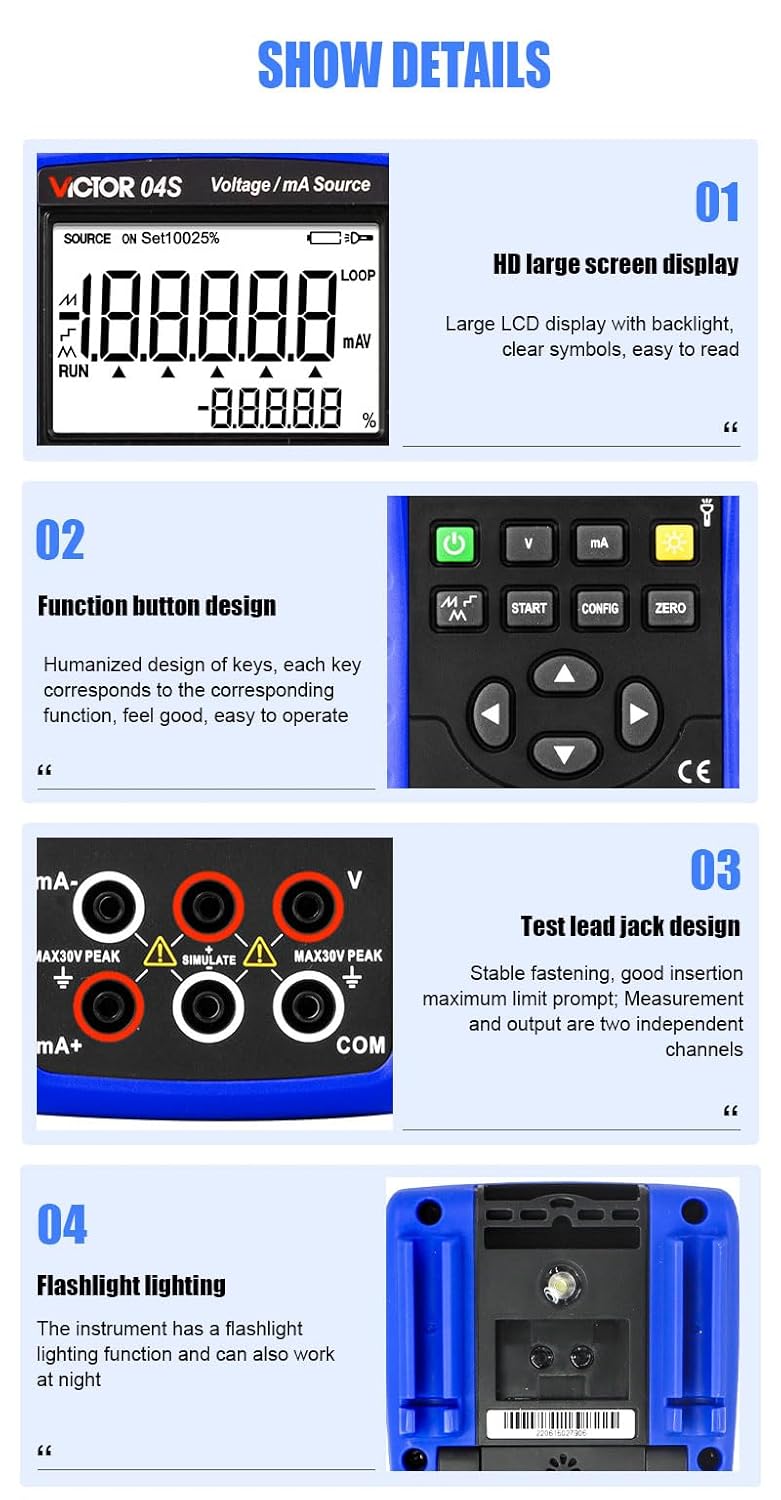
Figure 3: Detailed features of the VICTOR 04S calibrator.
- HD Large Screen Display: Large LCD display with backlight for clear readings.
- Function Button Design: Ergonomically designed keys for easy operation and corresponding functions.
- Test Lead Jack Design: Stable fastening for test leads, with maximum limit prompts and independent channels for measurement and output.
- Flashlight Lighting: Integrated flashlight for working in low-light conditions.
- Battery Compartment: Houses three 1.5V AA batteries for power.

Figure 4: Side view illustrating the flashlight, battery compartment, and integrated bracket.
5. Setup
5.1 Battery Installation
The VICTOR 04S requires three 1.5V AA batteries for operation. Ensure the device is turned off before installing or replacing batteries.
- Locate the battery compartment on the back of the calibrator.
- Use a suitable tool (e.g., a small screwdriver or the provided latch key) to open the battery compartment cover.
- Insert three 1.5V AA batteries, observing the correct polarity (+/-) as indicated inside the compartment.
- Securely close the battery compartment cover.

Figure 5: Back of the calibrator with the battery compartment. Serial number: 220615027906.
5.2 Connecting Test Leads
Connect the industrial test leads to the appropriate input/output jacks on the calibrator based on your measurement or source requirements. Ensure a stable and secure connection.
- For voltage measurements/sourcing, use the 'V' and 'COM' terminals.
- For current (mA) measurements/sourcing, use the 'mA+' and 'mA-' terminals.
- Observe the maximum voltage/current limits indicated near the jacks.
6. Operating Instructions
The VICTOR 04S offers various modes for calibration and signal generation. Refer to the on-screen indicators and button labels for specific functions.
6.1 Power On/Off
- Press the Power button (
) to turn the device on or off.
- The device features an automatic shut-down function to conserve battery life after a period of inactivity.
6.2 Mode Selection
Use the dedicated function buttons to select the desired operating mode:
- V: Voltage measurement/source mode.
- mA: Current (mA) measurement/source mode.
- Temperature: For temperature calibration (if applicable to the specific model variant).
- Waveform: For waveform output.
6.3 Adjusting Output/Input Values
- Use the directional arrow buttons (Up, Down, Left, Right) to navigate menus and adjust values.
- The START button initiates a function or measurement.
- The CONFIG button allows access to configuration settings.
- The ZERO button performs a clear or zero function for current readings.
6.4 Backlight and Flashlight
- Press the Light Bulb button (
) to toggle the display backlight.
- The flashlight function can be activated for illumination in dark environments.
7. Maintenance
7.1 Cleaning
To clean the calibrator, wipe the case with a damp cloth and a mild detergent. Do not use abrasives or solvents. Ensure the device is off and disconnected from all circuits before cleaning.
7.2 Battery Replacement
When the low battery indicator appears on the display, replace all three 1.5V AA batteries as described in Section 5.1. Remove batteries if the device will not be used for an extended period.
7.3 Fuse Replacement
If the calibrator fails to function correctly, a fuse may need replacement. Refer to the safety warnings before attempting to replace fuses. Use only fuses of the specified type and rating (spare fuses are included in the package).
8. Troubleshooting
| Problem | Possible Cause | Solution |
|---|---|---|
| Device does not power on | Dead or incorrectly installed batteries | Replace batteries, ensuring correct polarity. |
| Inaccurate readings | Poor test lead connection, incorrect mode, or environmental interference | Check lead connections, verify selected mode, move away from strong electromagnetic fields. |
| No output signal | Incorrect settings, blown fuse, or open circuit | Check output settings, replace fuse if necessary, ensure circuit is closed. |
| Display is dim or blank | Low battery, backlight off, or display issue | Replace batteries, press backlight button, contact support if issue persists. |
9. Specifications
| Parameter | Value |
|---|---|
| Model Number | E-VICTOR 04S |
| Basic Accuracy | 0.05% |
| Power Supply | 3 x 1.5V AA batteries |
| Display | Large LCD with backlight |
| Product Dimensions | 20 x 15 x 18 cm |
| Product Weight | 1 kg |
| Manufacturer | Xi'an Beicheng Electronics Co.Ltd (VICTOR and Ruoshui) |
10. Warranty and Support
The VICTOR 04S Multi-function Calibrator is manufactured to high-quality standards. For warranty information, please refer to the product qualification certificate included in your package or contact your point of purchase.
For technical support or service inquiries, please contact the manufacturer or your local distributor. Keep your purchase receipt and product serial number (e.g., 220615027906) handy when seeking support.


