1. Introduction & Safety Guidelines
This manual provides essential information for the safe assembly, operation, and maintenance of your WEELMOTION E1 PRO Electric Scooter. Please read it thoroughly before first use and retain it for future reference.
Important Safety Information:
- Always wear a helmet and appropriate safety gear (knee pads, elbow pads) when riding.
- Adult supervision is required for children operating this scooter.
- The scooter is designed for riders within the weight range of 40 lbs (18 kg) to 175 lbs (79 kg).
- Do not ride in wet conditions, on uneven surfaces, or at night without proper visibility.
- Familiarize yourself with local laws and regulations regarding electric scooter use.
- Ensure all components are securely fastened before each ride.

Image: A child safely riding the WEELMOTION E1 PRO Electric Scooter outdoors, demonstrating proper use with a helmet.
2. What's in the Box
Upon opening the package, verify that all the following components are present and in good condition:
- WEELMOTION E1 PRO Electric Scooter (main body)
- Handlebars (left and right)
- Power Adapter/Charger
- Allen Key
- User Manual (this document)
Video: Unboxing the WEELMOTION E1 PRO Electric Scooter, showing all included components.
3. Setup Instructions
Follow these steps to assemble your electric scooter:
Step 1: Set Up Front Stem
- Gently raise the front stem of the scooter to its upright position.
- Tighten the folding lock mechanism securely to ensure the stem is fixed in place.
Step 2: Install Handlebars
- The locking screws for the handlebars are pre-installed. Unscrew them slightly from the handlebars.
- Carefully insert each handlebar into the aligned holes on the stem.
- Use the provided Allen key to tighten the screws firmly, securing the handlebars in place.
Video: Detailed steps for setting up the front stem and installing the handlebars.
4. Operating Instructions
Power On/Off & Digital Display
Press the power button on the digital display to turn the scooter on or off. The LED display clearly indicates your current riding speed and battery level.

Image: The digital display on the handlebar, showing speed, battery, and control buttons.
Push Start Function
For rider safety, this scooter features a Push Start function. The acceleration throttle will only engage and activate the motor once the scooter reaches a speed of approximately 3 km/h (actual speed may vary). To start your ride:
- Place one foot on the scooter deck.
- Propel forward manually by pushing with your other foot.
- Once the scooter starts to coast and reaches 3 km/h, use your right-hand thumb to gently push down the throttle.
- Place both feet onto the deck and enjoy your ride.

Image: Visual guide for the Push Start function.
Braking System
The scooter is equipped with dual braking systems for maximum safety:
- Front Electronic Brake: Press down gently with your left-hand thumb for quick stops. Apply more pressure for a complete stop.
- Rear Fender Brake: Press down gently with your rear riding foot on the fender to slow down.

Image: Illustration of the dual braking system.
Lighting Features
The WEELMOTION E1 PRO features vibrant RGB paddle lights and bright front bar lights. These lights not only illuminate your path but also enhance visibility for others, especially during low-light conditions.

Image: The scooter displaying its vibrant RGB lights.
Video: A child riding the scooter, demonstrating its operation and lights in action.
5. Maintenance
Charging the Battery
When the battery level indicated on the digital display is low, connect the scooter to the power adapter. Plug the adapter into a standard electrical outlet. The battery will charge automatically. Avoid overcharging by disconnecting once fully charged.
Cleaning & Storage
- Wipe the scooter with a damp cloth after use. Avoid using harsh chemicals or abrasive cleaners.
- Store the scooter in a dry, cool place away from direct sunlight and extreme temperatures.
- The scooter features a durable aluminum frame and is designed to be easily foldable for convenient storage and portability.

Image: The scooter demonstrating its easy folding mechanism for storage.
Video: Demonstrating the folding and unfolding of the scooter for storage and transport.
6. Troubleshooting
If you encounter any issues with your WEELMOTION E1 PRO Electric Scooter, please refer to the following common solutions:
- Scooter does not turn on: Ensure the battery is charged. Connect the charger and allow sufficient time for charging.
- Motor does not engage: Remember the Push Start function. The scooter needs to be moving at approximately 3 km/h before the throttle will activate the motor.
- Reduced performance: Check battery level. Performance may decrease with a low battery. Ensure tires are free from debris.
- Unusual noises: Inspect all visible parts for loose screws or components. Tighten as necessary. If the noise persists, discontinue use and contact customer support.
For issues not covered here, please contact WEELMOTION customer support.
7. Specifications
Key technical specifications for the WEELMOTION E1 PRO Electric Scooter:
| Feature | Detail |
|---|---|
| Model Name | E1 Pro |
| Item Model Number | S31 |
| Motor Power | 150W |
| Max Speed | 16 km/hr |
| Max Distance Range | 8 Kilometers |
| Supported Weight | Min 40lbs - Max 175lbs |
| Wheel Size | 6.5 Inches |
| Wheel Type | Solid |
| Frame Material | Aluminum |
| Item Weight | 15.4 Pounds (6.99 kg) |
| Product Dimensions (L x W x H) | 91.4L x 33W x 76.2H Centimetres |
| Battery Type | 1 Lithium Ion battery required |
| Brake Style | Dual (Front & Rear) |
| Special Features | Foldable, Light Up Wheels |
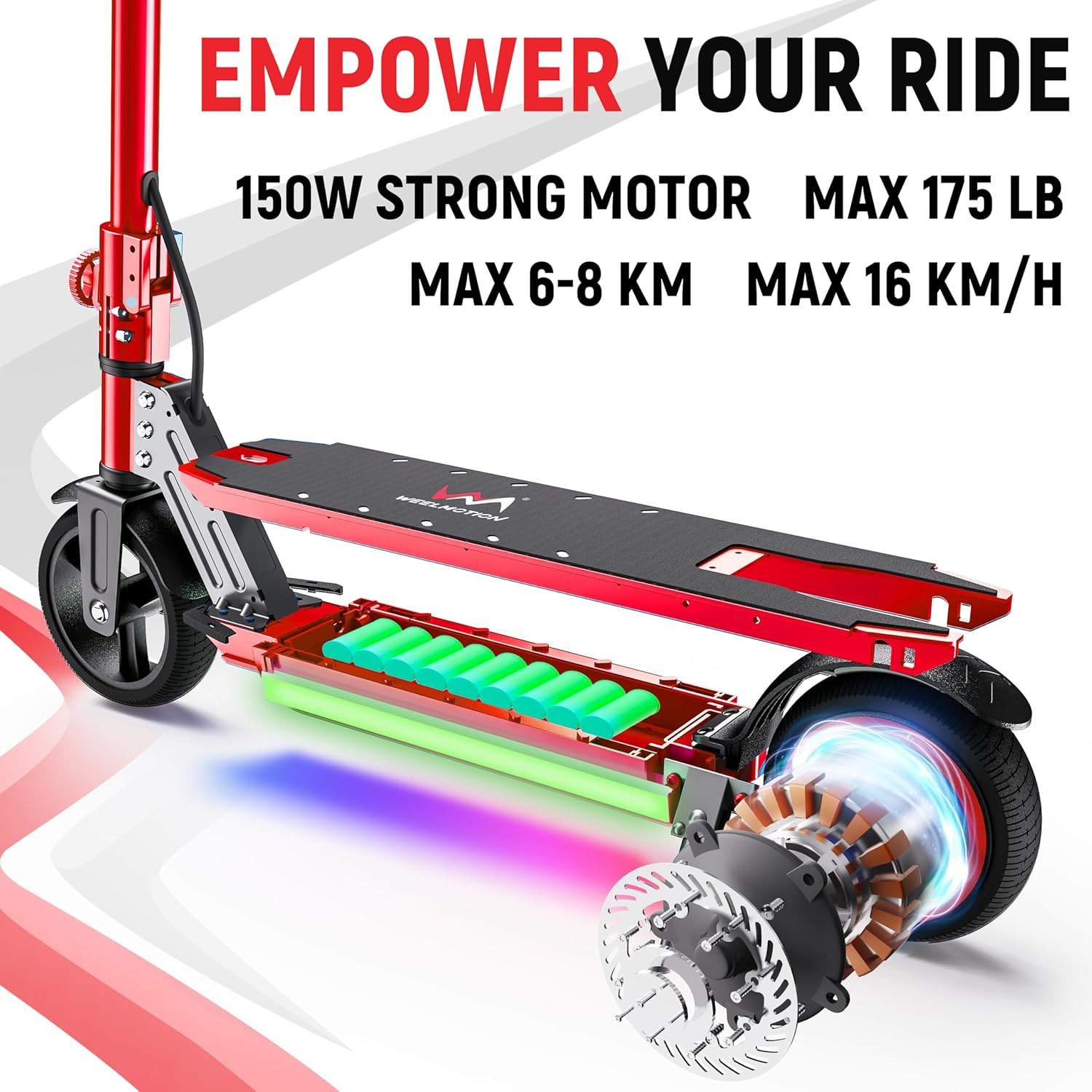
Image: Internal view highlighting the motor and battery components.
8. Warranty & Support
WEELMOTION products are manufactured to high-quality standards. For warranty information, technical support, or any questions regarding your E1 PRO Electric Scooter, please contact WEELMOTION customer service. Keep your purchase receipt as proof of purchase for warranty claims.
Manufacturer Contact Information: Happy Motion


