
TCL S9911236
TCL Smart TV 50C655 User Manual
Model: S9911236
Introduction
This manual provides comprehensive instructions for the setup, operation, maintenance, and troubleshooting of your new TCL 50C655 4K Ultra HD 50-inch Smart TV. Please read this manual thoroughly before using the television to ensure proper and safe operation. Keep this manual for future reference.

Figure 1: TCL 50C655 4K Ultra HD Smart TV. This image shows the front view of the television, highlighting its slim bezels and stand.
Safety Information
Always adhere to the following safety guidelines to prevent electric shock, fire, or damage to the television.
- Ensure the television is placed on a stable surface to prevent it from falling.
- Do not expose the television to rain or moisture.
- Do not block ventilation openings.
- Refer all servicing to qualified service personnel.
- Unplug the television during lightning storms or when unused for long periods.
- This product contains one piece. Handle with care.
What's in the Box
Verify that all components are present in the packaging:
- TCL 50C655 4K Ultra HD Smart TV
- Remote Control
- Power Cable
- Stand (if applicable)
- User Manual (this document)
Setup
1. Unpacking and Placement
Carefully remove the television from its packaging. Place the TV on a flat, stable surface or mount it on a wall using a compatible VESA mount (sold separately). Ensure adequate ventilation around the TV.
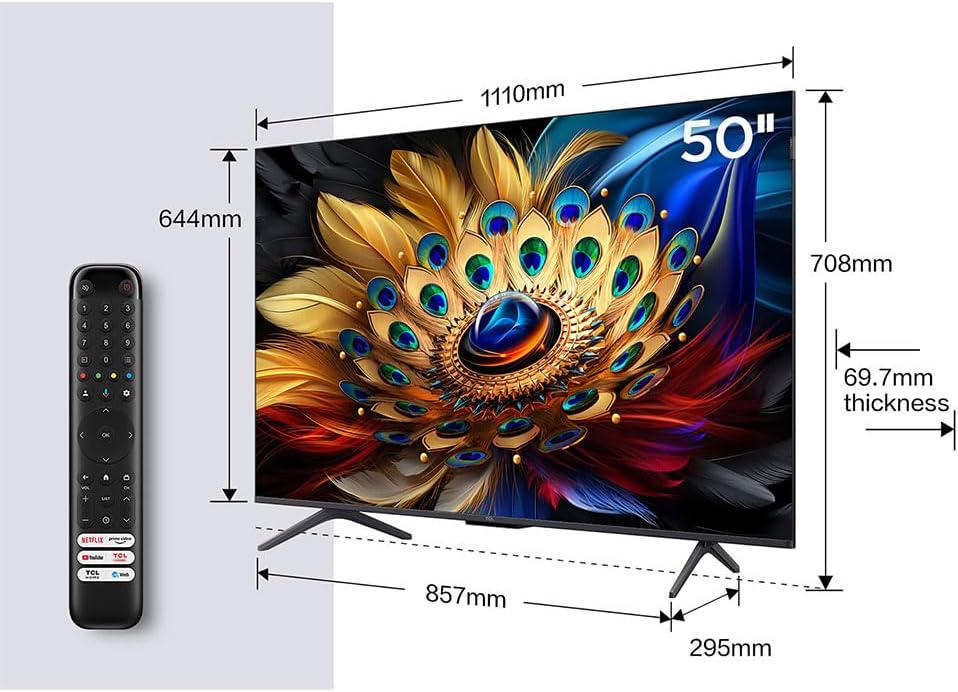
Figure 2: TV Dimensions and Remote Control. This image illustrates the physical dimensions of the 50-inch TV and provides a visual reference for the included remote control.
2. Connecting Devices
Connect your external devices such as set-top boxes, gaming consoles, or Blu-ray players to the appropriate ports on the TV.
- HDMI: For high-definition audio and video. The TV features 3 HDMI ports.
- USB: For connecting USB storage devices. The TV has 2 USB ports (1x USB 3.2, 1x USB 2.0).
- Ethernet (LAN): For wired internet connection.
- Optical: For digital audio output to soundbars or home theater systems.
- Headphone: For connecting headphones.
- Cable/Satellite: For antenna or satellite dish connection.

Figure 3: TV Connection Ports. This diagram illustrates the various input and output ports available on the television, including HDMI, USB, LAN, Optical, and others.
3. Initial Power On and Setup Wizard
Plug the power cable into the TV and then into a power outlet. Press the power button on the remote control or on the TV. Follow the on-screen instructions to complete the initial setup, including language selection, network connection (Wi-Fi or Ethernet), and channel scanning.
Operating the TV
1. Remote Control Functions
The included remote control allows you to navigate menus, adjust settings, and control playback. Familiarize yourself with the button layout for power, input selection, volume, channel, and smart TV functions.
2. Smart TV Features (Google TV)
Your TCL 50C655 is equipped with Google TV, providing access to a vast array of streaming services, apps, and content. Connect to the internet via Wi-Fi or Ethernet to utilize these features. You can also use Google Assistant for voice commands.

Figure 4: Google TV Interface. This image displays the user interface of Google TV, showing various streaming applications and content recommendations.
3. Picture Settings
Optimize your viewing experience by adjusting picture settings. The TV supports 4K Ultra HD resolution, HDR10+, HLG, and QLED technology for vibrant and accurate colors.
Figure 5: 4K HDR Pro. This image demonstrates the enhanced color and detail provided by 4K HDR Pro technology, showcasing a vibrant landscape.

Figure 6: QLED Pro Technology. This graphic illustrates how QLED Pro technology enhances color reproduction, resulting in ultra-high color vibrancy.
The TV also features Motion Clarity with MEMC (Motion Estimation, Motion Compensation) for smoother motion in fast-paced scenes.

Figure 7: Motion Clarity. This image compares a scene with and without MEMC, demonstrating how Motion Clarity provides smoother and improved motion.
4. Audio Settings
The TCL 50C655 features a 2.0 channel sound system with Onkyo audio and Dolby Atmos support for an immersive sound experience.

Figure 8: Immersive Audio Experience. This image highlights the Onkyo 2.1 Sound System and Dolby Atmos integration, promising a cinematic audio experience at home.
5. Gaming Features
For gamers, the TV offers HDMI 2.1 with ALLM (Auto Low Latency Mode) and eARC (Enhanced Audio Return Channel) for low input lag and quick response times.

Figure 9: HDMI 2.1 Connectivity. This image illustrates the benefits of HDMI 2.1, including low input lag and fast response for connected devices.
Maintenance
- Cleaning the Screen: Gently wipe the screen with a soft, lint-free cloth. For stubborn marks, use a screen cleaner specifically designed for televisions. Do not spray cleaner directly onto the screen.
- Cleaning the Cabinet: Use a soft, dry cloth to wipe the TV cabinet. Avoid using abrasive cleaners or solvents.
- Ventilation: Ensure the ventilation openings are not blocked by dust or objects.
- Power Cord: Regularly check the power cord for any damage.
Troubleshooting
If you encounter issues with your TV, refer to the following common problems and solutions:
| Problem | Possible Cause / Solution |
|---|---|
| No Power | Check if the power cord is securely plugged into the TV and the wall outlet. Test the outlet with another device. |
| No Picture / Sound | Ensure the correct input source is selected. Check cable connections to external devices. |
| Remote Control Not Working | Replace the batteries. Ensure there are no obstructions between the remote and the TV's IR sensor. |
| Cannot Connect to Wi-Fi | Check your router and modem. Restart the TV and router. Ensure the Wi-Fi password is correct. |
| Picture Quality Issues | Adjust picture settings (brightness, contrast, color). Check the resolution of the input source. |
Specifications
Detailed technical specifications for the TCL 50C655 Smart TV:
| Feature | Detail |
|---|---|
| Brand | TCL |
| Model Number | S9911236 |
| Display Technology | LED, QLED |
| Resolution | 4K Ultra HD (3840 x 2160 px) |
| Screen Size | 50 inches (127 cm diagonal) |
| Refresh Rate | 60 Hz |
| HDR Support | HDR10+, HLG |
| Smart TV Platform | Google TV |
| Audio Output | 20 W (2.0 channel), Onkyo, Dolby Atmos |
| Connectivity | Wi-Fi, Bluetooth, Ethernet, HDMI x 3, USB x 2 (1x USB 3.2, 1x USB 2.0) |
| Special Features | Miracast, Game Mode, Motion Clarity (MEMC), HbbTV |
| Dimensions (L x W x H) | 10 x 110 x 62 cm (product); 18 kg |
| Energy Class | F |
Warranty and Support
Your TCL 50C655 Smart TV comes with a manufacturer's warranty. For detailed warranty terms and conditions, please refer to the warranty card included with your product or visit the official TCL support website. For technical assistance, troubleshooting beyond this manual, or service requests, please contact TCL customer support.
You can find more information and support resources on the official TCL website: www.tcl.com
Ask a question about this manual
Ask about setup, troubleshooting, compatibility, parts, safety, or missing instructions. Manuals+ will review the question and use this page’s manual context to help answer it.