
LEXENT LCH14WF-NEW
LEXENT 14000BTU Portable Air Conditioning Unit
Model: LCH14WF-NEW User Manual
Important Safety Information
Please read this manual thoroughly before operating your LEXENT portable air conditioning unit. Retain it for future reference. Always follow basic safety precautions to reduce the risk of fire, electric shock, or injury.
- Ensure the unit is placed on a flat, stable surface.
- Do not block air inlets or outlets.
- Do not operate with a damaged power cord or plug.
- Keep children and pets away from the unit during operation.
- Unplug the unit before cleaning or maintenance.
- Use only the accessories provided or recommended by LEXENT.
Product Overview and Components
The LEXENT LCH14WF-NEW is a versatile portable air conditioning unit designed for cooling, heating, dehumidifying, and fan-only operation. It includes a remote control for convenient operation and a window kit for exhaust ventilation.
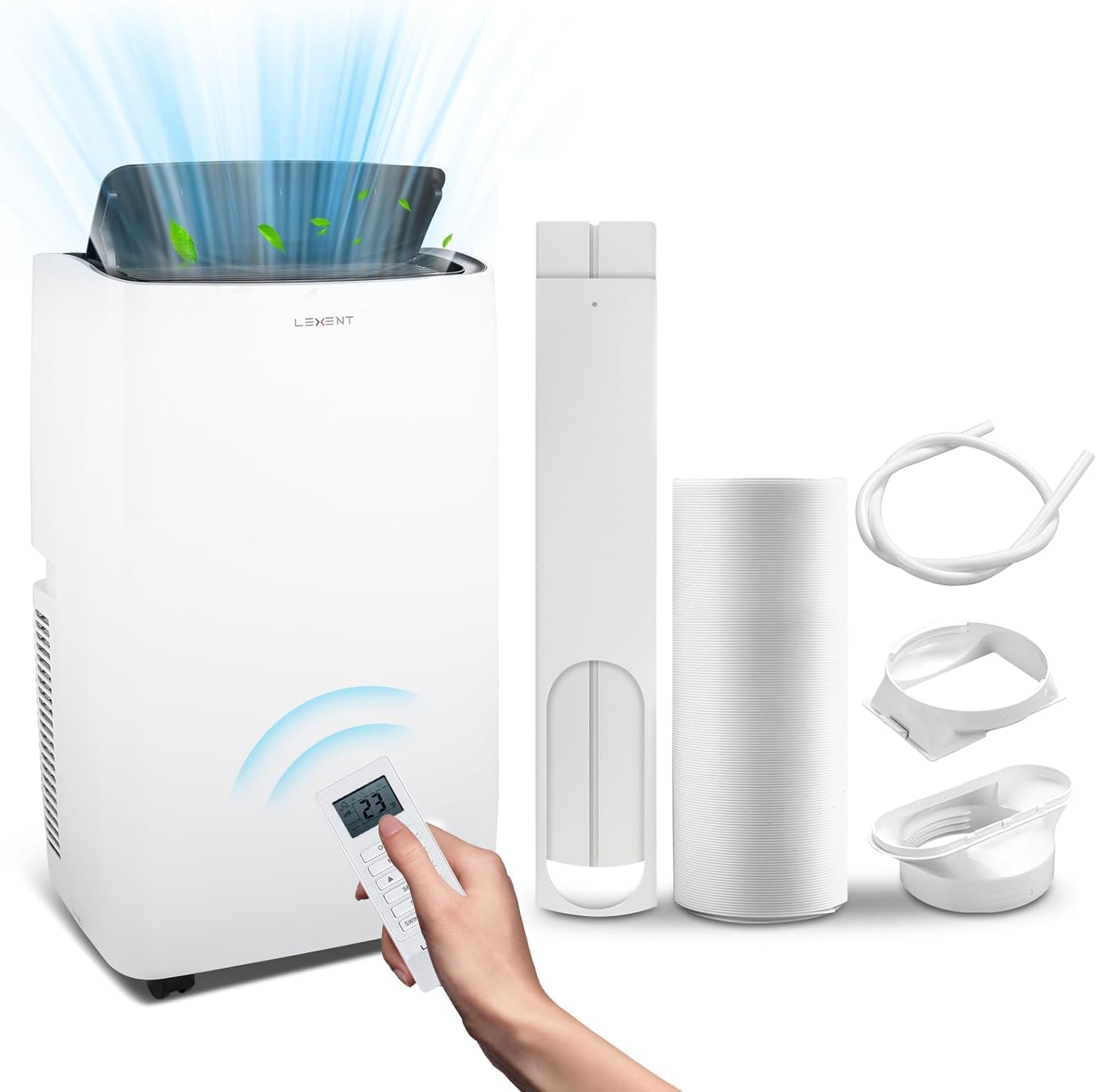
Image Description: A white LEXENT portable air conditioning unit is shown on the left, emitting cool air from its top vent. A hand holds the white remote control, displaying '23' degrees Celsius. To the right, the accessories are laid out: a window sealing kit, an expandable exhaust hose, a drainage tube, and various adapters for installation. This image illustrates the main unit and all included components for setup.
Included Components:
- LEXENT 14000BTU Portable Air Conditioning Unit
- Remote Control
- Exhaust Hose
- Window Sealing Kit (Window Slider Kit, Exhaust Hose Adapters)
- Drainage Tube
- User Manual (this document)
Setup and Installation
Placement:
Place the unit on a firm, level surface in a room that requires cooling or heating. Ensure there is at least 30 cm (12 inches) of space around the unit for proper airflow.
Exhaust Hose Installation:
- Attach one end of the exhaust hose to the exhaust outlet on the back of the unit.
- Attach the other end of the exhaust hose to the window exhaust adapter.
Window Kit Installation:
- Adjust the window slider kit to fit your window opening.
- Secure the window kit in place.
- Insert the window exhaust adapter (with the hose attached) into the opening of the window kit.
- Ensure the window is sealed as much as possible around the kit to prevent warm air from entering.
Drainage Setup (for Dehumidifier Mode or continuous drainage):
For continuous drainage, connect the provided drainage tube to the continuous drainage port on the unit and direct the other end into a suitable container or floor drain. For occasional drainage, the internal tank will collect water, and the unit will indicate when it needs to be emptied manually.
Power Connection:
Plug the power cord into a grounded electrical outlet. Ensure the voltage matches the unit's requirements (230 Volts).
Operating Instructions
The unit can be operated via the control panel on the top of the unit or using the remote control.
Control Panel and Remote Control Functions:
Image Description: A close-up view of the LEXENT portable air conditioning unit's side, showing a hand holding the remote control. The remote displays '23' degrees Celsius. The unit's display is also visible, indicating current settings. This highlights the primary interface for operating the device.
- Power Button: Turns the unit ON or OFF.
- Mode Button: Cycles through Cooling, Heating, Fan, and Dehumidifier modes.
- Temperature Up/Down Buttons: Adjusts the desired temperature.
- Fan Speed Button: Selects fan speed (Low, Medium, High).
- Timer Button: Sets the auto-on or auto-off timer (up to 24 hours).
- Sleep Mode Button: Activates sleep mode for quieter operation and gradual temperature adjustment.
- Swing Button: Controls the oscillation of the air outlet louvers.
Operating Modes:
Cooling Mode:
Select "Cool" mode. Use the temperature buttons to set your desired room temperature. The unit will cool the room to the set temperature.
Heating Mode:
Select "Heat" mode. Use the temperature buttons to set your desired room temperature. The unit will heat the room to the set temperature.
Fan Mode:
Select "Fan" mode. The unit will circulate air without cooling or heating. Adjust fan speed as desired.
Dehumidifier Mode:
Select "Dry" mode. The unit will remove moisture from the air. In this mode, continuous drainage is recommended.
Sleep Mode:
Activates a quiet operation mode, gradually adjusting the temperature for comfortable sleep. Press the Sleep button to activate/deactivate.
Maintenance
Regular maintenance ensures optimal performance and extends the lifespan of your unit.
Air Filter Cleaning (Every 2 weeks):
- Unplug the unit from the power outlet.
- Remove the air filter from the back or side of the unit (refer to the diagram in the full manual for exact location).
- Wash the filter under running water (warm, not hot) or use a vacuum cleaner to remove dust.
- Allow the filter to air dry completely before reinstalling. Do not expose to direct sunlight.
Water Drainage:
- When the internal water tank is full, the unit will stop operating and display an indicator (e.g., "FL" or "P2").
- Unplug the unit.
- Place a shallow pan or tray under the drainage port.
- Remove the drain plug and allow all water to drain out.
- Replace the drain plug securely before restarting the unit.
Unit Cleaning:
- Wipe the exterior of the unit with a soft, damp cloth.
- Do not use harsh chemicals, abrasives, or solvents.
Storage (End of Season):
- Drain all water from the unit.
- Clean the air filter.
- Run the unit in fan-only mode for a few hours to dry the interior.
- Unplug the unit and coil the power cord.
- Store the unit in a cool, dry place, covered to protect from dust.
Troubleshooting
Before contacting customer support, please refer to the following common issues and solutions:
| Problem | Possible Cause | Solution |
|---|---|---|
| Unit does not turn on. | No power, power cord loose, circuit breaker tripped. | Check power connection, reset circuit breaker. |
| Unit does not cool/heat effectively. | Air filter dirty, exhaust hose blocked/disconnected, room too large, windows/doors open. | Clean air filter, ensure exhaust hose is properly installed and unblocked, close windows/doors. |
| "CL" or "Child Lock" displayed. | Child lock function is active. | Press and hold the Sleep mode button for a few seconds to deactivate the child lock. |
| "FL" or "P2" displayed (Full Water). | Internal water tank is full. | Drain the water from the unit as described in the Maintenance section. |
| Unit is noisy. | Unit not on a level surface, fan speed too high, internal components vibrating. | Ensure unit is on a level surface, reduce fan speed, check for obstructions. |
Specifications
| Brand | LEXENT |
| Model | LCH14WF-NEW |
| Cooling Power | 14000 BTU |
| Functions | Cooling, Heating, Dehumidifier, Fan Mode, Sleep Mode, 24-Hour Timer |
| Product Dimensions (L x W x H) | 44 x 33 x 70 cm |
| Item Weight | 32 kg |
| Voltage | 230 Volts |
| 4000 watts | |
| Noise Level | 65 dB |
| Refrigerant | R-290 |
| Energy Efficiency | A+ |
Warranty and Support
Your LEXENT portable air conditioning unit is covered by a manufacturer's warranty. Please refer to the warranty card included with your purchase for specific terms and conditions.
For technical support, service, or replacement parts, please contact LEXENT customer service through their official website or the contact information provided in your purchase documentation.
When contacting support, please have your model number (LCH14WF-NEW) and purchase date ready.
Related documentsLCH14WF-NEW

Ask a question about this manual
Ask about setup, troubleshooting, compatibility, parts, safety, or missing instructions. Manuals+ will review the question and use this page’s manual context to help answer it.