
1. Introduction
Thank you for choosing the Pemberly Row 70 Inch 2-Door Wood TV Stand with Reeded Fronts. This manual provides essential information for the safe assembly, operation, and maintenance of your new furniture. Please read these instructions carefully before beginning assembly and retain them for future reference.

Figure 1: Assembled Pemberly Row 70 Inch 2-Door Wood TV Stand in Coastal Oak finish. This image shows the overall design with reeded doors and open central shelving.
2. Safety Information
WARNING: Failure to follow these safety instructions may result in injury or damage to the product.
- Always assemble the unit on a soft, clean surface to prevent scratches.
- Ensure all parts are present and undamaged before assembly. Do not use damaged parts.
- Do not overtighten screws, as this may damage the material.
- Keep small parts and packaging materials away from children and pets.
- This TV stand is designed to support televisions up to 80 inches and a maximum weight of 60 lbs on the top surface. The internal shelf supports up to 10 lbs. Do not exceed these weight limits.
- For stability, place the TV stand on a level surface.
- Consider using anti-tip hardware (not included) to secure the TV stand to a wall, especially in homes with children or pets, to prevent tipping accidents.
3. Package Contents
Before beginning assembly, verify that all components listed below are present and undamaged. If any parts are missing or damaged, please contact customer support.
- Top Panel
- Bottom Panel
- Side Panels (2)
- Center Divider Panels (2)
- Back Panel
- Reeded Doors (2)
- Legs (4)
- Hardware Pack (screws, dowels, cam locks, hinges, door pulls, etc.)
- Assembly Instructions Sheet

Figure 2: Exploded view and dimensional diagram of the TV stand, indicating various panels and weight capacities for the top surface (60 lbs) and internal shelf (10 lbs).
4. Assembly Instructions (Setup)
Follow these steps carefully to assemble your Pemberly Row TV Stand. It is recommended to have two people for assembly.
- Prepare the Area: Clear a spacious, clean, and soft area for assembly to prevent damage to the furniture.
- Attach Legs: Secure the four legs to the bottom panel using the provided hardware. Ensure they are firmly attached.
- Assemble Frame: Attach the side panels and center divider panels to the bottom panel using dowels and cam locks/screws as indicated in the detailed assembly diagram (refer to the included paper instructions for specific hardware placement).
- Install Back Panel: Slide or fasten the back panel into place. Ensure any cable management cutouts are correctly oriented.
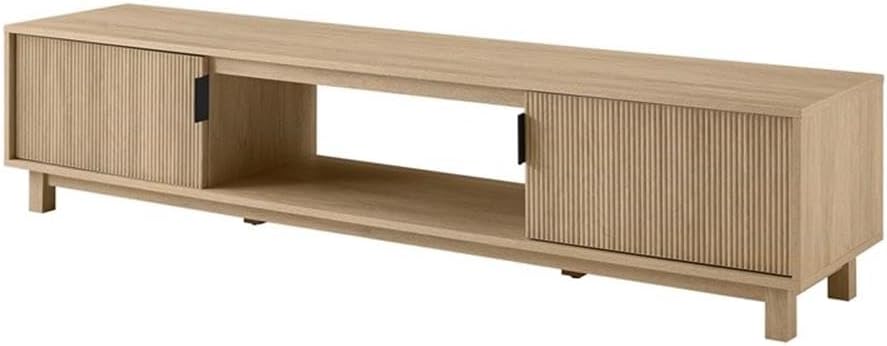
Figure 3: Rear view of the TV stand, showing the cable management cutouts for organizing wires.
- Attach Top Panel: Carefully place and secure the top panel to the assembled frame using the remaining hardware.
- Install Doors: Attach the hinges to the reeded doors and then to the side panels of the stand. Adjust hinges as needed for proper door alignment. Install the door pulls.

Figure 4: Close-up detail of the reeded texture on one of the TV stand's doors, highlighting the design element.
- Final Check: Ensure all connections are secure and the stand is stable.
5. Operation (Usage)
Your Pemberly Row TV Stand is designed to accommodate various entertainment components.
- Television Placement: Place your television centrally on the top surface. Ensure the TV base fits within the stand's dimensions. This stand accommodates TVs up to 80 inches.

Figure 5: Illustration demonstrating how the 70-inch TV stand can accommodate various television sizes, up to 80 inches, for optimal viewing.
- Component Storage: Utilize the open central shelf and the two enclosed compartments behind the reeded doors for media players, gaming consoles, soundbars, and other accessories.

Figure 6: The TV stand with its reeded doors open, revealing the spacious internal compartments suitable for various media devices and accessories.
- Cable Management: Use the pre-drilled cutouts in the back panel to route and organize power cords and audio/video cables, keeping them tidy and out of sight.

Figure 7: A close-up view of the circular cutout on the back panel, designed for efficient cable management.
6. Maintenance and Care
To ensure the longevity and appearance of your TV stand, follow these care guidelines:
- Cleaning: Wipe surfaces with a soft, dry cloth. For stubborn marks, use a slightly damp cloth with mild soap, then dry immediately. Avoid harsh chemicals, abrasive cleaners, or polishes that may damage the laminate finish.
- Spills: Blot spills immediately with a clean, dry cloth to prevent moisture damage.
- Heat and Moisture: Avoid placing hot items directly on the surface. Use coasters or protective pads. Keep the stand away from direct sunlight and excessive moisture.
- Inspections: Periodically check all hardware connections and tighten if necessary to maintain stability.
7. Troubleshooting
If you encounter any issues with your TV stand, refer to the following common solutions:
- Wobbly Stand: Ensure the stand is on a level surface. Check and tighten all assembly hardware. If the floor is uneven, use furniture pads or shims under the legs.
- Doors Not Aligning: Adjust the hinges on the doors. Most furniture hinges allow for minor adjustments in height, depth, and side-to-side positioning. Refer to the hinge manufacturer's instructions if specific adjustments are needed.
- Scratches or Dents: For minor cosmetic damage, furniture repair kits or markers designed for wood laminate can be used.
- Missing Parts: If parts were missing upon initial unboxing, contact Pemberly Row customer support with your purchase details and the specific part numbers needed.
8. Specifications
| Feature | Detail |
|---|---|
| Model Number | PR-4753-2760780 |
| Dimensions (L x W x H) | 70 x 15.75 x 16 inches (177.8 x 40 x 40.6 cm) |
| Item Weight | 68 pounds (30.8 kg) |
| Material | Warp-resistant MDF and durable laminate |
| Color | Coastal Oak |
| Max TV Size Accommodation | Up to 80 inches |
| Top Surface Weight Capacity | 60 lbs (27.2 kg) |
| Shelf Weight Capacity | 10 lbs (4.5 kg) |
| Special Features | Reeded doors, minimalist metal hardware, cable management cutouts |
9. Warranty and Support
For specific warranty information regarding your Pemberly Row TV Stand, please refer to the documentation included with your purchase or visit the official Pemberly Row website.
If you require assistance with assembly, have questions about parts, or need to report damage, please contact Pemberly Row customer support.
- Manufacturer: Pemberly Row
- Contact Information: Refer to your purchase receipt or the manufacturer's website for the most current contact details.